
A Battle-Tested Disaster Recovery Plan Template for First Responders
When a crisis hits, a generic disaster recovery plan is worse than useless—it's a liability. For dispatch centers and first responders, where every second is critical, a standard corporate plan just doesn't cut it. It fails to grasp the unique, high-stakes world you operate in, which is why our purpose-built disaster recovery plan template is the essential starting point for building real operational resilience.
Why Standard DRPs Fail in Public Safety
Picture this: a major storm knocks out regional power and communication lines. A typical corporate disaster recovery plan (DRP) might focus on getting sales data back online within 24 to 48 hours. For a 911 dispatch center, that’s an eternity. We're talking about a timeframe where lives hang in the balance.
The unique pressures of public safety mean that standard DRPs almost always fall short. You can get a sense of the bigger picture from these government disaster response insights, but the core issue is simple: corporate plans don't understand our dependencies.
They might have a section on server backups, but what about redundant communication channels? For example, if your primary radio system is compromised, a corporate plan has no provision for a cloud-based backup. What about the intricate link between your Computer-Aided Dispatch (CAD) system and a personnel management platform like Resgrid? When one system goes down, it kicks off a domino effect that a generic plan is completely unprepared to handle.
The High Cost of Unpreparedness
The risks—both financial and operational—are staggering. A couple of years back, weather-related disasters in the US accounted for over 90% of the nation's total economic losses. That’s a massive $320 billion. It's a stark reminder of why critical sectors like ours need rock-solid plans.
For a first responder agency, the cost isn't measured in dollars. It's measured in delayed response times, compromised situational awareness, and the potential loss of life. A generic plan might not prioritize restoring live personnel tracking, leaving command blind in the middle of a major incident. A practical example is paying for overtime you can't verify because your manual logs are a mess. With a resilient system, you maintain accurate timekeeping, saving thousands in payroll errors during a single major event.
A modern, resilient DRP for public safety has to be about one thing above all else: continuity of operations. It's not just about recovering data. It's about maintaining the ability to dispatch, communicate, and manage your people in real-time, no matter what’s happening.
A plan built for first responders is fundamentally different from one designed for a typical business. Let's break down some of the key distinctions.
Core Components of a First Responder DRP
| Component | Standard Corporate DRP Focus | First Responder DRP Focus |
|---|---|---|
| Primary Goal | Data recovery & financial continuity | Life safety & operational continuity |
| Recovery Time | Hours to days (RTO/RPO) | Seconds to minutes (Immediate failover) |
| Critical Systems | Email, CRM, financial records | CAD, radio, personnel tracking, alerting |
| Communication | Internal emails, status pages | Redundant, multi-layered comms (radio, satellite) |
| Personnel | Remote work policies | Role-based actions, mutual aid coordination |
| Testing | Annual tabletop exercises | Frequent, realistic drills & simulations |
As you can see, the entire mindset shifts from protecting assets to protecting people and maintaining command.
Actionable Strategies Over Simple Backups
A plan designed for our world moves past simple data backups and dives into actionable strategies that guarantee you can keep operating. It’s a framework that addresses the specific weak points of emergency services.
Here are a few things that absolutely must be included:
- Role-Based Checklists: Clear, simple instructions. What does a dispatch supervisor do in the first 15 minutes of an outage? For example, their checklist might say "Use Resgrid app to send a PTT broadcast to all on-duty staff confirming switch to backup channel."
- Redundant Communication Protocols: You need a plan A, B, and C. If CAD messaging goes down, you switch to a platform like Resgrid. If that fails, it's encrypted radio channels.
- System Prioritization: Know what's mission-critical. Dispatch and radio systems come first. Administrative records can wait. Recovery efforts have to be sequenced properly.
A generic template you download from a business website won't have this level of detail. It’s built for a world where downtime is just an inconvenience. For us, downtime isn't an option.
Our downloadable template is designed to be your starting point. It gives you the structure you need to build a plan that truly protects your community and your people.
Conducting Your Risk Assessment and Impact Analysis
Before you can even think about building a disaster recovery plan, you have to know what you're protecting and what you're protecting it from.
Jumping straight into solutions without a clear picture of your weak spots is like sending units out without an address. It's a costly guess that almost never ends well. This is why a solid Risk Assessment and a Business Impact Analysis (BIA) are your most critical first steps.
These aren't just bureaucratic boxes to check; they are the bedrock of a plan that's both effective and affordable. A Risk Assessment points out potential threats, and a BIA tells you how bad it'll hurt—operationally and financially—if those threats become reality. For a dispatch center, this means getting granular and looking past the obvious.
Identifying Your Unique Threats
Every single agency has its own unique threat landscape. A rural fire department might be all-in on planning for wildfires and communication dead zones. An urban police department, on the other hand, might be more worried about civil unrest or a sophisticated cyberattack.
You need to start by brainstorming every possible thing that could disrupt your operations, no matter how wild it sounds.
Your list of potential threats could look something like this:
- Natural Disasters: Floods, hurricanes, tornadoes, or earthquakes that could physically wipe out your primary ops center.
- Technical Failures: A catastrophic server crash, your CAD system going dark, or a widespread internet outage that cuts you off from cloud-based tools.
- Human-Caused Events: Think building fires, nearby hazmat spills, or even workplace violence that makes your facility a no-go zone.
- Cybersecurity Incidents: A ransomware attack locking down your records, or a DDoS attack that brings your entire network to its knees. If you're looking to button up your digital defenses, you can see the kind of comprehensive security measures Resgrid employs.
Once you've got your list, rank each threat by its likelihood (how probable is it?) and its impact (how devastating would it be?). This simple exercise immediately shows you where to focus your energy and budget first.
Prioritizing Mission-Critical Functions with a BIA
After you've identified what could happen, the Business Impact Analysis answers the all-important follow-up: "So what?"
Honestly, the BIA is where you save the real money. It forces you to look at every single one of your functions and systems and slap a label on them, from "absolutely mission-critical" to "important, but it can wait." This is what stops you from blowing your budget on expensive, high-availability setups for things that aren't essential.
For a first responder agency, critical functions are always the ones tied directly to life safety and command. These pretty much always include:
- Voice Communications: The ability to take emergency calls and dispatch units over the radio. Period.
- Personnel Tracking: Knowing the real-time status and location of every person on duty. This prevents losing track of responders, a costly and dangerous situation.
- Emergency Alerting: The power to blast out mass notifications to your entire team instantly.
Things like payroll or managing non-emergency records, while important, slide down the priority list. A practical money-saving insight here is that you just don't need to spend thousands on an instantaneous failover system for your vacation request software. Focus the budget on keeping your dispatch and alerting platforms live.
The whole point of a BIA is to define your tolerance for downtime. It helps you figure out exactly how quickly each system has to be back online to avoid a catastrophic impact on your life-saving operations. That clarity drives every dollar you spend on disaster recovery.
Defining Your Recovery Objectives
The BIA process gives you two of the most important numbers in your entire DR plan: the Recovery Time Objective (RTO) and the Recovery Point Objective (RPO).
- Recovery Time Objective (RTO): This is the maximum acceptable downtime for a given system. For your main radio dispatch console, the RTO might be seconds. For an admin file server, it could be 24 hours.
- Recovery Point Objective (RPO): This defines the maximum amount of data you can afford to lose. For a CAD system logging live incident data, your RPO is likely near-zero. For a training database that's only updated once a week, an RPO of a few days might be totally fine.
Nailing down these metrics for every system is the final piece of this puzzle. It tells you exactly what level of protection you need to buy. For instance, a system with a five-minute RTO (like dispatch) requires a completely different—and much more expensive—solution than one with an eight-hour RTO (like equipment inventory). This is how you justify spending on critical systems and save money on non-essential ones.
By taking the time to do a detailed Risk Assessment and BIA, you guarantee that your disaster recovery plan is built on a foundation of reality, perfectly fitted to your agency's needs and budget.
How to Customize Your Disaster Recovery Plan Template
A blank disaster recovery plan template is a great starting point, but its real power comes alive when you turn it into your agency's specific, actionable playbook. This is where you transform a generic document into a lifeline that reflects your team's structure, technology, and operational realities.
It’s about more than just filling in names and phone numbers. It’s about building a plan that feels intuitive to your people in the middle of a high-stress situation.
The goal is to create a living document that a dispatch supervisor, IT lead, or field commander can pick up at 3 AM during a crisis and know exactly what to do. This process involves a deep dive into your unique operational needs, moving from theory to practical application.
The core of effective customization is a simple, three-stage process: assess your unique needs, analyze the impact of different failures, and then build your tailored plan.
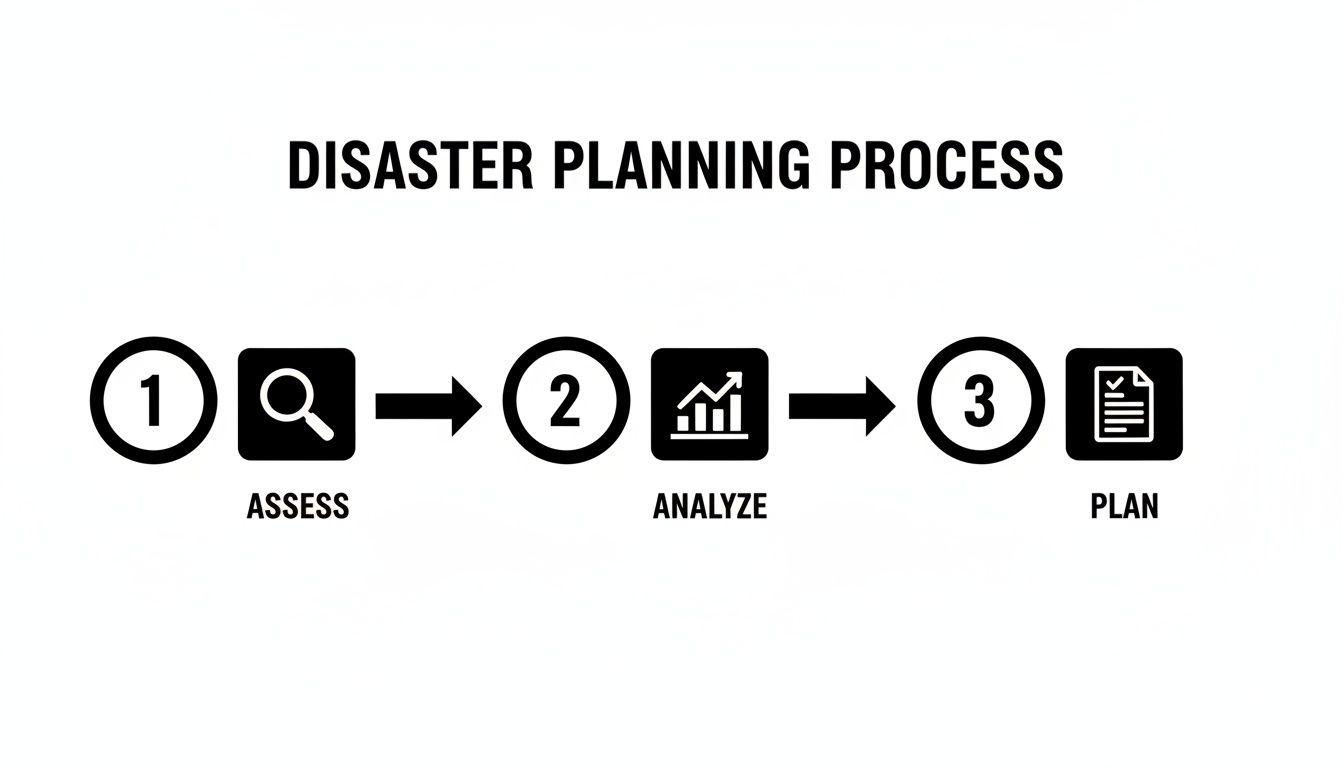
This visual underscores that a solid plan isn't created in a vacuum. It’s the result of careful assessment and analysis that’s perfectly matched to your agency's specific environment.
Building Your Emergency Contact Roster
The first section to tackle is your emergency contact list. This needs to be a comprehensive roster that goes far beyond a simple staff directory, including internal teams, external partners, and key vendors—complete with multiple ways to reach each one.
Consider creating a table with columns like these:
- Role/Agency: (e.g., Lead Dispatcher, IT Network Admin, County EMA Director, CAD Vendor Support)
- Primary Contact Name:
- Primary Phone: (Mobile)
- Secondary Phone: (Office or alternative)
- Email Address:
- Activation Protocol: (e.g., "Call mobile first, then text," "Email support with ticket #")
Here’s a crucial cost-saving tip: leverage the tools you already have instead of paying for a separate, costly emergency notification system. For example, platforms designed for first responders frequently have robust messaging capabilities built-in. You can explore the full feature set of a system like Resgrid to see how integrated messaging, push-to-talk, and group calls can serve as your primary or secondary channel, potentially saving you thousands per year on a standalone service.
Defining Role-Specific Action Checklists
This is the most critical part of your customization. Generic instructions are a recipe for failure during a crisis. What you need are clear, concise, role-based checklists that eliminate guesswork.
Let’s look at a practical example for a sudden CAD system failure.
Dispatch Supervisor Checklist
- Announce "CAD is down" on all radio channels.
- Activate manual dispatch protocol (pen and paper logs).
- Notify IT Lead and Command Staff via Resgrid mobile app's push-to-talk channel.
- Redirect non-emergency calls to the administrative line.
IT Lead Checklist
- Attempt to restart the primary CAD server.
- If restart fails, initiate failover to the backup server (est. time: 15 mins).
- Contact CAD vendor support if failover is unsuccessful.
- Provide hourly status updates to Command Staff via the 'IT Status' group in Resgrid.
These simple, direct actions are far more effective than a dense paragraph of instructions. For a specific framework to guide your IT-related checklists, this UK IT disaster recovery plan template is a really practical resource.
Pre-Scripting Critical Communications
When systems are down and stress is high, the last thing you want is someone improvising critical communications. Pre-scripting alerts for both internal and public-facing messages ensures clarity, accuracy, and speed.
A pre-written script removes the cognitive load from your team during a crisis. It allows them to focus on execution, not on wordsmithing an alert while the phones are ringing off the hook.
Here are a couple of examples you can adapt directly into your plan:
Internal Alert (SMS/Platform Message):URGENT: All units be advised, primary dispatch radio is down. Switch to backup channel B-7. Acknowledge this message immediately via app check-in.
Public Safety Announcement (Social Media/Press Release):Public Safety Alert: Our 911 phone system is experiencing a technical outage. For emergencies, please call our 10-digit backup line at [Backup Number]. Technicians are working to restore service. We will provide updates every 30 minutes.
By tailoring these key sections—your contacts, role-based checklists, and communication scripts—you transform the template from a simple document into a powerful operational tool. This hands-on customization ensures your plan is not only comprehensive but also perfectly aligned with your agency's real-world needs.
Testing and Validating Your Plan
Let's be honest, a disaster recovery plan gathering dust on a shelf is just a fancy paperweight. And an untested one? That’s a catastrophe waiting to happen. The true worth of your disaster recovery plan template only shows itself after it's been through the wringer with some practical, real-world testing.
I get it. A lot of agencies are scared to run drills because they think it's too complicated or will bring operations to a grinding halt. But it doesn't have to be that way. The trick is to start small and build up. You can find the major holes in your plan without ever touching a live system, turning those written procedures into muscle memory for when a real crisis hits.

Start with Low-Impact Tabletop Exercises
Your first and most important stop is the tabletop exercise. These are basically just discussion-based sessions where you get your key people in a room to walk through a specific disaster scenario. There’s no technical failover, no operational downtime, and it costs next to nothing.
Picture this practical example: you run a scenario where ransomware has locked up your dispatch servers and CAD system. You’d pull in your dispatch supervisors, IT leads, and command staff to talk through the plan, step by step.
- Who’s making the first call to your IT vendor?
- What’s the exact message going out to all field units?
- How do you actually switch over to the manual dispatch logs you have tucked away?
- At what point do you fire up the alternate command post?
Working through these questions in a calm, controlled setting will immediately shine a spotlight on the gaps. You might find out your primary and backup contacts for the CAD vendor are the same person. Or worse, that the manual logs are stored on the very server that just got encrypted.
A tabletop exercise is the cheapest and fastest way to find 80% of the flaws in your disaster recovery plan. It reveals procedural gaps, communication breakdowns, and incorrect assumptions before they can cause a real-world failure.
Smart Functional Drills That Save Money
Once you've hammered out the kinks through tabletop discussions, it's time for a functional drill. This is a bit more hands-on. You’re actually executing a piece of your plan, like failing over a single, non-critical system to its backup.
Here's an actionable, money-saving insight: piggyback your functional drills onto scheduled maintenance.
Instead of scheduling separate downtime, use a planned software update or hardware refresh as your testing window. For example, if you're already taking the records management server offline for a patch, use that time to test the failover process to the backup. This lets you validate all the technical steps without messing with live operations or paying for extra staff hours, which directly saves on overtime costs.
The Dangers of Infrequent Testing
Even with these low-disruption methods available, a surprising number of organizations drop the ball. A staggering 50% of businesses only test their plans once a year or less, and 7% don't test them at all. This means they’re flying blind when a real crisis hits. For first responders, that's just not an option—untested plans lead to data loss and operational paralysis. This is a huge concern for Resgrid users who depend on seamless shift management and real-time data to do their jobs. You can discover more about the risks of data loss on InvenioIT.com.
Regular testing, even if it’s just a simple tabletop drill, keeps your team sharp and your plan relevant. If you run into complex scenarios or have questions during your testing, our team is here to help. You can always get assistance from Resgrid support to make sure your communication platform is locked into your DRP correctly.
Keeping Your Disaster Recovery Plan Relevant
A disaster recovery plan isn't a trophy you create once and stick on a shelf. It's a living document, and it has to evolve right along with your agency. A plan that's even a year out of date can be a minefield of critical errors—outdated contact numbers, incorrect procedures for new tech—making it totally useless when you need it most.
This isn't just a "best practice"; it's a strategic necessity. Unfortunately, a lot of organizations fall behind. It's a sobering thought, but only 54% of organizations worldwide have an established, company-wide disaster recovery plan, leaving nearly half of them exposed. You can read more about this preparedness gap on phoenixNAP.com.
For first responders and dispatch centers who depend on seamless tech like Resgrid to manage people and events, that gap is especially dangerous.
Triggers for a Plan Review
Your disaster recovery plan template needs a regular check-up—at least twice a year—but some events should trigger an immediate update. Think of these as real-world alarms, signaling that your plan might be out of sync with how you actually operate.
Common triggers that should have you pulling up the plan right away include:
- Personnel Changes: When a key person, like your IT Lead or a Dispatch Supervisor, moves on, the plan needs to be updated immediately. Their contact information and system permissions need to be updated everywhere, from vendor call lists to your Resgrid user roles.
- Technology Upgrades: Did you just roll out new mobile data terminals in the trucks or upgrade your radio system? Your plan has to reflect the new hardware, software, and what it takes to get them back online.
- New Operational Protocols: If your agency just signed a mutual aid agreement with the neighboring county, your DRP better include their contact info and joint communication protocols.
Using a DRP Update Checklist
To make sure nothing slips through the cracks during a review, use a simple checklist. This helps standardize the process and gives you a documented record of your updates—something that’s invaluable for audits and after-action reviews. Your checklist should force you to verify the accuracy of every key component.
It's far cheaper and less disruptive to make small, regular updates than to attempt a massive overhaul every few years. This kind of proactive maintenance stops your plan from becoming obsolete and saves you from finding a critical flaw during an actual emergency.
Here’s a practical example of how this plays out. Imagine your fire department gets a grant for new thermal imaging cameras that stream video back to the command post. This one piece of new tech requires several DRP updates:
- System Inventory: The new cameras and the receiving software get added to your list of critical assets.
- Risk Analysis: You have to assess new potential failure points. What happens if the wireless network they depend on goes down?
- Recovery Procedures: Document the exact steps to restore that video feed if the primary server fails.
- Role Checklists: The Incident Commander’s checklist gets a new line item: "Verify thermal imaging feed is operational."
This structured approach turns plan maintenance from a massive, daunting project into a manageable, routine task. It ensures your disaster recovery plan template stays a powerful, relevant tool that actually supports your agency's ability to bounce back from whatever comes your way.
A Few Questions We Hear All the Time
Even when you've got a solid disaster recovery plan template to work from, a lot of questions pop up. It’s only natural. The goal here isn't just to have a document; it's to build a real operational advantage that works when everything else is failing.
Let's tackle some of the real-world concerns we hear from agencies where downtime is never an option.
What Is the Biggest Mistake Agencies Make with Their DRP?
Hands down, the single biggest failure is creating a plan and then shoving it in a binder on a shelf. This "set it and forget it" attitude turns the DRP into a bureaucratic checkbox instead of the living, breathing tool it needs to be. When a plan is cooked up just by the IT department or a single manager, it's guaranteed to miss the on-the-ground realities that only dispatchers and field crews know.
An untested plan isn't just useless; it's dangerous. It creates a false sense of security, packed with assumptions that have never been put under pressure. For example, a plan might assume everyone can access a shared drive for instructions, but during a network outage, that drive is inaccessible. This is a simple but critical failure.
A DRP only works when it’s a team sport. It has to be built with input from everyone—dispatch, IT, command, and the crews in the field. Then, it has to be tested, reviewed, and updated constantly to keep up with how your agency actually operates.
How Often Should We Really Test Our Disaster Recovery Plan?
For first responders, testing once a year is nowhere near enough. Things change too fast, and skills get rusty without practice. To build real muscle memory, you need to test more often, using a mix of different exercises.
We've found a steady rhythm keeps teams sharp without creating a huge operational headache:
- Quarterly Tabletop Exercises: These are low-impact, discussion-based drills. They're perfect for making sure key staff know their roles and can walk through the decision-making process for different scenarios.
- Bi-Annual Functional Drills: At least twice a year, do a practical drill. A real-world example is testing your backup communication channel by having all staff check in via the Resgrid app instead of the radio for one hour.
- Annual Full-Scale Simulation: Once a year, go big. Run a more comprehensive exercise, maybe even roping in mutual aid partners to test the plan under the most realistic conditions you can create.
This approach makes testing a normal part of your operational culture, not some big, scary event you have to prep for once a year.
Can a Cloud Platform Replace Our Entire DRP?
No, but a good cloud platform is an absolutely essential piece of a modern plan. Cloud-based systems bring incredible resilience and can slash your recovery time for certain functions. For example, if your personnel management or data backups are in the cloud with a provider like Resgrid, they're safe from a fire or flood at your main station.
But you still have to plan for local problems. What's the protocol if a massive internet outage cuts you off from those cloud services? What's your move if a power failure takes down the command post, including the computers you need to access those tools?
Your DRP needs to spell out exactly how your team will get to those critical cloud platforms from backup locations. A practical example is having a policy where every supervisor's department-issued cell phone is pre-configured with the app and has its own data plan, creating dozens of redundant access points.
How Can We Build a DRP on a Limited Budget?
A tight budget actually makes a good DRP more critical, because you can't afford to throw money at problems after they happen. The good news is, the most important parts of disaster recovery planning aren't about expensive hardware.
Your best money-saving tool is the Business Impact Analysis (BIA). You can do this internally at no cost, and it's what stops you from overspending. A BIA forces you to rank your systems and processes, making sure every dollar you do spend goes toward protecting what is truly mission-critical for life safety.
Here are a few practical, actionable ways to save money:
- Start with a Free Template: Use our free disaster recovery plan template. It provides the structure and saves you hundreds of hours of work right off the bat.
- Leverage Existing Tools: Before buying a new emergency notification system, can you use the group messaging and push-to-talk features in a platform you already pay for, like Resgrid? This can save thousands of dollars annually.
- Prioritize Low-Cost Testing: Focus on frequent, cheap tabletop exercises. They are incredibly effective at finding the big holes in your plan before you sink money into a fix.
A smart, well-tested DRP built on a budget will always beat a costly, complex plan that just collects dust.
Building a resilient organization starts with the right tools. Resgrid offers a comprehensive dispatch, management, and communication platform designed for the unique needs of first responders, helping you integrate your people and procedures seamlessly into your disaster recovery plan. Learn more at https://resgrid.com.