
A Modern Guide to Firehouse Alerting Systems
Think of a firehouse alerting system as the central nervous system for your entire emergency response. It's the critical link that takes a call from dispatch and instantly turns it into a series of smart, automated actions. We’ve moved way past just flipping on a siren; modern systems integrate everything from station tones and automated controls to mobile alerts, all to get crews out the door faster, safer, and with more information than ever before.
The Nerve Center of Modern Emergency Response
Picture the difference between a frantic scramble after a loud, generic alarm and a truly coordinated response. In one scenario, everyone is guessing. In the other, every firefighter knows the incident type, the address, and what their role is before the bay doors are even fully open. That difference is what a modern firehouse alerting system delivers.
This system is the digital backbone of your department. It doesn't just make noise; it translates a single dispatch call into a symphony of actions, delivering precise, need-to-know information at the exact moment it matters most.
From Chaos to Coordinated Action
Without a proper system in place, a callout can be a mess of fragmented information. Dispatch might read an address over the radio while a separate alarm just blares through the station. Responders are left scrambling to piece together the details, burning precious seconds that can make or break the outcome of a call. A modern alerting system gets rid of that friction completely.
A study from the National Fire Protection Association (NFPA) drives this home: the first five minutes of a structure fire are the most critical. Shaving even 30-60 seconds off your turnout time can mean the difference between knocking down a fire and a total loss.
By tying everything together, the system creates a seamless flow of information that puts everyone on the same page, instantly. All the different pieces work together to build situational awareness from the second the call drops.
Building a Smarter Response
A unified platform connects all the dots, turning separate functions into one intelligent process. This isn't just a nice-to-have; it brings huge operational advantages and can even save serious money.
- Automated Station Control: When a call hits, the system can be programmed to automatically turn on lights in the bunk room and bay, open bay doors, and even shut off the stove in the kitchen. This eliminates manual tasks and gets rigs on the road faster.
- Multi-Channel Notifications: Alerts blast out simultaneously across every channel that matters—station tones, push notifications to mobile apps, text messages, and even voice calls. It ensures nobody misses the call, whether they're at the station, at home, or on their way in.
- Incident Intelligence Delivery: Responders get the critical details—address, incident type, hydrant locations, and map routing—sent right to their phones. This lets them start mentally preparing and planning their response before they even climb into the truck.
Practical Example: A volunteer department can save thousands of dollars a year by ditching expensive pager contracts and instead using a system that works with the smartphones their members already carry. Platforms like Resgrid are built for this, offering a powerful and affordable way for departments of any size to get the same state-of-the-art response capabilities as the big guys, without being tied to clunky, outdated hardware. Actionable Insight: Calculate your current monthly pager bill per member. If it's over $15, you're likely overpaying. A software-based system using personal devices can cut that cost by over 75%, freeing up thousands for critical equipment.
From Bell Towers to Bandwidth
To really get why today’s firehouse alerting systems are so fast and precise, you have to look back at where it all started. Before we had instant mobile alerts, the first line of defense was a sharp pair of eyes and a very loud voice. The journey from a simple bell to a sophisticated IP network is really a story of solving one critical problem after another.
Early firefighting was a chaotic race against the clock, fought with the most basic tools. Back in the 17th century, an "alert" was just a watchman shouting "Fire!" or ringing the town bell. It was slow, inefficient, and gave zero details on where the fire was or how bad it might be.
The Telegraph Revolution
The first real game-changer was the telegraph. You can think of its coded pulses as a primitive form of data transfer—the first time anyone could send specific information over a wire instead of just making a loud noise. This was really the birth of structured, data-driven dispatch as we know it.
The first municipal fire alarm system, installed in Boston in 1852, used telegraph cables to link alarm boxes directly to a central station. This single innovation slashed response times from 10-20 minutes down to almost nothing. As cities like New York adopted the tech, fire-related property losses dropped by up to 40% in the following decades. It was a powerful lesson in how faster, more accurate information saves lives and property. Want to go deeper? Check out the full story on EaseAlert.com.
This shift from sound to signal was huge. For the first time, departments could get a coded message pointing to an exact location. It turned a city-wide guessing game into a coordinated, targeted response.
From Radio Waves to Digital Data
From there, each new technology built on the last, fixing the weak spots of the previous generation. The 20th century layered on new ways to communicate and automate the process.
- Radio Pagers: These little devices were a big deal. They untethered firefighters from the station, making it possible to recall volunteers and off-duty crews quickly. The downside? They were mostly one-way and couldn't carry much information.
- Computer-Aided Dispatch (CAD): When computers hit the scene, dispatch centers got a major upgrade with CAD systems. This made call-taking and unit assignments way more efficient, but that "last mile" of actually alerting the crew often still relied on old-school radio and tone systems.
- Station Automation: Slowly but surely, firehouses started wiring things up. Dispatch signals could now be linked directly to lights, bells, and even the bay doors. This was a critical step in automating the in-station part of the turnout.
When a department starts thinking about moving on from these older, often pieced-together methods, they're really looking at a comprehensive legacy system modernisation project. This whole evolutionary path shows why modern best practices, like having multiple redundant channels, are absolutely non-negotiable.
A single point of failure—whether it's a broken bell rope or a downed radio tower—has always been the enemy of a fast response. Today's IP-based solutions finally solve this by weaving every layer of alerting history into one resilient system. A platform like Resgrid does just that, integrating tones, mobile push alerts, SMS, and voice calls to make sure the alert always gets through, carrying on that long tradition of innovation in the fire service.
Decoding the Components of Your Alerting System
A modern firehouse alerting system is way more than just a loud alarm. It’s better to think of it as a complete ecosystem, where every single piece has a critical job to do. The whole operation starts with the CAD/Dispatch integration—this is the brain of the system, where that initial 911 call gets processed and turned into actionable data.
Once the brain has the info, it’s got to send out the orders. Those orders travel through different alerting channels, which are like the limbs of the system. Each channel has its own strengths, and a truly resilient setup uses several of them working together. It’s this multi-layered approach that creates redundancy and makes sure a single point of failure can't stop the alert from getting through.
The Brain: CAD and Dispatch Integration
The connection between your Computer-Aided Dispatch (CAD) system and your alerting platform is the starting line for every single response. When a dispatcher punches in the call details, that action triggers the entire alerting sequence automatically. This integration is what ensures information gets passed along instantly and accurately, cutting out human error and shaving precious seconds off the response time.
Practical Example: A CAD alert for a structure fire can kick off a powerful chain reaction. Instantly, the station lights can flick on, specific tones can blast over the intercom, and a mobile push notification—complete with incident details, map routing, and hydrant locations—is sent straight to your responders' phones. It’s that seamless automation that turns a simple alert into a real tactical advantage.
The Limbs: Alerting Channels Old and New
From the classic, unmistakable tones that can cut through any noise to the rich data delivered right to a smartphone, every alerting channel has a purpose. Understanding what each one does best is key to building a system that’s genuinely fail-safe.
- Tones and Pagers: These are the tried-and-true workhorses of fire alerting. Tones are fantastic at grabbing everyone's attention inside the station, while pagers offer incredible reliability, often working in places where cell service is sketchy or completely gone.
- Mobile Push Notifications: This is the digital powerhouse. Push notifications deliver a huge amount of information right to a responder's device—we're talking maps, incident notes, and real-time updates as the situation changes.
- SMS and Voice Calls: These channels are your backup plan, providing excellent redundancy. An automated voice call can read dispatch information out loud, which is a lifesaver if a responder's data connection is poor or they just happen to miss the initial push alert.
This timeline really shows how far we've come, from the simple bell on the wall to the complex, data-rich alerts we have today.
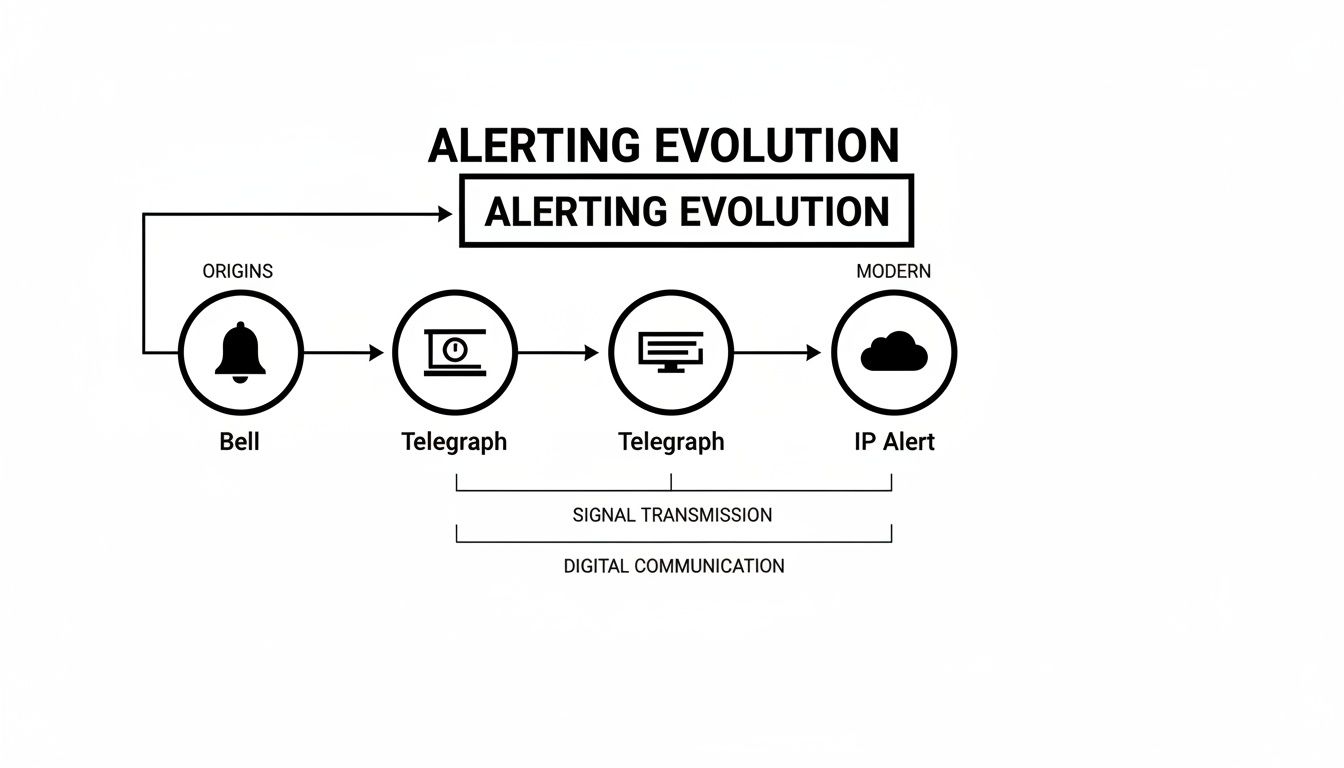
It’s a clear shift from basic, local alerts to sophisticated notifications delivered over modern IP networks.
Unifying Components for Huge Savings and Better Reliability
The real power—and the biggest chance to save some serious money—comes from bringing all these different components together on a single, unified platform. In the past, a department might have needed separate hardware and contracts for paging, another for station tones, and a third for mobile alerts. This created frustrating information silos and got incredibly expensive to maintain.
A unified platform gets every component talking to each other. When a CAD alert comes in, the system is smart enough to trigger tones, pagers, and mobile notifications all at the same time. This layered approach means if one channel fails for some reason, the others are already active, guaranteeing the message gets delivered 100% of the time.
Choosing the right mix of technologies is a balancing act. This table breaks down the pros and cons of the most common alerting channels to help you see how they stack up.
Comparison of Firehouse Alerting Technologies
| Technology | Speed | Reliability | Information Capacity | Typical Cost |
|---|---|---|---|---|
| Pagers (Radio) | Very Fast (seconds) | Very High (independent of cell) | Low (tones, short text) | Moderate (initial hardware) |
| Mobile Push | Very Fast (seconds) | High (depends on data/Wi-Fi) | Very High (maps, notes, files) | Low (software subscription) |
| SMS/Text | Fast (seconds) | High (uses cell network) | Low (limited text) | Low (part of subscription) |
| Voice Calls | Slower (10-30 seconds) | Very High (works on any phone) | Medium (spoken details) | Moderate (per-call/minute fees) |
| Station Tones/PA | Instant | Very High (hardwired) | Low (audio tones, voice) | High (initial install) |
As you can see, no single technology is perfect for every situation. That's why the best systems layer them, using the speed of push notifications, the reliability of pagers, and the universal reach of voice calls to create a truly bulletproof alerting strategy.
Modernizing this communication stack isn't a new idea. Back in 1852, Boston's fire alarm telegraph system connected street-corner alarm boxes to a central hub, which then relayed location codes to fire stations. This cut response times from over 15 minutes down to just a few, leading to a nearly 30% drop in fire fatalities in the city within five years. Today's IP-based systems are built on that exact same principle: delivering fast, accurate data when it matters most.
Actionable Insight: By using an integrated software solution, you get rid of the need for all that costly, separate hardware for each channel. This approach not only frees up a significant chunk of your department's budget but also makes everything much easier to manage. The principle of networked reliability is what makes today’s systems so effective, much like how modern smoke detectors use mesh technology for Increased Reliability and Redundancy in Smoke Detectors.
You can see how all these pieces come together by checking out the full feature set of a modern platform.
Choosing the Right Alerting System for Your Agency
Picking a new firehouse alerting system is a huge decision, but it doesn't have to be overwhelming. Instead of getting bogged down in tech specs, your focus should be on how a system will actually perform for your people in the real world. This is especially true for volunteer departments where every dollar and every second is critical.
The key is to look past the sticker price and really understand the Total Cost of Ownership (TCO). Way too many departments get snared by hidden costs buried in complex contracts. We're talking about steep upfront hardware fees, mandatory long-term service agreements, and expensive per-user licenses that punish you for growing your roster. Asking the right questions from the get-go can save your agency thousands of dollars and years of headaches.
Key Questions to Ask Vendors
Before you even think about signing a contract, you need to dig into the details that will impact your day-to-day operations. These questions will help you slice through the sales pitch and see a system's true worth.
- What happens if our internet goes down? A system that isn't redundant is a non-starter. Ask if it will automatically fail over to other channels like SMS or voice calls without someone having to flip a switch manually.
- Do we have to buy your proprietary hardware? Systems that lock you into their specific hardware can be a massive drain on the budget, both for the initial purchase and for maintenance. A flexible, software-based platform that runs on the smartphones and computers you already own offers huge savings.
- What’s your pricing model really look like? Be very suspicious of per-user fees. They seem small at first but can quickly become unmanageable for volunteer agencies. A simple, flat-rate subscription is far more predictable and easier to budget for.
- How hard is it to manage? You and your team should be able to update schedules, change personnel, and tweak alerting rules on your own, without having to call for pricey tech support every time.
The goal here is to find a partner, not just a vendor. A system should bend to fit your agency's needs, not force your agency to bend to its limitations. That flexibility is what separates a good system from a great one.
Choosing a system with a transparent, predictable cost structure is the single most effective way to save money.
Avoiding Hidden Costs and Making Your Budget Go Further
The biggest financial black hole in firehouse alerting often comes from legacy systems with outdated business models. Eye-watering hardware costs and long-term paging contracts can eat up a massive chunk of a department's budget, hitting smaller or volunteer-run agencies the hardest.
Practical Example: A volunteer fire department with 50 members might be paying $20 per pager per month. That's $1,000 every single month, which adds up to a staggering $12,000 per year. All for a one-way communication tool that gives them very little information.
By making the switch to a modern, software-based platform like Resgrid, that same department gets a full-blown alerting and management system that uses the smartphones their responders already carry. For a fraction of what they were paying for pagers, they get multi-channel alerting, real-time mapping, personnel tracking, and scheduling tools.
Actionable Insight: The savings—often over $10,000 annually—can then be pumped back into things that really matter, like critical PPE, training, or new equipment. Before signing any contract, demand a full breakdown of all potential fees, including support, hardware replacement, and user license increases.
The entire history of emergency alerting has been a story of constant improvement. From the telegraph boxes of the 1850s that improved dispatch accuracy by 80% to modern IP systems hitting 95% reliability, technology has made our communities safer. You can see how each innovation built upon the last in a detailed history of these life-saving advancements chronicled by APCO International.
This modern approach lets you make a smart financial decision that not only boosts your operational readiness but serves your community better for years to come.
A Practical Rollout and Integration Plan
Successfully rolling out a new firehouse alerting system comes down to smart planning, not just plugging things in. You really want to use a phased approach. It gives you the control needed for a smooth transition and prevents the nightmare scenario of a department-wide system failure on day one. The goal is to move deliberately, building confidence and skill with each step.
This structured rollout keeps you from overwhelming your people and lets you iron out any wrinkles in a controlled setting. A rushed deployment just creates confusion and kills trust in the very system that’s supposed to make things better.
Start with a Pilot Program
The best way to kick things off is with a small, focused pilot program. Pick a single station or even just a specific team to be your test group. This lets you find and solve problems on a small scale before they can blow up and affect the whole department.
During this phase, you'll gather priceless feedback on everything from the user interface to how reliable push notifications are in different coverage areas. This initial test run is your chance to fine-tune the system and make sure it holds up to the real-world demands of your crews.
Think of a pilot program as a full dress rehearsal. It’s where you discover that a specific cell carrier has a dead zone near a captain's house, or that a certain CAD alert format needs a minor tweak to be read correctly. Fixing those hiccups with a group of five is a whole lot easier than with a group of fifty.
Once the pilot group gives you the green light, you can start a staged rollout to the rest of the department. Go station by station or team by team, using what you learned to make each step smoother than the last.
Integrate with Personnel and Scheduling
To really unlock the power of your alerting system, you have to tie it into your personnel and scheduling software. This is the difference between blasting an alert to everyone and intelligently sending it to the right people at the right time. A system that knows who's on duty, who's on call, and who has specialized skills is a complete game-changer.
This kind of integration cuts through the noise of unnecessary alerts. For more info on making this process work smoothly, you can dig into the detailed documentation and resources over at the Resgrid support center.
Practical Example: Automated Call Routing
Let's imagine a call comes in for a technical rope rescue. Instead of paging every single member of the department, an integrated system like Resgrid can be set up to:
- Identify the incident type right from the CAD data (e.g., "Rope Rescue").
- Automatically check the schedule to see which members of the specialized technical rescue team are on duty.
- Send the alert only to that specific group.
This targeted approach means firefighters aren't getting bothered by calls they aren't assigned to. It drastically reduces alert fatigue and ensures your most qualified responders are activated instantly.
Build Redundancy from Day One
A modern alerting system simply cannot have a single point of failure. Right from the start of your rollout, you need to configure and test multiple ways of sending alerts to make your system fail-safe. True reliability comes from having layers of redundancy baked in from the beginning.
Practical Example: During your pilot phase, actively test failover scenarios. Unplug the station's internet router during a test dispatch. Did the system automatically send SMS and voice calls within seconds? If not, your configuration needs work. This hands-on testing is the only way to confirm your redundancy plan actually functions. This multi-channel strategy is the only way to guarantee 100% message delivery, no matter what happens.
The True ROI of a Modern Alerting System
Let's be clear: a modern firehouse alerting system isn't just another line item in your budget. It's a high-yield investment that pays dividends in both dollars and, more importantly, lives. To really understand the return on investment (ROI), you have to look past the initial price tag and see the whole picture—direct cost savings and the immense value of getting better at what you do.
The most obvious wins are financial. You can immediately see the impact on your bottom line by cutting out old, unnecessary expenses. These are the hard costs you can easily point to and measure.
Calculating Your Hard Cost Savings
So many departments are shackled to expensive, single-purpose contracts that just bleed the budget dry year after year. Making the switch to a unified, software-based platform lets you cut those recurring costs right away.
Practical Example:
- Legacy Pager Contracts: Imagine a department with 40 members. If you're paying just $25 per pager per month, that's a staggering $12,000 per year for technology that barely gives you more than a tone and a vague address.
- Dedicated Phone Lines: Some older systems still need dedicated phone or data lines just to function, adding hundreds or even thousands of dollars in fees every single year.
- Hardware Maintenance: Those proprietary servers and clunky station equipment? They need specialized maintenance and are a nightmare to replace when they inevitably fail.
Actionable Insight: By moving to a system that uses the smartphones your responders already carry, you can wipe these expenses off the books entirely. The savings, which can often be over 80% of what you were spending, can be funneled back into things that actually matter—like new turnout gear, equipment upgrades, or critical training. Present this direct cost comparison to your board or council to get budget approval more easily.
The Value of Faster Response Times
While the hard cost savings are great, the biggest returns aren't always found on a balance sheet. They're found in improved performance. Study after study shows that shaving just 30-60 seconds off a response time can completely change the outcome of an emergency. This is where the "soft" benefits become incredibly tangible.
A small kitchen fire can become a total structure loss in just a few minutes. Arriving one minute sooner is often the difference between a crew member using a single fire extinguisher and needing multiple engine companies to mount a defensive attack.
That saved time directly translates to less property damage. Over the long haul, that can even lead to lower insurance premiums for homeowners and businesses in your community. A faster, more effective response doesn't just save property; it builds public trust and reinforces the value your department provides every single day.
It's also about safety. Getting accurate information to crews while they're en route—things like hydrant locations, pre-plan details, and real-time updates from dispatch—is a game-changer. It improves firefighter safety by cutting down the uncertainty they face when they arrive on scene. You can't really put a price on that kind of situational awareness, but it's absolutely essential to your mission.
For departments looking to see how an affordable, no-contract approach can maximize these returns, you can learn more about Resgrid's pricing structure and how it gets rid of those hidden fees. At the end of the day, a modern firehouse alerting system isn't an expense; it's a strategic investment in efficiency, safety, and community protection.
Frequently Asked Questions
When departments start looking at new alerting systems, the same questions always pop up. It's totally understandable—you're talking about a critical piece of your operation. Below, we'll tackle the big ones we hear all the time about reliability, cost, and getting things hooked up.
What Happens If Our Station Loses Internet?
This is probably the most important question on the list, and for good reason. Any modern alerting system worth its salt is built for this exact scenario. It's all about having multiple ways to get the alert out, so you're never relying on just one thing.
If the primary internet-based (IP) alert fails, the system has to instantly and automatically switch over to backup channels. These backups could be SMS text messages, automated voice calls, or even your good old-fashioned radio pagers if you have them tied in.
Practical Example: Let's say a storm knocks out your station's internet. A properly configured system doesn't just go silent. It immediately re-routes the dispatch as a voice call to the crew's cell phones, so they still get the call, no questions asked. This happens on its own, with zero manual effort.
Actionable Insight: The goal is to eliminate any single point of failure. The call has to go out. When evaluating vendors, ask them to demonstrate a live failover test to prove their system's redundancy.
Are These Systems Too Expensive for Volunteer Departments?
Not anymore. It's true that the old, hardware-heavy systems could cost a fortune, but modern software has completely flipped the script for volunteer and smaller departments.
Today's systems are usually software-as-a-service (SaaS) platforms. You pay a simple subscription, and you don't get forced into buying a bunch of proprietary boxes or signing crazy long-term contracts. The real game-changer is that you can leverage the equipment you already have—like your responders' smartphones and the computers at the station.
- Practical Example: A small volunteer department can save over $5,000 a year just by dropping a $10 per person, per month pager contract for 45 members.
- Actionable Insight: Look for platforms that offer flat-rate pricing instead of charging you per user. This approach lets you add new members without your bill skyrocketing, which makes budgeting way more predictable. That money saved can go right back into buying gear or funding training.
How Difficult Is Integration with Our Existing CAD?
This used to be a major headache, but modern alerting platforms are built to be flexible. The most common and dead-simple method to get things talking is email parsing.
Practical Example: Your CAD system just sends a specially formatted email for each dispatch. The alerting platform grabs that email, reads the key info, and fires off the alerts. It's a nearly universal method that works with almost any CAD out there, whether it's brand new or been around for a decade. Setup for this can often be done in under an hour without any specialized IT help.
For departments that want a tighter, more direct connection, many systems offer APIs (Application Programming Interfaces). This allows for a real-time data connection between your CAD and the alerting platform. A good provider will have clear instructions and offer support to get this set up, so you don't need to hire a team of expensive developers to make it happen.
Ready to see how a modern, affordable, and rock-solid alerting system can change things for your department? Resgrid offers a unified, open-source platform that gets rid of pricey hardware and long-term contracts, putting you back in control.