
What Is E911 and How Does It Work
To really get what Enhanced 911 (E911) is, you first have to understand what it isn't. It’s not just a simple phone connection to an emergency operator. E911 is a smarter system that automatically gives a 911 dispatcher two crucial pieces of information the second you call: your phone number and your physical location.
This is a game-changer. It means first responders can find you faster, even if you can't say a single word. A practical example would be a person having a stroke who can dial 911 but is unable to speak their address; E911 ensures help is dispatched to their exact location anyway.
The Life-Saving Leap from Basic 911 to E911
Think back to the original 911 system that rolled out in the late 1960s. It was groundbreaking for its time, but really, it was just a universal phone number that routed you to a local emergency line. The dispatcher on the other end had no clue where you were unless you told them.
If the line dropped, or the caller was choking, having a heart attack, or was otherwise unable to speak, responders were flying blind. That call was a dead end, and the delay could be fatal. Imagine someone dialing 911 right before losing consciousness—the dispatcher had no callback number and no address.
The Two Pillars of Enhanced 911
E911 was built to solve this exact problem, standing on two foundational features that give dispatchers immediate context. It’s like upgrading from a basic phone call to one with Caller ID and GPS baked right in.
- Automatic Number Identification (ANI): This is the Caller ID part. The moment your call connects, your phone number instantly pops up on the dispatcher's screen. No more asking "What number are you calling from?" They have a reliable callback number if you get disconnected.
- Automatic Location Information (ALI): This is the GPS part. The system takes your phone number (from the ANI) and instantly queries a database to find the registered physical address, displaying it right alongside the number.
The combination of ANI and ALI is what makes E911 so powerful. The system started gaining traction in the 1970s as growing cities demanded faster, more reliable emergency services. While 911 only served 26% of the U.S. population in 1979, today about 95% of Americans have access, with the vast majority of those systems being enhanced to provide automatic location data. You can dig deeper into these national 911 statistics and their evolution.
For businesses running VoIP or multi-line phone systems, properly configuring E911 isn't just a safety feature—it's a smart operational move. Providing precise location data for every phone reduces the risk of hefty non-compliance fines and can even help lower insurance premiums by proving you have a solid emergency plan.
This instant data delivery slashes response times, gives first responders critical situational awareness before they even arrive, and ultimately saves lives.
To put it in perspective, here's a direct comparison of the old way versus the new.
Basic 911 vs Enhanced 911 Key Differences
| Feature | Basic 911 | Enhanced 911 (E911) |
|---|---|---|
| Caller's Phone Number | Not provided; must be stated verbally. | Automatically displayed via ANI. |
| Caller's Location | Not provided; must be described by the caller. | Automatically displayed via ALI database query. |
| Response Capability | Dependent entirely on information the caller can provide. | Dispatch can proceed even if the caller is unable to speak. |
| System Intelligence | Simple call routing to a central number. | Data-rich environment providing immediate, actionable intelligence. |
As you can see, the jump from basic to enhanced isn't just an upgrade; it's a fundamental shift from a reactive system to a proactive, data-driven one.
How E911 Finds You
The way Enhanced 911 automatically pinpoints a caller's location can feel like magic, but it’s really a logical, step-by-step flow of data. Everything centers around the Public Safety Answering Point (PSAP)—the dispatch center that takes the call. But how your location gets to that dispatcher's screen changes completely depending on the phone in your hand.
With a traditional landline, the process is dead simple and incredibly reliable. When you dial 911, your phone number (the ANI) travels with the call to the PSAP. The system instantly takes that number and queries the Automatic Location Information (ALI) database, which the phone company maintains. In seconds, your verified, static physical address pops up on the dispatcher's screen.
The Problem with Mobile and VoIP Calls
But that clean, simple model went out the window with the explosion of cell phones and internet-based calling (VoIP). A mobile phone isn't tied to one address, and a VoIP user can call from literally anywhere they have an internet connection. To solve this puzzle, wireless E911 was rolled out in two major phases.
- Wireless E911 Phase I: The first step was pretty basic. It required mobile carriers to give the PSAP the caller's phone number and the location of the cell tower handling the call. This gave responders a general search area, but it wasn't nearly precise enough for a crowded city block or a huge rural county.
- Wireless E911 Phase II: This was the real game-changer. Phase II forced carriers to provide much more accurate location data, usually as latitude and longitude coordinates. They get this data in two main ways: using the GPS chip in the handset itself or by triangulating the phone's position between multiple cell towers.
The rollout of these wireless phases was a huge milestone. The FCC put its foot down, mandating that by the end of 2005, carriers had to hit strict accuracy standards: GPS-based locations had to be within 50 meters for 67% of calls, and network-based methods had to be within 100 meters for 67% of calls. This upgrade made it possible for 93% of U.S. counties to offer enhanced wireless 911 services, fundamentally changing emergency response. You can dig deeper into the history and impact of these E911 rules on Wikipedia.
Location Tech for Modern Phone Systems
Modern business phone systems, or Multi-Line Telephone Systems (MLTS), bring their own set of headaches. A single office building can have hundreds of phones sharing the same street address. If someone dials 911, how do first responders know which floor, office, or conference room to rush to?
This is where a Location Information Server (LIS) steps in. Think of an LIS as a hyper-detailed internal address book. It maps specific devices like VoIP phones or even Wi-Fi access points to a precise, dispatchable location inside a building. When a 911 call goes out from a phone on that network, the system queries the LIS to grab that specific room or floor number and sends it along to the PSAP.
Actionable Money-Saving Insight: For any business, keeping an accurate LIS isn't just a compliance checkbox—it's about avoiding massive costs. Failing to provide a dispatchable location can lead to huge fines under regulations like RAY BAUM's Act. By proactively managing your location data, you dodge those penalties and, more importantly, the potential liability that comes from a delayed emergency response.
Getting this data management right is critical. For companies with remote workers, that employee's home address must be registered and tied to their VoIP extension. If it’s not, a 911 call from their home office could send first responders to corporate headquarters, wasting precious time when it matters most. You can also pull E911 data into powerful tools, like those found in Resgrid's suite of applications, to level up your entire organization's emergency management game.
Anatomy of an E911 Call from Dial to Dispatch
So, how does this all work in the real world? Let’s walk through the journey of a single emergency call to see the system in action.
Picture a hiker, alone and injured on a remote trail. When they dial 911 from their cell phone, a whole chain of events kicks off in a matter of seconds. It's an incredible sequence designed to turn that one button press into a life-saving response.
That call doesn’t just ring at some random call center. The cell network immediately pinpoints the nearest Public Safety Answering Point (PSAP) using cell tower data. At the same time, the system pushes two vital pieces of information through: the hiker's phone number (Automatic Number Identification, or ANI) and their exact GPS coordinates (Automatic Location Information, or ALI).
From Raw Data to Actionable Intelligence
Within moments, the dispatcher at the right PSAP sees the call light up their console. The screen fills in with the hiker’s callback number and a map plotting their latitude and longitude. This is huge. The dispatcher can confirm the hiker's condition while already knowing where they are, cutting out the precious minutes that would have been lost just trying to figure out the location.
This initial data stream is what kicks off a coordinated response. The dispatcher then sends the verified GPS coordinates and incident details to first responders, making sure the rescue team is headed to the right spot from the get-go.
This flowchart breaks down how E911 gets location data from different kinds of phones—whether it’s a fixed landline, a mobile device like our hiker’s, or a VoIP call from a home office.
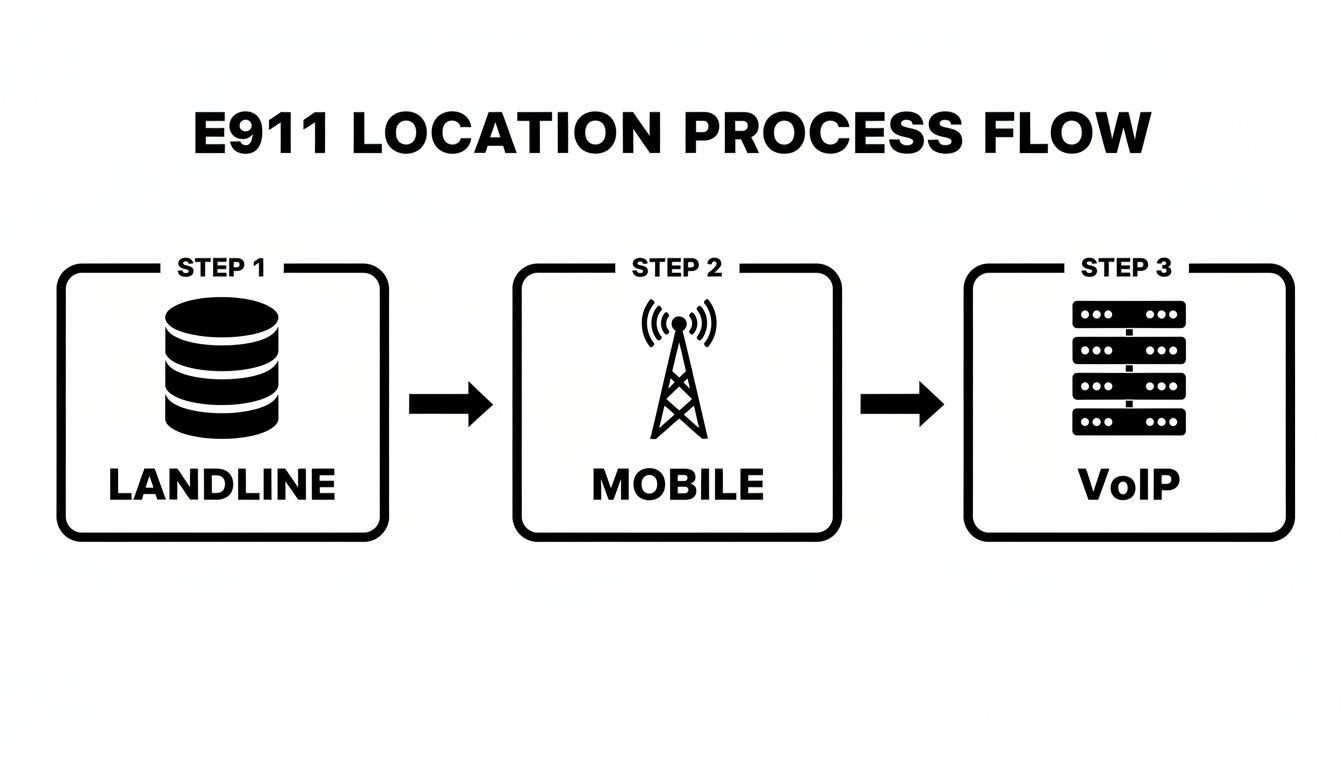
As you can see, landlines are easy because they’re tied to a static, physical address. But for mobile and VoIP calls, the system has to work a little harder to find a dynamic, real-time location to give dispatchers the right info.
Turning a Call into a Coordinated Incident
The process doesn't end when the units are dispatched. That ANI and ALI data becomes the foundation for building an incident inside modern platforms like Resgrid. What started as just a phone number and a location gets transformed into an active event that can be tracked, managed, and shared across multiple teams in real time.
This integration is a massive money-saver for agencies. By automatically pulling incident details from the E911 feed, you get rid of manual data entry. That means fewer chances for human error and it frees up dispatchers to focus on the next incoming call instead of typing. You’re wasting fewer resources on admin work and putting more focus on the actual response.
Key Takeaway: An E911 call is so much more than a voice connection; it’s a data delivery system. The magic happens when you can automatically pipe location and callback information directly into dispatch and incident management systems. That’s what closes the gap between a cry for help and a fast, accurate, and organized response.
To really get the full technical picture of how these calls travel in modern systems, it helps to understand how SIP trunking works, since it’s often the backbone for VoIP-based emergency calls. This technology is what makes it possible to reliably send both voice and data over the internet, making it a critical piece of the E911 puzzle for businesses and remote workers.
Navigating E911 Laws and Compliance
Knowing the ins and outs of E911 isn't just a technical exercise—it’s a legal minefield for many organizations. Dropping the ball here can lead to massive penalties and, more importantly, put real lives on the line. Two landmark federal laws have really set the tone for what's expected from modern emergency calling systems.
These rules weren't created in a vacuum. They were born from tragic events where people couldn't get help because of outdated phone systems. Now, the goal is simple: ensure that anyone, anywhere in a building, can reach help and be found fast. If you run a business, a school, or a hotel, this is not optional.
Kari's Law: Direct 911 Dialing
Kari’s Law tackles a frustrating and dangerous hurdle that used to be common in multi-line telephone systems (MLTS)—the kind you find in almost any office or hotel. The law mandates that any user must be able to dial 911 directly. No more fumbling for a prefix like "9" to get an outside line first.
It also requires the system to fire off a notification to someone on-site, like the front desk or a security office, the moment a 911 call is made. This lets your own people jump into action immediately, maybe even providing critical aid before first responders show up or at least clearing a path for them.
Practical Example: Picture a guest having a medical emergency in a sprawling hotel. Thanks to Kari's Law, they just pick up the room phone and dial 911. No confusion. At the same exact time, an alert flashes on the front desk computer showing the room number, letting staff guide paramedics straight to the door. Those saved minutes can make all the difference.
RAY BAUM’s Act: Dispatchable Location
While Kari’s Law makes sure the call gets out, the RAY BAUM’s Act makes sure responders know exactly where they're going. It requires that all 911 calls from MLTS and VoIP systems provide a "dispatchable location" to the Public Safety Answering Point (PSAP).
A dispatchable location is way more than just a street address. It’s the nitty-gritty detail that responders actually need—the floor number, suite, room number, or some other clear identifier to pinpoint the caller's spot in a big building. And for all those remote workers using your company's VoIP system? Their registered home address has to be kept up to date.
Actionable Money-Saving Insight: Ignoring these laws can get incredibly expensive, fast. Fines can hit $10,000 per incident, not to mention extra daily penalties that stack up. Proactively auditing your phone system and using a modern dispatch solution to manage location data is a heck of a lot cheaper than facing those fines and the legal nightmare that follows an emergency.
Getting all this right can feel like a tall order. A recent Metrigy study found that only 63.8% of organizations felt they were fully compliant with Kari's Law and the RAY BAUM's Act. This is where systems like Resgrid can be a game-changer, offering flexible, open-source tools to manage location data and communications without breaking the bank. You can also learn more about the history and development of these crucial public safety dispatch systems.
Your E911 Compliance Checklist
Making sure your organization is meeting its legal duties doesn't have to be a huge headache. If you focus on a few key areas, you can build a solid and compliant emergency response plan that protects everyone on your property. Managing this location data is also a big part of how organizations handle sensitive information, a topic we dive into deeper in our guide to data privacy policies.
To get started, we've put together a simple checklist to help you see where you stand.
E911 Compliance Checklist for Organizations
This table breaks down the core requirements of Kari's Law and RAY BAUM's Act into straightforward, actionable steps for any organization using a multi-line phone system.
| Compliance Area | Requirement | Actionable Insight |
|---|---|---|
| Direct Dialing | Can any user dial 911 without a prefix (e.g., dialing 9 first)? | Test this from multiple phones and locations in your facility. If it fails, your phone system configuration needs an immediate fix. |
| On-Site Notification | Does your system alert on-site staff when a 911 call is placed? | Set up your system to send an email, SMS, or screen pop-up to security or front desk staff with the caller's location. |
| Dispatchable Location | Is a specific floor, room, or suite number sent with every 911 call? | Audit your phone inventory. Make sure every single device, from desk phones to softphones, is tied to a precise location. |
| Remote Worker Addresses | Are remote employees' home addresses registered and current? | Create a policy that requires remote staff to verify their E911 address quarterly. This is non-negotiable for VoIP and softphone users. |
Walking through these points is the first step toward not only meeting your legal obligations but also creating a safer environment for everyone who walks through your doors.
Integrating and Optimizing Your E911 System
Having an E911-compliant phone system is just the starting line. Keeping it reliable, accurate, and cost-effective is a whole different ballgame, especially in the tangled world of VoIP and Multi-Line Telephone Systems (MLTS). This isn't a "set it and forget it" piece of tech.
The real goal is to build an ecosystem where precise location data flows like water from the caller straight to the dispatcher. When you get this right, you create a clear operational picture that saves time, money, and most importantly, lives. This requires a solid strategy for data maintenance, troubleshooting, and smart system integration.
Maintaining Precise Location Data
Bad location data is the Achilles' heel of any E911 system. A call from the fourth-floor accounting office that sends responders to the first-floor lobby is more than an inconvenience; it's a critical failure. The only way to prevent this is through regular, disciplined data management.
This means you need clear internal policies and routine audits. Think of your system's location database as a living document—it has to reflect every single move, addition, and change within your organization.
- Quarterly Location Audits: At a minimum, your IT or facilities team should walk the floor once a quarter. They need to physically verify that the location registered to each VoIP phone matches its actual desk.
- Remote Worker Address Verification: This one is huge. Create a mandatory process where remote employees must confirm or update their registered E911 address every three months. You can't have emergency services showing up at the corporate office for an incident happening at someone's home.
- Automated Location Updates: For bigger organizations, look into dynamic location services. These can detect when a user moves based on their IP address or Wi-Fi access point and update their address automatically.
Actionable Money-Saving Insight: Sticking with manual data entry isn't just a headache; it's a huge source of expensive errors. Integrating your E911 system with your HR or asset management software can automate address updates when an employee moves or leaves. This move cuts out manual work, slashes the risk of non-compliance fines, and keeps data accurate without paying for extra admin hours.
Troubleshooting Common E911 Issues
When an E911 call goes wrong, you need a quick way to figure out what happened. The most common culprits are calls with no location data at all or calls that plot to the wrong address on a dispatcher's map.
Your first step should always be to test from the device in question by dialing 933. This is the national E911 test number. It connects to an automated service that reads back the address and phone number currently tied to that line. If that information is wrong, you've found your starting point. From there, you can isolate whether it's a misconfigured phone, an old entry in the Location Information Server (LIS), or a network routing issue.
Strategic CAD Integration
Now, for the most powerful step you can take: integrating your E911 data feed directly with your Computer-Aided Dispatch (CAD) system. This is where you'll see the biggest return on your investment, hands down.
When a call comes in, the ANI/ALI data—the phone number and the dispatchable location—should automatically pop up and create a new incident in your CAD. This one simple connection gets rid of redundant data entry, which is a major source of human error and a massive time-waster for dispatchers.
Here's how it plays out: A dispatcher gets an E911 call. Without integration, they're juggling listening to the caller, manually typing the address and callback number into the CAD, and then trying to dispatch units. With integration, the address and number are already on their screen the second the call connects. They just have to verify the details and click to dispatch, shaving 30-60 seconds off the entire process.
This direct data flow creates a seamless, efficient, and far more reliable workflow. To see how different systems can connect and streamline operations, you can explore the various features of modern dispatch platforms. By getting these systems to talk to each other, you turn raw E911 data into actionable, life-saving intelligence.
The Future Is Now: From E911 to NG911
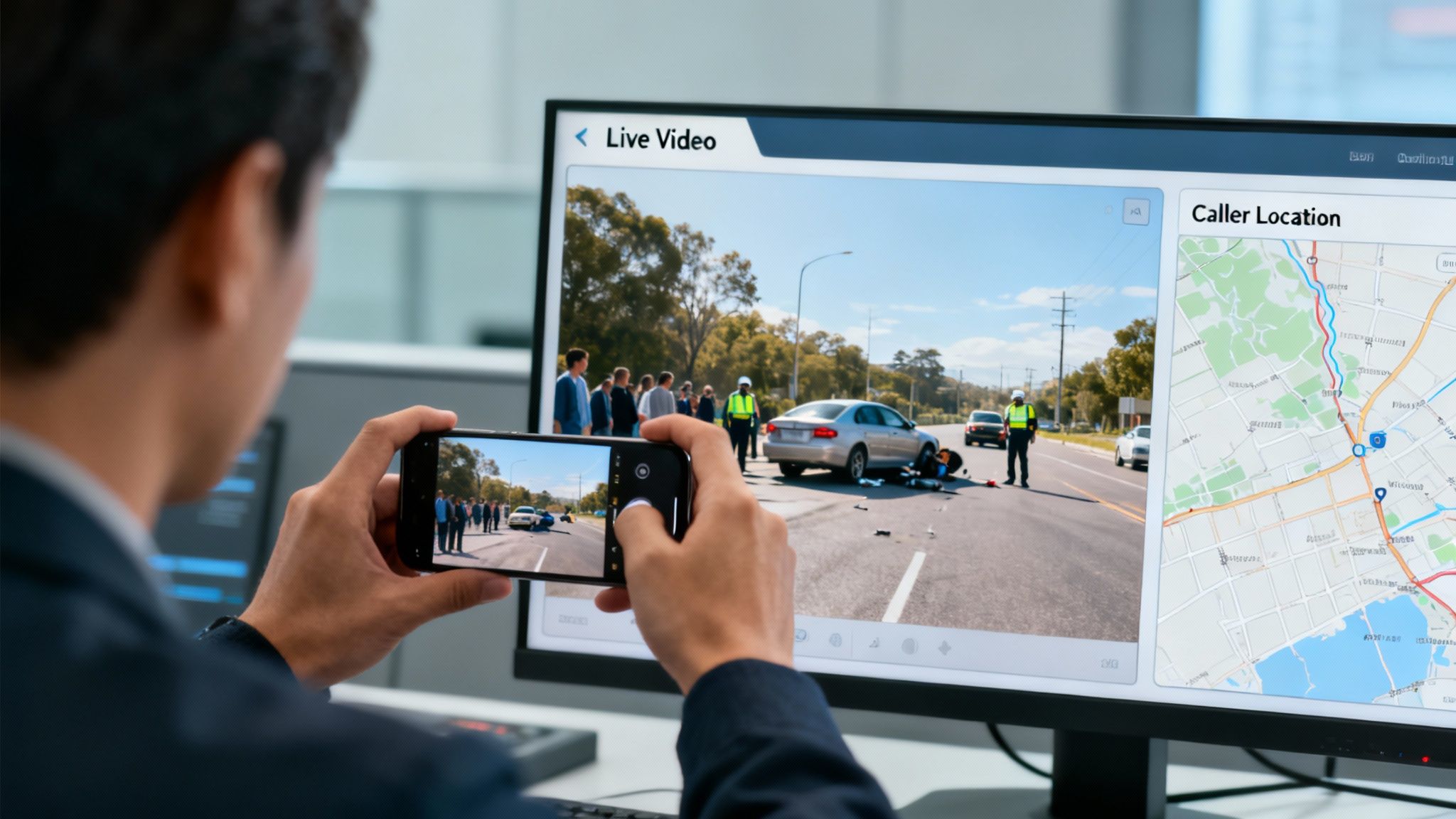
While E911 was a game-changer that gave us automatic location data, its successor, Next Generation 911 (NG911), is built for the world we actually live in today. It’s a ground-up rebuild, moving away from the old-school, voice-only foundation of E911 to a modern, IP-based network that can handle all sorts of rich data.
Here’s a simple way to think about it: E911 is like getting a postcard with a fixed address on it. It’s useful, but limited. NG911, on the other hand, is like getting a FaceTime call. It’s designed to accept not just your location but also text messages, photos, and even real-time video feeds straight from a smartphone.
Expanding Beyond Voice and Location
The real magic of NG911 is how it gives dispatchers a crystal-clear picture of what's happening before the first unit ever hits the road. This shift from a voice-first to a data-first model is a fundamental change in how emergency response works.
Think about a multi-car pileup. With E911, a witness can only describe the scene over the phone. With NG911, that same witness can text key details if it’s too loud to talk, snap a photo of a license plate, or even stream live video of the entire scene directly to the dispatcher.
This isn't just about convenience—it's about smarter, faster resource allocation. Seeing a live video of a minor fender-bender versus a vehicle actively on fire lets a dispatcher send the right assets. That means sending a single police car instead of a full fire and medical response, saving valuable units for other emergencies.
This flood of new information can be piped directly into incident management platforms like Resgrid. A dispatcher sees the call pop up on their map, and with a click, they can also view the incoming video or photos, giving them eyes on the scene as it unfolds.
Planning for the Transition
Let's be real—moving from a legacy E911 system to a full NG911 infrastructure is a massive project that needs careful planning. But forward-thinking agencies can start taking steps right now to make the eventual switch a lot smoother and more affordable.
- Adopt IP-Based Systems: If you haven't already, start upgrading your internal phone and dispatch systems to IP-based technology. This gets your own house in order and aligns your tech with where NG911 is heading.
- Prioritize Scalable Dispatch Software: Choose incident management platforms that are built for more than just voice and location pings. You need something that can handle diverse data types so you're ready for multimedia when it arrives.
- Focus on Interoperability: Make sure any new tech you bring in can talk to other systems through APIs. This is going to be critical for plugging into the regional and national networks that form the backbone of NG911.
Actionable Insight: By investing in scalable, IP-based technology today, your agency can avoid the massive, last-minute sticker shock of a forced, rip-and-replace upgrade down the road. It's an incremental approach that saves money and gets your team ready for what's next in emergency communications.
Common Questions We Hear About E911
Even after you get the basics down, a lot of practical, real-world questions pop up for administrators and first responders. Getting straight answers is the key to closing that gap between knowing the rules and actually making them work on the ground.
Here are some of the most common questions we see.
E911 vs. NG911: What’s the Real Difference?
Think of E911 as the system that mastered getting your phone number and address to dispatch. It’s a rock star when it comes to voice calls and location data from a specific, fixed point. Next Generation 911 (NG911) is the evolution of that, built for the way we communicate today on a modern, IP-based network that can handle a whole lot more than just a voice call.
The biggest game-changer is the type of data it can handle. With NG911, the public can send text messages, photos, and even live video straight to a PSAP. This gives dispatchers a richer, more accurate picture of what's happening in real-time—a massive leap beyond what E911 was ever designed to do.
Just How Accurate Is E911 on a Cell Phone?
Mobile E911 location accuracy has gotten worlds better, but it's not always perfect. If you're outdoors, a phone's GPS can usually nail down a location within 50 meters. But once you head indoors or into a downtown core packed with skyscrapers, that precision can drop.
A few things play into how accurate it is:
- GPS Signal Strength: A clear view of the sky gives you the best-case scenario.
- Cell Tower Triangulation: This is the old-school method. It’s not as precise as GPS but works as a solid backup.
- Wi-Fi and Bluetooth Beacons: Newer systems are getting smarter, using nearby network signals to get a much better fix on indoor locations.
It’s not foolproof, but modern mobile E911 gives responders a very reliable starting point to get them to the right area, fast.
Why Do 911 Calls from Our Office Show the Wrong Floor?
If a 911 call from your office just shows the main street address and nothing else, you're looking at a direct violation of the RAY BAUM's Act. The law is crystal clear: every call has to provide a "dispatchable location," which means the specific floor, suite, or room number.
This usually happens because the multi-line phone system (MLTS) hasn't been set up to map each individual phone to a specific spot. It's a job for your IT team—they need to get into the Location Information Server (LIS) and update it with detailed data for every single device.
A Money-Saving Tip: You can actually test your system's compliance yourself, for free. Just dial 933 from any office phone. It’s an automated service that will read back the address that’s on file for that line. If it only gives you the street address, you've just found a compliance gap you can get fixed before it causes a delayed response or lands you a hefty fine.
How Do I Make Sure Our Phone System Is E911 Compliant?
Getting compliant doesn't have to be a huge, expensive project. You can start with a simple two-step audit. First, check for direct dialing. Have someone pick up a few different phones and dial 911 without any prefix (like pressing "9" first). If the call goes through, you’re good on Kari's Law.
Next, use that 933 test number from as many places as you can think of—different offices, conference rooms, even from remote worker setups. Make a list of any phones that fail either of these tests. When you hand your IT provider a detailed log of non-compliant devices, you give them an actionable to-do list, which saves you a ton of money on open-ended "diagnostic" fees.
At Resgrid, we give you the tools to turn that E911 data into coordinated, decisive action. Our platform pulls together dispatching, messaging, and real-time tracking to make sure your team is ready for anything. Learn how Resgrid can streamline your response operations.