
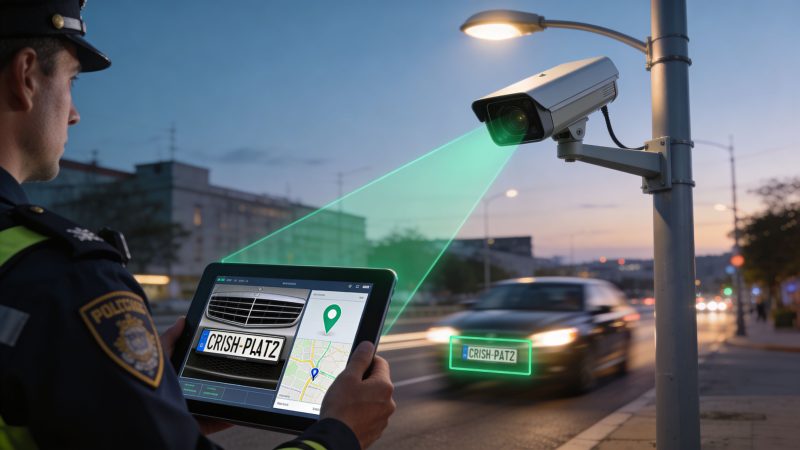
License Plate CCTV Cameras: A Guide for First Responders
A vehicle description goes out over the radio. The plate is partial, the caller is stressed, and your team has minutes to decide whether to flood patrol with a weak lead or wait for better information. In a lot of agencies, that means pulling camera footage, scrubbing timelines by hand, and hoping someone catches the right frame.
That approach breaks down fast when the incident crosses shifts, jurisdictions, or camera systems.
License plate cctv cameras change the job when they’re deployed correctly. They turn passive video into searchable vehicle data, and that matters most when dispatch needs an answer now, not after an investigator has spent half a day reviewing clips. The catch is that most buying guides stop at camera specs. They don’t address the hard part: getting plate reads into the systems dispatchers and responders already use.
That’s where projects succeed or fail. A good camera that doesn’t feed alerts into operations is an expensive recorder. A well-integrated LPR workflow becomes part of response, investigations, perimeter security, and after-action review.
Enhancing Situational Awareness with License Plate CCTV Cameras
A practical example makes the difference clear.
Before LPR, a BOLO for a suspect vehicle usually triggered a messy chain of calls. Dispatch notified units. Supervisors asked nearby facilities to review gates and parking lots. Someone exported video. Someone else checked timestamps that might or might not match system time. By the time a plate was confirmed, the vehicle was often long gone.
With properly deployed license plate cctv cameras, the workflow changes. A camera reads the plate, checks it against an alert list, and sends a usable event to operations. Dispatch gets the plate, vehicle image, location, and time in a format that can be acted on immediately. That’s what turns a camera from a forensic tool into an operational one.
This isn’t niche technology anymore. Automated License Plate Readers contribute to solving approximately 700,000 crimes annually in the United States, representing about 10% of all reported crimes nationwide, according to Flock Safety’s analysis of more than 5,000 communities. That number gets attention, but the operational lesson is simpler. The value comes from fast access, broad usability, and reliable alerting.
What dispatch gains
Dispatch managers usually care less about the acronym and more about the outcome. They need to know whether the system will help their people make better decisions under pressure.
In practice, good LPR deployments improve three things:
- Faster confirmation: Staff stop relying on manual video review for every vehicle-related lead.
- Better location context: Teams can place a hit on a map and route units accordingly. For agencies already using live incident mapping, vehicle events fit naturally into mapping workflows.
- Cleaner handoffs: Investigators, dispatchers, and field units work from the same event record instead of fragments passed over radio and email.
Practical rule: If a plate alert can’t get from camera to dispatcher in a form someone can use immediately, the system is underperforming no matter how good the camera image looks.
Where it works best
The strongest use cases are predictable choke points and decision points:
- Facility entrances and exits: Hospitals, public works yards, schools, and restricted campuses.
- Traffic corridors near incident-prone zones: Places where suspect or witness vehicles are likely to pass.
- Special events: Temporary perimeters where parking and vehicle screening matter.
- Mutual aid environments: When several agencies need the same situational picture.
The common thread is simple. The camera isn’t there just to record a car. It’s there to give your team actionable vehicle intelligence while there’s still time to do something with it.
How ANPR and LPR Technology Works
Think of ANPR and LPR software as a high-speed librarian. The camera collects the raw material, but the software does the organizing, reading, indexing, and matching. If any part of that chain is weak, the final alert is weak too.

Step one is image capture
The system starts by getting a clean image of the target vehicle. That sounds obvious, but it’s where many deployments fail. A general surveillance camera may show that a car passed through a scene. It may not produce a frame that software can reliably read.
LPR cameras are tuned for a narrower job. They’re trying to capture plate detail under difficult conditions such as headlights, angle distortion, dirty plates, and moving vehicles.
Step two is image pre-processing
Once the camera has the frame, the software improves what it can. It adjusts contrast, isolates likely plate regions, and corrects alignment enough to give the recognition engine a better shot.
This is one reason operators shouldn’t judge a system only by what the live stream looks like on a monitor. The recognition process may use enhancements and filters that aren’t obvious to someone watching the feed.
Step three is OCR
This is the part often considered first. Advanced ALPR uses AI-driven Optical Character Recognition and deep learning for both plate reading and vehicle fingerprinting such as make, model, and color, with systems achieving 98% character segmentation accuracy by mitigating glare with high-contrast black-and-white imaging, as described by CCTV Camera Pros.
The important phrase there is character segmentation. Before software reads text, it has to separate one character from the next. If glare washes out part of the plate, if screws look like letters, or if the plate border blends into the background, OCR struggles.
A strong system doesn’t just guess at letters. It evaluates confidence, formatting rules, and vehicle attributes to reduce bad reads.
Step four is data extraction and verification
After OCR, the system converts what it found into structured data. That typically includes the plate value, timestamp, image references, and often extra descriptors about the vehicle.
At this point, good systems also do sanity checks. They compare the read against likely plate formats, confidence thresholds, and related vehicle details. This process allows many false hits to be filtered before they ever reach dispatch.
Don’t send every raw read into operations. Send verified events with confidence rules, image context, and a clear reason for alerting.
Step five is cross-reference
Now the plate becomes useful. The software compares the read against hotlists, BOLO records, access control lists, or investigative datasets. This part is operationally sensitive because stale watchlists create bad alerts and weak policy creates bad searches.
For agencies building workflows that extend beyond law enforcement, it helps to understand how plate data is validated and used in adjacent industries. A useful outside reference is this professional guide to a reg plates check, which gives a good grounding in how plate-based lookups fit into broader verification workflows.
Step six is alert and action
The end product should never be “camera noticed car.” It should be something like this:
| Event field | What dispatch needs |
|---|---|
| Plate read | The recognized plate value |
| Vehicle context | Image and basic vehicle description |
| Location | Exact camera location or mapped point |
| Time | Accurate event timestamp |
| Reason for alert | BOLO match, deny list, stolen vehicle, investigative interest |
| Next action | Notify units, log event, escalate, or monitor |
That final handoff matters more than most vendors admit. If the event can’t move cleanly into a dispatcher’s queue or a responder’s mobile workflow, the recognition chain may be technically impressive and still operationally weak.
Decoding Key Camera and System Specifications
Specs only matter when they prevent a failure you’ll see in the field. That’s the best way to evaluate license plate cctv cameras. Don’t buy features because a datasheet looks impressive. Buy the features that keep bad weather, speed, glare, and motion from ruining your reads.

Shutter speed is not optional
If vehicles are moving, shutter speed is one of the first things to check.
Reliable capture is achieved with high-resolution sensors and electronic shutter speeds from 1/25s to 1/100,000s, enabling detection at speeds up to 120 kph (75 mph). Slower shutters can reduce OCR accuracy by up to 40% on vehicles at 80 km/h, according to the Dahua LPR camera datasheet.
That translates into a simple buying rule. If your roadway traffic is moving at normal speed, a camera that looks fine on a parked test vehicle may fail badly in live conditions.
The most important specs and what they mean
| Spec | Why it matters in the field | What goes wrong when it’s weak |
|—|—|
| Shutter speed | Freezes moving plates | Motion blur ruins OCR |
| Sensor quality | Preserves detail in low light and mixed lighting | Grainy night images and poor read consistency |
| Lens control | Lets you tighten the capture zone | Plates appear too small or distorted |
| WDR, HLC, BLC | Handles headlights and backlighting | Bright glare wipes out characters |
| Infrared illumination | Supports plate capture in dark scenes | Night reads become unreliable |
| Compression and network handling | Keeps video and metadata moving cleanly | Lag, dropped frames, and unusable event timing |
| Weather protection | Keeps performance stable outdoors | Moisture, dust, and temperature swings degrade results |
Don’t overpay for the wrong kind of resolution
Agencies often ask whether they need 1080p, 4MP, or something higher. The better question is whether the camera can deliver enough plate detail at the planned distance and lane width.
Higher resolution helps when it supports the capture geometry. It doesn’t rescue a bad install. A wide overview camera with lots of pixels still won’t behave like a true LPR camera if the plate occupies too little of the image or the lens is wrong for the lane.
A cheap way to waste money is to buy one “do-everything” camera and expect it to provide both broad scene awareness and dependable plate reads. Those are usually different jobs. In many deployments, one overview camera plus one dedicated LPR camera is the more honest design.
The least expensive system on bid often becomes the most expensive system to live with. Missed reads create rework, manual review, and weak evidence.
Features that matter at night
Night is where weak systems get exposed.
Headlights, reflections, and uneven illumination create false confidence because operators can still see the vehicle shape on screen. The plate itself may be unreadable to software. This is why WDR, Highlight Compensation, and controlled IR matter so much. They aren’t bells and whistles. They’re anti-failure features.
When reviewing vendor demos, ask for side-by-side examples from conditions that match your roads. Don’t accept daytime samples if your critical traffic comes in before dawn, after shift change, or during events at night.
Spend where it protects operations
A practical purchasing sequence looks like this:
- Define the mission first. Stolen vehicle alerts at a gate need a different setup than post-incident vehicle tracing on a public roadway.
- Budget for the right camera class. Dedicated LPR hardware usually beats a generic security camera running add-on analytics.
- Protect the lane, not the brochure. Match lens, angle, and illumination to the exact capture zone.
- Reserve budget for integration and testing. Hardware without operational setup is unfinished work.
- Require acceptance testing with moving vehicles. Static demos hide failure modes.
The best ROI usually comes from a narrower, more disciplined deployment. Fewer cameras, placed correctly, integrated properly, and tested against live traffic will outperform a larger but loosely planned rollout.
Deployment Best Practices to Maximize Capture Rates
A strong camera can still produce bad results if the install is sloppy. Most failed LPR projects I’ve seen weren’t caused by bad software. They were caused by placement decisions someone made in a hurry.
Start with the physical setup, not the dashboard settings.

Aim for a controlled capture zone
The best installs create a predictable point where each vehicle passes through a narrow read area. That’s easier at gates, lot entrances, and single-lane approaches. It gets harder on wide roadways where vehicles drift, change lanes, or bunch up.
A few field rules hold up well:
- Keep the target lane tight: Don’t ask one camera to read every lane if the lens and geometry won’t support it.
- Avoid steep approach angles: The more distortion you introduce, the harder the OCR job becomes.
- Plan for actual traffic flow: Delivery trucks, buses, and tailgating vehicles can block the plate you care about.
- Check sunlight at the specific time of day: A camera can look perfect at noon and fail during morning ingress.
Common mistakes that cost agencies money
A deployment can miss plates for months before anyone notices, especially if no one is auditing hit quality.
The most common avoidable mistakes are:
- Using dome cameras for the plate job: They may be fine for overview video, but glare and angle issues often make them poor LPR choices.
- Mounting too high: Operators like the broad view. OCR doesn’t.
- Mixing security and LPR objectives: One camera rarely does both jobs equally well.
- Ignoring the network path: A perfect read that never reaches the server is a wasted read.
- Skipping acceptance tests in bad conditions: If you only test in clear daylight, you haven’t tested.
A simple installation checklist
Use this to hold your installer or vendor accountable:
- Verify lane coverage: Confirm exactly where a plate will be read, not just where the camera can see.
- Check night performance: Review captures with headlights, not just ambient lighting.
- Validate timestamps: If camera and server time drift apart, evidence gets messy.
- Inspect cable and power quality: Intermittent power problems create strange and hard-to-diagnose failures.
- Run a live vehicle test: Use several vehicle types and repeated passes.
A short visual refresher helps when you’re training installers or operations staff on alignment and targeting:
What to do instead of “cover everything”
The temptation is to put cameras everywhere and hope software figures it out. That usually creates broad footage, weak reads, and high review burden.
A better approach is selective coverage. Protect high-value choke points first. Test them. Tune them. Then expand based on operational use, not on how much hardware you can mount in one budget cycle.
Good LPR deployment is disciplined. You’re designing a read zone, not decorating a pole.
Integrating LPR Data with Dispatch and Response Systems
This is the part most vendors under-explain.
They’ll show you a plate on a screen, a nice search interface, maybe a hit list. What they often won’t show is how the event gets from the camera platform into live dispatch operations without an operator retyping details or watching another dashboard all shift.
That gap matters because existing guidance often ignores integration with dispatch platforms, and one source estimates 20-30% alert inaccuracy from misconfigurations when connecting open systems like Resgrid in the broader LPR setup process, as noted by Vision Detection Systems. Whether your stack is public safety, private security, or emergency management, the lesson is the same. Integration work deserves as much planning as camera selection.

The three integration paths that matter
Most real deployments fall into one of these patterns.
API-based integration
An API gives you the most control. The LPR platform sends structured data, and your dispatch environment decides what to do with it.
That’s usually the best choice when you need to:
- Route alerts by agency, district, or incident type
- Apply business rules before notifying users
- Store event metadata in a reporting or case workflow
- Avoid being trapped in a single vendor’s monitoring console
The downside is implementation work. Someone has to map fields, handle authentication, and decide what constitutes a valid alert.
Webhooks and push events
Webhooks are often the fastest route to useful alerting. The LPR system posts a message when a watchlist hit occurs, and downstream systems process it.
They work well when you want near-real-time event flow without building a large middleware layer. For many agencies, this is the sweet spot. It’s faster to stand up than a full custom integration and easier to maintain than screen-scraping a proprietary dashboard.
The catch is consistency. If the camera platform sends incomplete payloads, or if event formatting changes after a vendor update, dispatch workflows can break imperceptibly.
NVR or VMS-centered workflows
Some agencies rely on the video management system as the hub. The camera sends events to the VMS, the VMS presents operators with clips and metadata, and staff act from there.
This can work, especially for smaller security teams. It’s weaker for high-tempo dispatch because it often keeps the event trapped in a video tool instead of a response tool.
What good event flow looks like
A practical LPR-to-dispatch workflow should produce one clean event record with these elements:
| Required event content | Why it matters |
|---|---|
| Plate value | Gives dispatch a searchable identifier |
| Vehicle image | Lets staff visually confirm the hit |
| Camera location | Supports routing and perimeter decisions |
| Timestamp | Preserves evidentiary value |
| Alert reason | Tells staff why this matters now |
| Confidence or validation state | Helps prevent overreaction to weak reads |
For agencies building live response workflows, this kind of information belongs in the same operational view as incidents, units, and messages. That’s why dispatch-focused platforms matter more than a second monitoring screen. If your process depends on a dispatcher manually watching a vendor portal and then creating a separate incident, you haven’t integrated it.
For teams evaluating workflow design around vehicle alerts, routing, and incident coordination, it helps to think in terms of dispatching operations rather than just camera notifications.
A workable alerting pattern
Here’s a model that saves both time and money:
- The camera reads a plate.
- The LPR system checks a maintained watchlist.
- A hit triggers a webhook or API event.
- Middleware applies local rules. For example, suppress duplicate alerts from the same camera within a short window.
- Dispatch receives a structured alert with image, plate, location, and recommended action.
- The event is logged once, not in four separate places.
This approach reduces duplicate operator effort and lowers dependence on proprietary software modules. It also gives you flexibility if you swap camera vendors later.
If the only place an LPR alert exists is inside the camera vendor’s portal, your operations are vendor-centric instead of mission-centric.
The gotchas that derail projects
The biggest integration problems are rarely dramatic. They’re small issues that stack up:
- Watchlists aren’t maintained. Old entries create noise.
- Time sync is inconsistent. Video, alerts, and CAD notes don’t line up.
- Camera names are unclear. “North Gate 2” means little if field staff call it something else.
- Payloads are incomplete. Operators get a plate but no image, or an image but no alert reason.
- No one owns the workflow. IT handles network, security handles cameras, dispatch handles incidents, and no one governs the handoff.
The agencies that get this right assign an operational owner, not just a technical one. Someone needs responsibility for the end-to-end alert path from read to action.
Navigating Privacy and Compliance Requirements
An LPR program that ignores privacy won’t stay stable for long. Even if the cameras perform well, the project can stall when staff, elected officials, counsel, or the public start asking basic questions about retention, access, and sharing.
Those questions are fair. LPR systems can capture thousands of license plates per minute, and one vendor dataset cited by the Electronic Frontier Foundation reached 6.5 billion scans, which shows why retention rules and search controls matter in any deployment that stores data about large numbers of uninvolved drivers. The scale is documented in the EFF’s discussion of automated license plate readers and privacy concerns.
The three controls that matter most
You don’t need a giant policy manual to start responsibly. You do need a clear program.
Retention
Set a rule for non-hit data and stick to it. If a plate isn’t tied to an alert, investigation, or defined security need, there should be a default path to purge it.
That protects privacy and reduces storage burden. It also makes discovery and records review less painful later.
Access control
Not everyone with a login should be able to search the system freely. Limit who can query historical data, who can add plates to alert lists, and who can export results.
Track searches. Require a valid operational reason. Supervisors should review use, not just trust that the system is being used properly.
Transparency
Public agencies and private operators both benefit from explaining the rules before controversy starts. Say what the cameras do, what data is stored, who can search it, and when information is shared.
That doesn’t weaken the program. It makes the program easier to defend.
Privacy controls aren’t red tape. They’re part of system design, just like network security and camera placement.
A simple policy template
A workable LPR governance policy should answer these questions:
- Purpose: Why is the system in use?
- Authorized users: Who may access live alerts and who may run historical searches?
- Retention: How long is non-hit data stored?
- Escalation: When can a routine read become part of an active case?
- Sharing: Which outside entities may receive data, and under what authority?
- Audit: Who reviews searches, exports, and watchlist changes?
- Training: What must users complete before access is granted?
If your organization needs a plain-language refresher on broader governance concepts, this overview of regulatory compliance is a useful primer for framing the discussion with managers and administrators.
Build trust before you need it
A privacy page, public policy summary, or internal governance statement helps prevent confusion. For agencies that want to benchmark how a platform communicates its handling of user and operational data, reviewing a published privacy approach like this one can help shape your own documentation.
The goal isn’t to copy another organization’s wording. It’s to make sure your own program answers the questions people will ask before a difficult case puts your LPR use under scrutiny.
Proactive Maintenance and Operational Tips
LPR systems don’t usually fail all at once. They drift. The lens gets dirty. A branch grows into the read zone. Firmware changes a setting. Time sync slips. Then the one night you need the camera most, the result is a bad image and a weak alert.
Routine maintenance prevents that slow decline.
The maintenance work that pays off
A simple checklist goes a long way:
- Clean the lens and housing: Dirt, water spots, and road film degrade image quality faster than many teams expect.
- Inspect the capture zone: Check for new signage, parked vehicles, vegetation, or construction changes.
- Verify event delivery: Make sure reads are still reaching storage, alerting, and downstream systems.
- Confirm time synchronization: Plate events without trustworthy time are harder to use and defend.
- Review sample reads: Don’t just check whether the camera is online. Check whether it is reading accurately.
Weather deserves its own plan
Bad weather changes performance, and teams should plan for it instead of treating it as a surprise. Field tests cited by SCW note that LPR capture rates can drop 40-60% in heavy rain, which is a practical reminder that weather-specific maintenance and hardware choices matter for reliable performance in operational settings, as discussed in SCW’s article on consistently capturing license plate data.
That means agencies should:
- Inspect seals and housings before wet seasons
- Recheck IR performance during storms and low visibility
- Adjust expectations for long-range reads in severe weather
- Train staff on confirmation steps when weather may affect accuracy
Operational habits that reduce misses
Operators can help the system by treating it like evidence infrastructure, not just a camera feed.
Good habits include documenting chronic problem plates, tracking repeat false alerts, and escalating when one camera’s hit quality drops below what staff expect from nearby sites. Those patterns usually point to a fixable issue such as alignment, contamination, or a broken workflow.
A camera being online doesn’t mean it’s operationally healthy. Review actual reads, not just device status.
Reliable LPR performance comes from small, repeated checks. That costs far less than discovering after a critical incident that the system was recording unusable data for weeks.
If your team needs a dispatch platform that can support real-time operations without locking you into costly contracts or rigid workflows, Resgrid, LLC is worth a close look. It gives first responders, dispatch centers, security teams, and emergency managers a unified open-source environment for dispatching, messaging, tracking, and coordination, which makes it a practical foundation for building smarter vehicle alert workflows around license plate camera data.