
Emergency Preparedness Software: Ultimate Guide 2026
At 2:13 a.m., the call volume jumps, someone is trying to update a paper contact list from memory, one supervisor is on the radio asking for unit status, and another is texting a group thread that half the team muted months ago. The incident itself may be manageable. The information flow is what starts to fail.
That's the moment teams often realize they don't have a response problem. They have a coordination problem.
Good emergency preparedness software fixes that by turning scattered tools into one operating picture. Instead of rebuilding the same process during every incident, you start from a system that already knows your people, plans, resources, contacts, locations, and escalation paths. That matters for safety, but it also matters for budget. Preparedness spending is one of the few areas in operations where the return is unusually clear. Investing $1 in disaster preparedness generates an average return of $13 in saved economic impact, with $6 coming from reduced physical damages and $7 from preserved jobs, income, and economic output according to the U.S. Chamber Foundation's disaster preparedness ROI analysis.
From Chaos to Coordination in an Emergency
A warehouse fire is a good example of how fast bad systems break down. Security calls it in. Facilities wants to know which shutoffs are affected. Operations asks whether the night shift has been evacuated. The public information lead needs a clean status update. If your process depends on binders, spreadsheets, standalone texting apps, and verbal relays, every update becomes a handoff. Every handoff creates delay.
Now compare that with a team using emergency preparedness software correctly. The incident opens in one platform. Contact groups are already organized. Building data is available. Unit assignments, acknowledgments, and task status are visible in one place. People stop asking, “Who has the latest version?” because there is one version.
What the old way costs
The direct costs show up quickly:
- Labor waste: Supervisors spend time chasing status instead of managing the incident.
- Delayed decisions: Teams hesitate because they don't trust the information in front of them.
- Repeat communication: The same message gets recreated several times across radio, email, and text.
- Recovery drag: Documentation is incomplete, so handoff to recovery vendors and insurers gets harder.
When teams know what to expect during emergency restoration, they usually focus on cleanup, mitigation, and reopening timelines. That's useful, but the response side starts earlier. The quality of your software and information handling often determines how smooth restoration will be once the immediate threat is under control.
Practical rule: If your team has to manually assemble the same contacts, plans, and location details during every incident, you're paying for the same delay over and over.
What coordinated response looks like
Modern emergency preparedness software doesn't eliminate stress. It removes avoidable friction.
A dispatcher can see who's available. A facility lead can pull the right site information without digging through shared drives. An incident commander can track assignments and communications from one screen. The finance side benefits too. Faster notification, cleaner documentation, and fewer communication errors reduce wasted labor and help limit downtime.
That's the fundamental reason these platforms matter. They aren't just compliance tools. They're operating systems for incidents, and when they're implemented well, they protect both people and budgets.
What Exactly Is Emergency Preparedness Software
Think of emergency preparedness software as air traffic control for emergencies. Aircraft don't move safely because each pilot works from separate notes and guesses what others are doing. They move safely because everyone is working from coordinated information, shared visibility, and defined procedures. Emergency response works the same way.
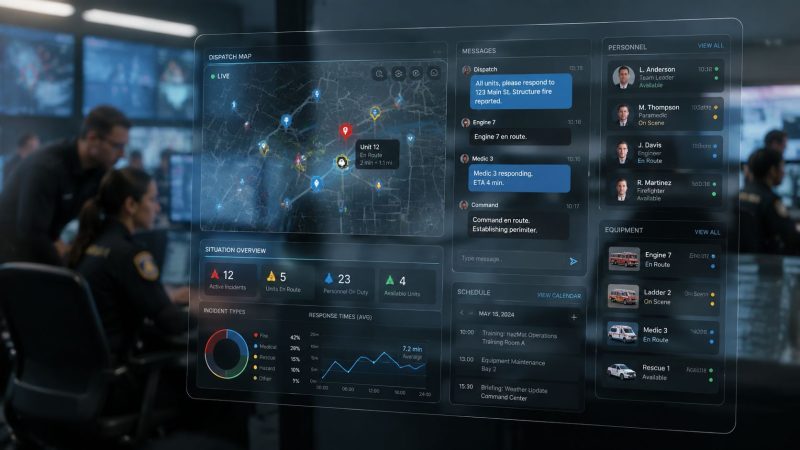
Emergency preparedness software is the platform that connects incident reporting, dispatch, messaging, personnel records, plans, resource status, and documentation into one operational picture. Instead of switching between radios, texts, spreadsheets, whiteboards, and local files, teams work from a single source of truth.

The main job of the platform
At its core, the software should answer four questions fast:
- What's happening right now
- Who is responding
- What resources are available
- What needs to happen next
If a system can't answer those clearly under pressure, it's not helping. It's just digitizing confusion.
Emergency management teams have already moved heavily toward web delivery for this reason. Web-based emergency management systems account for around 58% of the Incident and Emergency Management Market share, reflecting broad adoption across public safety agencies and critical infrastructure operators, according to Fortune Business Insights on the incident and emergency management market.
Not every tool does the same job
A lot of buyers lump all response tech into one category. That creates expensive mistakes. These are different tool types:
| Tool type | What it handles well | Where it falls short |
|---|---|---|
| Mass notification tools | Fast alerts to staff or the public | Weak on dispatch, resource tracking, and documentation |
| CAD-focused systems | Call intake, unit dispatch, status management | May not cover planning, scheduling, or organization management well |
| Emergency management platforms | Plans, incidents, teams, assets, reporting | Some require careful integration work to match field workflows |
| Facility-focused preparedness tools | Building data, maps, emergency procedures | Can be too narrow for multi-agency or mobile response operations |
A school district, a volunteer fire company, a hospital system, and a private security firm may all need emergency preparedness software. They won't need the same configuration.
Buy for the operational problem you actually have, not the demo that looks cleanest in a conference room.
The difference between software that helps and software that gets ignored
Useful platforms reduce clicks during an incident. Poor ones add them.
That's why the best systems feel less like a database and more like a command board. The team doesn't have to remember where information lives. They open the incident, and the right people, plans, tasks, and messages are already connected.
Core Features That Drive Efficiency and Savings
Features only matter if they remove work, cut delay, or prevent mistakes. Emergency preparedness software earns its cost when it reduces the admin burden around incidents, staffing, and follow-up.

Dispatch and incident creation
The first savings show up at the front end. When dispatch, incident creation, and personnel visibility live in one system, supervisors stop duplicating work across separate logs and message threads. That reduces confusion and cuts the time spent confirming basic facts.
A strong dispatch view should show active incidents, assigned personnel, unit status, and location context without making users open five separate windows. If your team still relies on a whiteboard plus a texting app plus a spreadsheet, you're carrying hidden labor cost on every event.
Messaging that doesn't create rework
Communication failures are expensive because they multiply. One unclear message gets repeated, corrected, re-sent, and documented later by hand.
Prebuilt communications solve a lot of that. Pre-building alert templates and contact groups within emergency preparedness software eliminates repetitive manual creation during incidents. For example, a chemical spill template can automatically include pre-written notifications to specific agencies, reducing response time and labor costs while ensuring consistent communication, as described in the Resgrid blog on crisis management software.
Here's what that looks like in practice:
- Hazmat alert: The template already includes command staff, facilities, safety, and external partners.
- Weather closure notice: The message is written in advance, so the duty officer only updates the specifics.
- Medical incident workflow: The right supervisors and support teams are notified in the right order.
That saves money because no one is drafting from scratch under pressure.
Personnel, equipment, and schedule control
Labor is one of the easiest places to lose money subtly. Teams overschedule because they can't see availability clearly. Equipment gets double-assigned because status isn't current. Overtime builds because shift changes are handled informally.
Good emergency preparedness software fixes that with:
- Availability tracking: You can see who's available before sending pages or callbacks.
- Shift and event scheduling: Planned coverage is visible early, which helps prevent last-minute gaps.
- Equipment status: Teams know what's in service, checked out, or assigned.
Organizations that care about data flow across systems should also look at adjacent examples outside traditional public safety software. A useful reference is how EMS leverages Snowflake, because it shows how operational data becomes more useful when teams stop trapping it in disconnected tools.
Reporting and audit trails
The incident doesn't end when the scene stabilizes. Someone still has to explain what happened, who responded, what actions were taken, and where the bottlenecks were.
That's where reporting creates savings. Instead of rebuilding the record from texts, notes, and memory, the software should already contain the timeline. That reduces administrative hours and improves after-action quality. Teams comparing platforms should pay attention to how feature sets support this full workflow in tools like Resgrid features.
The cheapest system is often the one that creates the most manual cleanup later.
Tangible Benefits for Responders and Agencies
The value of emergency preparedness software becomes obvious in the field, not in procurement slides. When it's configured well, responders make better decisions with less backtracking, and agencies spend less time cleaning up process failures.
Better evacuation decisions
A facility team dealing with a fast-moving smoke condition doesn't need a static floor plan sitting in a binder at the command post. They need to know which zones are at risk, which exits are affected, and who still needs direction. Advanced emergency preparedness platforms utilize geospatial modeling and two-way communication channels to dynamically visualize high-risk zones and evacuate populations, resulting in a 40% increase in evacuation accuracy compared to static paper-based plans, according to ARC Facilities on safer operations with emergency preparedness software.
That kind of improvement has practical consequences. Fewer people are routed into bad corridors. Fewer responders waste time clearing spaces that were already confirmed. Fewer supervisors rely on verbal relay alone.
Safer field operations
A responder safety benefit doesn't have to be dramatic to matter. Sometimes it's as simple as not sending the wrong person to the wrong entrance because the assignment view was current and visible to everyone. Sometimes it's knowing which team acknowledged a task and which team didn't.
That shared visibility reduces preventable exposure. It also helps command staff make smaller, smarter adjustments before a communication gap turns into a search problem.
When teams can see assignments, updates, and hazards in one place, they stop using guesswork to fill in missing information.
Faster post-incident recovery
The financial side often shows up after the incident. Agencies and businesses lose time when they can't reconstruct actions clearly, document notifications, or show what resources were used. Clean logs and structured timelines make handoff easier for leadership, facilities, insurers, and recovery partners.
A few practical examples:
- For hospitals: Status updates and task tracking help leadership keep departments aligned during disruptions.
- For campuses: Contact accountability and location-based alerts reduce confusion during sheltering or evacuation.
- For public safety agencies: Incident records support after-action review without a second documentation project.
Less burnout in command roles
This benefit gets overlooked. Supervisors burn out when they become the human integration layer between disconnected systems.
When software handles the information plumbing, command staff can focus on priorities, timing, safety, and coordination. That improves outcomes, but it also protects retention. Replacing institutional knowledge is expensive, and many organizations lose it because routine incident management is harder than it needs to be.
How to Evaluate and Choose the Right Software
Buying emergency preparedness software without a checklist is how agencies end up with polished demos and weak field performance. The right platform has to match your operating environment, integrate with existing tools, and stay usable when the pressure is high.

Start with the workflow, not the feature sheet
Map one real incident from first notification to after-action review. Don't abstract it. Use an actual storm activation, fire alarm, hazmat call, or medical surge event from your operation. Then ask where information currently breaks, where handoffs fail, and where supervisors waste time.
A vendor can claim broad capability. Your workflow will tell you whether that capability matters.
Look for:
- Clear incident flow: Can you open, manage, and close an incident without workarounds?
- Role fit: Does the system work for dispatch, field supervisors, command staff, and admin users?
- Low-friction use: Can people use it during stress without extra coaching?
Avoid platforms that only look good when one trained product specialist is driving the demo.
Interoperability is not optional
If the software can't connect with the systems your team already depends on, it becomes another silo. Emergency preparedness software must achieve real-time interoperability with Computer-Aided Dispatch (CAD) and Geographic Information Systems (GIS) to eliminate data silos, creating a single source of truth that reduces response times by 20-30% during complex multi-agency events, according to Peregrine's guidance on emergency management software systems.
That's the standard to measure against. Ask direct questions about CAD, GIS, personnel data, and mapping workflows. If the answer is vague, assume the integration burden lands on your team.
A practical way to compare this is to put vendors side by side and document where each one supports your requirements in software comparison criteria.
Here's a useful walkthrough to keep in mind while you evaluate platforms:
Evaluate total cost, not just subscription price
A cheap subscription can still become an expensive system. Hidden costs usually show up in four places:
| Cost area | What to ask | Red flag |
|---|---|---|
| Implementation | Who configures workflows, roles, and data imports? | “That's handled in a separate services package.” |
| Training | How fast can new users become functional? | Training is treated as an extra project |
| Support | What happens when you need help during rollout or an active incident? | Support paths are unclear or slow |
| Change management | How are updates and user feedback handled? | The product is rigid and difficult to adapt |
Field test advice: Put a shift supervisor, dispatcher, and admin lead in the same trial. Each one will spot a different failure mode.
Check the failure conditions
Most demos happen on stable internet, clean sample data, and ideal user behavior. Real incidents don't.
Ask what happens if the connection degrades, if a user misses an acknowledgment, if a plan changes mid-incident, or if an external partner needs limited access quickly. You're not buying software for sunny-day operations. You're buying it for bad timing, partial information, and human fatigue.
Implementation and Achieving Positive ROI with Resgrid
The purchase decision matters, but implementation is where agencies either realize value or bury it. Most software failures aren't caused by missing features. They happen because teams try to replace everything at once, skip role-specific training, or load bad data into a new system and expect a clean result.

Roll out in operational layers
Start with the workflows that produce immediate savings. For most organizations, that means incident creation, alerting, contact groups, and personnel visibility. Once those are stable, expand into scheduling, asset tracking, and reporting.
That phased approach works because users learn the system in context. They aren't memorizing a platform. They're solving the next operational problem.
A practical rollout sequence often looks like this:
- Clean your core data: Fix contact records, team structure, and resource lists before migration.
- Build high-frequency templates: Start with incidents you handle repeatedly.
- Train by role: Dispatchers, supervisors, and admins should not get the same training.
- Run drills inside the platform: Don't wait for a live event to discover workflow gaps.
- Review after each incident: Adjust templates, groups, and permissions while the lesson is fresh.
Where the ROI actually comes from
Software ROI in emergency management usually comes from four places, not one.
- Lower admin time: Fewer duplicate entries, cleaner logs, and less manual report building.
- Reduced labor waste: Better scheduling and faster notifications prevent unnecessary callbacks and overtime drift.
- Fewer communication errors: Prebuilt workflows keep the same incident from being re-explained in three different tools.
- Faster operational recovery: Leadership gets usable information sooner, which helps restore services with less confusion.
Some organizations expect ROI to show up as one dramatic metric. In practice, it's usually a stack of smaller savings that repeat every week.
A practical fit for cost-conscious teams
One option that matches this model is Resgrid, which provides dispatching, messaging, organization management, personnel tracking, scheduling, and reporting in one platform. For buyers focused on total cost of ownership, the relevant detail isn't marketing language. It's the self-service model, the absence of contracts, and the ability to review the platform structure directly through Resgrid pricing.
That kind of setup can matter more than a flashy feature launch. Agencies and businesses often don't lose money because the software lacks capability. They lose money because implementation fees, consulting dependencies, and rigid contracts keep them from adapting the system to actual operations.
Strong implementation is boring on purpose. Clean data, usable templates, trained people, and repeatable workflows beat “full deployment” every time.
What works and what doesn't
What works:
- A small internal champion group that includes operations, admin, and a field user.
- Template-based response design for recurring incidents.
- Short retraining cycles after drills and real events.
- Tight permission structure so users see what they need without interface clutter.
What doesn't work:
- Migrating bad data unchanged
- Training once and declaring the rollout complete
- Buying for edge-case features before fixing daily workflow friction
- Letting the system become an admin-only tool instead of an operational tool
If your software saves five minutes in one place but adds ten minutes somewhere else, it isn't delivering ROI. The right platform reduces friction across the whole incident lifecycle.
The Future of Your Emergency Response Starts Now
Emergency preparedness software isn't a luxury purchase anymore. It's part of basic operational readiness for any agency, business, campus, or response organization that has to coordinate people under pressure.
The right system saves money in plain ways. It reduces manual labor, limits communication errors, supports better decisions, and shortens the path from incident to recovery. More important, it gives responders and leaders one thing they rarely have enough of during an emergency: clarity.
If you're reviewing your current process and can see the gaps in dispatch, messaging, scheduling, or incident coordination, take a close look at Resgrid, LLC. It offers a practical way to centralize response operations without adding the contract overhead and implementation friction that often make emergency software harder to adopt than it should be.