

A Guide to Emergency Management Software
When the call comes in, chaos is the enemy. Emergency management software is the central nervous system for any response team, serving as the one platform that can coordinate people, equipment, and information in real-time. Think of it as an air traffic control system, but for boots on the ground. It’s all about getting the right resources to the right place at the right time.
What Is Emergency Management Software?
Picture the scene during a sudden flash flood or a multi-car pileup. Radios are crackling with conflicting reports, units are being sent out based on incomplete information, and keeping track of who is where becomes a nightmare. This is the exact kind of confusion that emergency management software is built to solve. It creates a single source of truth that every team member can tap into, whether they're in a truck, at a command post, or just using their phone.
This kind of technology has quickly gone from a "nice-to-have" IT project to a core part of how agencies and even private companies operate. The reason is simple: incidents are getting more complicated, and the old ways of coordinating just don't cut it anymore. The global market for this software hit USD 1.5 billion in 2024 and is expected to nearly double to USD 3.08 billion by 2032, growing at a steady clip of 9.5% annually. As you can see from market analysis on platforms like Verified Market Research, this isn't just a trend; it's a fundamental shift in how we prepare for and respond to everything from extreme weather to cyber threats.
Making Financial Sense of Smart Coordination
At its heart, this software is a powerful tool for saving money. It takes all those inefficient manual processes—phone trees, scattered radio calls, paper rosters—and replaces them with smart, automated workflows that have a real impact on the budget. Instead of trying to reach everyone one by one, a single alert can ping the entire team instantly, confirming who’s on their way and when they’ll get there.
It's not just theory; the savings are real and practical:
- Fuel and Maintenance Savings: A volunteer fire department can save hundreds of dollars a month. Instead of rolling a truck from the main station 20 minutes away, the software can find and alert the closest available responders and apparatus, cutting down on mileage and wear and tear. Actionable Insight: By routing the closest available unit, a department covering a 50-square-mile area could reduce its annual fuel bill by 10-15%, freeing up thousands for essential gear or training.
- Reduced Administrative Overhead: A business can manage a full-scale facility evacuation in minutes, not hours. The software automatically tracks employee check-ins at muster points, so there’s no need for manual headcounts. Afterward, you get an instant report for your safety and compliance records. Actionable Insight: Automating muster point check-ins for a 200-employee company can save 3-4 person-hours per drill, translating directly into reduced operational downtime and faster compliance reporting.
- Minimized Asset Loss: An ambulance service can keep tabs on its expensive gear in real-time. If a pricey defibrillator gets left behind at a chaotic scene, its last known location is logged, saving thousands in replacement costs and ensuring it's ready for the next call. Actionable Insight: Tag and track high-value assets like cardiac monitors (costing $15,000+). Preventing the loss of just one device can pay for the software subscription for several years.
To help you get a clearer picture, let's break down the essential capabilities that any solid emergency management platform should offer.
Core Functions of Emergency Management Software at a Glance
This table sums up the key jobs these platforms handle, showing you not just what they do, but why it matters on the ground.
| Core Function | Primary Purpose | Example Actionable Insight |
|---|---|---|
| Dispatch & CAD | To initiate and manage incident response by assigning the right resources. | "Alert the closest hazmat-certified team to a chemical spill in Sector 4, saving 10 minutes of response time and reducing potential damage costs." |
| Personnel Tracking | To maintain real-time awareness of responder availability, status, and location. | "Captain Miller is on-scene, but two of his crew are still en route (ETA 5 mins). Hold the secondary entry team until full crew is present to ensure safety." |
| Messaging & Comms | To provide secure, reliable communication channels for all stakeholders. | "Send a mass alert to all off-duty paramedics about a major incident downtown, filling critical staffing gaps 70% faster than a manual phone tree." |
| Equipment & Asset Tracking | To monitor the location, status, and maintenance needs of critical gear. | "Engine 5's SCBA tanks are due for inspection next week; automatically schedule it to avoid compliance fines and ensure operational readiness." |
| Reporting & Analytics | To create after-action reports, analyze performance, and ensure compliance. | "Generate a report showing our average response time dropped by 15% this quarter, providing concrete data to justify budget requests or lower insurance premiums." |
Each of these functions feeds into the others, creating a complete operational picture that was nearly impossible to achieve with older, disconnected systems.
The true value of emergency management software is its ability to turn raw data into immediate, cost-saving decisions. It answers the critical questions—who is available, where are they, and what equipment do they have—before you even have to ask.
Ultimately, this kind of software delivers a unified command center right to your screen. It gives leaders the clarity they need to make tough calls under pressure, makes sure responders have the information they need to stay safe, and creates a clear, auditable record of every single action taken. It’s all about maximizing your effectiveness when every second, and every dollar, truly counts.
Unpacking the Core Software Modules
It helps to think of emergency management software not as one single tool, but more like a modular command center. Every module is its own specialized department, focused on a specific job, but they all share information seamlessly. This creates a single, clear picture of what's happening on the ground. Let's break down the four essential building blocks that make any effective platform tick.
This flowchart gives you a sense of the fundamental flow. It shows how the software connects people, manages gear, and processes information all at once.
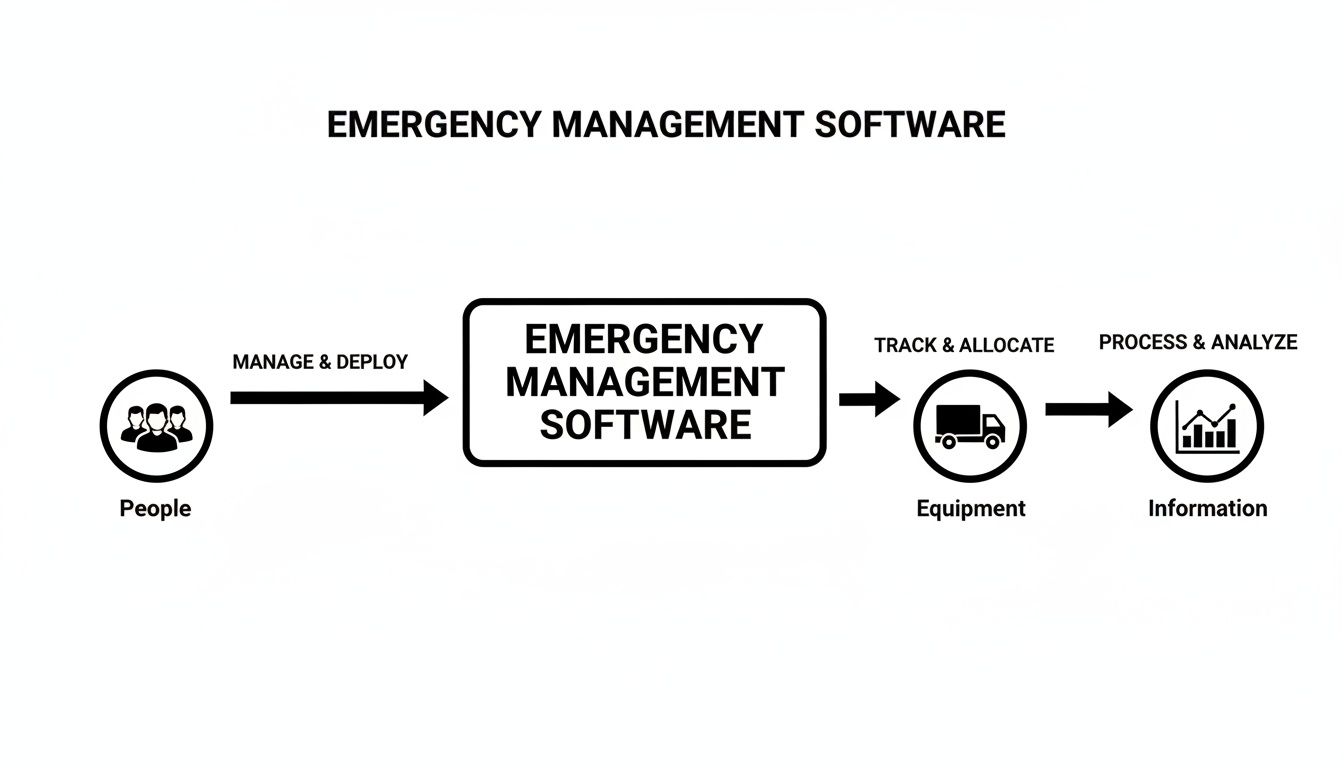
As you can see, a solid response starts with managing your people, linking them to the right equipment, and then using data to guide every single decision. These three pieces are the heart of any coordinated incident command system.
Dispatching and Computer-Aided Dispatch (CAD)
The dispatch module is basically the ignition switch for any response. It’s where that initial call for help comes in, gets verified, and is turned into an actual assignment. Modern Computer-Aided Dispatch (CAD) systems are a world away from simple radio call-outs; they're intelligent engines that can make cost-saving decisions on the fly.
For instance, when a call hits the system, the software can instantly analyze the location and the type of incident. Instead of just sending a standard engine from the main station 15 miles away, it might identify a volunteer responder with a smaller, faster vehicle who's just two blocks from the scene.
That kind of intelligent routing has a direct impact on the budget. It can slash fuel consumption by up to 20% for some departments and drastically cut down on vehicle wear and tear. Actionable Insight: For a fleet of five vehicles averaging 10,000 miles a year, a 15% reduction in mileage saves over $1,500 in fuel alone (at $4/gallon), not including reduced maintenance costs. Over the course of a year, these small, smart decisions add up to thousands of dollars in savings, freeing up cash for better training or new equipment.
Real-Time Messaging and Alerts
Once a unit is rolling, communication becomes everything. The old, inefficient phone trees are a thing of the past—and for good reason. A real-time messaging module makes sure critical information gets to the right people instantly and reliably, cutting through the noise of traditional channels.
A single, targeted alert can do the work of dozens of individual phone calls. It saves precious time and ensures every single responder gets the same verified information at the exact same moment. This is huge for eliminating miscommunication and taking the administrative load off your dispatchers.
Think about a large-scale event that needs mutual aid. Instead of dispatchers spending 30 minutes calling neighboring agencies one by one, a single mass alert goes out to every relevant group. The system can then track who has seen and acknowledged the message, giving command a clear picture of who is on the way. Actionable Insight: By automating mutual aid requests, a dispatch center can save an average of 20-30 minutes of manual call time per major incident. This frees up dispatchers to manage the active scene, directly improving responder safety and operational control.
Personnel and Equipment Tracking
Knowing what you have and where it is—that's fundamental. This module gives you a live, dynamic roster of all your people and your assets. It answers critical questions in seconds: Who's on duty right now? What are their qualifications? Where is Engine 3, and is its water pump working?
This real-time visibility prevents expensive mistakes and saves money. For example, an ambulance service might use the software to track high-value gear like portable ventilators, which can cost over $10,000 apiece. By logging which responder has which device, the agency can stop assets from getting misplaced in a chaotic scene or left behind at the hospital.
On top of that, this module helps you manage certifications and maintenance schedules. You can get automated alerts when a paramedic's certification is about to expire or a vehicle is due for an oil change. Actionable Insight: Automated certification tracking prevents lapses that could lead to fines or liability issues. This proactive approach avoids expensive emergency repairs by scheduling routine maintenance, ensuring your team is always ready to go and saving thousands in potential downtime and non-compliance penalties. To see how these components work together in a live system, you can explore the full range of features available in platforms like Resgrid.
Reporting and Analytics
After the incident is over, the work isn't done. The reporting and analytics module is where all the data logged during the response—from the initial dispatch to the final unit clearing the scene—gets automatically compiled into detailed, accurate reports. This completely eliminates hours of manual paperwork and gives you invaluable insights you can use to get better.
This data-driven approach has some serious financial benefits. An agency might analyze response times by area and discover one neighborhood consistently has longer arrival times. That insight could lead to a decision to pre-stage a unit in that area during peak hours, improving outcomes and potentially lowering insurance liability. Actionable Insight: Use response time heat maps to justify grant applications for a new substation or additional resources. Hard data demonstrating a specific need is far more effective than anecdotal evidence and can secure millions in funding.
Choosing Your Deployment Model: Cloud vs. On-Premise
When you're picking out emergency management software, one of the biggest decisions you'll make has nothing to do with features. It’s about where the system will actually live. This choice between a cloud-based setup or an on-premise one will have a huge ripple effect on your budget, your security, and your ability to grow down the line. It's not just a technical footnote; it's a foundational part of your whole operation.
Think of it like this: an on-premise system is like owning your own house. You're in charge of everything—the hardware, the locks on the doors, all the maintenance. It’s your fortress. But you're also the one on the hook for fixing the plumbing (server maintenance) and mowing the lawn (software updates).

A cloud-based system, on the other hand, is like leasing a high-tech apartment in a secure, managed building. You don’t own the building, but you get top-tier amenities, round-the-clock maintenance, and security guards—all for a predictable monthly fee. You can get into your apartment from anywhere, and someone else deals with the headaches.
The Financial Case for the Cloud
For most organizations, especially those running on a tight budget like volunteer fire departments or small businesses, going with the cloud makes immediate financial sense. The cost to get started is just so much lower.
You don't have to shell out thousands of dollars for expensive servers, let alone worry about the ongoing costs of power, cooling, and physical security for that hardware. This also takes a massive load off your IT folks, freeing them up to focus on more important things instead of babysitting servers and running routine updates.
By opting for a cloud solution, you trade a large, unpredictable capital expense for a predictable, manageable operational expense. This shift makes powerful emergency management software accessible without requiring a massive initial investment.
Actionable Insight: An on-premise server can cost $5,000 to $10,000 upfront, plus annual electricity and maintenance costs. A cloud subscription model avoids this entirely, allowing you to redirect that capital to tangible assets like personal protective equipment (PPE) or responder training programs.
Why Some Agencies Still Choose On-Premise
Even with the clear financial upside of the cloud, on-premise solutions are still the go-to for some, particularly large government agencies or organizations with ironclad data sovereignty rules. The main driver here is one thing: absolute control.
With an on-premise deployment, every bit of data stays within the organization's physical walls, on its own hardware. This gives them maximum control over who can access what and the security protocols in place, which can be a non-negotiable for certain federal or military operations. These agencies typically have the dedicated IT teams and the budget to manage the infrastructure themselves. You can learn more about how cloud providers tackle these security issues by checking out their detailed documentation on security and data protection measures.
Making the Right Strategic Choice
Let's be honest, the industry is clearly moving toward more flexible and accessible solutions. Cloud platforms are consistently outpacing traditional systems. Global analysis shows cloud-based software is the fastest-growing segment because it’s easier to scale and cheaper to start. While on-premise systems still have a strong foothold in government sectors, cloud offerings are seeing “rapid growth” as agencies look for ways to support distributed teams who need access from any device.
When you're looking at a cloud model, remember that solid emergency management software often leans on scalable, managed database solutions like a Relational Database Service (RDS). This ensures the system is reliable and performs well without you needing to have a database administrator on staff.
Ultimately, the right choice comes down to balancing your need for control with your budget and what you need to accomplish operationally.
A Practical Checklist for Selecting Your Software
Picking the right emergency management software is a high-stakes decision. It’s a choice that directly impacts your budget, how smoothly your operations run, and ultimately, the safety of your team. You have to move past the flashy sales pitches and adopt a methodical approach that focuses on what you actually need in the real world. This checklist will give you some solid, actionable criteria to guide your evaluation and make sure you invest in a platform that truly serves your people.
As you start looking, you'll inevitably run into the debate between custom software versus off-the-shelf solutions. Each path has its pros and cons, no doubt. But an off-the-shelf platform like Resgrid often gives you a robust, field-tested foundation that can be configured to your needs without the massive price tag and long development timelines of a fully custom build.
Core Functionality and User-Friendliness
Let's be blunt: the best software in the world is useless if your team finds it too complicated to use during a crisis. The interface has to be intuitive, especially on the mobile devices where most of your responders will be interacting with it.
- Actionable Insight: During a trial, grab a few team members—especially the ones who aren't super tech-savvy—and give them a simple task to complete without any training. Ask them to acknowledge a dispatch or update their status. If they can figure it out in under a minute, you're on the right track. This simple test tells you more about real-world usability than any slick product demo ever will, and high adoption rates are key to realizing cost savings.
A platform's true value is measured by its adoption rate in the field. Simplicity isn't just a feature; it's a direct driver of ROI, ensuring the tool gets used consistently when it matters most.
Integration Capabilities
Your new software can't be an island. It absolutely has to communicate with the systems you already rely on every day. If it doesn't, you're just creating more work for your dispatchers and admins.
- Actionable Insight: Here’s a direct question to ask a potential vendor that could save you a ton of money: "Does your platform have a pre-built integration or a documented API for our existing radio, paging, or HR system?" A clear 'yes' means you can automate things like roster updates and dispatch alerts, which can eliminate thousands of hours of manual data entry every year. A vague answer is a huge red flag that signals hidden, and likely expensive, custom development costs down the road.
Security and Compliance Standards
You're handling sensitive data—about incidents, about your personnel. That requires an unwavering commitment to security. The platform you choose must meet or exceed industry standards to protect your organization and the community you serve.
Make sure any vendor can hand over clear documentation on their security posture. Ask about their data encryption methods (both for data in transit and at rest) and how they handle compliance with regulations like HIPAA if you deal with protected health information.
Scalability and Future Growth
Your organization isn't static. Your needs will evolve. The software you pick today has to be able to grow with you, whether that means adding new members, expanding your service area, or handling more complex incidents.
This dashboard from Resgrid is a great example of a clean, organized interface. It provides a clear overview of operations, which is critical for scalability.
The layout puts key information front and center, letting a commander see personnel status, active calls, and unit locations at a glance without feeling overwhelmed.
- Actionable Insight: Try to forecast your needs for the next three to five years. If you're planning to bring on 50 new volunteers, ask the vendor how their pricing model adjusts. A platform with a flexible, per-user subscription model lets you scale up or down without penalty. This helps you avoid the painful and expensive process of migrating to a whole new system just because you outgrew your old one, saving you from a costly procurement cycle in the future.
Vendor Support and Contract Flexibility
Finally, take a hard look at the business model behind the software. Long-term, ironclad contracts with hefty setup fees are a massive financial risk, especially for volunteer-driven or budget-constrained organizations.
Look for vendors that offer a self-service, no-contract model, like Resgrid. This approach shows they have confidence in their product and, more importantly, it puts you in control. It completely eliminates the financial risk of getting locked into a multi-year agreement for a platform that might not meet your needs in the long run, saving you from a very costly mistake.
Calculating the ROI of Your Software Investment
Sooner or later, every conversation about new equipment or software hits the same question: what’s the return on investment? It's not enough to talk about faster responses or better communication. To get the green light, you need a rock-solid business case showing how emergency management software doesn't just improve operations—it actively saves money. The real ROI is found in tangible, measurable reductions in costs and liability.
This isn't just a box-ticking exercise for the people signing the checks. In 2024, North America's slice of the global incident management market was a massive 42.11%, accounting for a staggering USD 58.49 billion. With government and public sector agencies making up over USD 30.69 billion of that spending, the pressure to justify every single dollar is intense.

Figuring out your potential return means looking at the specific areas where smart software plugs the financial leaks.
Slashing Operational Costs
The quickest and most obvious savings come from tightening up your day-to-day operations. This kind of software gives you the data to stop guessing and start making decisions that cut fuel waste, reduce overtime, and get more life out of your expensive gear.
- Fuel and Vehicle Maintenance: Intelligent dispatching isn't just about speed; it's about efficiency. Sending the closest, most appropriate unit every single time can slash annual fuel consumption by 10-15%. That also means less wear and tear, pushing back expensive vehicle replacements.
- Overtime Reduction: Instead of scrambling to fill shifts at the last minute, automated scheduling tools give you a clear view of your coverage weeks in advance. You can spot the gaps early and make straight-time adjustments, protecting your payroll from costly overtime hits.
- Preventative Maintenance: Forget waiting for an engine to fail on the way to a call. The system tracks vehicle mileage and equipment hours, sending automated alerts for scheduled maintenance. This proactive approach prevents budget-busting emergency repairs and keeps your critical assets ready to roll.
Hypothetical Case Study: A Volunteer Ambulance Service
Let's make this real. Imagine a mid-sized volunteer ambulance service with 50 members and four vehicles. Here’s a before-and-after look at their books once they adopt an emergency management platform.
| Metric | Before Software (Annual) | After Software (Annual) | Money Saved / Gained |
|---|---|---|---|
| Administrative Hours | 400 hours (scheduling, reporting) | 100 hours (automated) | 300 hours recouped |
| Fuel Expenditure | $20,000 | $17,000 (optimized dispatch) | $3,000 saved |
| Overtime Payouts | $15,000 (shift gaps) | $5,000 (proactive scheduling) | $10,000 saved |
| Missed Billing Revenue | $16,000 (8% of $200k) | $2,000 (<1% of $200k) | $14,000 gained |
| Total Annual Impact | $27,000 + 300 hours |
In this scenario, the service reclaims over 300 administrative hours, saves $3,000 in fuel, and cuts $10,000 in overtime every year. By automating their incident reports, they also capture $14,000 in revenue that used to slip through the cracks due to billing errors. Those are hard numbers that show the software paying for itself many times over.
The ROI of emergency management software is realized when you stop spending money on inefficiency. Every optimized route, automated report, and prevented repair is a direct contribution to your bottom line.
Reducing Liability and Improving Outcomes
Beyond the direct savings, there's another huge financial benefit: risk reduction. Shaving minutes—or even seconds—off response times demonstrably improves patient outcomes. Better outcomes can lead to lower insurance premiums and a reduced chance of facing costly litigation.
The software creates an unchangeable, time-stamped digital record of every single action taken on a call. This isn't just for after-action reviews; it's a powerful tool for your legal defense. This audit trail proves that your team followed procedure, protecting both the organization and its members from liability claims. Actionable Insight: In a liability dispute, being able to produce a complete, time-stamped log of an incident can be the difference between a quick dismissal and a lengthy, expensive legal battle. This documentation is your financial shield.
When you can budget for a predictable subscription cost against these long-term benefits, the investment becomes a no-brainer. You can see different pricing tiers and their included features at https://resgrid.com/pricing to build a clear forecast for your agency. Ultimately, you’re not just strengthening your operational readiness—you’re securing your financial stability for years to come.
Still Have Questions? Let's Clear a Few Things Up
Picking the right software for your team is a big decision, and it’s normal to have a few questions floating around. Let's tackle some of the most common ones we hear from departments just like yours.
How Much Does This Stuff Actually Cost?
This is usually the first question, and the answer really depends on the path you take. The old-school, on-premise systems can hit you with a massive upfront bill for software licenses and server hardware. Then you're on the hook for maintenance fees year after year. It's a huge financial hurdle, especially for smaller or volunteer-based agencies.
There's a much saner way to do it now: the cloud-based, Software as a Service (SaaS) model. Platforms like Resgrid operate on a simple subscription, usually based on how many people you have.
The beauty of a cloud-based model is you ditch the hardware costs completely. Updates are just part of the deal. That means you get in the door for a lot less money and have predictable costs, which puts powerful tools within reach even if you're working with a tight budget. Actionable Insight: A predictable monthly subscription of a few hundred dollars is an operational expense you can easily budget for, unlike a surprise $8,000 server failure, which would be a crippling capital expense.
Is This Software Going to Be a Nightmare for Our Volunteers to Learn?
Not a chance. At least, not with the good platforms. The best software out there is built with volunteers in mind. It has to be dead simple, or it just won't get used. The focus is on clean, intuitive mobile apps that run on the smartphones your team already carries.
Think about it this way: a new volunteer should be able to download the app, get logged in, and set their availability in less than two minutes, with zero training. That’s the bar. Look for any provider that offers a free trial so you can let your people get their hands on it and see for themselves.
Can We Hook This Up to Our Existing Radio System?
Absolutely. Modern platforms are designed to play nice with other systems. They use what are called Application Programming Interfaces (APIs) to connect to everything from radio networks and paging services to your HR software.
This is a make-or-break question you need to ask during your evaluation. Getting these systems to talk to each other is where you'll see some serious time savings. For instance, hooking into your paging system can automate your call-outs, saving dispatchers hundreds of hours a year and killing the risk of someone fat-fingering an entry. Actionable Insight: Automating dispatch through a CAD-to-paging integration can save 30-60 seconds per call. Over 1,000 calls a year, that's over 16 hours of saved dispatcher time, allowing them to focus on critical incident command tasks.
How Does This Software Help with Accountability and Reporting?
Everything gets logged. Automatically. From the second a call goes out to the moment the last unit clears the scene, every single message, status change, and response is recorded with a timestamp.
What you end up with is a rock-solid digital audit trail that you can't argue with. The real-world benefit? Pulling accurate reports for compliance, billing, or after-action reviews becomes a one-click job instead of a week-long headache. It saves a ton of administrative time and gives you the hard data you need to justify your operations and fight for funding.
Ready to see how this can work for your team? Resgrid, LLC offers a powerful, no-nonsense emergency management platform built for first responders. No contracts, no hassle. Start your free trial today and see the difference for yourself.