

A Practical Guide to EMS Charting Programs
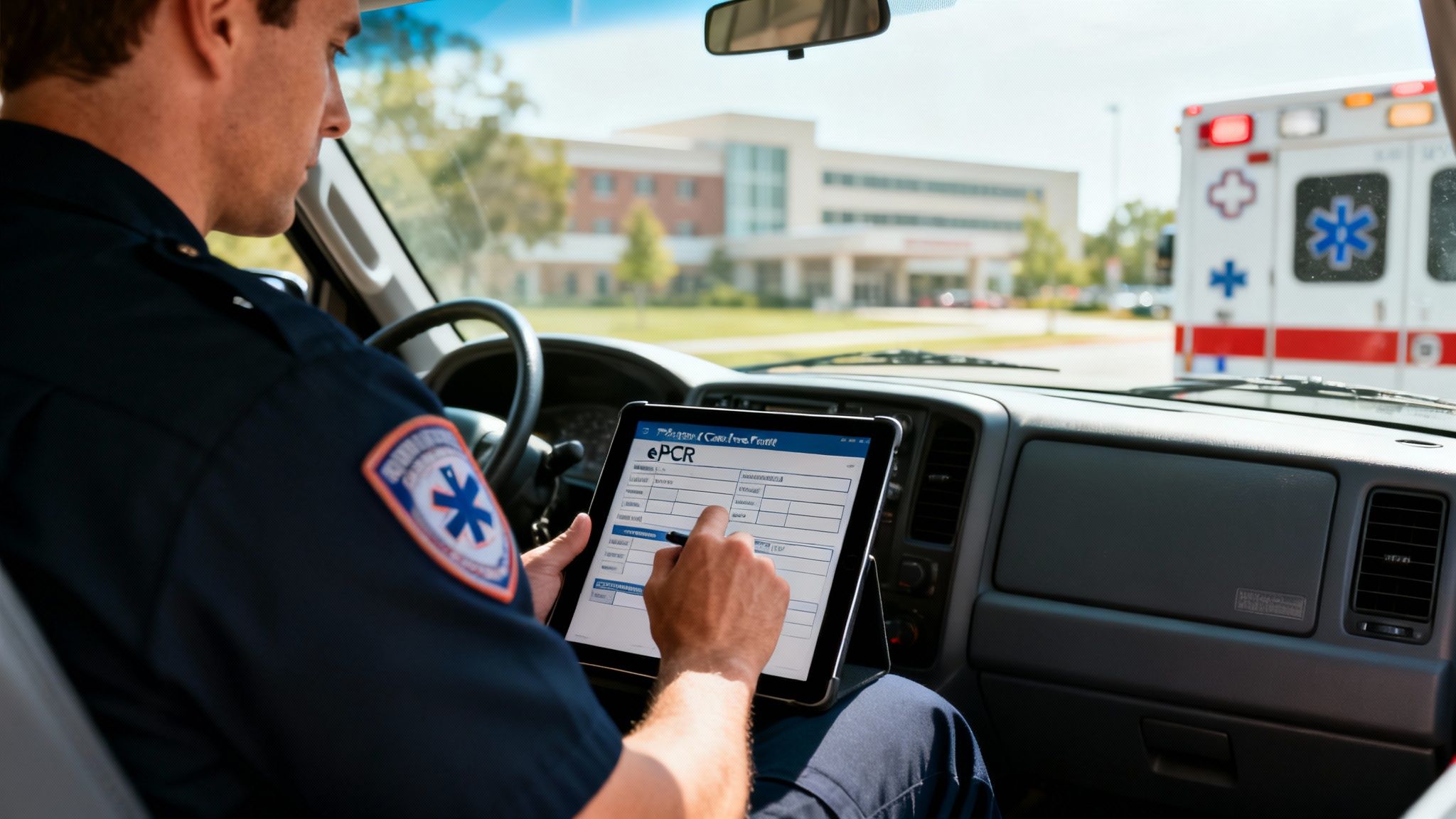
EMS charting software is the digital backbone of modern prehospital care, replacing the old clipboard and paper reports with electronic Patient Care Reports (ePCRs). At its core, this software is all about capturing accurate, real-time documentation of every patient encounter out in the field. Making the switch from paper to digital isn't a luxury anymore—it's a clinical and financial necessity for any serious EMS agency.
The Critical Role of Modern EMS Charting Programs
For years, EMS crews worked with pen and paper. This old-school method was a minefield of illegible handwriting, missing information, and frustrating delays in getting critical patient data to the hospital. Modern EMS charting programs fix these problems by giving medics a structured way to capture every single detail, from the moment a call is dispatched to the final handover at the ER. This keeps the data clean and creates a seamless line of communication for patient care.
Moving to digital charting is more than just a convenience; it's a strategic decision that hits both patient outcomes and the agency's bottom line. When accurate data gets to the receiving facility instantly, the emergency department can actually prepare for the patient's arrival, which can save precious minutes. For the agency itself, a solid ePCR system means a faster billing cycle, guaranteed compliance, and crews getting back in service quicker. It's an investment that pays for itself.
From Paper to Pixels: The Financial Imperative
The financial and operational upsides of going digital are huge. The global market for EMS software is exploding as agencies hunt for better ways to manage their data. In 2023, the market hit USD 1.25 billion and is on track to reach USD 2.61 billion by 2032. The numbers don't lie: good EMS charting programs can cut documentation time by up to 30%, freeing up crews to be ready for the next call. You can read more about the EMS software market growth on dataintelo.com.
The core money-saving principle of ePCR software is simple: faster, more accurate documentation leads to faster, more accurate billing. By eliminating lost paperwork and reducing claim denials due to incomplete information, agencies can significantly improve revenue capture for services rendered.
Standardizing Data for Better Outcomes
A major reason agencies are jumping on ePCR software is the need for standardized data collection, driven by systems like the National Emergency Medical Services Information System (NEMSIS). This isn't just about checking a box for the state; it’s crucial for quality improvement, research, and understanding what's happening on a national scale.
Here’s a look at the NEMSIS data cube, which gives you a visual of the millions of EMS activations collected across the country.
This shows how standardized data points—like patient demographics, provider impressions, and procedures performed—are all pulled together to paint a big picture of prehospital care. For an individual agency, being NEMSIS compliant doesn't just satisfy state requirements; it unlocks powerful analytics to fine-tune clinical protocols and make operations run smoother.
Comparing Core Features for Better Operational Efficiency
When you're kicking the tires on different EMS charting programs, a simple feature checklist won't cut it. The real question isn't what a feature is, but what it actually does for your crews in the back of a rig and for your agency’s budget. A slick-looking feature in a sales demo can turn into a clumsy, time-wasting nightmare on a real call.
The trick is to look at these tools through the lens of their real-world impact. We’ll break down the guts of these systems—from ePCR templates to billing exports—and show you how the right implementation can slash administrative headaches and save serious money.
Dynamic ePCR Templates vs. Static Forms
The electronic Patient Care Report (ePCR) is the heart and soul of any charting program. But let's be clear: not all ePCRs are built the same. A lot of basic systems are stuck with rigid, static forms that make medics click through a dozen irrelevant fields for every single call. It’s maddening.
A truly efficient system uses dynamic and conditional templates. This just means the form changes on the fly based on what the medic is documenting.
- Practical Example: A medic chooses "Chest Pain" as the primary impression. Instantly, the form expands with fields for a 12-lead EKG, MONA protocol details, and specific cardiac questions. If they'd picked "Trauma," those fields would stay hidden, and instead, sections for GCS, injury assessments, and tourniquet times would pop up.
This kind of smart design saves precious minutes on scene, cuts down on charting errors, and makes sure the data you collect is actually relevant. It also battles "click fatigue," a huge source of burnout for providers in the field.
Actionable Insight: When you're getting a demo, demand to see the template logic in action. A system that can trim documentation time by just two minutes per call can save a medium-sized agency thousands of dollars a year in recovered crew availability and less time spent on administrative reviews.
Hospital Data Exchange and Integrations
Getting patient data to the receiving hospital cleanly and quickly is a total game-changer. Basic systems might just let you spit out a PDF, which forces ER staff to manually punch all that info back into their own system. More advanced platforms, however, plug right in.
You want to look for systems that support Health Level Seven (HL7) standards or Direct Secure Messaging. These are the protocols that let your ePCR data flow straight into the hospital's Electronic Health Record (EHR) the second your crew closes the report.
This kind of automated handoff brings a few huge benefits that hit the bottom line:
- Wipes Out Radio Miscommunication: It cuts down on the errors that creep in when you're trying to relay complicated patient info over a crackly radio.
- Speeds Up Patient Handoff: The ER team has the full story before the patient even rolls through the door, making the move from stretcher to bed faster and safer.
- Builds Stronger Hospital Relationships: When you provide clean, instant data, you become a much more valuable partner to your local healthcare networks.
Medication Tracking and Billing Exports
Here’s where operational efficiency turns directly into financial health: accurate medication administration records (eMAR) and clean billing exports. A simple system might just give you a free-text box for meds, which is a recipe for typos and missing information.
A proper eMAR feature comes with a built-in, NEMSIS-compliant drug library. Medics can pick from a dropdown, enter the dose and route, and the system automatically timestamps everything. This creates a solid, unchangeable record that’s gold for QA/QI and patient safety.
That accuracy is then piped directly into your billing.
Essential Feature Comparison Across EMS Charting Programs
Here's a breakdown of how different levels of feature implementation can impact your daily operations and, most importantly, your agency's finances.
| Feature | Basic Implementation (What to Expect) | Advanced Implementation (What to Look For) | Actionable Insight for Cost Savings |
|---|---|---|---|
| Dynamic ePCR Templates | Static, one-size-fits-all forms with endless, often irrelevant fields. | Conditional logic that shows/hides fields based on patient complaint, saving clicks. | Shaving just 2 minutes off each report adds up to thousands in reclaimed crew time annually. |
| HL7/Direct Integrations | PDF exports that require manual data re-entry at the hospital. | Automated data transfer directly into the hospital's EHR system upon report completion. | Faster patient handoffs and fewer errors strengthen hospital relationships, potentially leading to better contracts. |
| eMAR | A simple free-text field for medications, prone to typos and missing data. | A built-in, timestamped drug library (NEMSIS compliant) for accurate, auditable records. | Reduces medication errors and provides bulletproof documentation for QA and liability protection. |
| Billing/Export | A simple CSV file that needs manual cleanup before being sent to billers. | A clean, pre-validated billing file that integrates directly with third-party billing software. | Can cut the time billers spend fixing reports by 50% or more, letting them chase down denied claims instead. |
| Voice/Field Data Capture | All data must be manually typed into the device. | Voice-to-text dictation and the ability to capture photos/signatures directly in the report. | Field data capture reduces "driveway documentation" and ensures critical details aren't forgotten. |
Choosing a system with a smart billing export ensures every single billable action is captured correctly, which means fewer claim denials and more revenue. This is one of those core functions where spending a little more upfront on a better program pays for itself over and over. When looking at the big picture, platforms like Resgrid offer a whole suite of integrated tools to manage these core operational needs in one place. Find out more about how we connect these dots by checking out our list of features.
Navigating HIPAA and NEMSIS Compliance Requirements
In EMS, compliance isn't just a box to check—it's the bedrock of your entire operation. The ems charting programs you choose are the primary guardians of your patient and operational data. Getting this wrong isn't a simple mistake; it can lead to crippling fines, a loss of funding, and a reputation that's hard to rebuild.
The two big ones you absolutely have to get right are the Health Insurance Portability and Accountability Act (HIPAA) and the National Emergency Medical Services Information System (NEMSIS). Honestly, the smartest way to look at compliance is as a cost-saving measure. A solid system prevents those eye-watering penalties and makes data reporting so much smoother, saving you countless admin hours down the line.
Understanding Your HIPAA Obligations
HIPAA is way more than just encrypting data. Real compliance means having a multi-layered security strategy to protect Protected Health Information (PHI). A quality charting program gives you the tools to enforce these layers, shielding your agency from violations that can run upwards of $50,000 per incident.
When you're vetting vendors, here's what to look for:
- Secure User Access Controls: This is critical. It ensures medics can only see the patient records they're directly involved with, stopping unauthorized access in its tracks.
- Detailed Audit Trails: Your software must log every single action taken on a patient's record—who looked at it, when they looked at it, and what they changed. It's all about accountability.
- Business Associate Agreements (BAAs): Any vendor you work with has to sign a BAA. This is a legal contract that makes them just as responsible as you are for protecting the PHI they handle. No BAA, no deal.
A huge part of data protection, especially for ems charting programs, involves building a robust incident response plan before a breach happens. To see what a comprehensive approach to this looks like, you can learn more about how Resgrid handles these challenges in our security overview.
The Strategic Value of NEMSIS Certification
While HIPAA is about patient privacy, NEMSIS is all about data quality and consistency. It’s the national standard that dictates how EMS data is collected and sent to state and national databases. Picking a vendor certified for the latest NEMSIS version (like v3.5.0) isn't really optional—it’s essential for staying compliant at the state level.
Actionable Insight: NEMSIS compliance is a direct pathway to saving money. Agencies that submit clean, compliant data are often eligible for federal grants and other funding opportunities that are unavailable to non-compliant services. For example, a department might use NEMSIS data to prove a spike in cardiac arrests in a specific district, justifying a grant application for new automated external defibrillators (AEDs).
This decision tree gives you a good visual of how agencies of different sizes might prioritize features in their charting software.
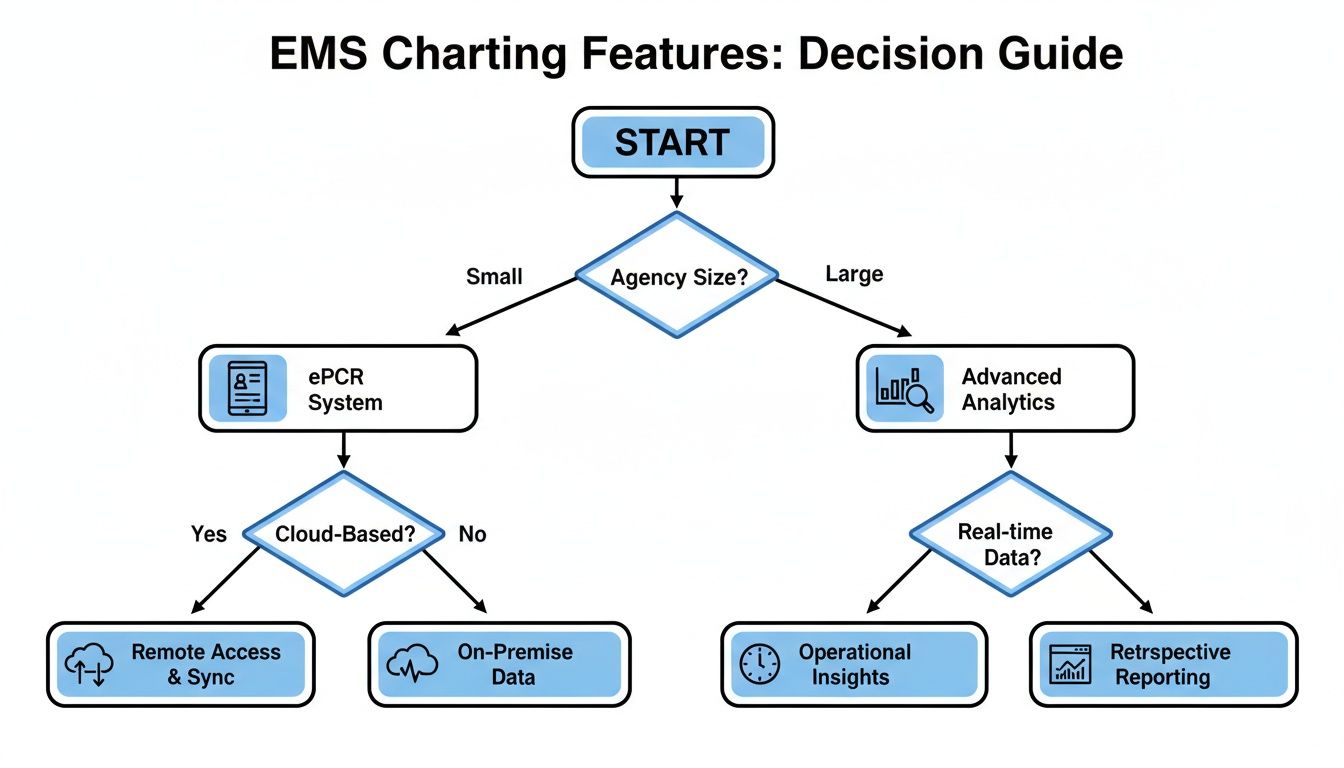
As you can see, smaller agencies might just need core ePCR functions. But larger organizations need the advanced analytics that can only come from clean NEMSIS data. That standardized data is what fuels powerful insights into clinical performance and operational efficiency.
Diving Into Software Deployment and Pricing Models
Picking the right deployment and pricing model for your EMS charting software is a decision that will impact your budget for years to come. It’s one of those choices that directly affects your agency's long-term financial health, so you really have to look past the sticker price and consider the Total Cost of Ownership (TCO). The two main roads you can go down are on-premise solutions or cloud-based Software as a Service (SaaS) models.
An on-premise system means you buy and maintain your own servers. On the surface, it seems straightforward, but the hidden costs can really start to pile up. You're not just buying software; you're basically signing up for a full-time IT commitment.
On the other hand, a cloud-based SaaS model runs on a predictable subscription fee. This approach essentially outsources all the hardware headaches to the vendor, freeing up your agency to focus on patient care instead of server maintenance.
On-Premise vs. Cloud Deployment
The old-school on-premise model gives you total control over your data because it’s sitting on a server in your own building. But that control comes at a pretty steep price, and the true TCO is often masked.
Here’s a look at what often gets overlooked with on-premise costs:
- Hardware Upgrades: Servers don’t last forever. You'll need to replace them every few years, which is a major capital expense.
- IT Staffing: You need dedicated IT folks to handle maintenance, run updates, and manage security.
- Software Licensing: The initial licenses can be costly, and upgrades aren't always part of the deal.
- Security and Backups: The entire burden of data security and disaster recovery planning falls squarely on your shoulders.
Cloud-based solutions neatly bundle all these expenses into a recurring fee, which makes budgeting way more predictable. The vendor takes care of server upkeep, security patches, and software updates automatically. For many agencies, this can translate into thousands of dollars saved annually in avoided IT overhead.
Breaking Down Common Pricing Structures
Once you’ve settled on a deployment model, the next step is to get a handle on the pricing structure. Vendors use a few common models, and the right fit really depends on your agency’s size and call volume.
Let's compare the most common pricing models you'll encounter:
- Per-User Pricing: You pay a monthly or annual fee for each person (medic, admin, etc.) who needs access. This is easy to understand but can get pricey for larger departments or volunteer services with lots of part-time staff.
- Per-ePCR Pricing: You’re charged for each patient care report you create. It’s a usage-based model that can be great for agencies with fluctuating call volumes, but costs can get out of hand for high-performance systems.
- Annual License/Subscription: This is a flat annual fee that covers the whole agency, often tiered by size or call volume. It offers the most predictable costs, which is a huge plus for budget planning.
Actionable Insight: For high-volume services on a per-ePCR model, try to negotiate a capped monthly rate. For example, agree to pay per report up to 1,000 reports, with a flat, reduced fee for any reports beyond that. This gives you budget predictability while protecting you from cost spikes during a major incident or a particularly busy season.
The Vendor Negotiation Checklist
Before you sign any contract, you have to ask the right questions to uncover the hidden fees that can completely derail your budget. Sales demos are great, but they rarely shine a light on the extra costs for essential services. Use this checklist as your guide during negotiations.
1. Data Migration Fees:
- Ask: "What’s the cost to migrate our historical data from our current system? Is this a flat fee or are you billing hourly?"
- Why it saves money: A surprise migration bill can run into the thousands. Getting this defined upfront stops budget overruns before they start.
2. Custom Template Fees:
- Ask: "How many custom ePCR templates are included with our subscription? What’s the cost for building additional ones?"
- Why it saves money: Your agency needs templates that actually match its protocols. Paying for every little tweak is a hidden cost that adds up fast.
3. Integration Costs:
- Ask: "Are there separate fees for integrating with our billing company, hospital network, or CAD system?"
- Why it saves money: Integrations aren't optional; they're essential for an efficient workflow. Making sure these are included or clearly priced avoids expensive add-on charges down the road.
Getting a clear picture of these potential costs is vital. For agencies looking for transparent and straightforward costs, some platforms offer simplified tiers. You can see how Resgrid approaches this with our own clear and accessible pricing models, which are designed to eliminate these kinds of financial surprises.
A Comparative Review of Top EMS Charting Software
Picking from the top EMS charting programs feels less like buying software and more like choosing a new operational partner. The right decision will echo through your agency's efficiency, data quality, and financial health for years to come. Instead of just listing pros and cons, let's break down the leading vendors through the lens of what different agencies actually need out on the street.
The goal here is to match a platform's real strengths with your service’s unique DNA. A large, multi-state commercial service operates in a different universe than a small municipal fire department or a volunteer rescue squad. The best software isn't about having the most features; it’s about having the right features for you.
ESO for the Data-Driven Enterprise Agency
ESO has cemented itself as a powerhouse for large, sophisticated EMS agencies, especially those juggling complex operations across multiple regions or states. Their biggest strength is a powerful, interconnected suite of products that covers everything from ePCR and fire records to scheduling and fleet management.
This isn't just a collection of tools; it's an ecosystem built for massive-scale data analysis. A landmark acquisition in April 2024 saw ESO purchase Logis Solutions, merging CAD, logistics, and billing into a more unified platform. This kind of integration is what helps them streamline workflows for over 10,000 U.S. EMS agencies. As over 60% of agencies shift to cloud-based systems, platforms like ESO have shown they can cut hardware costs by 40% while enabling the kind of remote access that’s critical during major incidents. You can explore more about the rise of cloud-based EMS solutions to get a better sense of the trend.
- Practical Example: A private, multi-state ambulance service needs to analyze response times, clinical performance, and unit-hour utilization across dozens of stations. They're trying to optimize resource deployment for a major contract renewal and need hard data to back up their decisions. ESO's analytics dashboards allow them to compare key performance indicators (KPIs) between different operational zones, pinpointing high-performing crews and identifying areas needing protocol reinforcement.
Actionable Insight: For a big agency, ESO's value is in operational optimization at scale. By using its analytics to reduce unit downtime by just 5%, a large service can save hundreds of thousands of dollars annually in fuel, maintenance, and staffing costs. For instance, data might show that repositioning one ambulance during peak hours can handle 10% more calls, eliminating the need to staff an additional peak-load unit.
ImageTrend for the Compliance-Focused Municipal Service
ImageTrend is a dominant player, especially with municipal fire and EMS agencies that put a high value on state reporting, research, and community health initiatives. Their platform is known for its rock-solid NEMSIS compliance, user-friendly field data collection, and strong integrations that support a holistic view of public safety.
ImageTrend’s whole philosophy is about creating a single, connected ecosystem. For agencies running both fire and EMS calls, crews can document everything in one workflow, satisfying both medical and fire reporting requirements. This kills the "double work" of filing two separate reports for the same incident.
- Practical Example: A county EMS agency is launching a Mobile Integrated Health (MIH) program to cut down on 911 misuse by frequent system users. Using ImageTrend's configurable forms, they can create custom MIH assessments. Their platform, Collaborate, lets them track patient interactions over time, identify trends, and generate reports showing a reduction in emergency transports for enrolled patients—justifying the program's funding.
Actionable Insight: By leveraging ImageTrend’s MIH and community paramedicine features, an agency can proactively reduce non-emergency 911 calls. Preventing just a few unnecessary emergency transports a week can save thousands in operational costs. For example, if data shows MIH visits reduce ER transports for a specific patient group by 50%, that's a hard number you can take to stakeholders to prove ROI and secure program funding.
ZOLL for the Integrated Billing and Operations Agency
ZOLL is a name everyone in EMS knows, not just for their cardiac monitors but for a comprehensive software suite that tightly braids ePCR with billing and revenue cycle management. Agencies that are laser-focused on maximizing revenue capture and streamlining the entire call-to-cash process often end up with ZOLL.
Their core advantage is the seamless flow of data from the medic's tablet directly to the back office. When a provider completes a chart in ZOLL's RescueNet, that data is already structured and validated for the billing team using their software. This single move drastically cuts down on the manual keying and endless errors that plague disconnected systems.
- Practical Example: A hospital-based EMS service is getting hammered by claim denials because of incomplete or inaccurate documentation. Their billing department is burning hours every week chasing crews for corrections. By implementing ZOLL's integrated platform, the data captured in the ePCR automatically populates the billing software. The system flags errors in real-time, forcing a medic to complete the report correctly before it can be closed, slashing the claim denial rate.
Actionable Insight: An integrated system like ZOLL’s can shorten the billing cycle by an average of 5-7 days. For an agency with $2 million in annual receivables, getting paid a week faster improves cash flow by over $38,000. Furthermore, by using the system’s built-in validation rules, you can reduce claim denial rates due to documentation errors by up to 20%, which translates directly to recovered revenue without added labor costs.
Ensuring a Smooth Implementation and Data Migration
Switching to a new EMS charting program is a huge undertaking, and a successful transition really boils down to how well you plan the implementation. Let's be honest—without a solid game plan, even the best software on the market will cause operational chaos, frustrate your crews, and delay any return on your investment. A smooth rollout isn't just about the tech; it's about managing change and getting your people on board from day one.
The first step is always to put together a dedicated implementation team. This group can't just be administrators and IT folks; you need representation from every corner of the agency. I'm talking about field providers, QA/QI coordinators, and billing specialists. Their first job is to map out a realistic timeline that covers everything: configuration, data migration, training, and a phased go-live. Rushing this part is a classic mistake and a recipe for disaster.

A Practical Checklist for Success
To sidestep common tripwires like bad data mapping or lackluster training, you need a structured approach. A detailed checklist keeps the project from going off the rails and makes sure no critical steps are missed.
Implementation Checklist:
- Define Roles and Responsibilities: Clearly assign a project lead and team members who own specific tasks, like designing ePCR templates or validating data imports.
- Engage Field Providers Early: Bring your medics and EMTs into the ePCR customization process from the start. Their real-world input is what makes a workflow practical in the back of a moving ambulance.
- Plan Historical Data Migration: Decide what historical data is truly essential to bring over. You'll need to work closely with your new vendor to map old data fields to the new system accurately to maintain the integrity of your patient records.
- Conduct Scenario-Based Training: Don't just teach people where to click. Run your staff through realistic call scenarios—a cardiac arrest, an MVC, a pediatric emergency—to build muscle memory and true confidence with the new software.
- Establish Super Users: Identify a few tech-savvy field providers and train them up as "super users." They become your go-to peer support during the go-live phase, taking a huge load off your administrators.
Actionable Insight: The single biggest way to save money during an implementation is to focus relentlessly on user adoption. If your crews hate using the system, you'll get garbage data, which translates directly to more QA time and rejected billing claims. By involving providers early, you ensure the new system actually makes their job easier—and that directly protects your revenue cycle.
Addressing Data Migration Challenges
Moving historical patient data is often the biggest technical headache in the whole process. If the data mapping is flawed, you can corrupt years of patient records, creating both clinical risks and major compliance problems down the line.
Practical Example: Let's say your old system had a free-text field for "Chief Complaint," but your new one uses a standardized dropdown menu. A simple data dump would be a mess. Your implementation team has to work with the vendor to map all those common text entries (like "Chest Pain," "CP," or "Pain in chest") to the correct, single field in the new EMS charting program.
The broader market for EMS software is pushing toward $2.5 billion by 2025, largely driven by this kind of digitization, with hospitals making up over 35% of that market. But interoperability is still a real hurdle. Only about 70% of systems are fully compliant, though emerging AI integrations are expected to help break down some of those data silos. You can discover more insights about the emergency medical software market and what's on the horizon.
Ultimately, a well-executed plan means your agency starts seeing the benefits of your new system right away, with minimal operational disruption and without burning out your staff.
Common Questions on EMS Charting
When you're knee-deep in comparing EMS charting programs, the same questions tend to pop up. Leaders always want to get to the bottom of cost, security, and what it really takes to get a new system up and running. Getting straight answers is the only way to feel good about the decision you’re making for your service.
How Does This Software Actually Save My Agency Money?
It’s a fair question, and the savings really come from three key areas. First, billing accuracy goes way up. Good software ensures every single procedure is captured and coded correctly, which means you’re not dealing with a mountain of denied claims. Second, it makes your crews more efficient. When they can wrap up documentation faster, they're back in service and ready for the next call that much sooner.
Finally, you’re buying down your compliance risk. Automating state reporting and keeping patient data locked down helps you sidestep crippling HIPAA fines or the legal headaches that come with a data breach. A single major HIPAA violation can cost tens of thousands of dollars, a cost that a secure, compliant ePCR system helps you avoid entirely.
Is Cloud-Based Software Secure Enough for PHI?
Yes, provided you're working with a reputable, HIPAA-compliant vendor. The top cloud providers use serious security measures—we're talking end-to-end encryption, physically secure data centers, and regular third-party audits to keep information safe.
Actionable Insight: Ask a potential vendor for their latest SOC 2 Type II report. This is an independent audit that verifies their security controls over time. A vendor that can readily provide this document is demonstrating a mature security posture, which translates to lower risk—and lower potential costs from breaches—for your agency.
What's the Biggest Mistake to Avoid When Switching ePCR Software?
The single biggest mistake you can make is not bringing your field providers into the decision-making process from day one. If the software is a pain to use in the back of a bouncing ambulance, your crews won't use it properly. Your entire investment could go down the drain.
Your paramedics and EMTs need to get their hands on the software and test it in real-world situations. Their feedback is gold. It's the only way you'll be able to set up templates and workflows that actually make their lives easier instead of adding another layer of frustration to an already stressful job.
Curious how an all-in-one dispatch and management platform can complement your charting solution? Resgrid gives you a unified system to handle personnel, resources, and incidents from a single dashboard. Check out our features at https://resgrid.com.