
Free Text Messages Alerts: A Cost-Saving Guide for First Responders
Yes, you can absolutely get free text message alerts for your department. It's not just possible; it's a powerful and cost-effective way to get critical information out to your people instantly. By tapping into existing email-to-SMS technology, first responder agencies can send notifications directly to their team's phones without having to pay the expensive per-message fees that traditional SMS gateway providers charge. This guide provides actionable insights to help you implement this system and save significant money.
The Power of Instant and Cost-Free Communication
When the tones drop, every second and every dollar count. For first responder agencies, especially those running on tight budgets, finding a way to communicate instantly without draining resources is a huge win. This is where free text message alerts stop being just a technical workaround and start becoming a strategic asset.
Think of this method as a universal master key for your team's communication. It gives you a direct and immediate line to every last volunteer and staff member, no matter what kind of phone they have or if they're even connected to the internet. It’s a simple approach that bypasses the high costs that come with sending thousands of texts a month.
A Universal and Effective Channel
The real strength of SMS is its universal reach and rock-solid reliability. By 2025, it's estimated that 5.5 billion people will use SMS every day, making it one of the most dependable communication channels out there. Its effectiveness is pretty staggering; studies show that 98% of SMS messages get opened, and 90% are read within just three minutes. That blows the typical 20-30% open rates for email right out of the water, highlighting why text is king for urgent alerts.
That level of engagement is a game-changer for dispatch centers and emergency management agencies. Whether you're notifying personnel about an active incident, a shift change, or a simple status update, free text alerts make sure the message gets through fast and is seen almost immediately.
A Quick Look at the Trade-Offs
Before diving deeper, it's helpful to see how free and paid systems stack up. While free is fantastic for the budget, it's important to understand the differences in reliability and features.
Free vs Paid Text Alert Systems at a Glance
| Feature | Free Alert Methods (e.g., Email-to-SMS) | Paid SMS Gateway Services |
|---|---|---|
| Cost | $0 (uses existing email infrastructure) | Per-message or monthly subscription fees |
| Reliability | Generally good, but can be less consistent | High, with delivery receipts and guarantees |
| Setup | Simple integration with carrier email gateways | More involved; requires API integration |
| Features | Basic text delivery | Advanced features like analytics, two-way chat |
| Best For | Budget-conscious agencies, volunteer teams | Organizations needing guaranteed delivery |
This table gives you a good sense of the landscape. For many, the cost savings of free methods far outweigh the potential for the occasional hiccup.
Direct Path to Significant Savings
The most immediate benefit here is the financial one. Using free text message alerts is a straight line to saving thousands of dollars every year. For a volunteer fire department or a small security company, those savings can be funneled back into essential equipment, training, or other operational needs.
Actionable Money-Saving Insight: By eliminating per-message fees, an organization sending just 2,000 alerts per month could easily save over $1,200 a year. This transforms a communication necessity from a recurring expense into a cost-free operational advantage. Practical Example: That $1,200 saved could purchase two new sets of firefighter gloves or cover the cost of a specialized training course for a volunteer.
Platforms like Resgrid are built to take full advantage of these free methods, creating a robust and genuinely affordable dispatch system. By automating the process, they make it easy for agencies to roll out a professional-grade alerting system without the professional-grade price tag. This ensures every critical message is delivered so your team can mount a rapid, coordinated response. If you want to dig into the different ways to send texts over the internet, including other free options, this guide to sending text messages online is a great resource.
How Free Text Message Alerts Actually Work
The whole idea behind free text message alerts is both surprisingly simple and incredibly effective. It boils down to a clever use of technology that every major mobile carrier already gives away for free, letting budget-conscious organizations sidestep the steep per-message fees that commercial SMS services charge.
Think of it like a digital translator. You write a standard email, shoot it off to a special address, and the carrier’s system instantly converts it into an SMS text message on your team member's phone. It all happens behind the scenes, using infrastructure that’s already in place.
The Magic of Email-to-SMS Gateways
The engine driving this whole process is the Email-to-SMS gateway. Every big carrier—Verizon, AT&T, T-Mobile, you name it—provides a unique email address for every phone number on their network. If you send an email to that specific address, it lands right in the person's text message inbox.
This isn't some back-door trick or a temporary loophole; it's a long-standing feature built for interoperability. All you need to know is the person’s phone number and who their mobile provider is.
These gateway addresses usually follow a predictable pattern. Here are some practical examples:
- Verizon:
5551234567@vtext.com - AT&T:
5551234567@txt.att.net - T-Mobile:
5551234567@tmomail.net
Actionable Money-Saving Insight: By collecting this info from your personnel when they join, you can stand up a powerful and completely free alerting system. For a department sending thousands of alerts a month, this isn't just a small saving—it eliminates a major operational cost, freeing up money for things like new equipment or training.
Automating the Alerting Process
Now, trying to manage all those unique email addresses for an entire department by hand would be a complete nightmare. This is where a system like Resgrid really proves its worth. A dispatcher doesn't have to look up each person's carrier and type out individual emails; the platform does all the heavy lifting.
This image shows how a platform can centralize messaging, removing manual work.
You can see options for sending to specific groups or all personnel, which simplifies targeting the right people instantly.
A dispatcher just writes the alert, picks who needs to get it, and hits send. The system automatically finds the right carrier gateway for every single person and fires off the message. You can explore a full range of these integrated communication tools to see how they create a seamless workflow.
Understanding the System's Limitations
While the Email-to-SMS method is a fantastic way to save money, it's crucial to be realistic about its limitations. Unlike paid SMS services built for mission-critical reliability, this free method is what's known as a "best-effort" system. That means there are a few trade-offs to keep in mind.
Practical Example: The biggest catch is the lack of guaranteed delivery reports. When you send an alert for a multi-vehicle accident, you won't get a confirmation that it was successfully delivered or opened. In a life-or-death situation, that ambiguity can be a serious problem. You can mitigate this with redundant alerts (more on that later).
On top of that, these messages have a few other constraints that you need to manage to make sure they're effective.
Key Limitations to Consider:
- Character Limits: Most carriers will chop a message off after 160 characters. To make sure your entire alert gets through, you have to keep things brief and to the point.
- Potential for Delays: They're usually instant, but emails can sometimes get held up for seconds or even minutes as they travel through different servers and spam filters.
- Spam Filtering: Carrier networks are always on the lookout for spam. If you blast a ton of identical messages from a regular email account (like a Gmail address), you risk tripping those filters and getting your alerts blocked.
- No Two-Way Communication: This is a one-way street. Recipients can't reply directly to the text to confirm they got it or give a status update.
Knowing these limitations isn't a reason to dismiss the system, but it's the first step in building a communication strategy that is both cost-effective and resilient.
Navigating the Legal Rules of Text Message Alerts
While using free text message alerts is a powerful, money-saving tool, it doesn’t exist in a legal vacuum. Even if you're just sending alerts to your own team members or volunteers, you have to follow some key guidelines to protect your organization from serious legal trouble and potential fines. This isn't about diving into complex legal theory; it's about simple, practical steps to make sure your communication is both effective and compliant.
The cornerstone of all messaging rules boils down to one simple concept: consent. You absolutely must have clear, documented permission from every single person before you send them automated alerts. Without it, you could be staring down significant penalties under regulations like the Telephone Consumer Protection Act (TCPA).
Securing and Documenting Consent
Think of consent as the foundation of your entire alerting system. If that foundation is weak or missing, the whole structure is at risk. The good news is that getting and documenting this permission is straightforward and doesn't cost a dime. The trick is to build it directly into your existing onboarding process.
Actionable Money-Saving Insight: This is a real, actionable step that will save you from future headaches and potential legal costs. Instead of trying to chase down permission after the fact, just make it a standard part of bringing someone onto your team. Legal fees for TCPA violations can be astronomical; this simple, free step provides crucial protection.
Here are a few practical ways to do this:
- Practical Example (New Employees): Add a simple clause to their employment agreement. A sentence like, "By providing my mobile number, I consent to receive automated text message alerts for work-related emergencies and scheduling," is often all you need.
- Practical Example (Volunteers): Include a similar consent line on your volunteer application or waiver form. Make sure they check a box and sign it, creating a clear paper trail.
- Practical Example (Existing Members): Send out a simple digital form or a printed sign-up sheet asking them to opt-in to the new alert system and document their agreement.
By embedding consent right into your workflow, you create a permanent record that proves you have permission to send messages. It’s that easy.
The Mandate for an Easy Opt-Out
Just as important as getting permission to send messages is giving people an easy way to stop them. Every alert system, free or paid, has to provide a clear and simple method for users to opt out at any time. This isn't just a best practice—it's a legal requirement.
Practical Example: The most universally recognized method is the 'STOP' keyword. Your system or your internal policy should ensure that if someone replies "STOP" to an alert, they are immediately removed from the active list. Failing to honor these requests is a fast track to compliance violations.
This mechanism protects both the recipient from unwanted messages and your organization from liability. It shows you respect your team's communication preferences and are operating in good faith. You also have to be transparent about how you handle this data. For a deeper dive into our commitment to data handling and user permissions, you can review the Resgrid privacy policy at https://resgrid.com/privacy, which outlines these principles in detail.
For a broader perspective on the complex relationship between technology and compliance, especially with how digital platforms manage user data, it's worth exploring the evolving GDPR and data privacy laws with AI and Big Data. By focusing on these two pillars—documented consent and a clear opt-out—you can use free text alerts confidently, knowing your system is built on solid legal ground.
Putting It All Together: A Practical Workflow Example
Okay, let's move from theory to practice. Understanding how free text message alerts work is a great start, but building them into a smooth, automated dispatch workflow is where you'll see the real payoff. This is how you build a seriously effective system that cuts costs without giving up an ounce of speed or reliability.
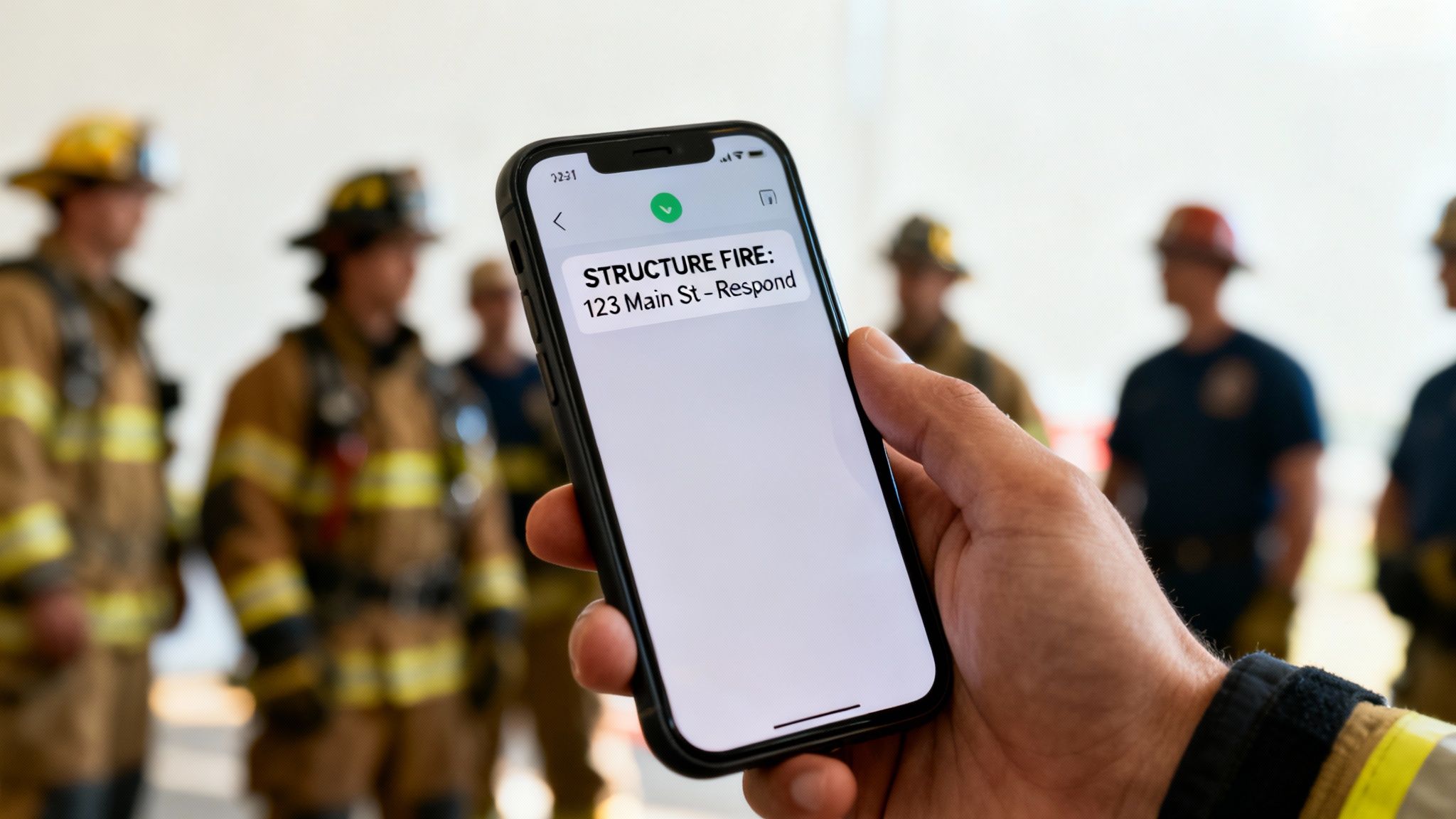
Practical Example: Picture this: a 911 call comes in for a structure fire. Instead of the dispatcher juggling multiple systems or manually texting individual responders, they just punch the incident details into a platform like Resgrid. With a single click, the system roars to life.
Automating Communication From Call to Response
The real magic of an integrated system is its knack for handling all the tedious work for you. Resgrid, for example, already has every user's mobile number and carrier information saved in their profile. So, when a dispatcher creates a call, the platform automatically translates it into an email perfectly formatted for each person's specific Email-to-SMS gateway.
This whole process is completely seamless. The dispatcher doesn't need to know if a firefighter is on Verizon or AT&T; the system handles that conversion on the fly. In seconds, the right personnel get a clear, concise text message about the incident, formatted correctly for their device. This level of automation crushes the risk of human error and frees up dispatchers to focus on what matters—the critical details of the call itself.
Of course, before you start sending out alerts, you have to get your consent and opt-out process squared away. It's not just a good idea; it's a requirement.
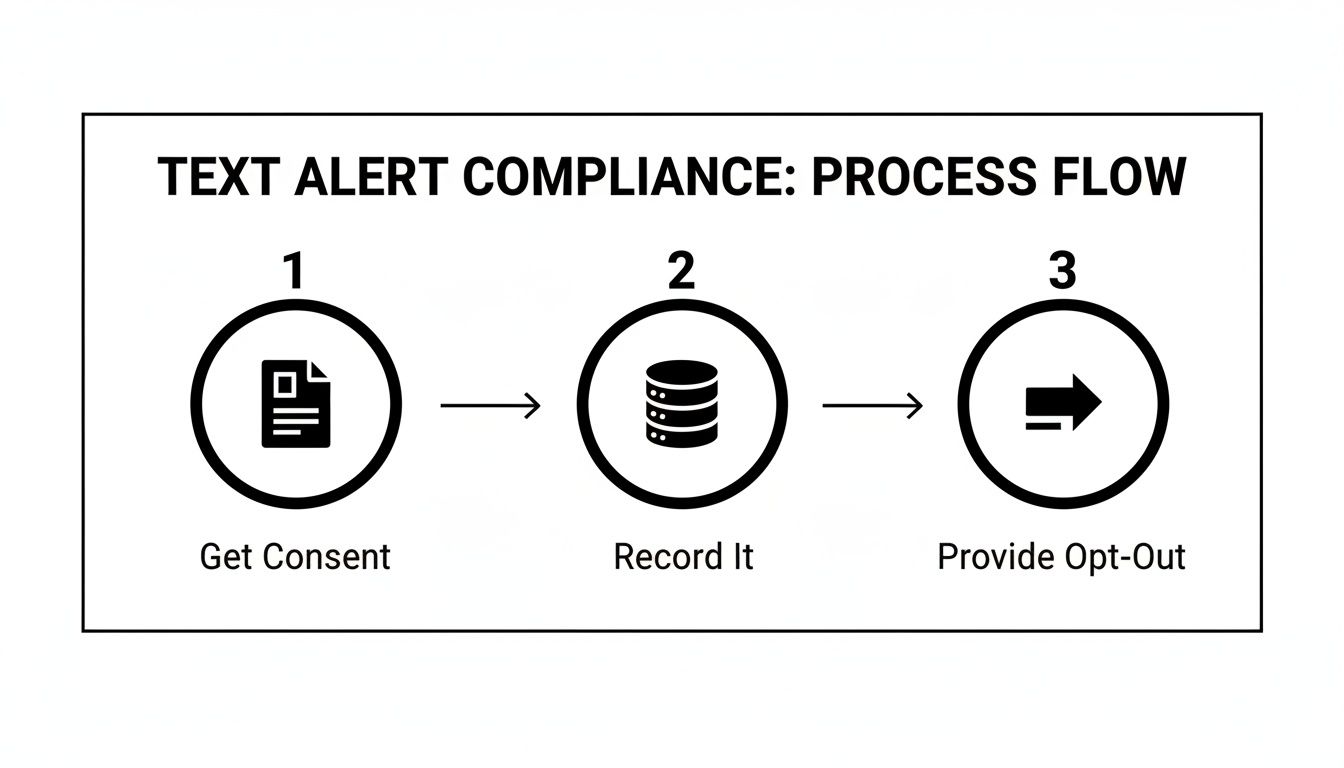
This flow nails the core legal requirements: get consent first, keep a record of it, and always give people an easy way to opt out. Building these steps right into your workflow protects your people and your organization.
The Tangible Cost Savings in Action
The most compelling reason to jump on this workflow is the direct and significant cash you'll save. Paid SMS services usually charge per message sent, and for an active department, those costs stack up fast. Let's run the numbers on a real-world, money-saving example.
Practical Example: Imagine a volunteer fire department that sends out an average of 2,000 alerts per month. This could be anything from dispatch calls and training reminders to administrative announcements.
- With a Paid Service: At a conservative rate of $0.05 per message, those 2,000 alerts would cost the department $100 every single month.
- Annual Cost: Over a year, that adds up to a hefty $1,200.
By switching to a system that uses free Email-to-SMS gateways, that entire $1,200 cost is just… gone. That's money you can reallocate to personal protective equipment, vehicle maintenance, or critical training. You're turning a recurring communication expense into a tangible investment in your operations.
Actionable Money-Saving Insight: This isn't just pocket change; it's a strategic financial move. For volunteer and budget-strapped agencies, freeing up over a thousand dollars a year provides a critical boost to front-line capabilities.
Building Redundancy for a Fail-Safe Strategy
While the Email-to-SMS method is incredibly effective, a smart communications strategy never relies on a single channel. A truly robust dispatch workflow should have layers of communication built in for ultimate reliability. The best part? You can create a powerful, fail-safe strategy by integrating multiple free methods.
In addition to sending the free text messages alerts, a platform like Resgrid can simultaneously fire off a free push notification through its dedicated mobile app. This creates an instant backup system.
A Multi-Layered Alerting Example:
- Primary Alert: The system sends the Email-to-SMS text message. This is perfect for reaching everyone, regardless of whether they have the app installed or a data connection.
- Secondary Alert: At the exact same time, a push notification hits the Resgrid app. This notification can pack in more detail, like links to maps, and allows for a direct response (e.g., "Responding" or "Not Responding").
This two-pronged approach dramatically increases the chance that every single person gets the alert instantly. If a carrier's email gateway has a momentary hiccup, the push notification will likely get through immediately, and vice versa. By combining these two free methods, you create a resilient, professional-grade communication strategy that ensures no message is missed—all without spending a dime on delivery fees.
Best Practices for Effective and Reliable Alerting

Sending free text messages alerts is only half the battle. Making sure they’re clear, effective, and actually get delivered is what really matters when the tones drop. A vague or rambling alert can cause more confusion than it solves, and that can slow down response when every single second counts.
If you nail down a solid set of practices for both writing messages and managing your system, you can turn a simple free tool into a professional-grade communications powerhouse. It's all about building a system your team trusts completely, from the words on the screen to the certainty that the message will always come through.
Crafting Messages That Drive Action
When it comes to the content of your alerts, the golden rule is ruthless clarity and brevity. Responders need to grasp the situation instantly, without having to translate vague language or sift through fluff.
One of the best ways to do this is by standardizing your message format. A consistent structure means your people can pull out the critical info—what’s happening and where it is—without even thinking about it.
Here is a practical example of a bad vs. good alert:
- BAD: "Hey team, we've got a fire. It's on Main, looks like a bad one. Need everyone who can to respond ASAP."
- GOOD: "STRUCTURE FIRE: 123 Main St – Smoke showing from second floor. All available units respond."
That second message is immediately actionable. It gives the incident type, the exact address, and key details in a predictable order. This cuts through the noise and helps your crew make faster, smarter decisions.
To help keep your messages on point, we've put together a simple checklist. Think of it as a pre-flight check before you hit "send."
Essential Checklist for Alert Message Crafting
This quick table breaks down the dos and don'ts to ensure every alert you send is clear, concise, and gets your team moving.
| Do | Don't |
|---|---|
| Use standardized formats (e.g., TYPE: ADDRESS – DETAILS). | Use slang, abbreviations, or informal language. |
| Lead with the most critical information first. | Bury the location or incident type in the middle of the message. |
| Keep it brief and to the point. | Include unnecessary commentary or speculation. |
| Double-check addresses and key details for accuracy. | Send alerts without verifying the information is correct. |
Following these simple rules can make a massive difference in how quickly and effectively your team responds. It removes the guesswork and lets them focus on the job at hand.
System Management for Unwavering Reliability
Beyond the words you use, the health of your communication system itself is everything. Since we're talking about Email-to-SMS gateways, a few basic maintenance habits can keep your free text messages alerts flying reliably.
First off, make it dead simple for personnel to update their carrier info. People switch providers all the time. Having a simple, easy-to-find form in your personnel system (like Resgrid) where they can update their carrier with a click is a game-changer. It prevents missed alerts from going to old, dead gateway addresses.
Second, run quarterly system tests. This doesn't have to be a huge production. Just send a simple, non-emergency message to everyone and ask them to confirm they got it. This helps you spot delivery problems before a real emergency hits.
Actionable Money-Saving Insight: This proactive approach is a huge money-saver. By finding and fixing potential weak spots in your system yourself, you avoid the cost of a failed response or having to bring in pricey outside help.
The Power of Redundancy: A No-Cost Strategy
The single most powerful way to guarantee reliability is to build redundancy into your system. This just means you're not putting all your eggs in one basket, even a great one like free text alerts. The best part? You can build this resilience without spending a single extra dime.
When you dispatch a call, your system should fire off alerts across multiple free channels at the same time.
Practical Example of a Redundant Alerting Workflow:
- Primary Alert (SMS): An Email-to-SMS text hits the user's phone. This is your baseline that reaches everybody.
- Secondary Alert (App Notification): A push notification comes through a dedicated app like Resgrid. This can often carry more detail and give response options.
- Tertiary Alert (Voice Call): For the really big calls, an automated voice call can be triggered. This makes sure even people who don't have their phone in their hand get notified.
This layered approach creates a safety net. If one channel fails or gets delayed, the others are right there to back it up. By combining free texts with app notifications and voice calls, you get professional-grade reliability for zero additional cost.
Troubleshooting Common Free Text Alert Issues
When your free text message alerts hit a snag, you don’t need an expensive support contract to get things working again. It turns out that most issues can be traced back to a handful of common culprits, and you can usually fix them yourself. Think of this as your in-house support manual—a way to save time and money while keeping your system dependable.
Practical Example: One of the most frequent problems we see is also the simplest: an incorrect carrier gateway address. Say a team member switches from Verizon to AT&T but forgets to update their profile. Suddenly, your alerts for that person vanish into the digital ether. It's a single point of failure that can silently take a key person out of your communication loop.
Diagnosing and Solving Delivery Failures
So, an alert doesn't arrive. What's the first step? Always confirm the user's carrier information. A simple annual or semi-annual audit where personnel just double-check their details can prevent 90% of these issues before they even start. If the info is correct and a message still fails, the next likely cause is the carrier's own spam filters.
Carriers are getting incredibly aggressive about blocking what they think is spam. If your alerts get flagged, you'll see anything from intermittent delays to your messages being blocked entirely. The good news is there are clear, no-cost solutions you can put in place to fix this.
Actionable Steps to Improve Deliverability:
- Whitelist Your Sending Address: Send a templated email to all personnel asking them to add your system's "from" address (for example,
alerts@youragency.com) to their phone's contact list. This one simple action tells the carrier that your messages are trusted and should be let through. - Keep Messages Short: Always try to keep alerts under 160 characters. Anything longer gets broken into multiple parts, which dramatically increases the odds of the message being flagged as spam or, worse, delivered out of order.
- Vary Your Message Content: Avoid blasting out a high volume of identical messages. Even small variations, like including a unique incident number or timestamp, can help your alerts bypass those pesky automated spam filters.
Actionable Money-Saving Insight: A simple, proactive approach to system maintenance is your best defense against delivery problems. By empowering your team to keep their own data current and whitelisting your sending address, you build a more resilient system without spending a dime.
Taking these steps transforms you from just a user into a proactive system administrator. Of course, if you run into more complex problems or need some guidance on platform-specific settings, you can always find more resources by checking out the Resgrid support documentation. By mastering these basic troubleshooting techniques, you'll ensure your free alert system remains a reliable and cost-effective lifeline for your organization.
Frequently Asked Questions
When you start digging into the world of free text message alerts, a few common questions always pop up, especially when you're talking about critical communications. Let's walk through some practical answers to get your system set up with confidence.
Are These Text Message Alerts Truly Free to Send?
Yes, they are. You're completely sidestepping the per-message fees that SMS gateway providers charge. The cost gets absorbed by the email and internet services your organization is already paying for, turning what could be a hefty recurring bill into a zero-cost operation.
Now, there is one practical thing to keep in mind: your email provider’s daily sending limits. A standard Gmail account, for example, might cut you off at around 500 emails a day. For an agency that needs to send a lot of alerts, hitting that limit could get your messages flagged as spam.
Actionable Money-Saving Insight: An easy, money-saving fix for this is to use a dedicated email service for a small monthly fee. You get way higher sending limits, and it’s still dramatically cheaper than paying for every single text. A service like SendGrid or Mailgun offers plans for under $20/month that can handle tens of thousands of messages.
What Is the Main Advantage of a Paid SMS Gateway?
The biggest draws for a paid SMS gateway are rock-solid reliability and a bunch of advanced features. Paid services give you delivery confirmation receipts, so you get proof that a message actually landed on someone's phone. They also usually support things like two-way messaging and dedicated short codes, which are non-negotiable for some mission-critical stuff.
The free Email-to-SMS method is more of a "best-effort" system—it doesn't come with those guarantees.
Practical Example: A paid system would be ideal for a county-wide evacuation notice where legal proof of delivery is required. But for organizations watching their budget, the free method delivers 99% of the benefit for 0% of the cost. It’s an incredibly powerful tool for primary notifications, general announcements, and secondary alerts where you don't need absolute, verified proof of delivery.
How Does Resgrid Save My Agency Time Managing Carriers?
This is where things get really good. Resgrid takes the most tedious, error-prone part of using free text message alerts and just automates it away. Instead of a dispatcher wrestling with a massive spreadsheet of phone numbers and carrier gateway addresses, the whole thing becomes hands-off.
Here’s a practical look at that workflow:
- User Profile: Each person on your team just picks their mobile carrier from a simple dropdown menu in their Resgrid profile. That's it.
- Automated Dispatch: When you fire off an alert, Resgrid instantly looks up every single recipient's carrier.
- Correct Formatting: The system automatically formats the message and sends it to the right Email-to-SMS address for every person, every time.
Actionable Money-Saving Insight: This simple bit of automation can save hundreds of administrative hours over the course of a year. But more importantly, it gets rid of the human error that could cause a critical alert to go to the wrong address and get missed by a responder when it matters most. Those saved hours translate directly into cost savings and improved operational focus.
Ready to build a reliable, cost-free alerting system for your team? With Resgrid, you can automate your dispatch workflow, manage personnel, and send unlimited free text message alerts without the high costs of traditional services. See how Resgrid can transform your operations by visiting https://resgrid.com today.