

Master Shift Select Scheduling A Guide For First Responders
Shift select scheduling flips the script on the old, rigid way of doing things. Instead of a top-down, command-and-control schedule, it's a flexible system where your team members can proactively sign up for the shifts they want. This simple change gives your people a choice, which directly reduces administrative burnout, gets coverage gaps filled way faster, and honestly, just makes everyone happier.
How Shift Select Scheduling Empowers Your Team
Look, shift select scheduling is more than just a slick new tool—it's a fundamental shift in how first responder agencies manage their most critical asset: their people. Think about it. Instead of a supervisor burning hours on the phone trying to fill an unexpected opening, the system handles the heavy lifting. This frees up your leadership to focus on operations that actually matter, not playing phone tag.
This approach is a game-changer for public safety organizations that are constantly juggling unpredictable call volumes and the need for rapid deployment. When you give your team this kind of flexibility and choice, you get a more engaged, more reliable workforce. It's that simple.
Here’s a glimpse of what a modern shift selection interface looks like. It gives you a clean, visual overview of who's on and what's available.

This kind of visual dashboard lets administrators see the entire coverage landscape at a glance, making it easy to spot potential holes before they turn into full-blown emergencies.
Direct Cost and Time Savings
The first and most obvious benefit is the massive cut in administrative overhead. Every single hour a manager spends making calls to cover a shift is an hour they're not spending on training, planning, or operational readiness. This is where you see an immediate financial return.
Actionable Insight: By automating the signup process, agencies can eliminate the endless phone calls for last-minute openings. If a supervisor making $50/hour spends just 10 hours a month on manual scheduling calls, that's $6,000 a year in administrative waste. A shift select system can reclaim nearly all of that, transforming scheduling from a reactive burden into a proactive, efficient system.
The market for these tools tells the same story. The global employee scheduling software market was valued at a whopping $481.5 million in 2023 and is on track to hit $1.2 billion by 2032. This isn't just hype; it's driven by a real need for automation in critical fields. Businesses using these systems are reporting productivity gains of 25-30% because they’re slashing the time it takes to build a schedule.
Enhancing Team Morale and Autonomy
When your people have a say in their schedules, they feel more valued and more in control of their work-life balance. In high-stress jobs like ours, that kind of autonomy is a powerful weapon against burnout. It’s huge for morale.
To really get this right, you need to understand the fundamentals of building a solid schedule, which is a whole topic in itself—a good primer is this guide on team scheduling 101. At the end of the day, giving your team the power to pick shifts that work for their lives builds a more committed, reliable, and ready response force.
Designing Effective Shift Signup Templates
The real magic behind a slick shift-select scheduling system isn't the calendar view—it's the templates working behind the scenes. A well-designed template is so much more than a time slot; it's a smart filter that guarantees the right person, with the right skills, is always on the right call. This is where you graduate from basic scheduling to intelligent, automated staffing.
By building out clear, standardized templates, you get to ditch all the guesswork and manual verification that ties up your administrators. Instead of chasing down certs after someone signs up, the template does the heavy lifting up front, preventing errors before they even happen. Honestly, the time you invest here pays for itself almost immediately in saved administrative hours.

This simple step—embedding requirements directly into the shift template—is a game-changer for automating compliance and keeping your safety protocols locked in.
Embedding Critical Requirements
The biggest money-saving feature of using templates is the ability to automatically enforce qualifications. Let’s walk through a real-world scenario. Say you need to staff a swift water rescue team for a potential flood response. The consequences of putting someone without the right training on that team are, frankly, severe.
Instead of just posting a shift and crossing your fingers that the right people see it, you design a template with the requirements baked right in.
- Shift Name: Swift Water Rescue Tech – Weekend Standby
- Required Role: Rescue Technician
- Required Certification: Swift Water Rescue I
- Needs: 2 Personnel
When this shift gets published, Resgrid’s system instantly checks these requirements against every personnel profile. Only team members who hold both the "Rescue Technician" role and the "Swift Water Rescue I" certification will even see the shift as an option. This completely removes the risk of a dangerous staffing error and frees up a supervisor from having to manually check everyone's qualifications.
Actionable Insight: By standardizing your shifts through templates, you eliminate the need for manual verification. This saves a ton of administrative time and ensures every position is filled by a properly qualified individual, which reduces liability and boosts operational readiness. This automation directly lowers your agency's risk profile, which can translate into lower insurance premiums over time.
Practical Templates for Different Agencies
The day-to-day needs of a volunteer fire department look nothing like those of a private ambulance service. Your templates have to reflect that reality. Here’s a look at how two very different organizations might set up their shift templates to meet their unique operational demands and keep a handle on costs.
Volunteer Fire Department Example
For a volunteer outfit, the name of the game is consistent station coverage, especially during peak hours, without burning out your crew.
| Template Element | Configuration | Cost-Saving Insight |
|---|---|---|
| Shift Name | Weekend Duty Crew (Sat/Sun) | Standardizes volunteer hours, making grant tracking and reporting effortless and more accurate. |
| Time Slots | 0600-1800, 1800-0600 | Breaks coverage into manageable 12-hour blocks to reduce burnout. |
| Needs | 1 Officer, 2 Firefighters | Ensures a proper command structure is always on duty, reducing operational risk. |
| Auto-Publish | Every Monday at 0800 | Saves 15-30 minutes of administrative work per week—up to 26 hours a year. |
Private Ambulance Service Example
Now, let's look at a private EMS company. They need to staff a big special event, making sure specific clinical capabilities are on-site while managing labor costs on a tight budget.
- Shift Name: Concert Medical – Event Paramedic
- Required Role: Paramedic
- Needs: 2 Personnel
- Pay Rate: Special Event Rate (if applicable)
- Notes: Report to Command Post Alpha.
This level of detail leaves no room for error and minimizes confusion on the day of the event. When you create specific templates for recurring gigs like special events, you build a repeatable, cost-effective process that guarantees you've got the right coverage, every single time.
Okay, you've got your shift templates built. Now for the fun part: putting them into action. Publishing shifts and automating the signups is where a system like Resgrid really starts to pull its weight, saving you a ton of time and, frankly, money. This isn’t just about throwing a schedule up on a board; it's about building a smart, automated workflow that gets the right notifications to the right people, right when they need them.
The first move is to set up your signup windows. Instead of a chaotic free-for-all the second a shift drops, you get to control exactly when those shifts become available for pickup. This one simple feature is incredibly powerful for keeping overtime costs in check and ensuring the whole process feels fair.
Tiered Releases and Smart Notifications
One of the smartest cost-saving tactics you can deploy is a tiered release for shifts. Think about it: you can offer new shifts or overtime opportunities to specific groups first—like your full-time staff—before you open the floodgates to part-timers or volunteers.
- Here's how it plays out in the real world: A last-minute overtime paramedic shift opens up on a Friday night. Instead of blasting an alert to every single qualified person in the department (and risking alert fatigue), the system first pings only the full-time paramedics. If that shift is still empty after a set time, say four hours, the notification automatically goes out to the next group, like qualified part-time staff.
This targeted approach can stop you from paying unnecessary overtime when a straight-time employee might have been ready and willing to take the shift. Plus, your people will thank you for not spamming them with notifications for shifts they aren't the primary candidates for.
Actionable Insight: The real magic here is automating what used to be a painful, manual phone tree. You’re replacing what could have been dozens of individual phone calls with a single, targeted push notification. This fills vacancies faster and slashes the odds of paying premium overtime rates just to get last-minute coverage. Even avoiding one forced overtime shift per month could save thousands of dollars annually.
Choosing the best Workforce Management Software is a big piece of the puzzle, as it helps tie all these automated processes together, from publishing shifts right through to the final signup. A smooth integration here is what really makes managing the entire employee lifecycle feel seamless.
The Power of Automated Scheduling
There's a reason the market for these systems is exploding. The global employee scheduling software market was valued at $0.48 billion and is on track to hit $1.36 billion by 2033. For public safety agencies, this kind of automation translates directly to results like 92% on-time shift fills, a massive leap from the 75% you typically see with manual methods. Open-source platforms like Resgrid take this even further by baking these core functions in without locking you into a hefty contract, potentially saving departments up to 40% annually.
This is where the real financial return on investment kicks in. Every single shift that gets filled without a supervisor having to pick up the phone is a direct saving on administrative labor. Many of these powerful scheduling tools are part of a much bigger platform, so it might be worth exploring the full suite of Resgrid features that make this automation possible.
Ultimately, this efficiency frees up your leadership to focus on what actually matters—critical operational tasks—instead of getting bogged down in administrative busywork. That focus strengthens your agency's readiness and ability to respond when it counts.
Managing Swaps And Filling Last-Minute Gaps
Let's be real—no schedule is perfect. Life happens. Team members get sick, family emergencies pop up, or sometimes people just need to trade hours. How your department handles these inevitable, last-minute curveballs is the true measure of your scheduling process. What used to be a frantic scramble of phone calls and text messages can become a smooth, automated process that keeps every shift covered without blowing your budget.
This is where a modern shift select scheduling system really earns its keep. It gives your people the power to manage their own swaps and drops, but within a framework you control. Instead of a frantic call to a supervisor that kicks off a desperate phone tree, a team member can simply request to trade or drop a shift right from their phone. All the administrator has to do is tap "approve" or "deny" on the notification.
Automating Last-Minute Coverage
The real magic isn't just in the request itself; it's what happens automatically after the request is approved. When an administrator signs off on a dropped shift, the system doesn't just leave a gaping hole in the schedule. It instantly re-publishes that opening to the signup board.
This move triggers an automated alert that goes out only to other qualified and available personnel. That distinction is the key to keeping costs in check.
- Practical Example: A paramedic needs to drop a shift for a family emergency just eight hours before it starts.
- The Old Way: The supervisor kills the next hour calling a list of people, trying to coax someone in, and probably ends up authorizing expensive overtime for whoever finally says yes.
- The Automated Way: The paramedic drops the shift in the app. The system immediately pings every other qualified paramedic about the open slot. Within minutes, a colleague who's on their day off picks it up at their standard rate.
This automated backfill process completely removes the supervisor from the frantic middle-man role. A potential staffing crisis just becomes a routine, self-correcting event.
Actionable Insight: The ability to instantly republish a dropped shift to a pool of qualified candidates is a game-changer for cost control. It actively prevents unnecessary overtime by finding an available, more affordable replacement automatically. If this system prevents just two overtime shifts per month, the savings can easily cover the cost of the software itself.
The Financial and Operational Impact
This intelligent approach is a huge reason the workforce scheduling software market has ballooned, hitting $1.6 billion with 12.2% year-over-year growth. It's not just hype; public safety agencies using these systems are reporting a 28% reduction in no-shows and are seeing far better resource allocation during critical incidents. Cloud-based solutions, which 65% of adopters now favor, have also slashed implementation costs by 50% compared to clunky, old on-premise systems. You can dig into more of these workforce management trends from recent market research.
This self-service model, where your team can see and manage their own shift changes, empowers your people and seriously strengthens your operational readiness. It's a core benefit you can explore by checking out the different apps and integrations that make this possible. The system handles the logistics, making sure every shift is filled by the right person without the last-minute panic or budget overruns that come with doing it all by hand.
Using Scheduling Data To Reduce Costs
Good shift select scheduling is about more than just filling today's empty slots. It’s about turning your scheduling data into a powerful, forward-looking tool for controlling costs. The reports and analytics baked into your system are an absolute goldmine of insights. By actually digging into this data, you can stop reacting to staffing fires and start proactively managing your schedule in a way that directly impacts your bottom line.
This means you start looking at signup patterns to really understand the pulse of your team. Are certain shifts consistently unpopular? Do you see a mad rush of signups for some roles but a constant struggle to fill others? This data tells a story about your operations and your people's preferences, letting you get ahead of potential staffing shortages before they become expensive, last-minute emergencies.
The chart below shows the stark financial difference between manually filling a shift with a phone tree versus using an automated system.
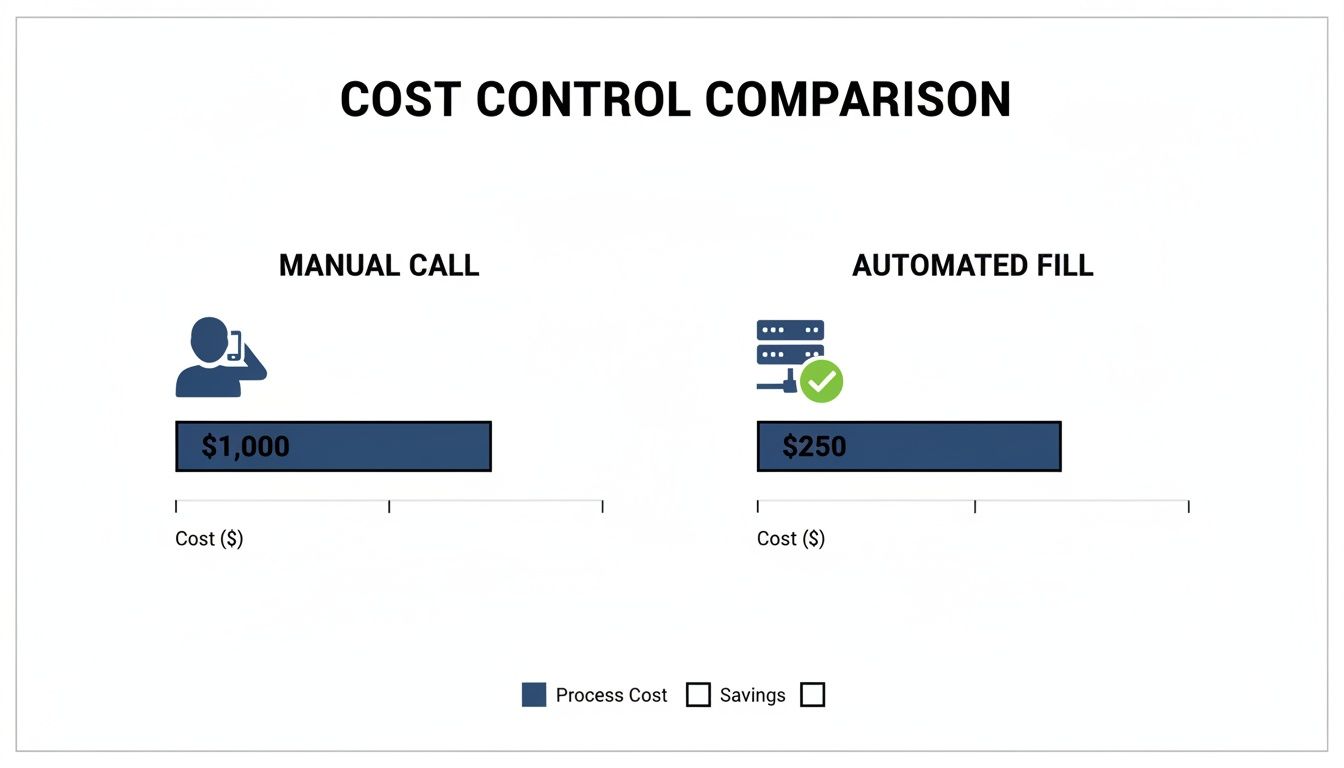
As you can see, relying on an automated fill is up to 75% cheaper than the administrative overhead and potential overtime costs that come with manual call-outs.
To put this in perspective, let's break down the potential savings per incident for a typical agency.
Manual vs Automated Shift Filling Cost Comparison
This table illustrates the potential cost savings per incident when using an automated shift select system like Resgrid compared to manual phone call methods.
| Metric | Manual Scheduling (Phone Call Tree) | Resgrid Automated Scheduling | Annual Savings (Example Agency) |
|---|---|---|---|
| Admin Time (1 hr @ $50/hr) | $50.00 | $5.00 (5 min setup) | $22,500 (based on 500 incidents/yr) |
| Overtime (4 hrs @ $75/hr) | $300.00 (avg. last-minute) | $0.00 (filled at straight time) | Up to $150,000 |
| Delayed Response Cost | Variable (potential for fines/liability) | Minimal | N/A |
| Total Per Incident Cost | ~$350+ | ~$5.00 | Significant |
The numbers don't lie. The cumulative effect of these small savings, incident by incident, adds up to a massive budget impact over the course of a year.
Pinpointing and Incentivizing Hard-to-Fill Shifts
Every single department has them—the Friday night shift, the holiday coverage, that one-time slot that always gets picked last. Your scheduling data will highlight these problem shifts with undeniable clarity. Once you know exactly where your pain points are, you can stop scrambling and start strategizing.
- Practical Example: If your reports show that the Friday 2200-0600 shift is consistently filled just hours before it starts (and often at overtime rates), you can take proactive steps.
- Actionable Insight: Offer a small, pre-approved stipend (e.g., $50) for grabbing that specific shift. This incentive is far cheaper than forcing someone into mandatory overtime (which could cost hundreds). You could also introduce a "credit" system: let personnel who take a hard-to-fill shift earn a credit for preferential signup on the next schedule release. This costs nothing but provides a powerful, non-monetary incentive.
This targeted approach turns a recurring headache into a manageable task, ensuring you have coverage without always resorting to your most expensive option—last-minute, premium-pay overtime. It’s all about making a small, calculated investment to avoid a much larger, unplanned expense down the road.
Financial and Compliance Reporting
The value of this data extends well beyond day-to-day operational scheduling. Accurate historical data is absolutely critical for financial management and for proving compliance with labor agreements. Your system becomes the single source of truth for every hour worked.
Actionable Insight: By using historical shift data, you can generate precise reports for payroll, track volunteer hours for grant applications, and provide auditors with clear evidence of equitable shift distribution, satisfying union or agency rules. For volunteer departments, automated hour tracking can be the key to securing grants that require detailed service logs, effectively making the software pay for itself.
This transforms your scheduling platform into an indispensable administrative tool. It automates the tedious work of tracking volunteer contributions, which can be the deciding factor in securing that next grant. Better yet, it provides a transparent, data-backed record to demonstrate fairness in shift allocation, protecting your agency from potential grievances and ensuring everyone is treated equitably. The data doesn't just fill shifts; it validates your entire operation.
Answering Your Shift Scheduling Questions
Adopting a new system always brings up good questions. I've seen it time and again—when departments move to a shift select scheduling model, managers and personnel have similar concerns about control, fairness, and what happens when things don't go as planned. Getting clear, practical answers is key to building the confidence your team needs to embrace the change.
This shift isn't about losing control; it's about gaining efficiency. The system is designed to automate the tedious parts of scheduling while leaving the critical decision-making with your leadership team. It handles the busywork so you can focus on what matters.
How Do You Prevent Unqualified Staffing?
One of the first questions that always comes up is how to make sure only qualified people can claim specialized shifts. The solution is built right into Resgrid’s shift templates.
Practical Example: When you create a shift for an "Advanced Life Support Unit," you can lock it to require a "Paramedic" certification. The system automatically cross-references this requirement with each user's profile. An EMT-Basic on your team won't even see the shift as an available option. This automates compliance and stops staffing errors before they can happen.
Managing Volunteer Hours and Preventing Burnout
For volunteer agencies, it’s a constant balancing act to distribute opportunities fairly and make sure no single member gets overworked. Resgrid lets administrators set rules that cap the number of hours or shifts any individual can claim within a specific timeframe.
Actionable Insight: For volunteer agencies, the biggest cost-saving isn't just money—it's preventing burnout, which is the #1 reason for volunteer turnover. By setting a monthly cap of, say, 48 hours per volunteer, you can automatically ensure opportunities are spread evenly. This reduces the risk of losing a valuable, highly trained volunteer, saving you the significant time and money associated with recruiting and training a replacement.
This kind of automated enforcement is a huge help in preventing burnout and making sure everyone gets a fair shot at contributing.
What if a Critical Shift Is Still Empty?
Look, no system can force a person to sign up, but it can provide some powerful safeguards. You can set up automated alerts that trigger if a critical shift is still empty as its start time gets closer. These smart notifications can escalate, first pinging all qualified personnel and then notifying supervisors directly if the spot remains unfilled.
Practical Example: You can configure the system to send a first-level alert to all qualified staff 24 hours before an unfilled shift. If it's still open 12 hours out, a second, more urgent notification goes out. Finally, if the shift is still empty 4 hours before it starts, an alert is sent directly to a shift supervisor's phone, giving them ample time to take manual action. This proactive monitoring gives you the information you need to step in manually when necessary, ensuring your community is never left unprotected.
The dashboard gives you a real-time, color-coded view of all your staffing levels, making it easy to spot potential coverage gaps long before they become an emergency. If you need more guidance on setting up these alerts, you can find helpful resources by checking out our guide on the Resgrid support page.
Ready to transform your scheduling from a chore into a strategic advantage? Discover how Resgrid can save you time, reduce costs, and empower your team. Get started today at https://resgrid.com.