
Software for Law Enforcement: Essential Tools and Unified Platforms
Think of law enforcement software as a digital partner for your agency. It’s the tool that takes fragmented radio traffic, mountains of paperwork, and gut-instinct decisions and turns them into a coordinated, data-backed operation. It acts as a central nervous system, connecting dispatchers, officers on patrol, and command staff so everyone is working from the same real-time playbook.
In short, this technology is a critical force multiplier, helping agencies do more with less.
How Software Transforms Modern Policing
Picture a high-stress call unfolding right now. Without modern software, officers are juggling disjointed radio updates and scribbling notes, creating dangerous gaps in what they know. Response times drag, situational awareness is patchy at best, and the post-incident report is a time-sucking administrative nightmare. It's a recipe for inefficiency and increased risk.
Now, let's replay that same scenario, but this time it's powered by an integrated digital platform. A dispatcher sees every unit’s exact location on a live map and assigns the closest officer instantly. That officer gets the call details, suspect information, and any premise history sent directly to their in-car terminal before they even pull out of the lot.
This is the entire point of software for law enforcement—it brings order to the chaos.
A Force Multiplier for Your Agency
Today’s agencies are stretched thin, facing rising community expectations and complex operational demands, often with budgets that aren't keeping up. Technology is what bridges that gap. By automating the routine stuff and serving up critical intelligence, the right software translates directly into real-world savings and better outcomes.
- Smarter Resource Allocation: Forget the guesswork. GPS tracking allows for the most efficient unit assignments, cutting down on fuel consumption and vehicle wear-and-tear. Practical Example: An agency using live GPS might see two available units. Without software, they might dispatch one that's 5 miles away. With it, they see another unit just 1.5 miles away, saving fuel and cutting response time. Over a year, this small change can save thousands in fuel and maintenance costs.
- Slash Administrative Overhead: The right reporting tools can cut the time an officer spends on paperwork by more than 50%. That’s more time for sworn personnel to focus on community patrol and proactive policing instead of being chained to a desk. Actionable Insight: If an officer making $60,000/year spends 2 hours less on paperwork per day, that's over 500 hours a year reclaimed per officer. For a 10-officer department, that’s like adding two full-time officers to your patrol force without increasing your payroll budget.
- Boost Officer Safety: Real-time data means fewer surprises. When officers arrive on scene better prepared, they're in a better position to de-escalate situations and reduce the risk of injury. That means safer officers and lower potential workers' compensation claims.
The global market for this tech is exploding for a reason—it’s essential. Valued at USD 17.19 billion in 2025, it's projected to hit USD 26.48 billion by 2029. This growth is all driven by the undeniable need for tools that help agencies make faster, smarter decisions. You can read more about the market growth projections.
This isn't just about cool new gadgets; it's a fundamental shift in how policing gets done. By embracing these digital tools, agencies can become more efficient, accountable, and ultimately, more effective in their mission to protect and serve.
Understanding the Core Law Enforcement Software
At the heart of any modern police department, you'll find a digital foundation built from a few key types of software. They might have different jobs, but they’re all designed to talk to each other, creating a seamless flow of information that brings order to the chaos of daily operations. Getting a handle on these core components is the first step toward building a smarter, more data-driven agency.
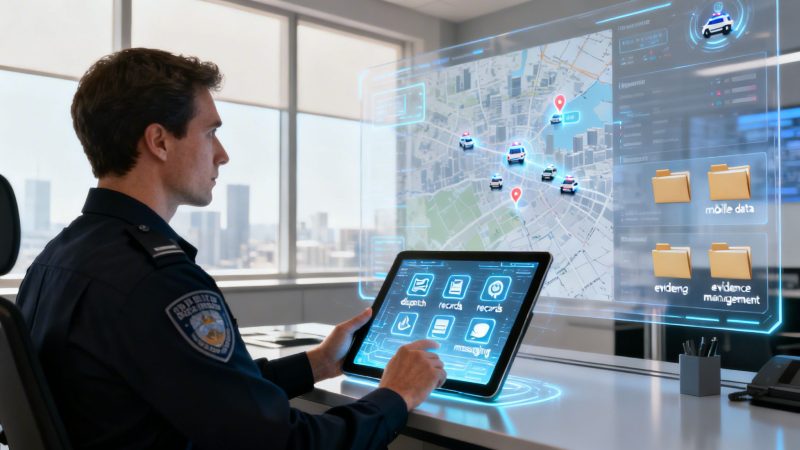
The image below really nails it, showing how the right software takes disconnected, messy events and organizes them into a coordinated, intelligent response.

It’s the critical bridge between the raw reality of an incident and the actionable intelligence every unit needs to do their job safely and effectively.
To better understand how these systems fit together, let's break down the main players and the roles they serve within an agency.
Core Software Types and Their Agency Roles
| Software Type | Primary Role | Real-World Analogy |
|---|---|---|
| Computer-Aided Dispatch (CAD) | Manages incoming calls, tracks units in real-time, and coordinates immediate field response. | The agency's air traffic control tower, guiding every unit to the right place at the right time. |
| Records Management System (RMS) | Securely stores, organizes, and retrieves all official data like reports, evidence, and case files. | The agency's digital brain or long-term memory, holding every critical piece of information. |
| Mobile Platforms | Puts CAD and RMS functionality directly into the hands of officers in their vehicles or on their phones. | The officer's in-field command center, providing instant access to vital data on the move. |
Each piece is vital, and together they create a powerful ecosystem that keeps the entire department connected and informed. Now, let's dive a little deeper into each one.
Computer-Aided Dispatch (CAD): The Agency's Nerve Center
Think of a Computer-Aided Dispatch (CAD) system as the air traffic control for your entire emergency response. When a 911 call hits, the dispatcher uses the CAD to log every critical detail, pinpoint the closest available units, and get them rolling to the scene with all the necessary intel. It’s the single source of truth during an active incident.
A modern CAD system does more than just push calls out. It gives you real-time mapping, tracks the status of every unit—whether they're en route, on scene, or clearing—and keeps a running, time-stamped log of every single action taken.
Actionable Insight for Saving Money:
Legacy CAD systems are notorious for requiring expensive on-site servers and a dedicated IT team just to keep them running. By switching to a cloud-based CAD, an agency can ditch those hardware and maintenance headaches for a predictable subscription fee. Practical Example: An on-premise server can cost over $10,000 in hardware, plus thousands annually for electricity, cooling, and IT staff time. A cloud-based CAD system replaces all that with a simple monthly fee, saving a small-to-mid-sized department tens of thousands of dollars a year in infrastructure costs alone.
Records Management System (RMS): The Digital Brain
If CAD is the nerve center, the Records Management System (RMS) is the agency's secure, long-term memory. It's the digital vault where every piece of information gets stored, organized, and made searchable—from incident reports and arrest records to evidence logs and witness statements.
Without a solid RMS, vital case data gets buried in file cabinets or lost in disconnected spreadsheets, grinding investigations to a halt. A quality RMS ensures an officer can pull up a suspect's entire history or find every report tied to a specific address in seconds. To handle modern evidence, many departments are also turning to specialized tools like forensic video analysis software that integrate with their core systems.
An RMS isn't just a digital filing cabinet; it's an analytical powerhouse. By tracking crime stats and incident patterns, it helps command staff spot hotspots and allocate resources proactively—shifting from reacting to crime to preventing it before it even happens.
Mobile Platforms: The Officer's Command Center
Mobile software is what truly untethers your officers, putting the power of the CAD and RMS right in the palms of their hands. Deployed on in-car laptops, tablets, or smartphones, these platforms give patrol units access to everything they need without constantly tying up the radio for routine checks.
With a mobile platform, an officer can:
- Run plates and check for warrants instantly.
- Get silent, text-based updates on sensitive calls.
- Start writing reports from their vehicle, cutting down on hours of desk time back at the station.
- Access premise history and known hazards before they even step out of the car.
Actionable Insight for Saving Money:
Equipping officers with mobile reporting capabilities is a game-changer for efficiency. When an officer can complete 80% of their paperwork in the field, it frees up a massive amount of time they used to spend chained to a desk. Practical Example: An officer finishes a call and writes the report in their car in 20 minutes. Without mobile software, they'd drive back to the station and spend 45 minutes at a desk. That's 25 minutes of patrol time saved per report. This gives you more community presence without the massive cost of hiring more personnel.
Essential Features That Boost Agency Performance
Knowing the types of software out there is just the start. The real value comes from digging into the specific, high-impact features that actually make a difference on the street and in the office. These are the non-negotiables that turn a basic program into a force multiplier for officer safety and agency efficiency.
Think of it like spec'ing out a new patrol vehicle. You wouldn't just order "a car." You'd demand a pursuit-rated engine, a reinforced frame, and specific comms gear. The same logic applies to software for law enforcement; the details in the feature list determine its real-world value.

Let's break down the core features that deliver practical results.
Real-Time Situational Awareness
Knowing where your units are and what they’re doing isn't just a nice-to-have; it's the foundation of modern command and control. This capability is critical for safety and tactical decision-making.
- Live GPS Tracking: This is the bedrock of intelligent dispatch. Seeing every unit on a live map lets dispatchers send the closest officer, not just the next one up in the queue. This single function creates a ripple effect, improving outcomes across the board.
- Integrated Unit Status: A solid system shows more than just a dot on a map. It displays if a unit is en route, on-scene, transporting a subject, or available for a call. This complete operational picture cuts through the radio clutter and ensures resources are sent where they're needed most.
Practical Example and Actionable Insight: During an active pursuit, a supervisor with live GPS tracking can see the chase unfold, anticipate the suspect's route, and strategically position other units for a safe resolution. This does more than increase the odds of a successful stop—it also slashes unnecessary fuel consumption and vehicle wear by preventing every nearby car from joining a chaotic, high-speed free-for-all. Shaving just a few minutes and miles off responses each shift adds up to thousands in real savings every year.
Streamlined Evidence and Case Management
The integrity of an investigation often comes down to how well evidence is handled. Disjointed systems—where bodycam footage lives in one silo, reports in another, and evidence logs in a third—are a recipe for disaster.
An integrated digital evidence platform isn't a luxury anymore. It creates a secure, unbroken chain of custody from the moment evidence is logged at the scene to the day it's presented in court, protecting both the case and the agency from legal challenges.
Modern software absolutely must provide a central hub for all case materials. Beyond just storing files, great software includes tools like robust case tracking functionality to ensure nothing falls through the cracks. This feature connects every digital asset—photos, videos, scanned documents, and incident reports—to the correct case file automatically.
This means when an investigator opens a case, they see the whole story instantly, without having to piece it together from a half-dozen different programs. You can dig into the specific functions that make this possible by exploring a full list of dispatch and management features.
Secure and Silent Communication
Open radio channels aren't always the best—or safest—way to communicate, especially during tactical operations. And letting officers use their personal phones for agency business is a massive security risk and a legal liability waiting to happen. This is why secure, built-in messaging is a must.
Practical Example: Picture officers setting up a perimeter around a building with a barricaded subject. With encrypted instant messaging, they can silently share tactical positions, suspect descriptions, and other critical updates without alerting the suspect with radio chatter. This is a huge win for operational security and officer safety. Actionable Insight: On the financial side, this built-in feature eliminates the need for pricey, specialized communication gear like tactical radios and avoids the liability and discovery headaches that come from using unsecured personal devices for official business.
Automated and Intelligent Reporting
If there's one thing that bogs officers down, it's paperwork. A key job of any effective law enforcement software is to automate as much of the reporting grind as possible, freeing up personnel for proactive police work.
Look for tools that offer:
- Customizable Report Templates: The software should adapt to your agency's forms, not the other way around.
- Data Auto-Population: It should pull names, addresses, and vehicle details directly from CAD and RMS into the report, eliminating redundant data entry.
- Mobile Reporting Capabilities: Let officers complete the bulk of their reports from their in-car terminals or tablets right at the scene.
This isn't just about saving a few minutes here and there. It's about reallocating your most valuable resource—your officers' time—back to where it belongs: serving the community.
Navigating Software Costs and Finding Savings
Buying new software for your agency can feel like walking through a minefield of hidden costs. I've seen it time and time again: the price on the proposal is just the opening bid. To really get a handle on what you'll be spending, you have to look past the sticker price and uncover the total cost of ownership, which is often loaded with expensive surprises.
The traditional software model in public safety is infamous for a reason. It often ropes agencies into long, multi-year contracts that are nearly impossible to break. These deals usually kick off with huge, mandatory implementation fees just to get the system turned on. And the costs don't stop there. Ongoing support, maintenance, and even small updates can all carry hefty price tags that blow up your budget year after year.
This old way of doing things creates a dependency that can leave an agency feeling stuck with outdated tech, simply because switching vendors is just too expensive. But it doesn't have to be this way.
Uncovering Hidden Expenses in Vendor Proposals
When you're looking at a new software solution, you need to dissect every single line item and, more importantly, ask about what’s not on the page. Legacy vendors have built their business on complex pricing structures designed to hide the true long-term expense.
Here are the classic financial traps I always tell agencies to watch for:
- Mandatory Long-Term Contracts: A five-year contract might sound standard, but it strips your agency of all its flexibility. If the software doesn't deliver or your needs change, you're locked in.
- Steep Implementation and Training Fees: Some vendors will charge tens of thousands of dollars just for setup and a few training sessions. That's a massive upfront hit before you've seen any real value from the system.
- Per-Seat Licensing and "Add-On" Charges: That low base price can multiply in a hurry when you're billed for every single user, every extra feature, and every mobile device you connect.
- Costly Ongoing Support Packages: Sure, basic support might be included, but priority help or 24/7 assistance often costs extra. That leaves you in a tough spot during a critical incident if you haven't paid for the premium package.
The procurement process is especially competitive in North America, which is the biggest player in this space, holding a massive 34.1% revenue share of the global market. Fueled by government funding, vendors are fighting hard for contracts, sometimes using tricky pricing to win the bid while burying the long-term costs. You can get more details on these market dynamics in the latest law enforcement software report.
Adopting a Smarter Financial Strategy
The key to getting control of your budget is to move away from this rigid, contract-heavy model and look for more transparent, flexible options. Modern, self-service platforms are changing the game entirely by offering a different path forward.
Instead of locking you into a contract, these solutions put your agency in the driver's seat. Think about it: a system with no long-term contracts, no mandatory implementation fees, and no hidden support costs. This model lets you adopt powerful technology without taking on a huge financial risk right out of the gate.
Actionable Insight for Immediate Savings:
Let’s walk through a real-world example. A small town police department needs a new dispatch system. A traditional vendor quotes them $50,000 upfront for implementation and locks them into a $2,000/month contract for five years. The total cost over that term? A staggering $170,000.
Now, let's look at the alternative. A self-service platform might offer a simple, pay-as-you-go model. By choosing an adaptable solution with clear subscription tiers, that same department could get up and running for a tiny fraction of the cost, potentially saving over $100,000 over the same five-year period. You can see what this looks like by reviewing a clear pricing model like ours. This approach doesn't just save taxpayer money; it gives the agency the freedom to scale services up or down as their needs change, ensuring they only ever pay for what they actually use.
The Power of a Single Unified Platform
Juggling a bunch of disconnected software systems is a recipe for disaster in law enforcement. It forces dispatchers to flip between screens, officers to log into different apps, and sergeants to manually stitch together data for reports. This patchwork approach isn't just clunky; it's a direct drain on your budget and a genuine risk to officer safety when every second counts.
Think about your smartphone. It seamlessly combines your GPS, camera, calendar, and messaging tools into one device. A truly unified software for law enforcement platform does the same thing for your agency, pulling dispatch, records, personnel tracking, and comms into a single, cohesive interface.

This kind of consolidation creates a powerful information loop. Every piece of the system makes the others stronger, which leads to smarter, faster decisions across the board.
From Silos to Synergy
When your systems talk to each other, your team works better. Simple as that.
In a unified environment, a dispatcher can see an officer’s real-time location on the same screen where they're typing up call notes. They can instantly push critical updates, premise history, or a suspect photo directly to that officer’s mobile terminal without missing a beat.
This seamless data flow continues right into the field. An officer can file an incident report from their patrol car, and the system automatically links it to the right CAD event and populates the case file in the RMS. No more redundant data entry or dangerous information gaps.
The move to cloud-based solutions is making this kind of synergy easier than ever to achieve. In fact, cloud software is quickly becoming the standard as agencies prioritize flexibility and cost savings. The market is projected to grow from USD 18.26 billion in 2025 to USD 40.76 billion by 2033, which tells you everything you need to know about where things are headed. You can read more about these law enforcement software market trends if you want to dig into the numbers.
Actionable Insight Turning Consolidation Into Savings
Moving to a single, unified platform isn't some luxury—it's one of the most practical cost-cutting moves an agency can make. The financial benefits aren't just theoretical; they hit your bottom line almost immediately.
Here’s exactly how a unified system saves you real money:
- Reduced Subscription and Licensing Fees: Instead of paying multiple vendors for separate CAD, RMS, and mobile software, you pay one predictable fee to a single provider. This makes budgeting a whole lot simpler and almost always lowers your total cost.
- Minimized IT Overhead: Supporting a patchwork of different software from a half-dozen vendors is an IT nightmare. A single platform cuts down on the complexity, troubleshooting, and maintenance hours your IT team has to burn, freeing them up for more important work.
- Lower Training Costs: Getting your team up to speed on one cohesive system is far faster and cheaper than teaching them how to navigate three or four separate, often clunky, interfaces. New hires get in the field quicker, and you spend less time and money on ongoing training.
By bringing all your core functions under one roof, you eliminate the hidden costs of data integration, vendor management, and all the administrative workarounds your team has been forced to invent. A unified system pays for itself by turning those operational headaches into direct, measurable savings.
Of course, choosing the right platform is what makes all this possible. To get a better feel for how different features stack up, it's worth checking out this direct comparison of dispatch platform capabilities. It’s a practical first step toward finding a solution that fits both your operational needs and your budget.
Your Next Steps Toward Smarter Policing
We've covered a lot of ground, showing how the right software for law enforcement is a direct investment in officer safety, operational efficiency, and community trust. We’ve looked at the core types of software, the absolute must-have features, and the huge financial upside of a unified, transparently priced platform.
So, where do you go from here? The path forward is actually pretty clear. It all starts with taking an honest look at the tech you're using right now. Pinpoint the gaps, the bottlenecks, and the daily frustrations holding your agency back.
Identify Your Pressing Challenges
Are your officers drowning in paperwork when they should be on patrol? Does your dispatch system cause delays or miscommunications when every second counts? These aren't just minor annoyances—they're real operational risks with serious costs.
Practical Example: a small department might have officers wasting an hour per shift on redundant report writing. With just ten officers, that's 50 hours a week of patrol time vanishing into thin air. A modern system that auto-populates reports can give you that time back, delivering the impact of new hires without blowing up the budget.
Explore Modern Solutions
The goal is to find a technology partner, not just a vendor. You need someone who offers a flexible, affordable, and scalable way to bring your operations into the 21st century. It's time to step away from the old-school vendors that lock you into expensive, multi-year contracts with massive upfront fees.
Your next step is to explore solutions that give your agency powerful tools without the financial straitjacket. This approach lets you adopt advanced technology piece by piece, proving its value and saving taxpayer money every step of the way.
Here’s a practical, money-saving plan to get started:
- Start with a Low-Cost Trial: Instead of jumping into a massive, five-figure commitment, find a platform that offers a free or inexpensive trial. Get a small team to test out the core dispatch and communication features in the real world.
- Calculate Your ROI on a Single Feature: Pick one high-impact area, like mobile reporting. Figure out the time savings and put a dollar value on it. This builds an undeniable business case for rolling it out to the whole agency.
- Prioritize No-Contract Vendors: Work with a partner that has to earn your business every single month. This keeps them honest, ensures you get great service and continuous updates, and gives your agency the freedom to adapt as your needs evolve.
Got Questions? We've Got Answers.
When you're looking at new software for your department, a lot of questions come to mind—usually around security, cost, and how practical it'll actually be for your team. You need straight answers, so let's tackle the big ones head-on.
How Secure Is Our Agency's Data in the Cloud?
This is non-negotiable. We're talking about sensitive case files, personnel records, and operational data. The good news is that reputable cloud software providers use layers of security that are often far more robust than what a small or mid-sized agency could manage on its own.
Think end-to-end encryption (which scrambles data so only you can read it), physically and digitally secured data centers, and constant security audits. It’s a bit like a bank vault—the provider makes a massive investment in top-tier security so that individual customers don't have to carry that burden alone.
Actionable Insight to Save Money:
Let's be real: maintaining an on-site server with that level of security is a huge money pit. You have to pay for the hardware, cooling, constant maintenance, and a dedicated IT person to watch over it. Moving to a secure cloud platform hands all of that responsibility and cost over to the provider for a predictable subscription fee, which can save you thousands every single year.
How Long Does It Take to Get New Software Up and Running?
The timeline really depends on the kind of software you choose. If you've ever dealt with traditional, legacy systems, you know they're infamous for long, painful rollouts that can drag on for months. This usually means on-site installations, complicated customizations, and pulling your entire staff off the line for weeks of expensive, mandatory training.
Thankfully, modern self-service platforms can get you going in a tiny fraction of that time.
A self-service platform lets an agency get started in a matter of hours or days, not months. Because there’s no complex hardware to install, you can sign up, configure your basic settings, and begin training your team on core functions almost immediately.
This approach means your department can start seeing real benefits—like faster dispatching or easier reporting—right away, without the long delays and huge upfront costs that come with older systems.
Can the Software Scale as Our Agency Grows?
Scalability is one of those things that’s easy to forget about until it’s too late. Your department's needs are going to change. You might add personnel, expand your jurisdiction, or take on new duties. The last thing you want is to be stuck with software that can't keep up.
This is where cloud-based software really shines. Its ability to scale is built right in. Adding more users or needing more data storage is usually as simple as just adjusting your subscription plan.
Practical Example:
Picture this: your department gets a grant to hire five new officers. With an old-school legacy system, that could mean buying five more expensive software licenses and scheduling another round of training. With a flexible platform, you just add five new users to your account online, and they can be up and running the same day.
Actionable Insight to Save Money:
This "pay-for-what-you-use" model is a budget-saver. Instead of buying a massive, expensive software package just to "future-proof" your agency, you can start with a plan that fits your current size and budget. You only scale up when you actually need to, which stops you from wasting money on capacity you aren't even using.
Ready to see how a modern, unified platform can transform your operations without the high costs and long contracts? Resgrid, LLC offers a powerful, flexible solution that puts your agency in control. Explore our features and transparent pricing today.