
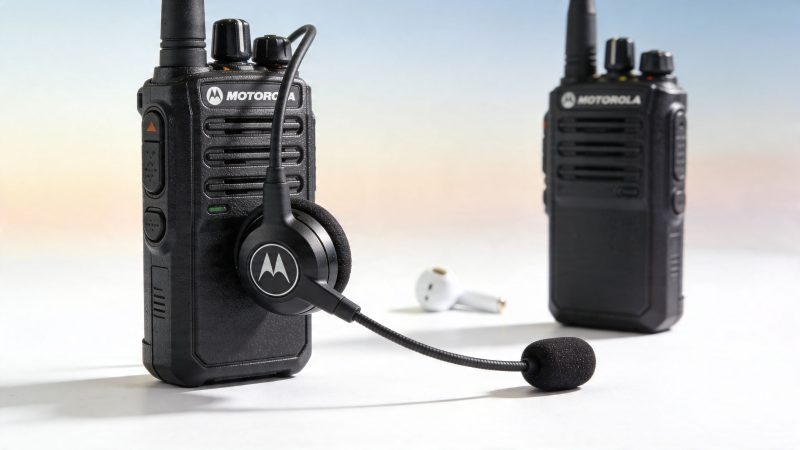
Bluetooth Headset for Motorola: Avoid Procurement Mistakes
A shift supervisor approves a quick headset purchase before a storm deployment. By the second operational period, users are repeating traffic, missing callouts, and passing around spare wired mics because the new Bluetooth units pair inconsistently or fail under noise. That is how a low-cost buying decision turns into downtime, rework, and a second procurement.
That is the main problem with shopping for a bluetooth headset for motorola by sticker price alone. In public safety, security, utilities, and industrial operations, the expensive mistake is rarely the headset itself. The bigger cost is lost clarity, user workarounds, failed accessories, and hours spent troubleshooting compatibility that should have been confirmed before the order was placed.
Motorola has sold wireless audio products for years, including consumer headsets such as the Moto Hint. That history matters less than buyers assume. A headset built for casual phone use follows a very different design target from gear expected to survive long shifts, high ambient noise, protective clothing, and radio-driven workflow.
The right question is not whether a headset connects over Bluetooth. The right question is whether it keeps communications reliable, integrates with the device and push-to-talk method you use, and avoids creating a hidden replacement cycle six months after rollout.
Why Your Standard Bluetooth Headset Is a Liability
A standard consumer Bluetooth headset can create a communications failure before anyone notices the buying mistake. The unit pairs during testing, passes a few calls, and looks like a budget win. Then it hits a noisy vehicle, a wet shift, a gloved user, or a radio workflow that depends on fast push-to-talk access, and the hidden cost shows up in missed traffic, repeated transmissions, and replacement orders.
That pattern is common because Bluetooth is only the transport. It does not guarantee microphone quality, radio control, accessory support, or field durability. A headset built for office calls and music playback follows a different design brief from gear expected to support Motorola radios during long shifts, shared use, and high-noise operations.
Practical rule: If a headset is marketed mainly for music, phone calls, and convenience, treat it as consumer gear until the vendor proves radio compatibility, environmental durability, and usable controls in the field.
The Moto Hint makes the point. It was a consumer product aimed at compact phone audio, not mission-critical communications, as noted earlier. That distinction matters more than the price tag because procurement teams do not pay only for the first invoice. They pay for battery failures during overtime, weak transmit audio that forces repeated traffic, and spare equipment issued to work around a bad purchase.
Common Failure Points in the Field
Audio usually fails first. Consumer microphones often struggle with engine noise, wind, crowd noise, and off-axis speech, so users sound clipped, distant, or inconsistent when they turn their head or move.
Workflow breaks next.
Phone headsets are designed around answer, end, and voice assistant functions. Field users need controls they can find by touch, access while wearing gloves, and trust under stress. If the user has to fumble for a tiny button or guess whether the microphone is active, the headset is slowing the job down.
Durability is the next cost driver. Gear that survives commuting and desk use may not survive shared users, vehicle deployment, charging in staging areas, sweat, dust, rain, and repeated drops into bags or consoles. Failures in those conditions do not stay isolated to one device. They create downtime, support tickets, user complaints, and a second round of purchasing.
That is why list price is a poor buying metric. The better comparison is total cost of ownership: replacement frequency, compatibility problems, training burden, troubleshooting time, and the operational risk of missed or delayed communications. In public safety, utilities, security, and industrial work, a cheap headset is often the expensive option.
Decoding Motorola Phone vs Two-Way Radio Compatibility
At 2 a.m., a headset can look fine in the truck bay, pair without complaint, and still fail the first time an officer or plant operator tries to transmit under load. That failure usually starts with a bad assumption. A Bluetooth headset proven on a Motorola phone is not automatically suitable for a Motorola radio system.
Phones and radios use Bluetooth for different jobs. Phone use centers on standard call audio and common control profiles. Radio use adds model-specific accessory behavior, audio routing rules, approved accessory paths, and push-to-talk requirements that often decide whether the product is usable at all.

Why compatibility breaks
The procurement mistake usually happens during testing. A team pairs a low-cost headset to a phone, confirms that audio passes, and treats that as proof of compatibility. It is not proof of radio compatibility, and it says nothing about transmit timing, remote PTT behavior, or how the accessory will behave across a fleet.
On MOTOTRBO systems, mismatched connectors can introduce pairing delays or signal dropouts, and IMPRES audio technology can improve voice intelligibility in noisy environments by compensating for changing conditions (Motorola headset compatibility guide). Those problems show up as clipped first words, repeated traffic, and users who stop trusting the gear.
The primary cost is not the headset itself. It is wasted supervisor time, avoidable support calls, replacement purchases, and the operational risk of a user missing the first transmission that mattered.
What buyers need to verify
Before buying a bluetooth headset for motorola radios, get these answers in writing from the vendor or reseller:
- Exact radio model support: CP200D, DP1400, XPR, and APX families have different accessory behavior and support limits.
- Accessory path: Confirm whether the setup requires an adapter, a specific wireless pod, a remote speaker mic, or a dedicated PTT accessory.
- PTT method: Verify how push-to-talk is triggered. Bluetooth audio support alone does not confirm field-ready transmit control.
- Audio processing compatibility: Ask whether the headset works with Motorola audio features used by your specific radio family.
- Use case fit: Venue security, utilities, EMS support, and industrial maintenance create different noise, movement, and duty-cycle demands.
A vendor that answers these points vaguely is telling you that your team will do the field testing at your own expense.
A practical procurement example
I have seen security and operations teams approve consumer-style earpieces because the demo focused on easy pairing with smartphones. Once deployed on Motorola radios at a busy site, users reported intermittent receive audio, delayed transmit pickup, and inconsistent PTT response. Supervisors first blamed training. The actual problem was accessory mismatch.
That purchase failed three times. The first order became sunk cost. Staff spent hours re-pairing and troubleshooting during live operations. Then the agency had to buy the right equipment anyway.
Where Motorola-specific audio handling earns its cost
In high-noise work, compatibility is not just about connecting. It is about staying intelligible when the user turns their head, speaks off-axis, moves between quiet and loud areas, or transmits from inside a vehicle.
Motorola-specific audio handling can justify a higher upfront price if it reduces retransmissions, user complaints, and failed deployments. If a seller cannot explain how a headset behaves with your exact radio model, accessory chain, and PTT method, treat that product as unverified. In mission-critical work, unverified usually becomes expensive.
Essential Specs for Mission-Critical Headsets
At 02:00, a headset failure is not a comfort issue. It becomes a missed transmission, a repeated call, a delayed response, and a supervisor pulling someone off task to sort out gear in the field.
That is why headset specs need to be tied to operational risk and total cost of ownership. A unit that survives noise, sweat, weather, and full-shift use costs less over time than a cheaper headset that burns staff hours, needs constant replacement, or fails during a priority call.
The Motorola RLN6491B is a useful benchmark because its published specifications align with real field concerns: 24-25 dB noise reduction, IP54 dust and water resistance, and 22 hours of operational time on a single charge (RLN6491B headset specifications). Those are not brochure filler. They affect hearing protection, survivability, and whether the headset can make it through a shift without becoming another battery management problem.

Noise control affects intelligibility and fatigue
Loud scenes expose weak headsets fast. Users start repeating themselves, miss receive audio, or pull one ear off the cup to hear what is happening around them. That creates two costs at once. Communication quality drops, and user fatigue rises over a long shift.
A headset with meaningful hearing protection is often the better financial decision, even if the purchase price is higher. It reduces the chance that teams will treat the headset as disposable or stop wearing it because it does not help enough in noise.
Battery life needs margin, not hope
Shared equipment environments punish short battery life. Chargers get misplaced. A unit goes back to the dock half charged. Someone grabs the wrong headset at shift change. On paper, a consumer device may look acceptable. In practice, it dies at the worst time.
Long runtime gives procurement breathing room. It cuts the need for spare inventory, replacement charging accessories, and the daily supervision that weak battery performance creates. If your team also relies on coordinated mobile communications and status updates through tools like mission messaging workflows, headset uptime matters even more because audio failure can break the larger information flow.
Ruggedization changes replacement cost
Ingress protection is not a minor line item. Dust, light rain, sweat, dirty vehicle interiors, and rough storage are normal conditions in public safety, utilities, transport, and industrial operations.
A headset built for those conditions usually lasts longer and generates fewer support tickets. A headset built for office calls usually looks cheaper until the second or third replacement cycle.
Form factor decides whether users can work in it
Fit is an operational issue. A headset that shifts under a hard hat, catches on outerwear, or loses mic position when the user turns their head will create clipped or muddy transmissions. Teams often misread that as a radio problem.
Use the wear style that matches the job:
- Boom mic designs: Better transmit consistency in noisy, high-movement environments.
- Inline mic setups: Higher risk of clothing rub, poor placement, and uneven pickup.
- Over-the-head heavy-duty units: Better for long wear, stable fit, and hearing protection.
- Low-profile earpieces: Better for low-visibility assignments, but they need closer scrutiny for durability and reliable radio use.
The cheapest mistake is buying for comfort during a desk demo. The expensive mistake is deploying that headset under helmets, body armor, rain gear, or gloves and learning too late that users cannot keep it positioned.
Quick comparison table
| Feature | Consumer-focused Bluetooth headset | Mission-critical Motorola-capable headset |
|---|---|---|
| Primary design goal | Calls, music, convenience | Reliable radio communication in demanding environments |
| Noise handling | Usually basic | Built for loud scenes and clearer transmit audio |
| Physical durability | Light daily use | Ruggedized for field handling |
| Water and dust resistance | Often limited or unspecified | Should be clearly documented |
| Battery planning | Personal use pattern | Shift-length use and operational margin |
| PTT workflow | Often absent | Must be verified explicitly |
| Support burden | User self-troubleshooting | Should fit fleet deployment and standard operating procedures |
What to verify before purchase
The best-performing headsets in mission-critical work usually have the same traits:
- Documented compatibility with the exact Motorola device in service
- A wear style that stays stable during movement
- Noise control that supports both protection and intelligible speech
- Battery runtime with enough margin for real shift conditions
- A clear path for replacement parts, chargers, and service
If a vendor cannot document those points, the low upfront price is usually an accounting illusion. The actual cost shows up later in downtime, replacement orders, and field teams working around equipment that should have worked the first time.
Solving The Push-to-Talk Integration Challenge
A unit acknowledges dispatch, but the first word never makes it through. The radio user repeats the message, dispatch repeats the instruction, and a five-second delay turns into avoidable traffic on a busy channel. That is the actual PTT problem with Bluetooth. Audio quality alone does not predict field performance.
Push-to-talk is the point where procurement mistakes show up fast. A headset can sound fine in a quiet office and still fail once users are gloved, moving, or trying to key up without looking at the controls. In public safety and industrial radio work, clipped openings, awkward button placement, and inconsistent transmit behavior are not minor annoyances. They waste airtime, slow acknowledgements, and drive up support time.

What proper PTT support looks like
Start with workflow, not Bluetooth branding. A Motorola-compatible headset needs a transmit method that users can hit by feel, a link that reconnects predictably after battery swaps or shift changes, and microphone behavior that still works when the user is turning, lifting, or wearing outer gear. If any one of those fails, the sticker price stops mattering.
Some APX and XPR headset demonstrations show fast pairing, encrypted Bluetooth links, and long-range microphone pickup for PTT use (APX and XPR Bluetooth headset demonstration). Treat that as a starting point for testing, not proof that every accessory sold as "Motorola compatible" will perform the same way on your exact radios, firmware, and duty setup.
The hidden cost sits in remediation. Once a headset causes missed first syllables or unreliable keying, departments start buying adapters, issuing replacement units, writing workaround instructions, and burning supervisor time on complaints that should never have reached the field.
Questions that expose weak PTT claims
Use these before approval:
Which exact Motorola models and firmware versions has this headset been tested with?
"Works with Motorola" is not enough for fleet buying.How does the user trigger transmit under stress?
Headset button, lapel pod, or inline adapter each changes speed, glove use, and training burden.What happens after a dropped link or a dead battery?
Reconnection behavior affects downtime more than brochure audio specs.Can users transmit reliably while wearing PPE, winter gear, or duty gloves?
Small flush buttons often fail this test.What replacement parts are stocked and how long is lead time?
A cheap headset with no spares becomes expensive the first time a charger, ear hook, or PTT module fails.What is the approved pairing process for this device?
Vendors should be able to document it clearly. If your team needs a plain-language refresher for basic Bluetooth steps before you layer on radio-specific procedures, use this guide on how to pair Bluetooth devices.
A field reality check
An EMS supervisor may tolerate a half-second annoyance on a personal phone call. The same delay on dispatch acknowledgement creates repeats, stepped-on traffic, and uncertainty about whether the call was received. That risk is operational, not cosmetic.
For agencies that need to cut repeated voice traffic, radio accessories should be standardized alongside digital coordination practices such as team messaging workflows. That does not replace radio PTT. It reduces unnecessary channel use so radio traffic can stay focused on time-sensitive voice communication.
If transmit audio clips at the start during testing, reject the setup. Users will not change their speech pattern to protect a bad procurement decision.
Where departments overspend
They overspend when they buy a generic Bluetooth headset first and try to force radio PTT into the workflow afterward. The usual result is extra adapters, inconsistent user behavior, more help-desk calls, and premature replacement.
A purpose-built Motorola-capable PTT headset often costs more upfront and less over its service life. The savings come from fewer failed transmissions, less retraining, lower support load, and fewer field workarounds. In mission-critical environments, total cost of ownership is driven by downtime and communication failure risk, not by the initial invoice.
Pairing and Troubleshooting Your Motorola Headset
Pairing should be treated like a deployment procedure, not like a casual phone setup. If your team uses multiple radio models, shared equipment, or rotating staff, standardizing the pairing sequence will save hours of avoidable downtime.

A good baseline is to document one approved process for each radio family and post it where chargers and spare accessories are stored. If your staff needs a simple refresher on the consumer side of the process, this guide on how to pair Bluetooth devices is a useful plain-language reference before you layer in Motorola-specific radio steps.
A clean pairing routine
Use a repeatable sequence every time:
- Start with a charged radio and headset: Low power causes bad troubleshooting decisions because users blame compatibility when the battery is the actual problem.
- Clear old pairings if the device was previously assigned: Shared gear often keeps stale records that interfere with new pairing attempts.
- Put the headset into its proper pairing mode: Don’t assume it works like a phone earbud.
- Enable Bluetooth on the radio and select the accessory through the radio menu: Follow the radio’s accessory flow, not just the headset’s.
- Test receive audio first, then transmit audio, then PTT behavior: Don’t stop at “connected.”
If your Motorola setup supports touch pairing or rapid pairing methods, use them. They reduce setup time and cut down on user error.
Quick troubleshooting guide
| Problem | Likely cause | What to do |
|---|---|---|
| Headset won’t pair | Wrong pairing mode, stale pairing record, unsupported accessory | Delete old pairings on both sides, restart both devices, verify the model is approved for that radio |
| Audio cuts in and out | Interference, low battery, weak fit, environmental obstruction | Test at close range, recharge fully, move away from dense electronics, confirm the wear position |
| You can hear but can’t transmit | Mic path or PTT setup issue | Check whether the headset actually supports radio transmit and whether the PTT method is configured correctly |
| PTT button doesn’t register | Unsupported control method or bad accessory mapping | Verify the exact accessory path for that radio and test with a known-good approved headset |
| Pairing works, field use fails | Bench test passed but operational conditions weren’t tested | Re-test in vehicles, outdoors, near noise, and with actual duty gear |
Here’s a practical test many agencies skip. After pairing at the bench, hand the radio to the end user and make them work through normal tasks. Put on gloves. Sit in the vehicle. Turn the head. Clip the radio where it’s normally carried. If the headset becomes awkward in that moment, it’s the wrong headset.
A short visual walkthrough can also help teams standardize training during rollout:
When troubleshooting turns into a support issue
If your team keeps re-pairing the same headset, stop treating it as a user problem. That pattern usually points to a compatibility miss, a charging discipline problem, or a poor deployment standard.
For agencies managing communications procedures and support workflows centrally, it helps to keep equipment issues documented in one place so staff can stop repeating the same fixes. A dedicated technical support workflow makes that easier, especially when multiple users share radios and accessories across shifts.
How Smart Procurement Saves Your Budget and Your Mission
The cheapest headset often becomes the most expensive headset. That’s not a slogan. It’s how field purchasing usually plays out.
A low-cost unit looks attractive because it lowers the approval threshold. But once it starts dropping audio, breaking physically, confusing users, or failing to integrate with radio workflow, your organization pays again through replacements, troubleshooting time, retraining, and operational drag.
Build the purchase around total cost of ownership
For a bluetooth headset for motorola deployments, total cost of ownership includes more than the invoice:
- Replacement frequency: How often the unit gets swapped out due to wear, battery decline, or failure.
- Admin time: Time spent by supervisors, radio techs, or IT staff handling complaints and re-pairing.
- Training burden: Every non-intuitive accessory creates repeat questions across every shift.
- Inventory complexity: Mixed headset fleets require more spares, more chargers, and more documentation.
- Mission risk: Missed or repeated transmissions slow the whole operation.
A headset that costs more upfront can still be the budget choice if it prevents repeat buying, repeat troubleshooting, and repeat communication failures.
Questions that save money before the purchase
Use these in vendor calls and quote reviews:
- What exact Motorola models is this approved for?
- Is replacement hardware available, or do we replace the whole unit when a part fails?
- Can one standard headset cover most of our fleet, or are we creating fragmentation?
- What does field cleaning and maintenance look like?
- How are warranty claims handled for agency deployments?
The agencies that save money usually standardize aggressively. Fewer headset models mean fewer training variations, fewer charging surprises, and fewer “I thought this one worked with that radio” mistakes.
Don’t borrow consumer procurement logic
Some buyers start with mobile accessory pricing because that’s the purchasing pattern they know. That’s fine for chargers, cases, and commodity add-ons, and a market overview of wholesale mobile phone accessories can be useful for understanding how accessory sourcing works at volume. But radio headsets for field operations should be purchased like specialized equipment, not like phone add-ons.
That distinction saves money because it changes your screening criteria. You stop comparing aesthetic features and start comparing deployment survival.
Compare options the right way
When teams evaluate alternatives, they should compare:
| Procurement factor | Low-end buying mindset | Smart buying mindset |
|---|---|---|
| Price | Lowest unit cost | Best operational value |
| Testing | Desk pairing only | Field use with real users |
| Support | Figure it out later | Vendor proves compatibility first |
| Fleet impact | Buy per request | Standardize where possible |
| Failure response | Replace ad hoc | Track patterns and adjust procurement |
If you’re comparing operational platforms as part of a broader communications modernization effort, it helps to review systems side by side with a structured feature comparison process so accessory, workflow, and coordination decisions support each other instead of creating separate silos.
Field Safety and Regulatory Compliance Considerations
A Motorola headset decision can become a safety issue quickly. In loud environments, the headset isn’t just an audio accessory. It can also function as part of the user’s protective equipment strategy.
That matters anywhere personnel work near sirens, engines, heavy machinery, crowd noise, or sustained industrial sound. A headset with documented hearing protection is in a different class than a light consumer earpiece that only claims to reduce noise in vague terms.
Hearing protection and situational awareness
The strongest options balance two needs that can conflict. Users need protection from damaging noise, but they also need to hear speech, alarms, and critical cues around them.
That’s why headsets built for public safety and industrial use deserve a separate review path from general Bluetooth products. The decision affects fatigue, intelligibility, and whether the user can safely stay on comms throughout the task.
Cable-free isn’t just convenient
Wires snag. They catch on turnout gear, seat hardware, tools, harnesses, vests, and vehicle interiors. In routine office use that’s just annoying. In field work it can delay movement, rip equipment loose, or force the user to stop and fix gear at the worst possible time.
Wireless setups remove that entanglement point, but only if the wireless system is stable enough to trust. Otherwise you trade one hazard for another.
Treat radio headsets the way you treat any other field-worn equipment. If it affects hearing, mobility, or communication, it belongs in the safety conversation.
Compliance starts with documentation
Agencies should keep records on approved headset models, intended use, cleaning procedures, battery handling, and replacement criteria. That creates a defensible standard and helps supervisors identify when a user is carrying gear outside approved conditions.
The most common compliance mistake is informal substitution. Someone brings in a personal Bluetooth headset because it “works fine.” That may bypass your agency’s review of audio reliability, hygiene, durability, and hearing protection. Once personal gear enters the workflow, consistency disappears.
A safer approach is simple. Approve specific models. Define where each can be used. Retire damaged units quickly. Don’t let convenience overwrite policy.
Frequently Asked Questions About Motorola Headsets
A headset that works fine in a quiet office can fail fast in a patrol car, on a fireground, or during a long shift with constant radio traffic. The questions below come up late in the buying process, usually after a team has already seen one compatibility miss or early hardware failure. That is exactly when cost control matters most, because every bad purchase turns into replacement cost, support time, and lost confidence in the field.
FAQ Quick Reference
| Question | Short Answer | Key Consideration |
|---|---|---|
| Can I use consumer earbuds with my Motorola radio? | Sometimes, but they are rarely a good fit for duty use | Connection is only one issue. Transmit control, durability, battery life, and audio performance under stress matter more |
| What is the practical range in the field? | Expect range to drop once bodies, vehicles, walls, and equipment get involved | Test in the actual operating environment, not at a bench or in a conference room |
| Do I need a dedicated PTT accessory? | In many cases, yes | Confirm how users will key up before you buy anything |
| Are heavy-duty headsets worth it? | Usually, yes for loud, mobile, or safety-sensitive work | They often lower replacement rates and reduce communication failures |
| How do I make headsets last longer? | Standardize charging, cleaning, storage, and user assignment | Early failures often come from poor handling and inconsistent issue procedures |
Common final questions
Can I let staff bring their own Bluetooth earbuds?
That usually creates more problems than it solves. One user may get acceptable audio on one shift, while another gets weak transmit control, poor fit under PPE, or battery failure halfway through an operation. It also drives up support time because every personal device introduces a different charging method, firmware version, and compatibility risk.
What maintenance matters most?
Charging discipline matters first. After that, inspect ear cushions, boom mics, clips, and charging contacts. Retire damaged units early. A headset that stays in service after the housing cracks or the mic boom loosens is a predictable field failure, not a surprise.
What is the smartest first step if I am buying for a team?
Run a field trial with the exact Motorola device, the exact accessory chain, and the actual users who will wear it on duty. Include a full shift, not a short demo. That is how you catch pairing drops, comfort complaints, weak PTT workflows, and charging problems before they spread across the budget.
Should I buy the cheapest model that passes a basic audio test?
No. The lowest purchase price often becomes the most expensive option once breakage, user rejection, spare units, and troubleshooting hours are added in. For professional use, total cost of ownership is the better filter.
How many spare headsets should a team keep?
Enough to cover charging gaps, damage, and units pulled from service for inspection or cleaning. If the operation cannot tolerate missed communications, buying only the exact headcount is a planning error.
If your team is trying to reduce communication failures, standardize field workflows, and avoid expensive trial-and-error purchasing, Resgrid, LLC is worth a serious look. It gives first responders, dispatchers, and operational teams one place to manage messaging, coordination, tracking, and reporting so radio traffic and digital workflows support each other instead of competing for attention.