
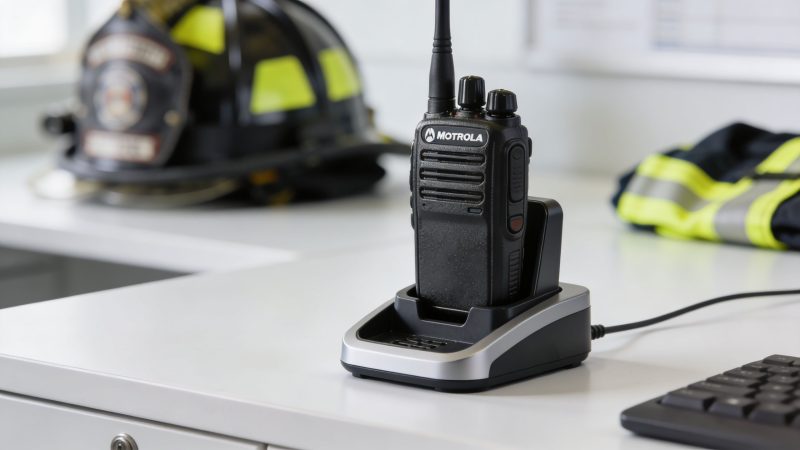
Walkie Talkie Motorola Charger: A First Responder’s Guide
A charger problem rarely shows up at the charging rack. It shows up in the middle of a call, when a portable that looked fine at shift start suddenly drops out on transmit, won’t power on after lunch, or comes back from staging with less runtime than the crew expected. That’s why experienced radio techs stop treating the charger as a cheap accessory and start treating it as part of the communications system.
For first responder agencies, the bigger issue is usually mixed fleets. One station has older Motorola handhelds, another has business-class units for support teams, and somewhere in the middle someone bought a third-party charger because it was cheaper on paper. That’s where total cost of ownership starts to matter. A lower purchase price can still cost more if it shortens battery life, creates compatibility headaches, or leaves radios out of service when they’re needed most.
Why Your Motorola Charger Is a Lifeline Not an Accessory
A radio battery problem rarely announces itself at the charger rack. It shows up ten minutes into a working fire, during traffic control on a long scene, or halfway through a transport when a portable starts browning out on transmit. At that point, the cost is not a replacement charger. The cost is missed traffic, repeated calls, spare swaps, and a crew working with less certainty than they should have.

That is why charger decisions belong in the same conversation as batteries, programming control, and spare radio planning. Agencies with mixed Motorola fleets feel this first. One division may run older portables, another may use newer units, and support teams may have lower-cost radios with different battery chemistry and charging behavior. A charger that is merely "compatible enough" can create extra battery purchases, more bench checks, and more radios tagged as bad when the radio itself is fine.
The cost issue is easy to miss because the charger is cheap compared with the radio. Over a year or two, the charger can drive more cost than its purchase price suggests. Poor charging fit leads to premature battery replacement, unnecessary troubleshooting time, and downtime that forces agencies to keep more spares in circulation. That is total cost of ownership in plain terms. Buy the wrong charging setup once, and you keep paying for it in labor and battery turnover.
Practical rule: If a radio is used to request help, confirm an assignment, or maintain accountability, its charger is part of operational readiness.
A dependable charging setup also cuts support noise. Crews report fewer "dead radio" complaints. Shift change is cleaner because radios return to known charging positions. Supervisors spend less time figuring out whether they have a battery problem, a charger problem, or a user habit problem. If your team already tracks incident readiness and support issues through Resgrid support resources, radio charging should be managed with the same discipline instead of treated like a miscellaneous accessory purchase.
The field failures are usually boring. That is what makes them expensive.
- Shared chargers with no labeling: Radios and batteries get dropped into any open pocket, and nobody can trace which charger has been causing weak runtime.
- Low-cost replacement chargers: They may power up and look fine in a quick check, then shorten battery life over months of daily use.
- No spare rotation: The same few batteries stay in constant service while others sit too long or never get inspected.
- Accessory mix-ups between stations: Charging bases, power supplies, and batteries migrate across sites until compatibility becomes guesswork.
A walkie talkie motorola charger affects more than convenience. It affects readiness, maintenance workload, and replacement spending across the whole fleet.
Decoding Motorola Charger Types and Technologies
A charger that fits the radio can still be the wrong charger for the job. That mistake shows up all the time in mixed fleets. One station buys desk chargers for individually assigned radios, another buys six-bank units for pool radios, then someone starts swapping batteries across models and chemistries. The result is higher battery spend, more troubleshooting, and less confidence at shift change.

The practical way to sort Motorola chargers is by two separate questions. First, how is the charger physically deployed? Second, how does it control the battery while charging? Agencies that keep those questions separate usually make better purchasing decisions and avoid paying twice for the same mistake.
Physical charger formats
The housing style affects workflow, bench space, cable clutter, and how easily crews return radios to the right location.
- Single-unit desktop chargers: Best for individually assigned radios, supervisors, take-home units, and low-volume offices. They are easy to label by user, but they create sprawl if you try to support a whole shift with them.
- Multi-unit chargers: Best for station racks, shared pools, staging rooms, and any operation that turns radios over between shifts. They cost more up front, but they usually save labor and reduce missing-equipment confusion.
- Vehicular chargers: Best for crews who stay in the field for long stretches. They keep a radio topped off between calls, but they do not replace a controlled charging setup back at base.
Form factor is an operations decision before it is a technical one. A detective unit with assigned radios has different needs than an EMS station rotating handhelds through three shifts. Buying the same charger setup for both groups usually raises total ownership cost because one side ends up working around the hardware.
Charging method is what drives battery life
This is the part buyers skip. They see the right cup, the right connector, and the radio powers up, so the charger gets approved. Over time, that shortcut gets expensive.
A basic charger supplies power at a fixed rate or near-fixed rate and expects the battery to sit long enough to reach full charge. That can work for older, low-demand setups, overnight charging, or backup inventory. It is simple and usually cheaper. It is also slower, less informative, and less forgiving when users drop batteries in and out all day.
An intelligent charger monitors charge state and adjusts the charging process instead of feeding the pack the same way from start to finish. That matters in agencies running mixed fleets, because charging behavior that is acceptable for one battery type may shorten service life on another. A smarter charger can also give staff a clearer read on whether the problem is the battery, the radio, or the charging pocket.
The trade-off is straightforward. Intelligent chargers usually cost more at purchase. They often save money later by reducing premature battery replacement, cutting false “bad radio” reports, and giving the shop fewer mystery failures to chase.
The charger has to match fleet behavior, not just the radio model
Mixed fleets create the biggest confusion. A charger may be physically compatible with a radio family but still be a poor fit for how that radio is used. If patrol swaps radios every shift, charging speed, status indication, and pocket labeling matter more than they do in an office where one person uses the same unit every day. If reserve radios sit for long periods, maintenance charging behavior matters more than fast turnaround.
Here is the practical filter:
| Charger need | Best fit | Why it works |
|---|---|---|
| Individually assigned radio | Single-unit desktop charger | Easier user ownership and simpler tracking |
| Shared shift radios | Multi-unit charger | Faster turnover and fewer mix-ups at change of shift |
| Mobile team | Vehicular charger | Supports field readiness between returns to base |
| Older batteries or mixed battery inventory | Intelligent charger | Better control and clearer charging status |
One rule saves a lot of money. Standardize charger types by use case, not by whoever places the next order.
A mixed agency does not need one charger strategy. It needs a small number of approved charging setups tied to real operating patterns. That keeps purchasing cleaner, training simpler, and battery replacement costs more predictable.
The Critical Choice OEM vs Aftermarket Chargers
A charger decision usually looks cheap until the first week of failures. One patrol radio comes off the cradle half-charged. A spare battery runs hot. The shop swaps batteries, then radios, then chargers, and labor starts eating whatever was saved on the purchase order.
That is why OEM versus aftermarket should be judged on total cost of ownership. In a mixed Motorola fleet, the key question is not which charger costs less to buy. It is which option gives you fewer battery replacements, fewer false trouble tickets, and fewer radios out of service during shift change.
Where OEM earns its keep
OEM Motorola chargers are designed around specific battery and radio combinations. That matters in agencies running mixed inventories, where one bad purchasing shortcut can create years of avoidable confusion. The advantage is consistency. Radios seat correctly, charge indicators are more predictable, and support is clearer when something goes wrong.
For front-line units, that consistency usually pays for itself. A charger that treats batteries properly helps hold runtime longer and cuts down on the steady drip of premature pack replacement. It also reduces the common shop problem where a weak battery gets reported as a bad radio.
If your team is also tracking radios in vehicles and field assets through tools like agency AVL unit management, charger reliability matters even more. Location data is useful only if the radio or attached equipment stays powered through the shift.
Where aftermarket can make sense
Aftermarket chargers do have a place. I have seen them work acceptably in training rooms, low-use reserve caches, and temporary expansion buys where the agency needs coverage fast and can tolerate some extra oversight.
The mistake is buying them for mission-critical use without a test plan.
A third-party charger should be checked for cradle fit, charge completion behavior, heat, power supply quality, and warranty response. In mixed fleets, it should also be checked across the exact battery variants your agency already owns. A charger that works fine with one battery revision can become a nuisance with another.
That risk is not theoretical. It shows up as intermittent charging, loose seating, and batteries that look charged on the LED but do not hold through a full shift.
OEM vs. Aftermarket Motorola Chargers A Comparison
| Factor | OEM (Original Equipment Manufacturer) | Aftermarket (Third-Party) | Impact on First Responders |
|---|---|---|---|
| Charging profile | Designed for specific Motorola battery and radio behavior | Often built around broader compatibility claims | Better battery care usually means fewer early replacements |
| Fit and contact reliability | More consistent across approved models | Can vary by vendor or production batch | Poor contact leads to missed charges and wasted troubleshooting time |
| Support path | Manufacturer documentation and established parts channels | Usually depends on the reseller | Faster diagnosis keeps radios in service |
| Feature support | Better match for model-specific charging functions | May skip or simplify those functions | Matters more in mixed fleets with different battery types |
| Upfront cost | Higher | Lower | Purchase savings can disappear if failure rates rise |
| TCO in mixed fleets | More predictable | Requires more validation and spot checks | Lower uncertainty helps budgeting and replacement planning |
One more practical point. Aftermarket accessories can be perfectly fine when the task is simple and the consequence of failure is low. A consumer add-on such as a walkie talkie adapter for Razor is not being asked to support a patrol fleet, a fire cache, or an EMS rotation board. Charger buying for public safety has a different standard because downtime costs labor, missed readiness, and replacement batteries.
Buy OEM for front-line service, shared shift radios, and any fleet where downtime creates operational risk. Use aftermarket only where the use case is controlled, the vendor is proven, and the savings still hold up after testing, replacement rates, and technician time are counted. In a mixed agency fleet, that is the line that protects both uptime and budget.
Matching Chargers to Your Fleet A Compatibility Guide
Mixed fleets create charger mistakes because the equipment often looks close enough to seem interchangeable. A radio drops into the cradle. The LED comes on. Everyone assumes it’s fine. Then the unit comes off the rack with a weak battery, or it charges only when the battery is off the radio.
That’s why compatibility has to be managed like an inventory problem, not left to memory.

Read the charger like a part, not like an accessory
A walkie talkie motorola charger should be checked by exact model, supported radio family, battery type, and power supply requirement. Don’t rely on “fits Motorola” from a vendor listing. In practice, that phrase causes more confusion than clarity.
One under-documented pain point in mixed fleets is the radio-side contact problem. In those cases, a battery may charge correctly off-radio but not while attached to the radio. Teams often blame the charger first and replace the wrong part. Forum discussions highlighted over 15 unresolved cases since 2020, which shows how often charger diagnosis gets mixed up with contact or seating faults (Motorola troubleshooting guide).
A real example with a multi-unit charger
The Motorola 56531 is a good example of what “buying for fleet workflow” looks like. It’s a six-unit multi-charger built for CLS Series business walkie-talkies including CLS1110, CLS1410, CLS1450, plus VL50, with limited compatibility for DLR1020/DLR1060. It supports simultaneous charging through a single power input and reaches full capacity in about 6 to 8 hours per unit in DLR-compatible use. It also doubles as a cloning station for up to six devices, transferring settings without PC software, and that reduces programming time by over 80% for large teams (Motorola 56531 multi-charger details).
That last point matters more than most buyers realize. In a mixed fleet, the charging rack can also become the standardization point. If the charger helps keep channel settings and privacy codes aligned, it saves labor and prevents user-error drift between shifts.
For teams also juggling field accessories, it helps to keep radio add-ons just as model-specific. A good example is this walkie talkie adapter for Razor, which is useful when you’re trying to connect hearing protection or headset setups without improvising in the field.
Practical compatibility rules
Use these rules before you place an order:
- Match by exact model number: Don’t buy from appearance alone.
- Verify battery chemistry: NiCd, NiMH, and Li-ion don’t all behave the same in a charger.
- Standardize power supplies: The charger base is only half the system.
- Label fleet groups: Put charger-family labels on shelves, not just on spreadsheets.
- Test one unit first: Especially with mixed fleets or replacement vendors.
If you’re tracking field resources and mobile units through tools like AVL unit mapping for responders, the charger side should be just as organized. Radios are easier to account for when the charging infrastructure is standardized by station, team, and model family.
Safe Charging Practices to Maximize Battery Lifespan
A battery program usually fails in the charging room first. In mixed first responder fleets, that failure shows up as rising replacement orders, radios that come off the rack half-ready, and crews losing confidence in gear that should have been dependable.

What protects the battery
Battery lifespan comes down to heat, charge control, and consistency. The charger matters, but daily handling matters just as much.
Use the charger and power supply specified for that battery family. Improvised adapters and look-alike cradles are expensive shortcuts. They can overheat packs, undercharge them, or create intermittent contact that looks like a battery failure. In a mixed fleet, that confusion drives up total cost of ownership because staff start replacing batteries, then radios, before they identify the charging mistake.
Heat is the silent budget killer. A radio that has been transmitting hard in a patrol car, on a fireground, or during a long event should cool down before it goes back in the cradle. Charging a hot pack shortens service life and makes runtime less predictable. That matters more to field operations than the purchase price of the battery.
Charging contact is another common weak point. Dirty battery terminals, bent contacts, and worn cradle springs create false charge behavior. The LED may show activity, but the pack never reaches a reliable full charge. Agencies then blame the battery, even though the problem lies with the charging station.
The battery that “failed early” often spent weeks charging hot, charging on the wrong supply, or sitting in a dirty cradle.
Daily habits that actually save money
Shops and stations that get good life from their batteries usually enforce a few basic rules:
- Let hot radios cool before charging: Especially after heavy transmit use.
- Train staff on normal LED behavior: A status light only helps if crews know what a fault looks like.
- Clean contacts on a schedule: Dirt, skin oil, and pocket debris interfere with charging.
- Avoid using standard chargers as storage racks: Return charged units to service rotation.
- Keep power supplies matched to each cradle: Mixed adapters create hard-to-trace failures.
- Tag weak units early: One bad battery left in circulation wastes labor across multiple shifts.
Those habits save money because they reduce false replacements. They also reduce the operational cost of uncertainty. Crews stop swapping radios mid-shift, supervisors stop chasing “dead” batteries that are really charging problems, and procurement stops buying around a preventable maintenance issue.
A quick refresher can help staff spot problems before they become replacements:
A simple shift checklist
Use the same check at the start or end of every shift:
- Seat the radio fully and confirm the expected LED behavior.
- Check for excess heat, swelling, or case damage before and after charging.
- Inspect battery and radio contacts for dirt, corrosion, or wear.
- Remove problem units from rotation immediately instead of giving them one more shift.
- Return each radio to the correct charger family for that battery type.
This is basic discipline, not extra admin work. In agencies running mixed Motorola fleets, it is one of the cheapest ways to extend battery life, cut avoidable purchases, and keep more radios ready at the start of shift.
Troubleshooting Common Motorola Charger Issues
Charging problems are easier to solve when you stop guessing and isolate the fault. Start with the simplest question. Is the issue in the battery, the charger, or the radio contacts?
Radio won’t charge in the cradle
Symptom: The radio sits in the charger, but charge status is inconsistent or absent.
Likely cause: Bad seating, dirty contacts, wrong charger family, or a radio-side contact issue.
Solution: Clean the battery and radio contacts, reseat the unit, then test the same battery in a known-good charger. If the battery charges off-radio but not while attached, inspect the radio-side contacts before replacing the charger. That specific problem shows up often enough in mixed fleets that it shouldn’t be treated as rare.
Battery charges but dies too fast
Symptom: The radio indicates full charge, but runtime drops off quickly in service.
Likely cause: Aging battery, heat damage, repeated charging with the wrong adapter, or a charger that isn’t finishing correctly.
Solution: Compare against a known-good battery from the same fleet. If the replacement battery performs normally, pull the original pack from service. If both act the same, test the charger and power supply together.
Charger appears dead
Symptom: No LED activity, or none of the bays respond.
Likely cause: Failed power supply, loose connection, or damaged charger base.
Solution: Verify the correct adapter is attached and properly seated. Check for cable damage, then move one known-good radio and battery into the suspect charger. If nothing responds while the same radio charges elsewhere, the charger or power supply is the issue.
One bay works, another doesn’t
Symptom: Multi-unit charger charges some radios normally, but one position fails repeatedly.
Likely cause: Dirty bay contacts, physical wear, or a damaged charging slot.
Solution: Swap the radio into a different bay. If the problem stays with the bay, mark that slot out of service and clean or replace the charger as needed.
Don’t replace batteries, radios, and chargers at the same time. Swap one known-good component at a time, or you’ll spend money without learning anything.
A clean troubleshooting routine cuts downtime and prevents “parts cannon” repairs where teams replace everything and still don’t solve the problem.
A Smart Procurement Strategy for Your Agency
If you’re buying chargers one at a time whenever something breaks, you’re not controlling cost. You’re reacting to failures. A better approach is to buy charging infrastructure as part of communications uptime.
That means evaluating a charger purchase against four agency costs: battery replacements, radio downtime, labor spent troubleshooting, and the operational friction caused by mixed equipment.
A practical TCO framework
Use this short framework when reviewing any charger purchase.
First, ask whether the charger matches how the radio is issued. Shared shift radios need multi-unit discipline. Individually assigned radios may not. If the form factor fights the workflow, the charger will create work instead of removing it.
Second, ask whether the charger reduces fleet confusion. In mixed Motorola environments, standardizing by station or team often saves more than shaving a little off unit price. Wrong-cradle mistakes, mismatched power supplies, and “it fit so we used it” logic are all hidden costs.
Third, ask what happens when it fails. OEM gear usually gives you a clearer path for replacement and support. With third-party gear, that path depends on the vendor and your own testing discipline.
Questions worth asking before you buy
Use procurement reviews to force clear answers.
- Which exact radio and battery models does this charger support?
- Does the charger require a specific power supply?
- Will staff be able to tell charge status and fault status easily?
- Can this charger support a shared-rack workflow without confusion?
- Does this purchase reduce labor, or only reduce invoice price?
If the vendor can’t answer those questions cleanly, keep looking.
Where agencies save money
The biggest savings usually come from standardization, not bargain hunting. Buy fewer charger types. Label them by fleet group. Keep matched power supplies with matched cradles. Replace suspect accessories before they damage batteries. Test new chargers in a controlled group before wide rollout.
For agencies budgeting communications tools alongside operations software, it helps to think the same way you would with any service platform. Don’t compare sticker price only. Compare what it costs to keep the system running. That same mindset applies whether you’re reviewing chargers or looking at response platform pricing options.
The right procurement strategy doesn’t just buy chargers. It buys reliability, fewer preventable failures, and less wasted labor at the rack.
Resgrid, LLC helps first responders, dispatch centers, and field teams manage the operational side that surrounds critical equipment. If you need a practical platform for dispatching, messaging, personnel tracking, scheduling, and reporting without heavy implementation overhead, take a look at Resgrid, LLC. It’s a strong fit for agencies that want better visibility into people, resources, and day-to-day readiness.