
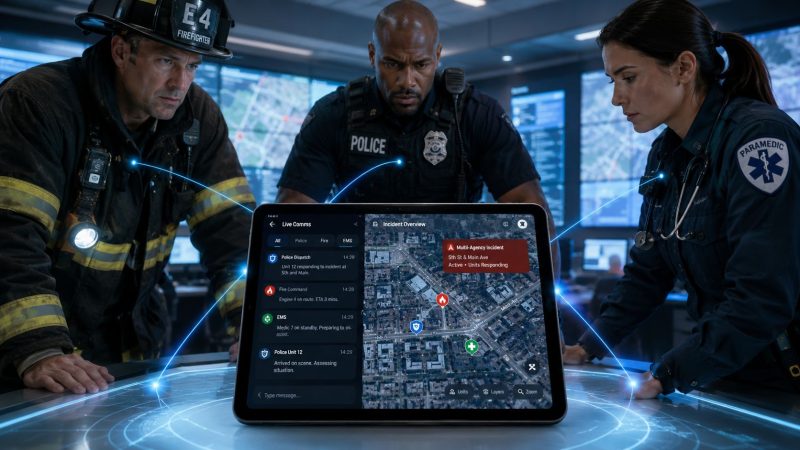
Real-Time Messaging Platform for First Responders
You're probably dealing with this already. A unit is en route, another is staging, dispatch is fielding updates from three directions, and someone important is still relying on a phone call chain or a consumer chat thread to push operational information. That works right up until the moment it doesn't.
In routine operations, bad communication wastes time. In a wildfire, building collapse, mass gathering, missing-person search, or weather event, it creates blind spots. People duplicate effort, miss status changes, and act on stale instructions. A real-time messaging platform fixes part of that problem, but only if it's built for field conditions instead of office convenience.
The difference matters. Mission-critical messaging has to survive bad coverage, overloaded networks, tired users, and shifting command structures. It also has to be affordable enough that agencies can deploy it widely, not just buy licenses for a handful of supervisors and call the problem solved.
Why Instant Communication Is Non-Negotiable in a Crisis
A communications breakdown rarely starts with a dramatic failure. It starts with small delays.
Dispatch sends an update. One crew sees it. Another is in a fringe coverage area. A third hears part of it over radio traffic but not the location correction that followed. Then a photo from the scene arrives in a separate app, not the incident channel, so command never sees it in time. Nobody intended to create confusion. The system created it.
That's why a real-time messaging platform matters. It gives teams one operational thread for updates, acknowledgements, media, and status changes. It reduces the number of places responders have to check while they're already overloaded.

Consumer behavior points in the same direction. Help Scout's live chat statistics report that 41% of consumers prefer live chat support, while 73% satisfaction is higher than phone at 44% and email at 61%. In emergency operations, that preference becomes stricter. People under pressure want the fastest path to a clear answer, not a delayed callback.
Consumer apps feel familiar, but that's not enough
A lot of teams default to the tools people already know. That's understandable. Familiar apps lower training friction. The problem is that familiarity gets mistaken for reliability.
Consumer-grade chat tools usually optimize for convenience, social use, and broad adoption. Incident communications need different priorities:
- Clear channel structure: Operations, medical, logistics, staging, and command can't all live in one noisy group.
- Accountability: Teams need to know who received an instruction and who acknowledged it.
- Retention: Missed messages have to remain available when a responder reconnects.
- Operational control: Admins need role-based access, not an informal invite link.
Field reality: If your comms tool can't answer “who saw this, who responded, and what changed since the first message,” it's not an incident tool. It's a chat app.
This is also where adjacent safety tools matter. For people working alone or in unfamiliar areas, SafePing is a safety and emergency app for solo travelers. It's not a substitute for responder coordination, but it shows the same basic truth. Fast, location-aware communication becomes more valuable as risk goes up.
Delay compounds fast
One late update can trigger a chain of unnecessary movement. Two units get sent instead of one. A perimeter team searches the wrong access point. A supervisor burns time confirming information that should have been visible in the incident channel. Those mistakes cost fuel, labor, and attention. In a serious incident, they also increase exposure.
A real-time messaging platform earns its place when it shortens the time between observation, distribution, acknowledgement, and action.
How Real-Time Messaging Platforms Actually Work
The core idea is simple. A good platform keeps a line open instead of repeatedly checking whether there's new information.
If you want the plain-English version, think of the difference between a dedicated radio channel and constantly hanging up, redialing, and asking if there's traffic. One model stays open. The other wastes time and network overhead.

Persistent connections beat constant polling
Production systems usually rely on persistent full-duplex connections, commonly WebSockets. This chat architecture overview explains why that matters. The sender's message is written to durable storage, the platform checks whether the recipient is online, and it either delivers immediately over the open connection or queues the message for later retrieval.
That architecture solves a problem many buyers overlook. Instant delivery is only half the job. The other half is preserving the message when the network is unstable.
Here's what that means in practice:
- A responder sends a message from the field.
- The platform stores it durably so it isn't lost if the connection drops a second later.
- The system checks presence to see who is currently online.
- Online users get immediate delivery over the open connection.
- Offline users get deferred delivery when they reconnect.
That last step is what separates operational messaging from disposable chat.
Storage matters as much as transport
A lot of demos focus on how quickly a message appears on another phone. That's fine for sales. It's not enough for an after-action review or a multi-hour incident.
A mission-ready platform should preserve conversation continuity even when users move through dead zones, tunnels, stairwells, parking structures, or rural terrain. If a firefighter goes offline inside a structure and reconnects later, the message history should still make sense. If a supervisor joins midway through the incident, they should see the thread in order.
Don't buy based on the happy-path demo. Ask what happens when a user sends a message, loses signal, reconnects on a second device, and needs the full thread intact.
A related consideration is media. Teams often share photos, maps, location references, and short clips, not just text. If you're evaluating camera-supported workflows, this guide on live feed camera features and quality is useful because it highlights the operational side of video inputs. The lesson applies to messaging too. Rich media is only helpful when the transport, compression, and retrieval logic are built for field use.
Here's a short visual walkthrough of the underlying concepts:
What works and what doesn't
A few patterns consistently work well in the field:
- Open connections for active users: Better for low-latency updates.
- Durable message storage: Better for auditability and reconnect behavior.
- Presence tracking separate from message history: Better for performance and simpler scaling.
- Offline queueing: Better for uneven coverage.
What tends to fail operationally is the opposite:
- Polling-heavy designs: They add delay and chatter.
- Session-based chat with weak persistence: Fine for customer support, bad for incidents.
- No offline logic: Users think messages were sent or received when they weren't.
- Media sent outside the incident system: Teams lose context and records.
If your platform can't keep transport and storage separate, it will start dropping value the moment the environment gets messy.
Key Platform Features for Mission-Critical Operations
Features are easy to oversell. Most product lists read like they were written for a procurement sheet, not for a storm, a hazmat scene, or a citywide event. The question isn't whether a feature exists. The question is whether it prevents confusion, saves labor, or keeps someone safer.

Delivery discipline comes first
Before you care about voice clips, maps, or status icons, care about message order.
Ably's guidance on chat architecture emphasizes ordered, exactly-once delivery to prevent duplicate or out-of-order messages. In regular business chat, a duplicate can be annoying. In field operations, it can create contradictory action.
A platform should preserve sequence for operational instructions like staging changes, evacuation routes, task assignments, and safety updates. If those arrive out of order, the conversation stops being trustworthy.
Features that actually change outcomes
The most useful systems usually include a mix of communication and command-support capabilities:
- Priority channels: Separate command, operations, medical, logistics, and support traffic so one noisy conversation doesn't bury a critical update.
- Acknowledgements: “Delivered” isn't enough. For key messages, teams need a clear acknowledgement state so dispatch doesn't resend blindly or assign backup units unnecessarily.
- Role-based group messaging: Contact the hazmat team, event security detail, or on-call EMS group without building ad hoc lists under pressure.
- Rich media sharing: Photos of damage, access points, patient packaging issues, route blockages, or equipment faults carry far more context than text alone.
- Status visibility: Units can mark available, en route, staged, on scene, or unavailable without tying up voice traffic.
- Push-to-talk support: Some situations call for voice speed with messaging persistence alongside it.
Each of those can save money if used correctly. Acknowledgements reduce duplicate dispatches. Better role targeting reduces broad alerts that pull in people who don't need to act. Integrated status updates cut radio clutter and save dispatcher time.
Audit trails save more than paperwork time
A searchable incident thread is not just an admin feature. It prevents rework during the event and supports review afterward.
If your team is comparing options, Resgrid messaging features are one example of how messaging can sit inside a broader operational environment instead of being bolted on as a separate app. That matters when status, assignments, and communication need to live in the same system.
A good platform reduces the number of follow-up questions responders have to ask. That's where the time savings actually show up.
Features to treat with skepticism
Some feature sets look impressive in demos but don't add much value in real operations unless the basics are solid first.
| Feature area | Useful when | Risk if overemphasized |
|---|---|---|
| AI summaries | Shift changes, long incidents | Can hide missing context if message order is unreliable |
| Fancy reactions and social-style chat tools | Low-stakes collaboration | Add noise in high-tempo channels |
| Heavy customization | Mature teams with admin capacity | Becomes expensive if every workflow needs consulting work |
| Large media support | Damage assessment and evidence capture | Fails if upload handling is weak in low coverage |
The cheapest mistake is skipping gimmicks. The expensive mistake is paying for them before you've verified ordering, persistence, acknowledgements, and channel discipline.
Ensuring Your Messages Get Through When It Matters Most
The hardest test for a real-time messaging platform is simple. Does it still help when normal communications start failing?
That's the question many buying processes avoid. Vendors love feature tours in strong Wi-Fi, on recent phones, with a quiet test group. Real incidents don't look like that.

Reliability starts with failure assumptions
A serious platform should assume some combination of these will happen:
- Coverage drops
- Devices reconnect intermittently
- Users switch from one network to another
- Teams need access to earlier messages after an outage
- Sensitive information moves through the same channels as routine coordination
That drives the design requirements. Messages need to queue locally or server-side when delivery can't happen immediately. Users need the thread to reconcile cleanly after reconnect. Security controls need to hold up even when the network path changes.
If your agency handles medical or personally sensitive details, security can't be vague. You need to know how access is controlled, what gets logged, how long data is retained, and where it's stored. Resgrid security information is the kind of material you should expect any serious vendor to provide. If a provider can't answer those questions plainly, keep moving.
Dead zones are no longer edge cases
For rural agencies, disaster teams, event security, and search crews, “limited coverage” is normal operating territory. The overlooked issue isn't whether a message app is fast in town. It's whether it still functions during outages or away from terrestrial networks.
Infovista's overview of non-terrestrial networks notes that the industry is shifting toward direct-to-device satellite connectivity for emergencies, allowing platforms to maintain communication during outages, disasters, or rural operations where terrestrial networks are unavailable.
That doesn't mean every agency needs satellite on day one. It means buyers should stop treating terrestrial coverage as guaranteed.
If the platform's resilience plan is “users can always call instead,” you don't have a resilience plan.
What to ask before you trust it
Don't settle for “we're reliable.” Ask operational questions:
- What happens to a sent message if the sender loses signal immediately afterward?
- How does the system handle offline recipients?
- Can users retrieve missed messages in order after reconnecting?
- What fallback exists when cellular networks are degraded or unavailable?
- Are acknowledgements preserved across devices and reconnects?
- Can admins separate sensitive channels from general operational traffic?
You're not looking for polished marketing language. You're looking for evidence that the platform was designed by people who've thought through failure states.
Resilience is also a cost issue
Fragile tools get expensive fast. Teams compensate with duplicate systems, extra radio traffic, repeated phone calls, and manual logging. Supervisors spend time reconciling conflicting updates. Dispatchers repeat information because they can't trust delivery. None of that shows up as a line item in software pricing, but agencies still pay for it in labor and avoidable confusion.
Reliable delivery, offline recovery, and practical failover design often save more money than a long list of premium features.
How to Select the Right Real-Time Messaging Platform
Most agencies don't buy the wrong platform because they chose carelessly. They buy the wrong platform because the evaluation focused on visible features and ignored operating cost.
A useful buying process starts with one question: will this tool still be affordable and usable after the rollout, not just during procurement?
Start with fit, not feature count
By 2026, over three billion people are projected to actively use messaging apps, making messaging a foundational communication behavior according to Business of Apps messaging market data. For first responder agencies, that means the platform should feel intuitive enough that users don't need extensive retraining, while still providing the controls consumer apps lack.
That's an important budget issue. Every extra hour of training, support, and workaround documentation is part of the actual cost.
Look for fit in four areas:
- Operational fit: Can it support incidents, shifts, teams, and role-based communications without awkward workarounds?
- Integration fit: Can it coexist with dispatch, CAD, rosters, notifications, and reporting workflows you already use?
- User fit: Can volunteers, reserve staff, and non-technical personnel use it correctly under stress?
- Financial fit: Can you scale it across the organization without pricing penalties that force partial deployment?
Compare protocols with the use case in mind
The protocol itself isn't the whole buying decision, but it affects behavior, performance, and maintenance.
| Protocol | Best For | Pros | Cons |
|---|---|---|---|
| WebSockets | Interactive real-time messaging | Supports persistent two-way communication and quick event delivery | Requires careful connection management at scale |
| MQTT | Lightweight telemetry and constrained environments | Efficient for device-oriented messaging and low-bandwidth cases | Often needs added application logic for richer chat workflows |
| Polling-based approaches | Simple low-volume updates | Easier to prototype in basic systems | Higher overhead and weaker real-time behavior |
A vendor doesn't need to expose every architectural detail to end users. They do need to explain why the design fits your environment.
Ask questions that expose total cost
Procurement teams often get trapped by low entry pricing and high operational drag. Use questions that uncover hidden spend:
- How is pricing structured as users, channels, and incidents grow?
- Do you charge for implementation, onboarding, or mandatory professional services?
- Can we administer channel structures and user roles ourselves?
- What requires vendor intervention that our own staff can't handle?
- How does offline behavior work in fringe coverage areas?
- What reporting and message retention are included by default?
- How easy is it to remove or add users without contract friction?
A lot of agencies overpay because they buy a communications tool that needs consulting hours for routine changes.
Locked-in suites versus flexible models
The market splits here.
Some platforms bundle messaging into broad enterprise suites with long contracts, layered modules, and implementation dependencies. That can work for very large organizations with procurement muscle and dedicated IT teams. It often works poorly for mixed career/volunteer agencies, local governments, event operations, and lean emergency management teams.
Flexible models tend to be more cost-effective when your needs change frequently. Resgrid comparison information is relevant here because it reflects a different approach: messaging as part of an operational platform with self-service management rather than heavy contract dependency. That doesn't make it the right fit for every agency, but it does illustrate the kind of pricing and deployment model worth considering.
Buy the platform your whole organization can use, not the one that only looks good in the command staff demo.
The right real-time messaging platform should cut friction, not create a new administrative burden. If your rollout plan depends on limiting access because full deployment costs too much, your communications gap will stay in place.
Building a More Connected and Resilient Response Team
A real-time messaging platform is no longer a convenience layer for public safety and field operations. It's part of command, coordination, and personnel safety.
The practical standard is straightforward. The platform has to deliver messages quickly, preserve them when conditions are bad, keep conversation order intact, and support teams that don't operate in perfect coverage. It also has to be affordable enough for broad deployment. A system that only reaches a slice of the organization leaves the same old gaps in place.
The most expensive mistake is buying on appearance. Clean interface, long feature list, polished demo. None of that matters if users lose context in a dead zone, if command can't verify acknowledgements, or if pricing forces you to ration licenses and split communication across multiple tools.
A better approach is to audit your current stack thoroughly. Check where incident communication really happens today. Identify where updates get duplicated, where message history disappears, where teams fall back to personal apps, and where coverage gaps break continuity. Then evaluate platforms against field conditions, not office assumptions.
Cost-effectiveness doesn't mean buying the cheapest tool. It means buying the system that reduces duplicate dispatches, lowers admin overhead, shortens training time, and avoids expensive workarounds. Reliability and cost control usually travel together when the platform is designed well.
If your team operates in harsh conditions, rural areas, crowded events, or multi-agency incidents, this decision affects more than convenience. It affects tempo, clarity, and confidence when the situation gets noisy.
If you're reviewing your communications stack, Resgrid, LLC is worth evaluating as a purpose-built option for first responders, dispatchers, and operational teams. It combines messaging with broader incident and personnel management in a self-service model, which can help agencies improve coordination without adding contract-heavy overhead.