
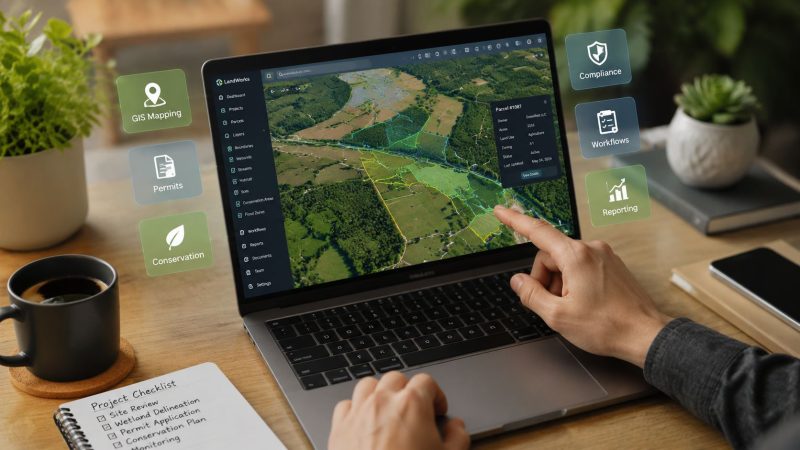
Optimize with Land Management Software: Your 2026 Guide
You're probably dealing with some version of this right now. A parcel boundary lives in one GIS file. Lease terms sit in a spreadsheet someone copied last year. Permit dates are buried in email. Field crews are using a different map than the office. Then an outage, spill, access dispute, or wildfire threat hits, and everybody starts asking the same question at once: which record is the right one?
That's when land management stops being an administrative function and becomes an operational one.
I've seen teams treat land records like filing cabinets with better search. That approach fails the moment the field needs fast answers. Good land management software doesn't just store documents. It connects ownership, access, obligations, maps, contacts, and field status so the people making decisions can act on current information instead of assumptions.
Your Land Data Is More Chaotic Than You Think
The warning signs usually look small at first. A right-of-way map doesn't match the tract file. A permit renewal date is off by a few days. A crew shows up at the wrong gate because the access notes were updated in email but never pushed into the map everyone else uses.
Then a real event exposes the whole mess.
A drainage complaint comes in after heavy rain. Operations needs to know who owns the affected parcels, whether there's an active easement, what environmental conditions apply, and which access road is usable. One person opens a spreadsheet. Another pulls a PDF survey. Someone in the field texts a photo of a locked entrance. Legal has the latest agreement, but only in a shared folder with vague file names. That isn't a software problem. It's a coordination problem caused by fragmented records.
The market has grown because more organizations now recognize that fragmented records are expensive to maintain. One market study values the global land management software market at USD 1.93 billion in 2024 and projects USD 3.25 billion by 2033 at a 5.97% CAGR, reflecting a shift from manual record-keeping to integrated digital workflows, according to Business Research Insights on the land management software market.
Where teams usually lose time
- Duplicate records: The same parcel gets tracked in finance, GIS, legal, and field logs with slightly different details.
- Version confusion: Staff waste time asking which map, survey, or lease abstract is current.
- Missed obligations: Calendar reminders live with one person instead of in a shared operational system.
- Slow incident response: Dispatch, operations, and field teams spend early response time assembling basic property context.
If your team still relies on survey PDFs and static tract maps, it helps to sharpen the basics too. A practical guide on how to evaluate land accurately is useful because bad parcel interpretation often starts before the software even enters the picture.
When a team says its land data is “mostly organized,” that usually means it works on quiet days and breaks on the days that matter.
Land management software earns its keep when it turns scattered records into one operational picture. That's what makes it valuable.
What Is Land Management Software Really
Land management software is best understood as a digital control tower for land assets. It gives operations, legal, GIS, compliance, and field staff one place to see the same parcel, the same status, and the same obligations.

A lot of buyers think it's just lease administration with maps attached. That's too narrow. In practice, a solid platform combines spatial data with transactional data. The parcel on the screen isn't only a shape. It's linked to ownership history, surveys, agreements, expirations, access notes, field observations, and compliance tasks.
What sits at the center
Technically, these platforms are built around a GIS-enabled system of record that centralizes cadastral boundaries, ownership data, surveys, and leasing records in one database, making parcel-level changes visible across departments, as described by DITECH land management system guidance.
That architecture matters more than most demos admit. If mapping lives in one system and obligations live in another, teams still end up reconciling records by hand. The software only becomes operationally useful when the map and the workflow are tied together.
A simple way to explain this is:
| Operational question | Weak setup | Strong setup |
|---|---|---|
| Who controls access to this parcel? | Search email and PDFs | Open parcel record and see current rights |
| What expires next month? | Check personal reminders | View shared obligation calendar |
| Can the field team trust the map? | Depends on file version | One authoritative parcel layer |
| What changed on this tract? | Ask around | Review record history in one place |
What it replaces
Older systems often handled tract records well but stayed office-bound. One industry review notes that WolfePak LandPro was founded in 1990, showing how long specialized on-premise tract systems have been part of this category. That same review describes the evolution toward modern tools with acreage histories, chains of title, interactive maps, and dashboards in newer platforms, as discussed in BISOK's review of land management software history and capabilities.
That history explains a common buying mistake. Teams replace paper but keep the same habits. They scan documents, upload them, and call it digital transformation. It isn't. If the software can't support current operational decisions, it's just better storage.
Practical rule: If a field supervisor can't answer “Who owns this, what applies here, and who needs to be notified?” from one screen, the system still isn't doing the real job.
The value of land management software is shared situational awareness. That's what prevents avoidable trips, rework, access mistakes, and compliance misses.
The Core Features That Unlock Major Savings
The features that matter most aren't always the ones vendors lead with. Buyers often focus on record depth, but the biggest savings usually come from reducing repeat work across office and field teams.

The largest performance gain comes from workflow automation. Independent industry descriptions note that these platforms consolidate agreements, obligations, and field updates in a single platform with mobile access, shortening approval cycles and lowering the risk of missed compliance commitments, according to Boreal's overview of land management software workflows.
Features that actually save money
GIS and map-based operations
A good parcel map saves money before anyone notices it. Crews stop driving to the wrong access point. Office staff stop issuing work against the wrong tract. Supervisors can plan staging, ingress, and adjacent land impacts using the same map the field sees.
Practical example: if a road closure blocks a normal route, the team can check alternate parcel access and ownership conditions before dispatching trucks. That avoids wasted trips, delayed work orders, and avoidable calls to landowners after the fact.
Obligation and compliance tracking
Many teams encounter a point where they stop thinking like operators and start thinking like archivists. A permit, lease term, surface use condition, or easement requirement isn't just a document. It's a future action.
What works:
- Shared due dates: Everyone sees the same renewal, inspection, and notice windows.
- Parcel-linked obligations: The rule appears with the land record, not in a separate spreadsheet.
- Triggered tasks: A status change creates the next action automatically.
What doesn't work:
- Email-only reminders: They disappear when staff changes.
- One person owning the calendar: That creates blind spots.
- PDF archives with no workflow: Easy to store, hard to operate from.
Automation and mobile access
Field updates need to move back into the system fast. If crews inspect a gate, note erosion, confirm occupancy, or report a blocked right-of-way, that update should feed operations without a second round of manual entry.
That's why mobile capability matters. It's not about convenience. It's about reducing lag between observation and action.
A strong setup usually includes:
- Offline-friendly field capture for remote areas
- Photo and note attachment at the parcel or agreement level
- Approval routing so legal, land, and operations aren't working in sequence when they could work in parallel
For teams that also manage incidents, schedules, and field coordination, platforms with interoperable tools matter. The broader workflow becomes much smoother when land records can complement systems used for dispatch and operational coordination, such as Resgrid's platform features for field and response management.
The cheapest software becomes expensive fast if crews keep calling the office to verify access, boundaries, or obligation status.
The savings are usually straightforward. Fewer repeat site visits. Fewer missed dates. Less time reconciling conflicting records. Less legal and operational friction around the same parcel.
Land Management in Action Across Key Sectors
The strongest proof of value isn't in a feature list. It's in how the software behaves when different sectors use the same land record under pressure.
Government agencies are the dominant users of land management software, with use cases focused on property tax assessment, permit approvals, and zoning enforcement, according to Strategic Market Research on land management software adoption. That matters because public-sector work is rarely just administrative. It crosses departments, timelines, and field conditions.
Agriculture and water access
A farm operator might use the platform to manage parcel boundaries, water rights documentation, seasonal access restrictions, and contractor permissions. The immediate win is fewer mistakes around who can enter which tract and under what conditions.
The less obvious win is planning. When planting decisions, drainage concerns, and access constraints sit in the same system, the operator can prevent work from being scheduled on land with unresolved restrictions. That cuts rework and keeps crews from burning a day on avoidable conflicts.
Forestry and wildfire coordination
Forestry teams need more than harvest planning. They need to track boundaries, environmental constraints, haul routes, and agency coordination.
During a wildfire threat, those records stop being administrative and become tactical. Staff need to identify parcel ownership near the fire edge, confirm ingress and egress routes, note water access, and flag restrictions that could affect heavy equipment movement. If the information is split across stand maps, permit binders, and office drives, response slows down at exactly the wrong time.
Mapping matters here, especially when response agencies and land managers need a shared operating picture. Tools that support clear geospatial coordination, such as mapping capabilities for operational teams, fit naturally into this kind of workflow.
Public lands, parks, and regional agencies
A search and rescue callout on public land is a good test of whether the system is operationally useful. Dispatch wants access points. Rangers want hazards and terrain context. Command wants ownership boundaries, closures, and authorized vehicle routes. Public information staff may need to know which adjacent stakeholders must be notified.
A weak setup forces each unit to assemble that picture manually. A strong one lets staff open the area, see the relevant parcels, and work from current records.
Here's what that difference looks like in practice:
| Scenario | Without an integrated land platform | With an integrated land platform |
|---|---|---|
| Missing hiker near boundary area | Staff debate ownership and access | Teams identify jurisdiction and entry points quickly |
| Utility fault crossing multiple parcels | Calls and emails to verify rights | Easements and contacts are already tied to the map |
| Flooded culvert on managed land | Field notes stay local to one crew | Updates are visible to office and response leads |
Public agencies get the most value when land software supports live coordination, not just record retention.
That's why the best public-sector deployments usually involve operations, GIS, permitting, and field supervisors from the start. If only the back office owns the system, the field won't trust it when an urgent event hits.
Connecting the Office to the Field with Integrations
A land platform by itself helps. A land platform connected to the rest of your operations stack changes response speed, handoffs, and accountability.

The mistake I see most often is buying land management software as a destination system. Teams load records into it, then keep dispatch, inspection, work order, and communications processes somewhere else. That creates a clean database but a messy operation.
What good integration looks like
Start with the information that has to move without delay:
- Incident to parcel context: A reported event should pull the affected parcel, ownership, access notes, and restrictions.
- Field observation to task creation: A crew note about damage, encroachment, or blocked access should create a follow-up action.
- Agreement to operational schedule: If an easement condition requires notification, the system should push that task to the team responsible.
- Map update to everyone else: Boundary or access changes must be visible to office staff and field users at the same time.
This matters most during time-sensitive work. If a dispatcher receives a call about smoke near managed land, the first minutes shouldn't be spent opening separate systems to figure out road access, neighboring landowners, or whether a gate code changed last week.
Remote work breaks weak systems first
Integration also depends on connectivity in field conditions. Field teams working in rough terrain, rural corridors, or storm-damaged areas often struggle with unstable signal. If the mobile workflow assumes perfect coverage, updates arrive late or not at all.
That's why operational teams should pay attention to field communications basics, including practical ways to improve coverage and device performance. A guide to Magic Eagle's signal solutions is useful context because software only helps when crews can reliably send and receive information.
For organizations managing dispatch, messaging, and mobile coordination, it also helps to connect land records to the tools crews already use in the field, such as mobile apps for operational response and team coordination.
Integration priorities that pay off
- Tie land records to maps used in the field. If crews can't open the same parcel context from a phone or tablet, the office is still operating alone.
- Push alerts from obligations into team workflows. Don't make users check a second system for expiring conditions.
- Preserve one authoritative record. Integrations should distribute information, not create a second editable version somewhere else.
A good integration strategy saves money in quiet periods and saves time during incidents. Those are different benefits, but both come from the same design choice. One source of truth, connected to the tools people use.
A Buyer's Checklist for Selecting Your Platform
Buying the wrong system usually happens for simple reasons. The demo looks polished. The map looks good. The vendor promises configuration. Then implementation starts, and the team discovers the product was built for document storage, not operational work.

Buyers should focus less on feature volume and more on operational fit. Decision-makers increasingly want tools that help manage rights, risks, and regulations “with speed and clarity,” which is why proactive compliance matters more than passive document storage, as stated by Quorum's right-of-way and land management overview.
Questions worth asking in every demo
Can the system support your actual map layers
Don't ask whether it has GIS. Ask whether it can display the layers your teams rely on every day. Parcel boundaries are the minimum. You may also need easements, access routes, restricted zones, environmental overlays, and field asset references.
If the vendor only shows a polished base map, keep pushing.
Does mobile access work for field conditions
A field app that only works with stable connectivity will disappoint you fast. Ask how users handle remote inspections, offline notes, photos, and later sync. Ask what happens when two users update related records from different places on the same day.
Can the platform coordinate across departments
The right product should work for land, legal, GIS, compliance, and operations without forcing one team to become the permanent data clerk for everyone else.
Here's a practical checklist:
- Check workflow depth: Can obligations trigger alerts, reviews, and follow-up actions?
- Check record history: Can staff see who changed a parcel, agreement, or status and when?
- Check permissions: Can the system limit editing while still giving field crews the visibility they need?
- Check integrations: Is there a realistic path to connect your maps, reporting, finance, or dispatch tools?
- Check support quality: Who helps with configuration, migration, and user training after the contract is signed?
Warning signs I wouldn't ignore
| Warning sign | Why it matters |
|---|---|
| Vendor talks mostly about storage | You may get a repository, not a working system |
| Demo avoids field workflows | The product may be office-centric |
| No clear audit trail | Disputes and corrections become harder to manage |
| Weak permission controls | Sensitive land data becomes harder to govern |
| Customization is the answer to everything | Costs and delays usually follow |
Buy for the worst day, not the best demo. If the system helps during an access dispute, emergency closure, or compliance review, it will handle ordinary work just fine.
The cheapest safe choice is usually the platform that fits your current process with the fewest workarounds. Workarounds are where operating costs hide.
Crucial FAQs and Common Implementation Pitfalls
Implementation is where good software projects either become standard operating practice or turn into another system people bypass. Most failures aren't technical. They come from poor data cleanup, weak ownership, and rollout plans that ignore field reality.
How do you migrate decades of paper records
Start by deciding what must be structured and what can remain reference material. Parcel identifiers, ownership status, obligation dates, access notes, and active agreements should become usable data. Old correspondence and legacy scans can stay attached as documents if they don't drive current decisions.
A common pitfall is trying to clean everything before loading anything. That stalls projects. A better approach is phased migration:
- Prioritize active land records first
- Standardize naming conventions before import
- Flag uncertain records for review instead of guessing
- Assign one owner for final validation
If you migrate bad naming and duplicate parcel logic into a new system, you've only made old confusion faster.
How do you get field teams to actually use it
Field adoption rises when the software helps crews do their job with less back-and-forth. It drops when the rollout adds taps, screens, and data entry without giving anything useful back.
What works in practice:
- Show immediate value: access notes, maps, contacts, and parcel restrictions should be easier to get in the new system than by calling the office.
- Train by scenario: use examples like blocked access, inspection follow-up, or storm response instead of generic menu walkthroughs.
- Keep forms tight: if a field update needs too many required fields, crews will delay it until later and details will degrade.
If the field has to work around the software to get work done, adoption problems are a design problem, not a training problem.
How should teams think about cloud security and control
Treat cloud security as a governance question, not a slogan. You need clear permissions, audit history, role-based access, and defined rules for who can edit sensitive land records.
The common mistake is giving broad edit rights because it feels collaborative. That usually creates cleanup work later. A better model is broad visibility with controlled editing and documented approval steps for key changes.
What implementation mistakes cost the most later
- Skipping data standards. If parcel names, tract IDs, and agreement references aren't consistent, reporting and search get messy fast.
- Ignoring cross-team workflows. A land system used only by one department becomes stale.
- Underbuilding the alert structure. If obligations don't trigger visible reminders and tasks, people go back to spreadsheets.
- Launching without field testing. A process that looks fine in the office can fail on a muddy road with weak signal and gloves on.
- Treating go-live as the finish line. Teams need cleanup cycles, refresher training, and process tuning after rollout.
The best implementations stay grounded in daily work. Who needs the record, under what conditions, and how fast? Keep answering that, and the platform will pay for itself in fewer mistakes, fewer delays, and better coordination when the pressure is on.
If your team needs to connect land records with dispatch, messaging, mapping, and field coordination, Resgrid, LLC is worth a look. It gives first responders, public agencies, and operations teams a practical way to tie office planning to real-world response, without forcing crews into a patchwork of disconnected tools.