
How to Track Volunteer Hours: A First Responder’s Guide
Grant season hits, and the station office turns into an evidence locker. Paper sign-in sheets are stuffed in binders. Training attendance lives in a text thread. Community event hours sit in somebody's email. Response time from standby crews was never written down at all. Then a funder asks one simple question: how many volunteer hours did your organization contribute last year?
If you can't answer that cleanly, you're not dealing with a paperwork nuisance. You're looking at an operational weakness.
First responder organizations run on people showing up when it counts. Tracking volunteer time tells you who served, where they served, and whether your staffing model is holding. It also gives you clean records for grants, board reports, audits, insurance conversations, and internal planning. Done right, it saves money, reduces confusion, and gives volunteers credit for the work they performed. Done poorly, it creates friction and bad data.
Beyond the Binder The Case for Strategic Volunteer Tracking
A volunteer fire chief usually doesn't notice the tracking problem on a normal week. Crews train, cover events, pull standby, and respond. Everyone knows who's active, at least by feel. The trouble starts when memory has to become documentation.
One missing roster might not matter on Tuesday night. It matters when you need to prove community engagement, justify equipment requests, or show that your volunteer model is carrying real operational weight. If your records are scattered across clipboards, station whiteboards, and personal phones, you can't produce a reliable service picture.
What disorganized tracking actually costs
The obvious cost is time. Someone has to reconstruct attendance from scraps. The less obvious cost is credibility. If two supervisors report different totals for the same event, the rest of your reporting becomes suspect.
For first responder teams, volunteer tracking supports three mission areas:
- Operational readiness: You can see who participates in training, standbys, and incident support.
- Funding support: You can convert service records into reports that funders understand.
- Retention management: You can spot who is engaged, who is drifting, and where assignments may be off.
Keep one principle in mind: if service isn't logged in a consistent system, it may as well not exist when decisions are made.
What a strategic system looks like
A usable tracking system records the basics every time: volunteer name, role, date of service, and time worked. In a first responder setting, it should also separate categories clearly. Training is not the same as on-scene response. A parade standby is not the same as station maintenance. If you lump everything together, you lose the ability to plan.
A practical example: a rescue squad runs monthly drills, event standbys, and community CPR outreach. If those all get logged under one generic “volunteer hours” bucket, leadership can't tell whether member time is going toward preparedness, public presence, or direct service. That makes staffing and budget decisions harder than they need to be.
The fix isn't glamorous. It is disciplined. One method. One approval path. One place to pull reports from when the pressure is on.
Choosing Your Tracking Method From Spreadsheets to Software
Most organizations don't need the same tool forever. The right method depends on team size, reporting pressure, and how many moving parts your operation handles in a typical month.
For a small volunteer team, software can be overkill. For a growing response organization with rotating shifts, multiple locations, and frequent events, manual logs become their own emergency.
When a spreadsheet is the right call
For teams under 25 volunteers, a free Google Sheets template with columns for name, date, start time, end time, and activity type is the most cost-effective option, and it can save approximately $300 to $500 annually in initial setup costs compared to paid software, according to Qomon's volunteer hour tracking guidance.
That's a real savings for a small department deciding between admin tools and actual operational needs. If your current workflow is one station, limited events, and a manageable number of active volunteers, a disciplined spreadsheet often beats buying a platform too early.
When software starts paying for itself
Software makes sense when your process breaks under volume. Common signs:
- Multiple check-in points: Volunteers arrive at incidents, drills, and public events through different supervisors.
- Approval lag: Officers spend too much time correcting timesheets and reconciling duplicate entries.
- Reporting pressure: You need fast exports by event, role, shift, or person.
- Mobile operations: Members need to log or verify time from the field, not just at a desk.
At that point, look for a platform with digital sign-in, mobile access, and reporting tied to shifts and assignments. If your organization runs recurring staffing blocks, tools built around shift management workflows reduce the clerical cleanup that manual systems create.
Volunteer Tracking Methods Compared
| Factor | Manual Methods (Spreadsheets, Paper) | Digital Software (e.g., Resgrid) |
|---|---|---|
| Setup cost | Low or free | Higher upfront or subscription cost |
| Best fit | Small teams with simple reporting | Growing teams with recurring shifts and layered reporting |
| Data entry | Manual, easy to forget or duplicate | Structured, often tied to check-in and assignments |
| Accuracy | Depends on discipline and supervisor review | Better when volunteers sign in through one system |
| Reporting | Basic summaries, more manual work | Faster filtering, cleaner exports |
| Training burden | Low at first | Moderate, especially during rollout |
| Flexibility | Easy to customize quickly | Stronger when processes are standardized |
| Money-saving angle | Avoids licensing fees for small teams | Saves staff time once scale and complexity increase |
Practical rule: Start with the cheapest system that your officers can enforce consistently. Upgrade only when missed entries, reporting delays, or staffing complexity start costing more than the tool.
What doesn't work
Paper-only systems fail subtly. They look simple because they're familiar. But once you need monthly reports, event-specific totals, or historical records by volunteer, paper becomes a scavenger hunt.
A hybrid system can also fail if it isn't intentional. Paper sign-ins at the station plus text-message self-reporting plus a spreadsheet updated “when someone has time” creates competing records. Pick one primary source of truth and make everything else feed into it.
Establishing Clear Tracking Policies and Workflows
A tool without a policy gives you messy data faster. The fix is a written workflow that tells volunteers what counts, how to log it, who reviews it, and when it becomes final.
Research cited by VolunteerHub says volunteers are 66% less likely to quit when they are properly assigned to specific roles, and systematic hour tracking supports that by helping organizations match people to the right work and monitor engagement through clean records in VolunteerHub's discussion of volunteer hour tracking and retention.
That matters in first responder environments. People stay engaged when expectations are clear, their assignment makes sense, and their work is recognized.

Write down what counts
Don't leave this to rumor. Your policy should list approved categories in plain language. For most first responder teams, that means:
Training hours
Include drills, certifications, tabletop exercises, and required refreshers.Operational response
Include dispatched calls, staging, rehab support, scene support, and post-incident reset if your organization treats it as service time.Community service
Cover public education, standby coverage, fundraising support, and outreach events.Administrative work
Include approved planning meetings, equipment checks, report prep, and logistics support.
If standby time is treated differently from active response, spell that out. If fundraising counts only when pre-approved, say so. Ambiguity is where disputes start.
A short training aid helps during rollout:
Build an approval chain that officers can sustain
A good workflow is boring on purpose. It should survive weekends, vacations, and personnel turnover.
Use a sequence like this:
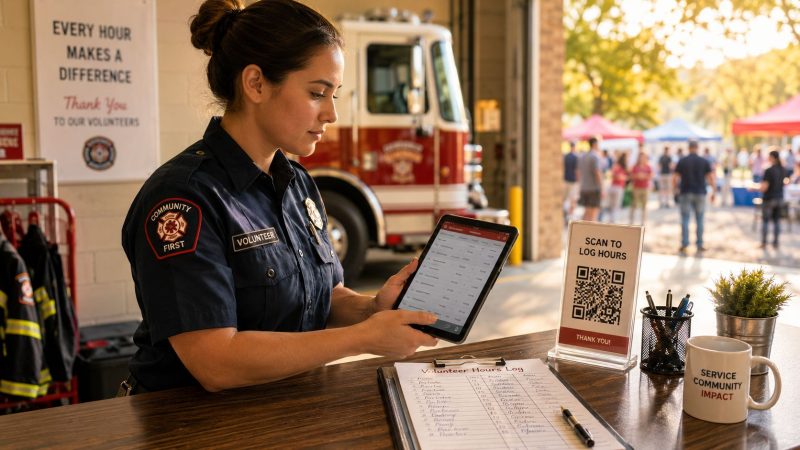
- Volunteer submits time: Through the designated app, kiosk, QR check-in, or spreadsheet form.
- Supervisor verifies activity: Company officer, team lead, or event coordinator confirms the work happened.
- Admin locks the period: A designated administrator reviews exceptions and closes the reporting window.
- Leadership reviews trends: Officers look at totals by role, event, and member on a regular schedule.
For organizations that need more structure, a documented workflow system for approvals and operational processes helps prevent entries from sitting unreviewed.
If your policy requires three approvals for a two-hour community event, your policy is the problem.
A sample policy outline you can adapt
Use this as a working skeleton:
- Purpose: Why hours are tracked and how records are used
- Covered activities: Exact service categories that qualify
- Submission method: Where volunteers log time
- Submission deadline: When entries must be submitted
- Approval authority: Who verifies each activity type
- Correction process: How retroactive or disputed entries are handled
- Reporting schedule: When summaries are generated
- Data retention: Where records are stored and who can access them
Keep it short enough that members will read it. Then train to it, not around it.
Reporting Data for Funding and Compliance
Tracked hours become valuable when you can turn them into evidence. Funders don't just want to know that volunteers helped. They want proof of labor contribution, program support, and organizational discipline.
The national value of a single volunteer hour in 2025 was officially estimated at $36.14, a 3.9% increase from the previous year's $31.80, according to Independent Sector's value of volunteer time research. When an organization multiplies tracked hours by that rate, it can quantify a Return on Volunteer Investment, or ROVI, for reports and grant narratives.
Turning hours into a funding narrative
The formula is straightforward. Total tracked hours multiplied by the accepted volunteer hour value gives you a defensible economic contribution figure.
That only works if your records are clean. You need the underlying log to show who served, when, in what role, and for how long. Without that, the dollar figure is just a guess.

A practical grant example looks like this:
- Volunteer labor record: Training support, standby coverage, and community outreach are tracked by date and role.
- Economic value statement: Total hours are converted using the recognized hourly value.
- Program support note: The report ties those hours to actual service delivery, such as event coverage or preparedness activity.
- Budget relief explanation: Leadership shows how volunteer labor offsets staffing pressure and preserves cash for equipment, maintenance, or program costs.
That last part is where the money-saving insight matters. Good tracking doesn't just help you ask for funds. It also helps you show where donated labor preserved scarce budget dollars that would've otherwise been spent on paid coverage or admin cleanup.
Compliance and skilled labor issues
Standard volunteer value is useful for broad reporting. Financial statements can get more nuanced, especially when skilled professional services are involved.
Support material from Virtuous highlights a common blind spot around skilled volunteer labor and how organizations account for it in records and statements in Virtuous guidance on tracking volunteer hours. The operational takeaway is simple: if your volunteers provide specialized services, don't treat every hour as identical for every reporting purpose.
Examples in a first responder environment might include:
- A volunteer attorney reviewing agreements
- A licensed clinician supporting wellness programming
- A certified instructor delivering required training
- A specialized mechanic donating high-skill maintenance labor
Report general volunteer value one way for impact storytelling. Review skilled donated services carefully before using them in formal financial statements.
The safest practice is to keep role labels precise in your tracking system from day one. That preserves your options when finance, grant, or audit questions arrive later.
Boosting Accuracy and Volunteer Engagement
The fastest way to wreck a tracking system is to make it feel like surveillance. Volunteers didn't join to feed an admin machine. They joined to serve.
That tension is real. Volunteer Commons argues that intrusive tracking can damage motivation and notes that mandatory logging can push people away, with 70% of new volunteers disengaging within a year when administrative burden gets in the way in Volunteer Commons' discussion of volunteer hour tracking and volunteer fatigue.
So yes, you need records. But you need the right records with the least friction possible.

Make logging easier than forgetting
If volunteers have to remember details hours later, accuracy drops. Build check-in around the work itself.
Good options include:
- QR check-in at the station or event site: Members scan, confirm assignment, and move on.
- Kiosk sign-in for public events: One device, one queue, one clean record.
- Mobile logging for field teams: Especially useful when service happens away from a central desk.
- Simple correction requests: Let volunteers fix missed entries without needing a chain of emails.
If your team already works from phones and tablets, using mobile apps for field access and updates removes most of the lag between service and recordkeeping.
Show volunteers why the record matters
Tracking shouldn't be framed as “help us with paperwork.” That's weak and people know it. Frame it as their service record.
A logged record helps volunteers:
- Document training and service history
- Confirm participation for awards or internal milestones
- Support community service verification when needed
- See where their time is making the biggest difference
Recognition matters here. If your organization wants to improve how it acknowledges service, this practical guide on how to thank church volunteers is useful well beyond church settings because the same principle applies: people stay engaged when leaders notice specific effort, not just generic participation.
The less time a volunteer spends proving they showed up, the more likely they are to keep showing up.
Collect meaningful data, not vanity data
First responder organizations often overbuild forms. They ask for too much and then wonder why compliance drops.
A better standard is to collect only what you can use:
- Required every time: Name, role, date, start time, end time, activity type
- Useful when relevant: Incident number, location, supervisor
- Usually unnecessary: Long narrative descriptions for routine assignments
For example, a community blood pressure screening doesn't need a paragraph from every volunteer. It needs attendance tied to role and time. Save detailed notes for exceptions, unusual incidents, or after-action review inputs.
Accuracy goes up when forms are short, expectations are clear, and volunteers can see the benefit of participating.
Frequently Asked Questions About Volunteer Tracking
How should we handle on-call or standby time
Write it into policy as its own category. Don't mix it with active incident response unless your organization intentionally treats them the same. Define when standby starts, what qualifies as availability, and who verifies it. Consistency matters more than the exact model you choose.
What's the best way to track a large one-day event
Use one intake method for everyone. For example, set a single check-in point with preassigned activity types and one event lead responsible for final review. Temporary volunteers should not be texting hours to five different supervisors. For these events, simple beats clever.
A practical workflow looks like this:
- Pre-register volunteers with names and assignments
- Check in through one station using a kiosk, QR code, or printed roster
- Assign one approval authority for all event entries
- Close the reporting window quickly while details are still fresh
What do we do when someone forgets to log time
Allow retroactive entries, but require verification. A missed entry isn't misconduct. It's a data quality issue.
Best practice is to require the volunteer to submit the date, assignment, and estimated hours within a defined correction window, then have the supervising officer approve or adjust it. Keep the original correction trail. Quiet edits with no record create future disputes.
Should we track every task down to the minute
No. Track at the level needed for operational use, funding reports, and internal fairness. If your process becomes so granular that it irritates members and clogs approvals, you'll get worse data, not better data.
How often should leadership review the data
On a regular cadence your team can maintain. Monthly works well for many organizations because it catches drift before the reporting backlog turns into a cleanup project. The point isn't to admire the spreadsheet. The point is to act on what it shows.
Resgrid, LLC gives first responder organizations one place to manage shifts, messaging, personnel tracking, reporting, and operational coordination without the contract-heavy overhead that slows implementation. If your current volunteer tracking process is spread across clipboards, texts, and disconnected tools, take a hard look at Resgrid, LLC as a practical way to tighten accountability, reduce admin drag, and keep your team deployment-ready.