
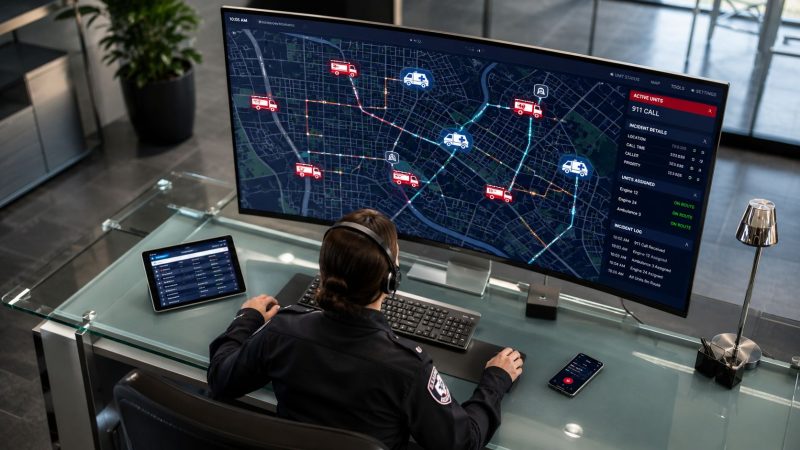
What Does the Acronym CAD Stand for? Computer-Aided
For first responders, CAD stands for Computer-Aided Dispatch, the system used to create calls, track unit status, and manage dispatch operations across tools like SMS, WhatsApp, or Slack. In other fields, CAD can also mean Computer-Aided Design or Coronary Artery Disease, which is why dispatch teams need to be clear about the context fast.
If you're a new dispatcher, a volunteer chief, or the person who just got told to "look into CAD options," that acronym can send you in three completely different directions. Search results often mix emergency communications with drafting software or medical articles, which wastes time when what you really need is a working understanding of the dispatch side.
In a public safety setting, CAD isn't an abstract tech term. It's the operational layer that keeps calls organized, units visible, and updates attached to the right incident instead of spread across radio traffic, sticky notes, and memory.
The Primary Meaning for First Responders Computer-Aided Dispatch
For your world, Computer-Aided Dispatch is the right answer to the question, what does the acronym CAD stand for. It's the system first responders use to manage call creation, unit status tracking, and dispatch operations, including natural-language workflows on channels like SMS, WhatsApp, or Slack, replacing paper logs and radio-only coordination with cloud-based tools, as described in Resgrid's dispatch features.
What CAD does in the real world
A good CAD system becomes the department's working incident record.
A caller reports a vehicle fire. The dispatcher opens an incident, enters location details, tags the call type, and starts assigning units. As crews acknowledge, go en route, arrive, and clear, those status changes live in one place. Supervisors can see what's active. The next dispatcher on shift can pick up without asking for a recap. After the call, the department still has a usable record instead of half-complete notes.
That matters because manual processes break down at busy moments. Paper logs don't update themselves. Radio traffic is easy to miss. Whiteboards help with visibility inside one room, but they don't travel with units or create a searchable history.
Practical rule: If your dispatch information lives in three places, your CAD process isn't under control.
What works and what doesn't
What works is a single workflow where dispatchers enter the call once and keep building on it. What doesn't work is retyping the same information into separate tools for paging, status tracking, and reporting.
A practical CAD setup should help your team handle at least these basics:
- Create incidents quickly: Dispatchers need a clean screen for address, call type, notes, and priority.
- Track unit movement: En route, on scene, available, and out of service should be visible without asking over the radio every time.
- Keep the log tied to the incident: Updates need to stay attached to the call record.
- Support field communication: Crews should receive usable information wherever they already work.
If you're evaluating systems, start with the actual dispatch workflow, not the sales list. Look at how incident data moves from first report to final clear. A practical example of that workflow is visible in dispatching features built around incident handling.
Core Functions of a Computer-Aided Dispatch System
A dispatch system proves its value during the full life of a call, not at login. The easiest way to understand it is to follow one incident from start to finish.

From first report to unit assignment
A caller reports smoke from a commercial building. The dispatcher starts an incident and enters the core facts: location, callback, reported conditions, and any hazards mentioned. At that point, CAD should already be reducing friction by keeping everything in one record.
Next comes resource selection. A useful system helps the dispatcher see which engine, truck, medic, or supervisor is available and where they are relative to the scene. With integrated mapping, the software should support smarter assignment choices instead of forcing the dispatcher to rely on memory alone. That's where a live mapping view for dispatch decisions becomes operationally important.
Status changes and scene management
Once units are assigned, the incident keeps evolving. The first due engine marks en route. A medic unit gets added after the update changes from "smoke investigation" to "working fire." Mutual aid becomes a possibility. The chief wants timestamps.
Without CAD, the dispatcher is juggling radio notes, call sheets, and separate status boards.
With CAD, the system keeps one running operational picture:
- Incident creation: One record holds the original report and later updates.
- Unit status tracking: Available, responding, on scene, transporting, and clear statuses are visible in context.
- Communication log: Notes stay attached to the incident instead of getting lost in side channels.
- Timeline support: Supervisors can review the sequence of events after the incident closes.
When a scene expands, the CAD record needs to expand with it. If your team starts using scratch paper midway through a call, the software isn't carrying enough of the load.
Closing the call without creating more admin work
The last phase is where weak systems create hidden cost. Units clear, but someone still has to reconstruct the incident for reports, shift review, or compliance documentation.
A strong CAD platform leaves you with a usable final record because the dispatcher and field units have already been updating the same incident throughout the response. That saves time after the radio goes quiet. It also reduces the common problem of crews and dispatch having different versions of what happened.
For chiefs, the practical takeaway is simple. Don't judge a CAD platform by how nice the dashboard looks. Judge it by whether one dispatcher can open, run, escalate, and close a call cleanly under pressure.
Clearing Up Confusion Other CAD Acronyms Explained
Outside emergency services, "CAD" often means something else entirely. That's why a chief searching software options, a grant writer reviewing documents, or a new dispatcher reading vendor material can end up on the wrong track.
The two meanings that cause the most confusion are Computer-Aided Design and Coronary Artery Disease. Both are legitimate, widely used definitions. They just have nothing to do with dispatch operations.
CAD Acronyms at a Glance
| Acronym Meaning | Field / Industry | Core Purpose |
|---|---|---|
| Computer-Aided Dispatch | Emergency services and public safety | Manage incidents, unit status, and dispatch coordination |
| Computer-Aided Design | Architecture, engineering, and manufacturing | Create precise 2D drawings and 3D models for design and production |
| Coronary Artery Disease | Medicine and public health | Describe heart disease involving plaque buildup in coronary arteries |
Why the confusion keeps happening
Computer-Aided Design is a digital design methodology that replaced manual drafting tools such as pens, pencils, protractors, and compasses. The CAD software market includes many products, and Autodesk's AutoCAD is described as the most widely used product globally for precise 2D drawings and 3D virtual models in industries like architecture, engineering, and manufacturing, according to Autodesk's overview of computer-aided design.
Coronary Artery Disease is the most common type of heart disease in the United States and refers to plaque buildup in the arteries supplying blood to the heart, as explained by the CDC page on coronary artery disease.
If you work around EMS, fire, and law enforcement, that medical meaning comes up more often than people expect. It also shows up in training, patient history, and healthcare documentation. In adjacent protective fields, context matters just as much. Material like understanding body armour vital protection is a good reminder that emergency and medical terminology often overlaps with technical language, and a single acronym can carry very different consequences depending on where it's used.
The safest habit is simple. When the audience is mixed, say the full term first, then use the acronym.
How Modern CAD Platforms Save Time and Reduce Costs
CAD saves money when it removes duplicate work, not when it adds another screen to maintain. That's the trade-off chiefs should care about.
If dispatchers are still entering the same call into multiple systems, a "modern" platform isn't saving much. If crews still need a separate process for status changes, reporting, and notifications, the software may look current but the workflow is still expensive.

Where the savings actually come from
The most reliable savings usually come from process control:
- Fewer duplicate entries: One incident record reduces rework after the call.
- Better unit use: Dispatchers can see who is available instead of tone-out by habit.
- Cleaner follow-up: Logs and status history are already attached to the incident.
- Less vendor pressure: Departments avoid paying for features they don't use when they can start small.
For smaller organizations, cost of entry matters as much as feature depth. Organizations using Resgrid's hosted CAD can access up to 10 entities for free indefinitely, which lets small departments manage personnel, shifts, and calls without contracts, saving an average of $699/year compared to entry-tier proprietary CAD plans, based on Resgrid pricing details.
Actionable ways to cut cost before you buy
You can save money with CAD even before full rollout if you stay disciplined:
- Map your current handoffs. Count where call information gets re-entered. Every extra handoff is labor.
- Start with high-friction workflows. Shift coverage, personnel availability, and incident updates usually show value faster than edge-case features.
- Standardize routine incidents first. Fire alarms, lift assists, welfare checks, and event standby calls are easier places to tighten process.
- Use workflow automation where it removes clicks. If a workflow still needs manual cleanup after every incident, it isn't finished.
A practical place to examine this is workflow automation for dispatch operations. The goal isn't more automation on paper. The goal is fewer manual decisions on routine tasks so dispatchers can focus on exceptions.
Get Started with a Modern CAD Solution Today
Most departments don't need a massive procurement cycle to get moving. They need a realistic starting point that fits staffing, budget, and IT capacity.
That usually means choosing between a hosted system and a self-hosted one. Hosted is simpler for teams that want to move quickly. Self-hosted can make sense when the department wants tighter control over deployment, data location, or long-term cost structure.

A practical rollout path
If I were advising a new dispatcher center or a volunteer chief, I'd keep the first phase narrow and operational.
- Pick one incident flow first: Start with the most common call types your team handles every week.
- Define status language early: Make sure everyone uses the same unit states and incident note habits.
- Train on live scenarios: Use realistic drills, not abstract software tours.
- Review the first month closely: Look for workarounds. If people are keeping side notes, fix the process.
This is also the point where platform flexibility matters. Resgrid offers an open-source CAD platform that organizations can self-host on Docker, Windows Server, or Azure at no cost, while retaining code access under the Apache License 2.0, which helps avoid vendor lock-in and implementation fees, according to Resgrid's open-source deployment information.
What to look for before committing
Not every CAD deployment fails for technical reasons. Many fail because the system doesn't match daily operations.
Use this checklist when you're evaluating options:
- Dispatch fit: Can your team open and manage incidents without adding side spreadsheets?
- Field usability: Can responders get updates in a format they will use?
- Administrative burden: Does the platform reduce after-action reconstruction, or create more of it?
- Exit path: If your needs change, can you move without being trapped by contracts, proprietary hosting, or inaccessible data?
Buy for the calls you run every day. Don't buy for the demo scenario you might run once a year.
For a small department, the smartest move is often to pilot CAD with one clean workflow, tighten the discipline around statuses and notes, then expand. That's how you keep the project affordable and keep staff buy-in high.
If you're ready to replace paper logs, reduce duplicate entry, and give your dispatch team a clearer operational picture, take a look at Resgrid, LLC. It provides a practical path into Computer-Aided Dispatch for departments that need flexible deployment, straightforward workflows, and lower-cost options without locking themselves into a heavy implementation model.