
Incident Management Tools for First Responders (2026 Guide)
The call comes in just before shift change. Multi-vehicle crash. One lane blocked. Then two lanes. Then a report of entrapment. Your dispatchers are juggling radio traffic, texting supervisors, calling mutual aid, and trying to figure out whether the heavy rescue is already committed across town. Somebody writes unit status on a whiteboard. Somebody else starts a group text. Ten minutes later, nobody is fully sure which information is current.
That’s not a people problem. That’s a tool problem.
A lot of agencies are still trying to run complex incidents with a patchwork of radios, phone trees, CAD notes, spreadsheets, and memory. It works until it doesn’t. The bigger the event gets, the more that patchwork turns into friction. Crews ask for updates that dispatch already gave. Command asks for a resource count that nobody can confirm. Mutual aid partners get partial information. The radio fills up with traffic that should never have needed air time.
A modern incident platform should reduce that noise, not add to it. It should act like a shared operating picture for dispatch, field units, command staff, and support agencies. If you’re tightening procedures, updating SOPs, or building a business safety emergency plan, the software decision sits right in the middle of that work. Good plans fail when the information flow fails.
Your Guide to Modern Emergency Response
Most searches for incident management tools lead you straight into the IT world. You’ll see pages about server outages, support tickets, and software alerts. Some of those ideas are useful. Most of those products were not built for a patrol supervisor, a battalion chief, or a dispatcher trying to coordinate units moving across a county.
For emergency services, an incident management tool is better understood as a digital command post. It should answer operational questions fast.
What the tool must answer in real time
- Where are my units: Not where they were ten minutes ago. Where they are now.
- Who has command: If that changes on scene, everybody needs the same update.
- What resources are available: Personnel, vehicles, specialty gear, and mutual aid status.
- What’s the current incident picture: Hazards, staging, road closures, assignments, and next actions.

That distinction matters because the market is split. IT platforms are good at digital alerting, but emergency services need tools that handle physical security, threat assessment, offline field use, and personnel safety tracking, as noted in NetWitness's review of incident response tools.
Why IT language needs translating
In IT, an “incident” might be a failed deployment or a service outage. In public safety, an incident is a live event with moving people, changing hazards, and consequences in the street. The clock matters differently. Connectivity may fail. The radio may be congested. Personnel accountability is part of life safety, not just reporting.
A platform that works well for a desk-bound team can still fail badly in the field.
That’s why I tell agencies to ignore flashy feature lists at first. Start with operational reality. If your crews lose signal in rural areas, offline capability matters more than polished dashboards. If you rely on automatic aid, multi-agency visibility matters more than ticket queues. If your dispatch floor is short-staffed, automation matters because it takes repetitive work off people who are already overloaded.
A useful tool doesn’t replace command judgment. It gives command cleaner information, faster.
Essential Capabilities Your Team Cannot Live Without
Feature overload is how agencies waste money. Vendors love long checklists. Most of those lists mix useful capabilities with things your crews will never touch. For emergency services, the short list is tighter and far more practical.
Start with the functions that change operations

The first essential is CAD integration. If dispatch has to re-enter calls into a second system, you’ve created delay and duplicate work. The system should receive incident data cleanly and push updates back where needed.
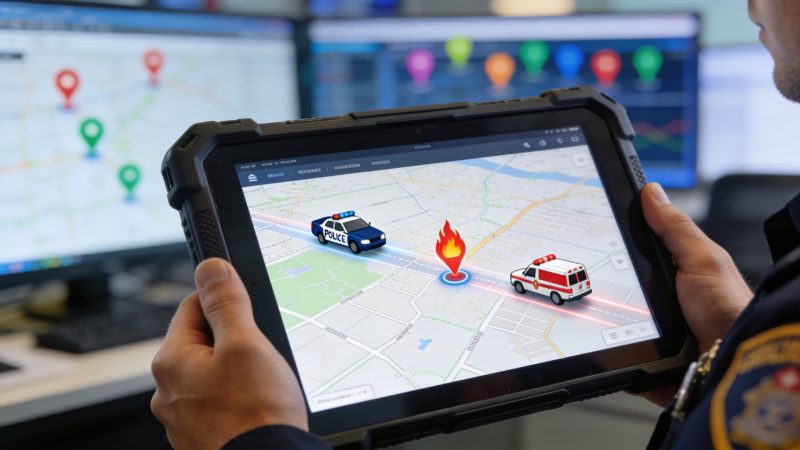
The second is live mapping and unit visibility. This isn’t just convenience. It helps dispatch assign the right resource, gives command a current operational picture, and reduces the back-and-forth radio traffic asking for location checks and ETAs.
Third is mobile access that works in the field. Rugged tablets, phones, and mixed-device environments are normal in public safety. If the tool only works well on a desktop in the communications center, it’s incomplete.
The capabilities that save money quietly
A lot of cost savings in emergency operations don’t show up as a line item called savings. They show up as avoided overtime, fewer duplicate dispatches, less radio congestion, and shorter reporting cycles.
- Offline field operability: When crews move through dead zones, they still need assignments, notes, maps, and status options. A system that collapses without signal forces people back to radio and phone workarounds.
- Secure messaging and notifications: Sensitive medical details, tactical updates, and command-level coordination shouldn’t rely on unsecured consumer tools.
- Resource management: Dispatchers need to see available units, specialty assets, and staffing constraints without opening three separate systems.
- Time-stamped activity logs: Good records reduce report-writing time and support after-action reviews without asking people to reconstruct events from memory.
One area where modern platforms can make a real difference is workflow automation. According to EasyVista's incident management overview, modern platforms can automate end-to-end workflows through playbooks, reducing manual triage by up to 75%. In dispatch terms, that means a call type can trigger the right notifications, suggest equipment mobilization, and route information with less manual handling.
Practical rule: If a dispatcher performs the same sequence every time a call type appears, that sequence should become a playbook.
That’s where systems with dedicated dispatching capabilities earn their keep. The value isn’t abstract automation. The value is fewer missed steps during stress.
What doesn’t work well in the field
Tools built mainly for IT often assume stable internet, keyboard-heavy use, and users who stay in one place. That design breaks down during field response. Long forms don’t get completed on the shoulder of a highway. Tiny buttons fail with gloves. A platform that requires too many clicks won’t survive real operations.
When you evaluate incident management tools, ask one blunt question. Can a tired dispatcher and a field supervisor use this correctly during a bad night? If the answer is uncertain, keep looking.
Mapping Tools to Real-World Incident Response
Take that highway crash again. Not the training version. The actual version with incomplete caller information, weather moving in, and one jurisdiction already tied up.
The call enters CAD. A modern platform pulls the incident into a live operational view. Dispatch sees unit locations, available apparatus, and any nearby supervisors. The closest appropriate resources go out fast, and everyone looking at the incident sees the same status updates instead of chasing them across radio traffic and side conversations.

What changes during the first few minutes
The first-arriving unit marks on scene through the mobile interface. Command is established and visible across the system. If law enforcement needs traffic control, if fire needs an additional medic unit, or if EMS requests air medical consideration, those changes become shared information instead of isolated radio moments.
A strong platform also improves geography. Dispatch can see road access issues, staging points, and where supporting units are coming from. For agencies that need that shared map view, dedicated incident mapping tools help turn scattered updates into one common picture.
Here’s where old methods usually bog down. Someone asks who’s handling patient transport coordination. Somebody else asks whether public works was notified about debris. Mutual aid gets requested, but acknowledgment comes back through another channel. None of that is dramatic. It’s just friction. Friction slows response.
Mid-incident coordination
As the scene stabilizes, the software keeps doing the boring work that usually eats time. Unit status changes are logged. Photos and notes can be attached to the incident. Leadership can get updates without dispatch relaying every detail over the radio. That protects airtime for traffic that belongs there.
For teams that want a quick visual on how digital coordination can support field operations, this short overview is useful:
After-action work is where weak tools get exposed
A lot of systems help during dispatch, then become dead weight after the incident. That’s a missed opportunity. The post-incident phase is where you justify budgets, fix workflow failures, and prevent the same procedural mistakes from repeating.
According to Xurrent's review of incident management software, AI-powered post-incident analysis can review logs, timelines, and communications, then generate summaries and action items. In the examples cited there, this reduced recurrence rates of procedural errors from over 40% in manual processes to under 15%.
Good after-action review isn’t about blame. It’s about shortening the distance between what happened and what you learn from it.
In public safety terms, that means the platform can help reconstruct who was notified, when assignments changed, where delays occurred, and which handoffs created confusion. That gives training officers, chiefs, and dispatch managers something more useful than opinion. It gives them an event record they can work from.
Evaluating and Choosing Your Incident Management Tool
Agencies often encounter this common pitfall. The demo looks polished. The salesperson says all the right words. Then the contract lands, implementation takes longer than expected, and six months later your team is using only a fraction of what you bought.
The best defense is a disciplined evaluation process.
Use your own scenarios, not the vendor's script
Don’t let the vendor run a generic product tour. Give them three scenarios from your world and make them work through each one live. Good examples are a multi-vehicle crash, a missing person search, and a weather-driven multi-agency activation.
Ask specific questions while they demonstrate:
- How does this handle field users with poor connectivity
- How are mutual aid agencies added to the incident
- What does personnel accountability look like during a moving event
- How are command changes documented
- What does the dispatcher have to do manually
If the answers drift back to IT use cases, that tells you a lot.
Look hard at pricing friction
A system that seems affordable can become expensive fast if pricing is tied to every user, device, module, or support request. Public safety agencies need predictable costs. You also want to know whether implementation requires paid consulting or whether your team can configure the basics without bringing in a vendor team for every change.
A side-by-side comparison helps. A tool like Resgrid comparison pages can be useful when you want to line up features and buying models against alternatives in a more structured way.
If the platform needs a consultant every time you adjust workflow, you haven't bought flexibility. You've bought dependency.
Sample Decision Matrix for Incident Management Tools
| Evaluation Criterion | Weight (1-5) | Vendor A Score | Vendor A Weighted | Vendor B Score | Vendor B Weighted |
|---|---|---|---|---|---|
| CAD integration | 5 | 4 | 20 | 3 | 15 |
| Offline field use | 5 | 3 | 15 | 5 | 25 |
| Personnel tracking | 4 | 4 | 16 | 4 | 16 |
| Multi-agency coordination | 5 | 5 | 25 | 3 | 15 |
| Mobile usability | 4 | 3 | 12 | 5 | 20 |
| Reporting and audit trail | 3 | 5 | 15 | 4 | 12 |
| Implementation effort | 4 | 2 | 8 | 4 | 16 |
| Pricing clarity | 4 | 2 | 8 | 4 | 16 |
A matrix won’t make the decision for you, but it stops the conversation from getting hijacked by the flashiest demo. It also gives you something defensible to bring to a board, city manager, or finance committee.
Implementation Best Practices That Save Money
Buying the platform is easy compared with getting people to use it correctly under pressure. Most failed rollouts don’t fail because the software was unusable. They fail because leaders tried to launch everything at once, trained people poorly, and never defined what success looked like.
Roll out in phases
Start with one operational slice. That could be dispatch supervisors, one battalion, one patrol district, or one special event team. Choose users who will give honest feedback and who can help other personnel once the wider launch begins.
A phased rollout saves money because it catches workflow problems before they spread agency-wide. It also keeps you from paying to customize parts of the system nobody needs.
- Pick a pilot group carefully: Choose people who understand operations and can explain field reality to the vendor.
- Limit the first launch scope: Start with incident logging, unit status, mapping, or notifications before adding advanced workflows.
- Document friction early: Every extra click, duplicate field, or confusing screen matters.
Train by scenario, not by menu
Crews don’t care where a button lives in a settings panel. They care whether they can use the system during a rollover, a pursuit perimeter, or an evacuation. Training should follow likely incidents and the decisions tied to them.
This is also where you protect your budget. If people understand how the tool reduces duplicate calls, radio congestion, and report reconstruction, they’re more likely to adopt it. That means you get value from the purchase instead of paying for shelfware.
Measure one or two operational outcomes first
A lot of teams drown themselves in metrics. Don’t. Start with the measures your leadership and line staff will both respect. In public safety, the closest translation from IT is time to stabilize and close an incident workflow. The broader market still treats MTTR as the dominant performance indicator, with 86% of organizations tracking it and over 60% using it to measure incident resolution efficiency, according to InvGate's incident management statistics. The same source notes that 92% of respondents have invested in dedicated ITSM solutions, and one migration example reduced MTTR from 39 minutes to 24 minutes.
That statistic comes from IT, not field operations, but the lesson carries over. Track the equivalent measure in your environment. It may be time from call intake to command established. It may be time from request to mutual aid acknowledgment. It may be total time to close documentation.
Measure the delay your people complain about most. If the platform doesn't improve that, nobody will care about the rest.
Good implementation is quiet, practical, and deliberate. That’s usually what sticks.
From Controlled Chaos to True Command
The point of incident management tools isn’t to make emergency response feel more technical. It’s to make it more controlled. Crews need less guesswork. Dispatch needs fewer manual handoffs. Command needs one current picture instead of five partial ones.
That’s the divide between IT-centric tools and field-ready platforms. One helps manage digital alerts. The other helps manage people, movement, accountability, and decisions in real conditions.
If you’re making the business case internally, it helps to borrow evaluation discipline from outside public safety too. A framework like this guide to enterprise social media ROI is useful for thinking about value in operational terms instead of vendor language. The category is different, but the discipline is the same. Tie the purchase to measurable outcomes, not enthusiasm.
The agencies that get this right don’t buy software because it’s modern. They buy clarity. They buy fewer missed steps. They buy a better chance of putting the right information in the right hands at the right moment.
True command starts there.
If your agency needs a practical platform for dispatching, personnel tracking, mapping, reporting, and incident coordination, take a serious look at Resgrid, LLC. It’s built for first responders and dispatch operations, uses a self-service model, and fits teams that want modern incident management tools without heavy implementation overhead.