
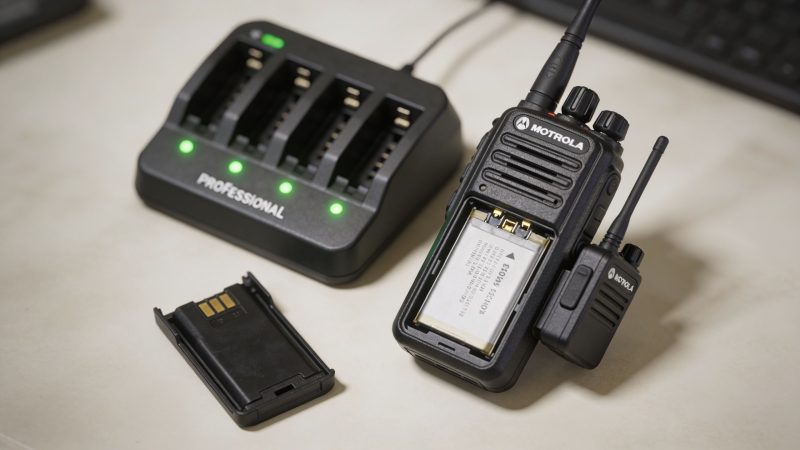
Master Your Battery Walkie Talkie Motorola Fleet
A radio failure rarely starts with the radio. It starts with a battery that looked fine at morning check-in, made it through a routine shift yesterday, and then folds under stress when traffic gets heavy, weather turns rough, or a team moves into a weak-signal area and the radio has to work harder.
That’s why battery management sits in the same category as dispatch discipline, spare equipment staging, and preventive inspections. If you run a Motorola fleet, the battery walkie talkie motorola question isn’t just “which pack fits this model?” It’s “which battery strategy keeps people reachable, shifts covered, and replacement costs under control?”
I’ve seen agencies spend more money reacting to battery failures than they would have spent building a sane replacement and charging program in the first place. The expensive part usually isn’t the pack itself. It’s overtime, missed calls, radios pulled from service, and supervisors scrambling for spares during an incident.
A dead radio in an emergency is a safety problem first. It becomes a budget problem right after that.
Your Radio Is Only as Strong as Its Battery
A patrol unit signs out a handheld at the start of shift. The radio powers on, passes a quick voice check, and goes into service. Hours later, traffic spikes, the user spends more time transmitting than usual, and the battery drops out far earlier than anyone expected. The problem wasn’t visible at issue time because the pack was old, poorly tracked, and never really maintained.
That scenario is common because battery failures hide in plain sight. A cracked case gets ignored. A weak pack gets shuffled back into the charger instead of tagged. An old battery stays in circulation because “it still works most days.” In public safety, security, and event operations, “most days” isn’t a standard.
Practical rule: Treat every radio battery like a consumable asset with a service life, not a permanent accessory.
The good fleets build routine around batteries. They inspect date codes, rotate spares, clean contacts, and remove questionable packs before they fail in the field. They also document battery handling the same way they document vehicle checks and gear readiness. If your team already uses a preventive maintenance checklist template for other equipment, adapt that discipline to radios. Add battery age, charge status, visible damage, and spare count to the same habit.
What poor battery control actually costs
The direct costs show up fast:
- Extra replacements: You buy new batteries sooner because old ones were cooked by bad charging habits or left in service too long.
- Labor waste: Staff spend time swapping radios, chasing chargers, and troubleshooting problems that should’ve been prevented.
- Operational gaps: A weak spare turns one battery problem into two because the backup also can’t hold up.
- Risk exposure: If a user can’t transmit at the wrong moment, your fleet problem becomes an incident problem.
Strong fleet managers don’t wait for batteries to “prove” they’re dead. They build a battery program that assumes readiness has to be earned every shift.
How to Identify Your Motorola Battery Model
A radio can pass a quick power-on check and still fail your team later in the shift. That usually starts with bad battery identification. If the pack in hand is the wrong chemistry, the wrong capacity, or too old, your runtime forecast is guesswork and your replacement budget will drift.

Start with the battery, not the radio
Battery control gets easier once every pack is identified by what is printed on the pack itself. Storage bins get relabeled. Radios get reassigned. Batteries are what fail, age, and drive replacement cost, so inspect those first.
Look for four things:
Part number
This is your cleanest match point for purchasing, charger compatibility, and asset records. If the part number on the shelf does not match the part number in your spreadsheet, fix the record before that error turns into a bad reorder.Chemistry
Motorola packs are commonly NiMH or Li-ion. That affects charging method, storage behavior, expected service life, and whether a battery should stay in frontline rotation or move to backup duty.Capacity marking
Capacity, usually listed in mAh, helps explain why two batteries that fit the same radio may deliver very different runtime. That matters for staffing plans, spare counts, and overtime risk on long shifts.Date code
This is one of the best indicators for replacement planning. Motorola Talkabout documentation describes a date code format where the first two digits represent the year and the last two represent the week. A code such as 2138 points to the 38th week of 2021. The same documentation also shows how different battery packs in the T82 line can produce different runtime expectations, which is exactly why model identification affects both readiness and budget planning. See the Motorola Talkabout battery and model reference.
Read the code for replacement timing
A battery that still takes a charge is not automatically a battery worth keeping in primary service. Fleet managers need to know age, chemistry, and capacity because each one affects total cost of ownership. Misidentified batteries stay in circulation too long, get paired with the wrong chargers, and create false confidence in your spare inventory.
That problem shows up often in mixed event fleets and auxiliary caches. One tote may contain original NiMH packs, higher-capacity replacements, and packs bought during a shortage from a different supplier. On paper, it looks like you have depth. In the field, you have uneven runtime and a harder time predicting who will need a swap before the end of the shift.
If your staff already handle rechargeable cells in other gear, basic chemistry labeling habits carry over well. The charging behavior discussed in these digital-rc rechargeable AAA insights is useful background for teams that also manage NiMH-powered accessories.
A quick audit method that works
Walk the shelf and sort batteries into three groups:
| Group | What to check | Action |
|---|---|---|
| Clearly identified | Part number, chemistry, date code visible | Keep in service and label in inventory |
| Partially identified | Missing one key detail, faded label, uncertain match | Pull aside for verification |
| Unknown | No readable label, mismatched fit, unclear age | Remove from frontline issue until confirmed |
Unknown batteries distort your readiness picture. They count as inventory in the storeroom, but they do not give you reliable runtime planning.
What this looks like in practice
In a MOTOTRBO or APX fleet, proper identification affects charger assignment, spare rotation, and which batteries are trusted for emergency issue. In a Talkabout cache, it often exposes a mix of alkaline trays, NiMH packs, and higher-capacity replacements that have been treated as interchangeable. They are not interchangeable from a cost or readiness standpoint.
Use a simple inspection rule. Every time a battery comes off the charger bank for scheduled review, verify the part number, chemistry, and date code against the asset list. One minute of inspection is cheaper than an avoidable field failure, a rushed battery order, or a supervisor pulling staff off task to solve a radio problem mid-incident.
NiMH vs Li-Ion The Chemistry Behind The Charge
NiMH and Li-ion both power Motorola radios, but they behave differently enough that fleet managers should treat them as different tools, not interchangeable commodities.
The easiest comparison is this. NiMH is the dependable workhorse. Li-ion is the lighter, higher-performance option. Both can be useful, but they reward different operating habits.

Where NiMH still makes sense
NiMH shows up in many older fleets and in consumer-style radios because it’s familiar, serviceable, and often easier for teams that already keep AA-based or interchangeable battery workflows. Some operators also prefer it when they want simpler field swap options or compatibility with older charging setups.
If your team uses NiMH anywhere else in operations, it helps to understand its charging behavior. A practical overview from Digital RC offers useful background on digital-rc rechargeable AAA insights, especially for teams that already stock rechargeable cells in supporting gear.
NiMH’s downside is maintenance discipline. It’s less forgiving when users top off irregularly, mix chargers, or ignore conditioning needs. In a loose fleet, NiMH performance tends to drift.
Why Li-ion became the standard
Li-ion dominates professional radio fleets for good reasons. It’s lighter for the amount of energy it carries, it generally charges faster, and it’s better suited to agencies that need radios ready with less babysitting. That matters when the battery walkie talkie motorola decision affects not just one user, but an entire dispatch or response roster.
A good example is the Motorola RLN6308 ultra high-capacity Li-ion battery, which can power a 4 to 5 watt business radio for up to 18.5 hours, but can last up to 26 hours in a 2-watt configuration, according to Tech Wholesale’s RLN6308 specifications. That doesn’t just show Li-ion endurance. It shows the practical tradeoff between radio power and runtime.
The tradeoff that catches managers off guard
The battery chemistry matters, but radio settings matter too.
- Higher transmit power gives you better range and penetration, but drains faster.
- Lower power operation stretches runtime, which is often ideal for campus, event, or administrative use.
- Heavy talk time can overwhelm even a good battery if the shift plan assumes only moderate traffic.
- A mixed fleet creates planning mistakes when one team expects all radios to perform like the longest-lasting unit.
If one division needs maximum range and another mostly works short-range traffic, they shouldn't automatically share the same battery plan.
Which one should you standardize on
For frontline, mission-critical use, Li-ion is usually the cleaner choice because it simplifies charging and daily readiness. For legacy systems, backup inventories, or cost-sensitive low-risk assignments, NiMH can still be reasonable if you maintain it deliberately.
A simple decision filter looks like this:
- Choose Li-ion when uptime, lower carrying weight, and shift-ready convenience matter most.
- Keep NiMH where existing equipment already supports it well and users understand the charging routine.
- Avoid mixing chemistries casually in one issue pool unless your inventory and charger labeling are tight.
The mistake isn’t choosing one chemistry over the other. The mistake is running both without rules.
OEM vs Aftermarket Batteries The Real Cost of a Bargain
Battery purchasing goes wrong when buyers focus on invoice price and ignore field behavior. A cheap battery that fails early, charges inconsistently, or doesn’t work properly with your chargers isn’t a savings. It’s deferred cost.
OEM Motorola batteries cost more because you’re paying for fit, charging compatibility, and predictable behavior with Motorola radios and charger systems. That matters most when the radio is a duty tool and not just a convenience item.
Where OEM earns its price
For frontline operations, OEM is usually the safer decision because the battery has to do more than power on a radio. It has to fit properly, hold up under repeated shift use, and work with the charger logic your fleet already depends on.
That’s especially important if your operation relies on smart charging and battery health indicators. If the battery and charger ecosystem don’t communicate as intended, your technicians lose visibility just when they need it.
A practical rule I use is simple:
- Frontline emergency response: Stay with OEM.
- Supervisory, support, or administrative radios: Consider selective cost-cutting only if testing proves the replacement is dependable.
- Unknown vendor with vague specs: Pass.
Where the bargain can make sense
Not every radio in a fleet has the same risk profile. A spare unit at a fixed post, a training cache, or a low-traffic admin radio might justify a lower-cost option if you’ve tested it in your own workflow.
That same logic applies to consumer dual-power radios. In prolonged no-charge scenarios, the calculation changes. A 2025 IEEE study cited in a Walmart battery roundup found that AA alkalines can outperform Li-Ion batteries by 15% in disaster events lasting 24 to 48 hours, and that an agency could save 60% over two years by using $2 AA batteries in some scenarios rather than a $50 IMPRES battery, according to the Motorola walkie talkie rechargeable battery overview. That doesn’t mean AA is the new standard. It means backup strategy matters.
The TCO test
Use this checklist before approving a lower-cost battery purchase:
| Question | If the answer is no | What it means |
|---|---|---|
| Has your team tested it in actual radios? | No field trial | You’re buying blind |
| Does it fit securely and charge correctly? | Inconsistent seating or charging | Expect user complaints and downtime |
| Is the radio mission-critical? | Yes | Don’t gamble on bargain packs |
| Do you have a fallback power option? | No | Risk rises fast during long incidents |
Cheap batteries often fail twice. First in runtime, then in the labor spent proving they’re the problem.
What works in budget-conscious fleets
The best compromise I’ve seen is tiered procurement. Use OEM for any assignment where a failed radio changes the safety picture. Use carefully vetted alternatives only where failure is inconvenient rather than dangerous. Keep a separate reserve strategy for extended incidents, which may include radios that accept standard cells when charging access disappears.
That gives you a cost-saving path without pretending every radio role carries the same consequence.
Charging and Storage Best Practices for Maximum Lifespan
Most battery waste happens in the charger. Not because chargers are bad, but because fleets treat charging as passive. Put radio in cradle. Walk away. Hope for the best. That habit shortens service life, hides weak packs, and increases the number of “mystery failures” that show up at the start of a shift.

Start new batteries correctly
A new Motorola battery shouldn’t go straight from the box into hard service. Motorola’s IMPRES charging guidance, as summarized by RCS Communications, says new batteries should receive a 14 to 16 hour initialization charge so they can reach maximum rated capacity. The same reference notes standard replacement planning at 18 to 24 months, and explains key charger signals such as flashing green for over 90% charged, steady green for full charge, and flashing red/green for nearing end-of-life in IMPRES systems, according to this Motorola battery life and IMPRES charger guide.
That first charge matters because it sets your baseline. Skip it, and users may think a good battery is a weak battery from day one.
Daily habits that extend service life
A charger bank needs rules, not just outlets.
- Dock with purpose: Charge batteries because they need charging, not because empty cradles make people nervous.
- Pull known bad packs early: If a battery repeatedly comes back weak, tag it and remove it from issue.
- Keep contacts clean: Dirt, oil, and oxidation create bad charging behavior that looks like battery failure.
- Match battery and charger correctly: Mixed charging setups create avoidable trouble.
For teams that want less manual follow-up, turning battery handling into a documented process helps. A workflow tool can enforce inspection, swap, and retirement steps so batteries don’t drift through the system unnoticed. A structured setup like equipment workflows for routine operational tasks is useful when multiple stations or supervisors all touch the same radio pool.
Know what the charger is telling you
IMPRES systems are valuable because they communicate battery condition instead of forcing technicians to guess. Train your staff to read the light patterns and act on them.
| Charger indication | Meaning |
|---|---|
| Flashing green | Battery is over 90% charged |
| Steady green | Battery is fully charged |
| Flashing red/green | Battery is nearing end-of-life |
| Steady orange | Conditioning mode |
One of the most useful habits is requiring users to report abnormal light behavior instead of moving the battery to another slot and hoping it clears.
Here’s a practical walkthrough for teams training staff on charger handling:
Storage is where fleets quietly lose money
Storage mistakes destroy batteries slowly enough that people miss the pattern. The common ones are storing packs fully depleted, leaving them forgotten in radios, or baking them in poor environments.
What works better:
- Store in a cool, dry area.
- Label spare batteries by service status. Don’t mix active-duty spares with retirement candidates.
- Rotate reserve stock. The oldest acceptable battery should be used first, not left aging untouched.
- Inspect while handling. Every touchpoint is a chance to catch cracked housings, worn contacts, or mislabeled packs.
A charger can fill a battery. It can't reverse age, heat damage, or neglect.
The cheapest battery in your fleet is the one you didn’t have to replace early because your charging room followed rules.
How to Replace and Safely Dispose of Old Batteries
Replacing a Motorola battery is straightforward, but bad habits still create damage. People force latches, pry housings, or swap packs without checking contacts and fit. That turns a routine maintenance task into a radio repair problem.
Replace the battery without creating a second problem
On most Motorola handhelds, the safe method is simple:
Power the radio off first.
Don’t swap batteries with the unit live unless the equipment is specifically designed for that workflow.Release the battery latch or clip carefully.
Talkabout models are usually simple. Professional units like APX or MOTOTRBO use a more secure latch system. Press the release as designed. Don’t lever the battery off with a tool.Inspect the contact area.
Look for dirt, bent terminals, moisture, or corrosion before attaching the replacement.Seat the new battery fully.
If it doesn’t fit smoothly, stop and verify the model. Forcing a near-match is how housings and contacts get damaged.Power on and test transmit.
A battery that powers on the radio but can’t support transmit is not ready for field use.
Build a removal standard
A good battery swap should include one quick judgment call: does the old battery go back to stock, go to observation, or go out of service?
Use visual signs to make that decision easier:
- Return to stock: Case intact, clean contacts, no charge or fit issues reported
- Observation bin: User reported short runtime, intermittent charging, or unusual heat
- Retire immediately: Swelling, cracked case, severe corrosion, or failure to seat securely
This keeps weak batteries from boomeranging back into service because someone was in a hurry.
Disposal is a safety issue, not just a housekeeping task
Old Li-ion and NiMH batteries shouldn’t go into ordinary trash. The risk isn’t theoretical. Damaged or spent batteries can create heat and fire hazards, especially if terminals contact metal during transport.
Use a proper recycling stream such as a certified e-waste recycler or a battery recovery program that accepts rechargeable packs. Tape exposed terminals if your recycler recommends it, segregate damaged batteries from normal returns, and keep a small container specifically marked for retired radio batteries so staff don’t improvise.
If a battery is bad enough to remove from duty, it's bad enough to control until it reaches the recycler.
The easiest way to stay compliant is to assign one person or one shift role responsibility for the retired-battery container. Shared responsibility usually means no responsibility.
Troubleshooting Common Motorola Battery Issues
When users say “the battery is bad,” they’re often right. But not always. Heat, mode selection, dirty contacts, charger faults, and old packs can all produce the same complaint: short runtime or unreliable startup.

Battery dies too fast
This is the most common complaint, and it usually needs context before it needs a replacement order.
A battery that performed adequately in a cool building may collapse in heat or under heavier transmit load. According to Large.net, batteries charged or used in hot environments can lose about 25% of runtime, and a 2200 mAh Li-ion battery can last about 14.5 hours in analog mode versus 18.5 hours in digital mode under the same 5/5/90 profile, as outlined in this radio battery performance reference for heat and operating mode.
Likely causes
- Hot charging area such as a vehicle, equipment room, or poorly ventilated post
- Analog operation when digital would stretch runtime
- Heavy transmit use beyond what the shift planner expected
- Aging battery that still charges but no longer sustains the load
What to do
- Move chargers to a cooler location.
- Review whether the radio should be operating in digital mode for longer shift endurance.
- Compare runtime complaints by assignment. A gate officer and a search team don’t use radios the same way.
- Pull old or suspect packs from frontline issue instead of repeatedly redistributing them.
Charger behavior looks wrong
Users tend to describe this as “the light was blinking funny,” which isn’t enough. You need a shared reference.
| Charger light | Likely meaning | Action |
|---|---|---|
| Steady red | Charging | Leave it alone and verify later |
| Flashing red | Fault | Reseat battery, inspect contacts, test another slot |
| Steady green | Fully charged | Return to service if runtime is normal |
| Flashing orange | Conditioning | Let the process complete |
If you’re using an IMPRES setup and behavior doesn’t match expectation, don’t guess. Confirm the battery type, charger type, and whether the pack has a known history of weak runtime. If staff still can’t sort it out, route the issue through a support process instead of letting each shift invent its own fix. A central help path like technical support for operational equipment issues keeps troubleshooting repeatable.
Radio won’t turn on with a new battery
A new battery that won’t start the radio is usually one of four things:
- Wrong battery for the radio
- Battery not seated correctly
- Dirty or damaged contacts
- Battery arrived unready for immediate service
Check fit first. Then inspect contacts. Then place the pack on the correct charger and confirm charging behavior before declaring it defective.
New doesn't automatically mean ready. It only means unused.
Corrosion and physical damage
If the battery housing is cracked, swollen, or corroded, stop troubleshooting and remove it from service. Don’t put damaged batteries back into circulation just because they still work on a bench. Those are exactly the packs that fail under movement, weather, or extended transmit periods.
Building Your Resilient Battery Fleet Management Strategy
Reliable fleets don’t manage batteries one at a time. They manage them as a program. That means procurement, labeling, charging, inspection, reserve planning, and retirement all work from the same set of rules.
The battery walkie talkie motorola challenge is usually not buying a pack. It’s keeping an entire fleet predictable over time without overspending.
The five-part strategy that holds up
Audit what you already own
Start with a physical battery audit, not an old spreadsheet. Confirm part numbers, chemistry, visible condition, and date codes. If a battery can’t be identified clearly, don’t leave it in frontline stock.
This first pass often reveals the actual problem. Not shortage, but disorder.
Stagger replacements
Don’t let your fleet age in one wave. If too many batteries were purchased at the same time, too many will weaken at the same time. Spread replacements across budget periods so you don’t create your next shortage while solving the current one.
Match battery quality to mission risk
A dispatch supervisor’s spare radio, a training cache, and a rescue team handheld don’t need the same battery policy. Build tiers. Reserve your highest-confidence batteries for the users who can’t afford failure.
That same thinking applies to equipment tracking. When you know which radios and users are mission-critical, location-aware equipment management through AVL units for fleet visibility helps operations teams understand where high-priority assets are assigned during active incidents.
Standardize wherever you can
Fleet complexity drives cost. It creates charger confusion, stocking errors, and mixed expectations about runtime.
Use a practical standardization checklist:
- Reduce battery variants: Fewer approved pack types make training and purchasing easier.
- Label service entry date: Mark when the battery entered duty use, not just when it was manufactured.
- Separate duty and reserve stock: Don’t mix field-ready batteries with questionable spares.
- Set a quarantine shelf: Anything with odd runtime or charger behavior goes there until inspected.
Build battery checks into sign-out
A radio issue desk should verify more than “unit present.” Add battery checks to the issue routine:
| Check | What the user or issuer confirms |
|---|---|
| Charge status | Ready for expected shift duration |
| Physical condition | No cracks, swelling, or damaged latch points |
| Fit and function | Battery seats correctly and supports transmit |
| Spare availability | Critical assignments have backup power ready |
The best time to discover a weak battery is before the radio leaves the building.
What a mature program looks like
A strong battery program doesn’t need to be fancy. It needs to be consistent. You know what batteries you own. You know how old they are. You know which ones are assigned to critical roles. You know where suspect packs go. And you know who makes the call to retire them.
That discipline protects people and budgets at the same time. It cuts waste because you stop replacing batteries blindly. It improves readiness because users stop gambling on old packs. And it gives supervisors fewer surprises during the worst part of the day, which is when everyone suddenly remembers batteries matter.
Resgrid, LLC helps first responders, dispatchers, and operational teams keep people, assets, and workflows organized in one place. If you want a practical way to manage dispatching, messaging, tracking, reporting, and routine operational processes without adding unnecessary complexity, take a look at Resgrid, LLC.