
Motorola Serial Numbers: Find, Decode & Use
You probably have one right now. A handheld in a charger with a fading label. A spare mobile in a cabinet with no clear owner. A tablet that still powers on, but nobody knows whether it belongs on a rig, in a command vehicle, or in surplus.
That kind of equipment drift is normal in public safety shops. It’s also expensive. Teams lose time hunting for the right unit, send out gear that should’ve been retired, and replace equipment early because nobody can prove what they already have. The fix usually isn’t buying more hardware. It’s getting disciplined about identifiers, especially motorola serial numbers.
Why Your Equipment Cache Is More Chaotic Than It Should Be
Most agencies don’t have a hardware problem first. They have an identification problem.
A radio gets returned after an event. The battery is swapped. The charger goes into another room. A spare phone gets reassigned during an outage and never makes it back into the right inventory record. Six months later, the agency still owns the equipment, but nobody has a clean answer on age, service status, or compatibility.
That gets worse in hybrid fleets. Radios are usually tracked better because radio shops have lived with serial-based workflows for years. Phones and tablets often aren’t. That gap matters because field operations now rely on both. The challenge is clear in this overview of Motorola serial decoding gaps for non-radio products, which notes that guides often cover radio serials going back to the 1970s while failing to address the mobile devices and tablets used in the field.
What the mess looks like on the ground
A few common examples show up over and over:
- Unknown-age radios mean supervisors can’t tell whether a unit is a solid spare or a retirement candidate.
- Unlabeled mobile devices create confusion during deployments when crews need a known-good tablet fast.
- Bad records during audits force staff to piece together ownership from boxes, stickers, and memory.
- Replacement orders made in haste lead to buying gear that doesn’t match the existing network.
Practical rule: If the device can leave a shelf, truck, desk, or charger, it needs an identifier record before it needs another accessory.
The serial number is what turns that chaos into a system. On Motorola radios, it can tell you when a unit was built. On some advanced systems, it’s also tied to feature activation. On mobile devices, the issue is different. You still need a durable identity for inventory, but the available decoding guidance is much thinner.
That blind spot is where many agencies lose control. They track radio fleets one way and mobile hardware another way, then wonder why the inventory never reconciles.
The Universal Language of Motorola Identifiers
When people say “serial number,” they often mean any number printed on a Motorola device. That’s where mistakes start.
For asset management, you need to separate factory identity from network identity. Those aren’t the same thing, and they don’t solve the same problem.

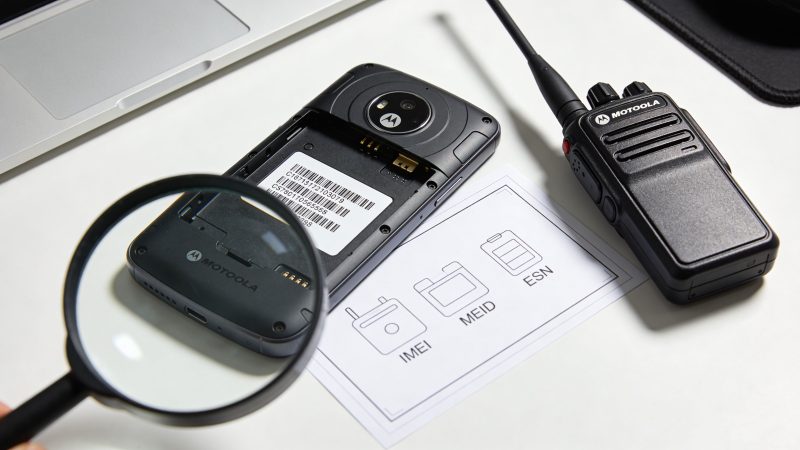
Serial number versus IMEI and MEID
A serial number is the device’s factory identity, much like a vehicle VIN. It stays with that specific unit and helps you trace manufacturing details, service records, and ownership inside your fleet.
An IMEI is different. For cellular hardware, it identifies the device on a mobile network. It’s closer to a license plate than a VIN. It matters for activation, carrier issues, and blacklisting, but it doesn’t replace the serial number in your internal asset records.
You may also run into MEID and older ESN references on some devices. Those serve a network identification role similar to IMEI, but they come from different cellular standards. For inventory work, the practical takeaway is simple: if the device is cellular, you may need both the serial number and the network identifier in your records.
Motorola Solutions versus Motorola Mobility
This distinction matters more than most buyers realize.
Motorola Solutions is the side most radio shops know. That includes professional two-way radios and public safety equipment. The serial and model systems there are more structured, better documented, and much more useful for compatibility planning.
Motorola Mobility is the phone side. That’s where teams often expect the same tidy decoding rules and don’t get them. Existing tools may claim support for phones, tablets, and wireless devices, but the available guidance for non-radio items is far less specific. That means you shouldn’t assume a consumer Motorola phone follows the same decoding logic as a Motorola Solutions radio.
What belongs in your asset record
If you manage mixed fleets, keep these fields separate:
| Device type | Identifier to record first | Also record if available | Why it matters |
|---|---|---|---|
| Two-way radio | Serial number | Model number | Age, service history, compatibility |
| Cellular phone | Serial number | IMEI or MEID | Inventory plus carrier-facing identity |
| Tablet with cellular | Serial number | IMEI or MEID | Internal control plus activation details |
| Accessory bundles | Parent asset reference | Any printed serials | Prevents orphaned gear |
Treat the serial number as the permanent identity inside your agency. Treat IMEI or MEID as operational network data.
That one distinction clears up a lot of inventory confusion before it starts.
How to Locate Your Device's Serial Number and IMEI
The fastest way to improve your records is to stop waiting for a perfect inventory day. Start with what staff can verify by hand in a few minutes.

On Motorola two-way radios
With radios, don’t trust just one location. Labels wear down, batteries get swapped, and older fleet records may contain transcription errors.
Use this order:
- Check the exterior label. Many Motorola radios have the serial and model information on the housing.
- Remove the battery. On many handheld units, the detailed label sits underneath, where it’s protected from wear.
- Review programming or service menus when available. Some models expose identifying data through the device interface or service software.
- Match the physical label to your asset record. If they don’t match, stop and correct the record before putting the radio back in service.
A practical shop habit helps here. Record the serial number and model number together during intake, not as separate tasks. That prevents a common problem where the radio’s age gets documented but its band or split doesn’t.
On Motorola phones and tablets
Phones and tablets usually give you more than one way to find the identifier. That’s useful when the screen works but the label is missing, or the box exists but the user can’t gain access to the device.
Use these methods:
- Dial the device code. On many phones, dialing *#06# displays IMEI information.
- Open Settings. Look in About phone or the device information section for the serial number and network identifiers.
- Inspect the SIM tray or device body. Some devices print identifier details on the tray or a small exterior label.
- Check original packaging. If the device box is still in storage, it often includes the serial and IMEI.
If the printed identifier and the software-displayed identifier disagree, verify both before you assign the device. One of those records is wrong.
For teams that need a visual walkthrough, this video is a useful field reference:
What to do during the first pass
Don’t try to solve every record problem on day one. Build a triage list.
- Ready for service means the identifier is readable and the assigned user or vehicle is known.
- Needs verification means the device exists but the record is incomplete or conflicting.
- Hold from deployment means you can’t verify identity, ownership, or role.
That approach gets usable control quickly. It also avoids the classic mistake of treating every missing field like a reason to stall the whole inventory effort.
Decoding Motorola Radio Serial and Model Numbers
A radio that powers on is not automatically a deployable radio. I’ve seen agencies issue spare units during a storm or wildfire, only to learn too late that the radios were from the wrong split, outside the service plan, or built years apart with different revision details. The serial and model number are what prevent that kind of avoidable failure.
Once you read those identifiers correctly, motorola serial numbers become working asset data. They tell you how old a radio is, which band family it belongs to, and whether it fits the system you already run across portables, mobiles, and even the non-radio Motorola devices that end up in the same inventory.

Reading the standard radio serial format
One common Motorola radio serial format uses three digits, three letters, and four digits. In that pattern, the fifth character is the year code and the sixth character is the month code, as described in Motorola date-of-manufacture decoding guidance.
For example, serial number 203FLW6421 points to a manufacture date in early November 2010 based on those fifth and sixth characters.
There is also a secondary format with two digits, four letters, one digit, and four letters. In that structure, the ninth character indicates the year, the tenth indicates the month, and the eleventh identifies warranty-period information.
That date matters for more than curiosity. It helps the shop decide whether a unit belongs in frontline service, reserve stock, training inventory, or retirement review. Older equipment can still be useful. Equipment with an unknown age usually creates the bigger problem because nobody can defend the maintenance or replacement decision.
Model numbers tell you whether the radio fits the job
The serial number helps with age. The model number helps with compatibility.
Motorola model suffix digits identify band families and narrower frequency splits inside those families. A radio can look right on the shelf and still be wrong for your system. That is one of the fastest ways to waste budget on a replacement that cannot be programmed where you need it.
For mixed public safety fleets, this matters across more than handhelds. Agencies often track radios, vehicle installs, body-worn tech, and Motorola mobile devices in separate spreadsheets, even though they support the same crews. One clean identifier standard fixes that. If your asset team already maps devices by unit, station, or vehicle, pairing those records with AVL unit assignment workflows makes it easier to see which radio and which mobile device belong together in the field.
Use this check before you buy, reassign, or send a radio for service:
| What you check | What it tells you | Why it matters |
|---|---|---|
| Serial number format | Manufacturing date details | Supports age and lifecycle decisions |
| Model suffix first digit | VHF or UHF family | Prevents wrong-band purchases |
| Split details | More precise tuning range | Avoids partial or total incompatibility |
| Revision letter | Production change level | Helps when matching mixed batches |
A VHF label is not enough. A UHF family match is not enough either. The actual split has to line up with the channels and system plan your agency uses.
That is where experienced radio shops save money. They do not approve replacements by appearance or product family alone. They confirm the serial format, decode the age, verify the model suffix, and match the split before the order goes out.
Putting Your Serial Number to Work for Your Agency
Good identifier records should do more than satisfy inventory policy. They should save money, shorten downtime, and prevent unnecessary purchases.
That only happens when the serial number leaves the sticker and enters daily operations.

Use case one and use case two
The first win is simple. Stop paying for avoidable repairs and replacements. When the serial is recorded correctly, your shop can verify the exact unit before sending it out, cross-check service history, and avoid replacing hardware just because nobody can confirm what’s on hand.
The second win is lifecycle control. If you track serial numbers by person, vehicle, or station assignment, you can tie equipment to inspections, battery rotation, repair history, and planned refresh schedules. That’s where one clean identifier often saves more than another round of emergency purchases.
For agencies that need location-aware equipment records, pairing serial-based asset tracking with tools such as AVL units and mapping workflows makes assignment records more useful in the field. The value isn’t just knowing what you own. It’s knowing what’s active, where it belongs, and what should be serviced next.
The hidden value in advanced MOTOTRBO features
This is the part many agencies miss.
For advanced MOTOTRBO radios, the serial number is required to generate an Entitlement ID (EID) that activates paid features like Capacity Plus digital trunking (HKLN4439), according to Motorola Solutions serial number lookup information. If the serial isn’t accurate, that activation process can stall.
That has a direct budget consequence. Sometimes a fleet appears limited because the organization hasn’t properly registered and activated what the existing hardware can already support. Proper registration can activate capability that the agency would otherwise try to solve by buying more equipment.
The same Motorola Solutions reference also notes serial-based activation around MOTOTRBO licensing and EID workflows, including upgrades tied to exact radio identity. In practical terms, that means the radio’s serial number isn’t just for inventory. It can be the gatekeeper for capacity, trunking, and feature expansion.
What works in practice
A useful operating pattern looks like this:
- Capture during intake. Record serial number, model number, assigned role, and physical condition before the unit goes back into rotation.
- Require verification before programming changes. If the label and record don’t match, fix the record first.
- Store proof once. Keep a photo of the label with the asset record so staff don’t have to re-open batteries or trays every time.
- Use exceptions lists. Flag devices with unreadable labels, uncertain ownership, or unclear compatibility for supervisor review.
One accurate serial record can prevent a bad replacement order, a delayed feature activation, and a wasted bench hour.
Radios and mobile devices should live in one process
This is the operational shift that helps hybrid fleets most. Don’t run one careful workflow for radios and a loose spreadsheet for phones and tablets.
Instead, standardize the intake questions:
- What is the device?
- What is its permanent identifier?
- What network or system does it belong to?
- Who has it now?
- What condition is it in?
- What decision is next: deploy, service, retire, or verify?
That unified approach closes the gap that usually causes losses. The gear itself is different. The control process doesn’t need to be.
Security and Best Practices for Serial Number Management
A bad serial number process usually shows up at the worst time. A radio goes down before an event. A replacement handset gets ordered for the wrong band split. A phone assigned to a command vehicle disappears from the record after a staff change. None of those failures start in the field. They start in the inventory system.
Motorola identifiers deserve the same protection as any other operational record. A full export of serial numbers, IMEIs, model details, assignments, and retirement notes gives an outsider a clear picture of what your agency owns and how it is deployed. It also gives your own staff plenty of room to make expensive mistakes if records are copied into email threads, local spreadsheets, or shared folders with no controls.
The problem is bigger than radios. First responder fleets now mix portable and mobile radios with phones, tablets, and purpose-built Motorola mobile devices. If security rules cover the radio shop database but ignore the mobile device list, the agency still has a blind spot. Good asset control means one standard for both.
What needs protection
Protect the identifier itself, but also protect the context around it. A serial number without assignment data has limited value. A serial number tied to a user, vehicle, talkgroup role, warranty status, and replacement history is far more sensitive.
Poor handling creates practical failures:
- Repair delays when the unit on the bench does not match the record.
- Warranty trouble when purchase history or ownership status is unclear.
- Retirement gaps when decommissioned gear stays active on paper.
- Purchasing errors when staff approve a replacement from an incomplete model description.
- Cross-fleet confusion when radios and mobile devices are tracked in separate systems with different naming rules.
That purchasing error costs real money. As noted earlier, Motorola model suffix details can determine whether a replacement radio will work on your existing network. Get that wrong, and the agency pays for hardware that cannot be fielded.
Controls that hold up under turnover
The best policy is the one a new supervisor can follow on day one without calling the one technician who remembers how things were done five years ago.
Use a short set of controls and enforce them every time:
- Keep one system of record. Radios, smartphones, tablets, and vehicle-mounted devices should live in the same controlled asset process, even if different teams support them.
- Restrict who can export full records. Viewing an asset is different from downloading the full fleet list.
- Require verification before purchase or reassignment. Match the physical label to the record before spending money or moving equipment between users, vehicles, or stations.
- Document chain of custody. Record who had the device, when it changed hands, and why.
- Close retirements properly. Mark whether equipment was destroyed, sold, transferred, cannibalized for parts, or stored as reserve stock.
- Apply system access controls. Use role-based permissions, account reviews, and documented security controls for emergency operations platforms.
One more point gets missed often. Accessories should be standardized and tracked with the same discipline when they affect replacement rates and field readiness. If your agency issues Motorola phones in protective kits, it helps to compare Motorola phone case features before standardizing by model, especially if cracked devices keep driving avoidable replacement costs.
A serial number database is not just an inventory file. It is a purchasing control, a maintenance record, and a security document. Treat it that way, and the fleet stays usable. Treat it casually, and small record errors turn into radio incompatibility, missing devices, and wasted budget.
From Chaos to Control Your Asset Management Blueprint
Clean inventory work supports frontline readiness. That’s the essential point.
When you can find a Motorola identifier quickly, decode the radio details accurately, and store the right data in one place, routine decisions get easier. You stop guessing about age. You stop moving incompatible hardware around the fleet. You stop buying replacements just because records are incomplete.
The biggest operational gain comes from using one discipline across radios and mobile devices. Radio serial guidance is far better documented than phone and tablet guidance, but the field reality is that crews use both. A single intake and tracking process solves more than another labeling project ever will.
A few supporting habits make the system stick. Record identifiers at intake. Match serial and model details before ordering. Keep a label photo. Flag exceptions instead of burying them. If your team also manages protective accessories for issued smartphones, it helps to compare Motorola phone case features when standardizing what goes into field kits, especially when trying to reduce damage-related replacement churn.
The final step is turning the process into repeatable actions. A good workflow system keeps intake, verification, reassignment, service, and retirement from becoming ad hoc tasks. That’s where structured asset and response workflows make the difference between “we have a list” and “we have control.”
Resgrid, LLC helps first responders, dispatchers, and organizations manage personnel, equipment, messaging, tracking, and reporting in one platform. If you want a practical way to organize radio and mobile asset records without adding unnecessary complexity, Resgrid, LLC is worth a look.