
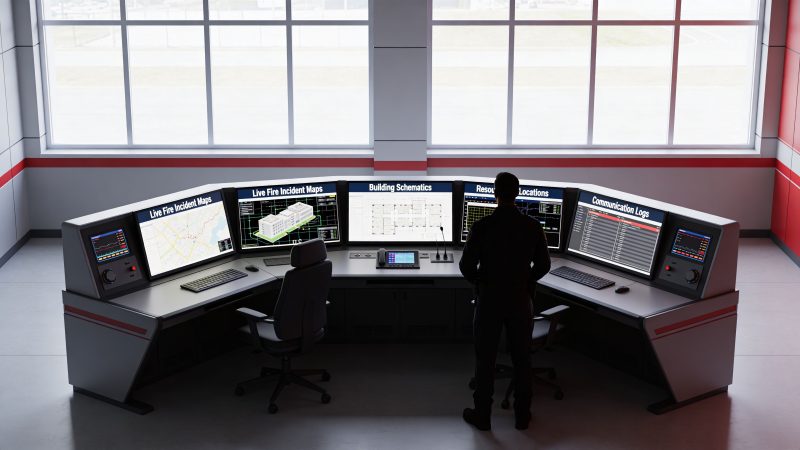
Future-Ready Fire Command Center Design & Ops 2026
At 2:14 a.m., the lobby panel says waterflow on an upper floor. Security says they smell smoke but can’t confirm the location. An elevator is recalled. One stair door shows trouble. The first-arriving company gets a report of people still inside, while another crew hears the alarm may be false. If nobody is pulling those inputs into one decision point, the incident starts to split in half before the attack line is even charged.
That’s what a fire command center prevents. It gives the incident commander one protected place to confirm what the building is saying, what crews are seeing, and what support systems are doing. Without that central brain, teams work from fragments. One officer is looking at the alarm panel, another is chasing a radio report, and somebody else is trying to figure out smoke control from memory.
The practical problem for most organizations isn’t whether a fire command center matters. It’s how to build and run one that works under pressure without overspending on the wrong hardware, the wrong software, or the wrong room layout.
Why Every Major Incident Needs a Central Brain
A multi-floor building fire rarely fails because one component breaks. It fails because information arrives in pieces and nobody has a reliable way to turn those pieces into a common operating picture.
Take a routine but dangerous example. A detector trips on one floor, a pull station activates on another, and occupants start self-evacuating through the same corridor firefighters need to use. If command is operating from the curb with partial radio traffic and no clear access to the building systems, the first tactical choices get delayed. That delay changes everything. Search assignments get fuzzier. Ventilation decisions get riskier. Accountability gets harder.
A working fire command center fixes that by creating a single place where the incident commander can verify status, assign priorities, and keep crews aligned. In the field, that matters more than any glossy display wall. Command needs clear alarm information, dependable communications, building controls that can be used under stress, and a way to track assignments without resorting to guesswork.
One of the best ways to understand the operational value is to look at support infrastructure that keeps emergency access functional when timing is tight. The Wilcox Door Service Inc. case study is useful because it highlights a simple truth many planners miss. Doors, access points, and emergency service readiness are command issues, not just maintenance issues.
For agencies trying to reduce delay between incoming information and action, a digital layer matters too. A platform with integrated dispatching workflows can help command move beyond handwritten notes, especially when incidents stretch across multiple companies, entrances, or exposures.
The room matters, but the function matters more. If command can’t see, confirm, and communicate from one place, the incident gets more expensive and more dangerous.
The Modern Fire Command Center Explained
A fire command center isn’t just a room with panels. It’s the operational authority point for the incident. Think of it as an air traffic control tower for emergencies. Its job is to absorb inputs, sort signal from noise, and support decisions that crews can act on immediately.

What the command center actually does
At a practical level, the command center carries four burdens at once:
- Situational awareness: It shows what systems have activated, where conditions may be changing, and what parts of the building demand attention first.
- Resource coordination: It gives command a place to organize assignments, staging, support functions, and incoming mutual aid.
- Communications control: It reduces the chances that critical information gets buried in scattered radio traffic.
- Accountability: It helps command keep track of who is operating where, under what assignment, and with what hazards.
That sounds straightforward until conditions deteriorate. Smoke migration, elevator issues, confused occupants, and partial system failures all push command toward overload. A good fire command center reduces that overload by turning scattered building data into usable decisions.
Why ICS shaped the modern room
The structure behind today’s command centers didn’t appear by accident. The Incident Command System, or ICS, grew out of the catastrophic 1970 wildfire season in Southern California, which exposed severe multi-agency coordination failures. Congress then funded development of a standardized approach to resource tracking and command, and by 2004 ICS became a cornerstone of NIMS, as outlined in FireRescue1’s history of incident command evolution.
That history still shows up in daily operations. The reason command boards, status tracking, designated roles, and formal reporting lines matter is simple. Freelancing and parallel decision-making kill tempo. They also create avoidable risk.
A modern fire command center works best when the room mirrors the discipline of ICS:
| Command need | What works in practice | What doesn’t |
|---|---|---|
| Clear authority | One incident commander with defined support roles | Multiple people issuing direction from different locations |
| Shared picture | Common display of alarms, building status, and assignments | Individual crews piecing together separate fragments |
| Resource tracking | Visible staging, tasking, and accountability status | Relying on memory or scattered notes |
| Scalable structure | Expanding roles as the incident grows | Improvised structure after the incident is already outrunning command |
Function first, furniture second
Many organizations overspend on appearance and underspend on command flow. Large monitors can help, but only if they display information that commanders use. Clean panel layout, readable building schematics, simple controls, and disciplined information routing matter more than a flashy room.
Practical rule: If a visiting chief is impressed but your night-duty officer can’t run the room under stress, the design failed.
The best command centers support the basics first. Confirm the incident. Control communications. Track people and systems. Then add convenience features if the budget allows.
Anatomy of a Compliant Command Center Room
A command function needs a survivable room. In high-rise operations, that’s not a luxury item. It’s part of the safety system.
Per model building codes, fire command centers in high-rises must be at least 200 square feet, typically 20 by 10 feet, with a minimum width of 10 feet, and they must have 1-hour fire-rated separation from the rest of the building, as described in Fire Engineering’s guidance on high-rise fire command centers. That protected envelope is what allows command to keep operating when the rest of the structure is under stress.

What has to be in the room
A compliant room centralizes the systems that command needs immediately, not eventually. That typically includes the Fire Alarm Control Panel, emergency voice and communication systems, smoke control interfaces, fire pump indicators, sprinkler valve and waterflow displays, HVAC status and controls, elevator status and controls, stairwell reentry controls, emergency or standby power indicators, building schematics, and telephone access.
The operational reason is obvious on a bad day. If smoke is moving where it shouldn’t, command needs access to smoke control. If a pump is in trouble, command needs status without sending someone on a scavenger hunt through the building. If elevators are behaving unexpectedly, command needs that information in one protected location.
Room layout decisions that save money
The cheapest command center is often the one that avoids expensive rework. Most cost overruns come from late-stage changes after electrical, controls, and millwork are already installed.
Use these budget rules early:
- Start with panel reach and sightlines: Put the most-used controls where an officer can operate them without crossing the room repeatedly.
- Choose modular millwork where possible: Custom cabinetry looks polished, but modular layouts are usually easier to service, replace, and reconfigure.
- Reserve wall space for future systems: Empty wall area is cheaper during construction than relocating installed equipment later.
- Standardize labels: A neat label set costs little and pays back every time a crew unfamiliar with the building has to use the room quickly.
There’s another overlooked issue inside the room itself. Noise. Alarms, radios, phones, ventilation equipment, and multiple staff talking at once can make a command room harder to use than the corridor outside it. If you’re planning the interior, Cubicle By Design for office noise reduction is a useful reference for acoustic treatment ideas that can improve speech intelligibility without major reconstruction.
Location beats aesthetics
Near the main entrance or fire lift lobby usually works better than a hidden back-of-house location. Command doesn’t need a dramatic room. It needs a room responders can find immediately, enter safely, and operate under pressure.
A command center that’s technically compliant but hard to locate or too cramped to work from is compliant on paper and weak in the field.
Good design protects the command function from the emergency itself. That’s the whole point of the room.
The Technology and Communications Stack
The room gives you survivability. The technology stack gives you usefulness.
A fire command center becomes operationally valuable when its systems produce a common picture fast enough to affect decisions. That stack usually starts with the Fire Alarm Control Panel, then extends outward to firefighter communications, building controls, schematics, incident notes, personnel status, and supporting data feeds.

Start with the systems command will actually touch
Modern FACPs allow incident commanders to manage zones, silence alarms, and reset detectors from a central point. They also support a more disciplined operating rhythm because command can verify what the building is reporting instead of relying on verbal relays. As noted in the DMP Fire Command Center documentation, integrating FACPs with two-way firefighter communication systems can reduce radio traffic congestion by 40% in high-rises, and FACP lifespan averages 10 to 15 years, so replacement planning matters before obsolescence turns into parts scarcity.
That last point gets missed all the time. Many organizations spend heavily on visible upgrades and leave the aging panel in place because it still powers on. That’s false economy. A command center built around a panel nobody can service quickly becomes a liability.
Legacy hardware versus flexible integration
Here’s the trade-off.
Legacy systems often offer deep building integration, but they can lock you into proprietary service models, awkward interfaces, and expensive upgrade cycles. Modern integrated platforms tend to be easier to extend, easier to train on, and easier to connect to operational tools outside the room.
A practical comparison looks like this:
| Decision area | Legacy-heavy approach | Flexible modern approach |
|---|---|---|
| Alarm visibility | Panel-specific screens only | Panel data paired with broader incident view |
| Staff training | Depends on vendor-specific familiarity | Easier to document and standardize |
| Upgrades | Often tied to proprietary paths | More room for phased adoption |
| Incident coordination | Building-focused | Building plus personnel and task visibility |
That doesn’t mean every legacy system should be ripped out. It means you should be selective. Keep what is reliable, serviceable, and code-appropriate. Replace what creates single points of failure or training bottlenecks.
Add the digital layer carefully
A digital command platform should reduce friction, not add another screen nobody trusts. The right setup helps command share updates, assign tasks, and keep a record of operational changes while the incident is still moving. Tools with integrated team messaging can help connect dispatch, command staff, and support personnel without forcing every detail onto the main radio channel.
Resgrid, LLC is one option in this category. It provides dispatching, messaging, tracking, and reporting in a unified platform, which can support a fire command center that needs a digital operational picture without a large custom software project.
Before adding any software layer, ask three questions:
- Can command use it under stress? If the workflow is slower than a grease pencil and a board, it won’t survive real incidents.
- Can it accept data from existing systems? If integration is weak, people will double-enter information and stop trusting it.
- Can you train new personnel on it quickly? A brilliant interface that only one captain understands is not a resilient command tool.
A quick walkthrough helps people see the operational side more clearly:
Spend where failure hurts most
If the budget is tight, prioritize these in order:
- Communications clarity: Two-way firefighter communications and dependable voice pathways.
- Panel reliability: A maintainable FACP and related interfaces that your crews and vendors can support.
- Usable displays: Clear schematics and status displays beat oversized dashboards full of clutter.
- Interoperable software: Buy tools that can grow with operations instead of trapping you in manual workarounds.
Don’t chase a futuristic command room. Build one that a tired shift commander can still operate correctly at 3 a.m.
Staffing Roles and Operational Procedures
The best fire command center in the region won’t fix a team that hasn’t defined who does what. Rooms and screens support command. People create it.
The backbone here is role clarity. That idea was strengthened by the 1973 America Burning report, which helped professionalize the fire service through data collection standards and led to creation of the U.S. Fire Administration. That data culture still matters because modern command decisions are shaped by national reporting systems. In 2023, NFIRS reported 1,389,000 fires and $23.2 billion in property losses, as discussed in FireEMSBlog’s review of data collection in the modern fire service.
Core roles that keep the room functional
Inside a fire command center, not every role needs a dedicated person on every incident. But every function does need ownership.
Incident commander
The incident commander sets objectives, approves strategy, and keeps the operational picture coherent. In smaller incidents, that person may also absorb some planning and logistics functions. In larger incidents, they shouldn’t.
Operations support
Someone needs to translate strategy into assignments, track progress, and surface conflicts. In a growing incident, this role prevents the commander from becoming a radio clerk.
Accountability and personnel status
This function tracks who is assigned, where they’re operating, and when conditions require a status check. A digital personnel management workflow can support this function by organizing staffing, availability, and team visibility in one place.
Logistics and building support
Somebody has to manage the practical side. Keys, access, utility contacts, spare radios, rehab coordination, replacement equipment, and liaison with building staff. If nobody owns logistics, operations will eventually absorb it and lose focus.
SOPs that are worth writing down
Many standard operating procedures get written to satisfy policy binders. The useful ones are the procedures people follow when the room is busy.
The procedures that deserve the most attention are:
- Shift change handoff: Command tools, status boards, trouble conditions, and out-of-service systems must transfer cleanly.
- Alarm investigation flow: Define how incoming signals are verified, escalated, and communicated.
- Resource request process: Crews should know how requests move from the field into command decisions.
- Communications discipline: Specify what belongs on radio, what belongs on phone, and what belongs in the digital log.
- System impairment handling: If smoke control, elevators, or the alarm system are degraded, that must trigger a clear altered-response procedure.
Cross-training saves money and reduces fragility
Staffing every role with dedicated specialists is expensive and often unrealistic. Cross-training is cheaper and more durable, but only if it’s intentional.
A practical staffing model usually works better when:
| Approach | Benefit | Risk if done poorly |
|---|---|---|
| Cross-train command support staff | Covers vacancies and surge periods | People know a little about everything and not enough about anything |
| Use job aids in the room | Speeds action under stress | Job aids become outdated and misleading |
| Run short recurring drills | Builds muscle memory without major disruption | Drills become box-checking if scenarios never change |
The team doesn’t need more policy binders. It needs repeatable habits that still hold when radios are busy and information is incomplete.
If you’re mixing career staff, volunteers, building engineers, and outside responders, keep procedures brutally simple. Complexity looks smart in planning meetings and falls apart during smoke conditions.
Your Implementation and Operations Checklist
Planning a fire command center gets easier when you treat it like an operational build, not a décor project. The checklist below keeps spending tied to mission need.

Planning phase
Before buying anything, get agreement on what the room must do on its worst day.
- Define the incident profile: List the building or campus risks that should shape the room. High-rise fire, smoke migration, access control issues, large occupant loads, and after-hours staffing all change the design.
- Set the budget in layers: Separate must-haves from nice-to-haves. Communications and maintainable life-safety interfaces belong in the first bucket. Cosmetic finishes and oversized displays belong later.
- Confirm code and authority requirements: Bring facilities, fire protection, IT, and the authority having jurisdiction into the conversation early. Late compliance changes are where budgets get hurt.
Implementation phase
Many projects overspend because everybody wants to optimize at once. Phase the build if you need to.
Build the room around workflow
Put primary systems where command can read and operate them quickly. Make sure the entry path is obvious, the signage is permanent, and the room can support more than one operator when the incident grows.
Install systems in a serviceable way
Fancy millwork that blocks access to wiring, terminals, or replacement components creates future maintenance cost. Keep access panels, labeling, and cable management straightforward.
Integrate only what people will use
If a feed won’t improve decisions, don’t force it into the room. Extra data is only helpful when somebody can act on it.
Buy for maintainability. Every inaccessible panel, custom bracket, or obscure vendor dependency becomes tomorrow’s emergency service invoice.
Operations phase
Once the room is live, operational discipline matters more than ribbon-cutting.
Run realistic drills
Test the room with scenarios that create competing priorities. Use partial information. Add a communications wrinkle. Force the team to verify inputs instead of assuming the panel tells the whole story.
Maintain a replacement calendar
Every command center has aging components. Keep a schedule for panel review, communication device checks, battery or power verification, and software support status. Deferred replacement usually costs more than planned replacement because it arrives during failure.
Audit room usability
Walk through the room as if you were a mutual-aid chief arriving cold. Can you find the controls? Are labels readable? Are schematics current? Can a second operator work without blocking the first?
A compact decision matrix helps when money is tight:
| Priority | Fund now | Delay if needed |
|---|---|---|
| Life-safety communications | Yes | No |
| Core alarm and control reliability | Yes | No |
| Clear schematics and labeling | Yes | Rarely |
| Premium finishes | No | Yes |
| Oversized display upgrades | Maybe | Yes |
| Custom furniture beyond operational need | No | Yes |
A practical order of operations
If you need a lean roadmap, use this sequence:
- First: Lock in room location, survivability, and code requirements.
- Second: Make the alarm, communications, and control interfaces reliable and understandable.
- Third: Add digital coordination tools that reduce manual tracking.
- Fourth: Train, drill, and revise based on how people use the room.
That order saves money because it prevents teams from polishing systems that don’t yet support command.
Frequently Asked Questions about Fire Command Centers
What’s the difference between a fire command center and a 911 dispatch center
They support the same mission but do different jobs. A 911 dispatch center receives calls, processes information, and sends resources. A fire command center supports command at the building or incident level by centralizing alarm data, building systems, communications, and tactical decision support.
Dispatch gets the right resources moving. The fire command center helps those resources operate safely and effectively once the incident is underway.
Is a fire command center legally required for every building
No. The requirement depends on the type, size, and design of the building and the applicable code adopted by the jurisdiction. High-rises are the classic case where a dedicated fire command center becomes a major compliance and operational issue.
The practical move is to confirm requirements early with your fire protection engineer, design team, and authority having jurisdiction. Don’t guess. Late design corrections are expensive.
What’s the most common design mistake
Treating the room like a showcase instead of a working control point. Organizations often focus on screens, cabinetry, or appearance before they’ve solved flow, labeling, communications, and panel usability.
A plain room with clear controls will outperform a beautiful room that slows operators down.
How often should we drill on command center operations
Often enough that staff can run the room from memory, but not so mechanically that the scenarios become predictable. Short, targeted drills usually work better than rare marathon exercises.
Vary the problem set. Run one drill around smoke control, another around confusing alarm inputs, another around loss of a supporting system. The goal is judgment under pressure, not theatrical complexity.
Should we replace an older fire alarm control panel if it still works
If the panel is aging, hard to service, or dependent on scarce parts, waiting can create a bigger problem later. “Still works” is not the same thing as “reliable under incident conditions.”
Replacement decisions should consider serviceability, staff familiarity, compatibility with current operations, and whether the system still supports the command function you need.
Can smaller organizations build a capable command center without a huge budget
Yes, if they prioritize correctly. Spend first on survivable space, reliable communications, maintainable life-safety interfaces, and clear operating procedures. Add advanced software and convenience features where they reduce real workload.
Smaller budgets usually fail when teams buy premium visual hardware before they’ve fixed the basics.
How do we test the fire command center without disrupting normal operations
Use controlled drills with pre-briefed participants and narrowly defined objectives. Test one workflow at a time when needed. You don’t have to simulate a full building emergency every time.
A good drill can focus on one decision chain, such as alarm verification, stairwell reentry control, communications routing, or accountability updates. That approach is easier to schedule and easier to evaluate.
If you're building, upgrading, or rethinking a fire command center, Resgrid, LLC offers a practical way to add dispatch, messaging, personnel visibility, and reporting without forcing a large custom implementation. For agencies and organizations that need a workable digital layer on a real-world budget, it’s worth evaluating alongside your existing command room systems.