
What Is Dispatch Software? A 2026 Guide for Agencies
At 2:17 a.m., the storm hits, alarms start coming in, and the room changes fast. One dispatcher is juggling radio traffic. Another is writing addresses on a legal pad because the whiteboard is already full. A supervisor is trying to figure out which crew is currently available, not just which unit was supposed to clear twenty minutes ago. Someone misses a callback because the number got scribbled on the wrong sticky note.
That setup works right up until it doesn't. Manual dispatch can hold together during a routine shift. It breaks under surge volume, staff turnover, weather events, mutual aid, or any incident that needs clean coordination across teams.
For a new chief, that's usually the moment the question stops being academic. You're not asking what is dispatch software because you want a cleaner screen. You're asking because you need fewer blind spots, better accountability, and a way to move resources without making your people think through the same decisions over and over under pressure.
This matters even more in emergency response, where the software can't just help route a driver to a customer. It has to support triage, accountability, personnel safety, and decisions that affect lives. Generic dispatch tools often get marketed as if they're interchangeable. They aren't.
From Chaos to Coordination An Introduction
A dispatch center without a structured system usually develops its own workarounds. Phone calls get logged in notebooks. Unit status lives partly in a radio operator's head and partly on a board. Notifications happen through group texts, phone trees, and whatever app the crew already has on their phones.

That doesn't just create clutter. It creates operational risk. When information is scattered, dispatchers repeat questions, commanders work from stale information, and field crews lose time waiting for updates that should have been automatic.
What the shift feels like in practice
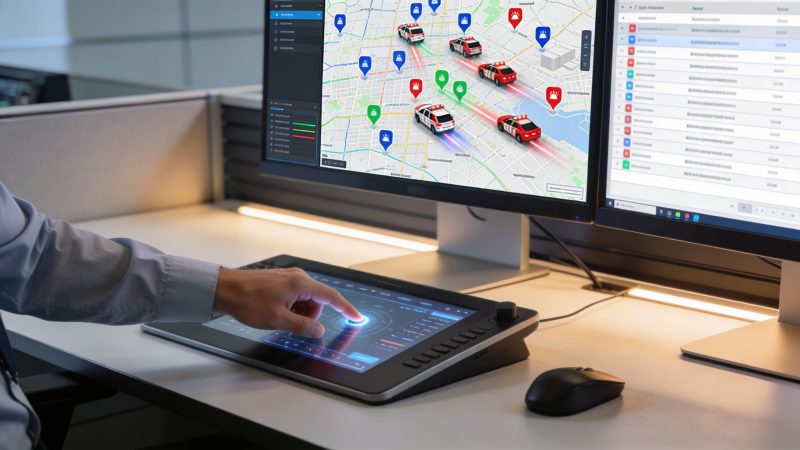
With proper dispatch software, the center starts working from one operational picture. Calls come in through a defined workflow. The system tracks who is available, who has acknowledged, who is en route, who is on scene, and who still needs follow-up. That alone removes a surprising amount of friction.
A simple example makes the difference clear:
- Manual process: A vehicle crash comes in. The dispatcher phones the station, radios a nearby unit, texts a supervisor, and writes the location down twice because the first note is unreadable.
- Structured dispatch process: The incident is entered once, the right units are alerted through predefined rules, responders receive the location and details immediately, and command can see acknowledgments in real time.
Practical rule: If your dispatch process depends on one experienced person remembering who to call next, you don't have a system. You have a workaround.
For first responders, dispatch software is less about convenience than control. It gives the agency a repeatable way to move from intake to assignment to accountability without relying on memory, sticky notes, or luck.
What Is Dispatch Software Really
The simplest answer is this. Dispatch software is the control layer that turns incoming information into coordinated action. It isn't just a map, a pager replacement, or a chat tool.

The best way to explain what is dispatch software to a chief is to compare it to air traffic control for ground operations. Aircraft don't just need radios. They need sequencing, prioritization, separation, status awareness, and a common operating picture. Ground units need the same thing.
According to Axon's explanation of fire dispatch software, dispatch software is a decision-support and resource-orchestration system that combines computer-aided dispatch, real-time location awareness, and workflow automation to reduce the time between incident intake and resource assignment. That matters because it lowers cognitive load and speeds up turnaround in high-volume environments.
What it actually does behind the screen
A usable system handles four jobs at once:
| Function | What it means on the floor |
|---|---|
| Incident intake | Captures the call, location, type, and priority without forcing dispatchers to improvise the workflow |
| Resource selection | Helps identify the right unit, crew, or specialty resource based on availability and context |
| Status tracking | Shows whether resources are assigned, responding, on scene, transporting, or clear |
| Communication flow | Pushes the same incident data to the people who need it without re-entering it across tools |
This is why a GPS app isn't dispatch software. A chat platform isn't dispatch software either. Both may support operations, but neither manages the full chain from incident creation to assignment to closure.
Why that matters under pressure
Dispatchers in emergency settings don't have time to build the workflow from scratch during every call. They need prompts, defaults, status changes, and clear records. Good systems reduce the number of manual handoffs and make the next decision easier.
The software should remove decisions that don't require human judgment, so your people can focus on the ones that do.
That distinction gets lost in a lot of vendor messaging. If a platform mainly talks about route efficiency, customer updates, and driver productivity, it's probably built for a different problem set. Emergency dispatch needs a system that supports urgency, escalation, and accountability first.
Core Features for Mission-Critical Operations
The easiest way to evaluate a platform is to ignore the sales language and look at the operational features. If it can't support emergency work at the feature level, it won't suddenly become mission-critical because a vendor says it can.

A major gap in the market is that many tools are built for commercial scheduling, not emergency response. As DispatchTrack notes in its discussion of dispatch software, first-responder dispatch requires sub-second response times, multi-agency coordination, and personnel safety tracking in high-risk scenarios, not just route optimization for cost reduction.
Computer-aided dispatch and incident handling
In emergency operations, CAD is the foundation. It gives dispatchers a structured way to create calls, classify them, prioritize them, assign units, and keep a timeline.
That sounds basic until the tempo rises. Then structure matters. If a caller reports smoke in a commercial building, the dispatcher shouldn't have to remember every required question or manually notify every role.
Look for:
- Call prioritization: The system should help separate routine work from time-critical incidents.
- Unit recommendation: It should support assignment based on status, role, and proximity.
- Incident timeline: Every update should be attached to the call, not scattered across radio logs and text threads.
Personnel and apparatus tracking
A chief needs to know more than who was toned out. You need to know who accepted, who is moving, and who is still unaccounted for.
That includes:
- GPS and map awareness: Closest available isn't always the same as assigned on paper.
- Unit status changes: En route, on scene, committed, available, out of service.
- Personnel accountability: Which individuals are attached to which apparatus, strike team, or assignment.
For agencies that also coordinate logistics or event support, it's useful to understand adjacent systems too. This overview of supply chain management software helps show how resource visibility and workflow control matter across different operational environments, even though public safety needs are more time-sensitive.
A practical product checklist helps here. Review a live feature set such as dispatching capabilities in Resgrid and compare it against your current workflow, step by step.
Here's a short demo that helps visualize how a dispatch workflow looks in practice:
Alerts and communications that actually work
Emergency dispatch software should notify people through multiple channels because no single alert path is reliable all the time. App push, SMS, voice, email, and in-platform messaging all have a place depending on staffing and response model.
If your alerting plan depends on every responder hearing a radio call in real time, your redundancy is too thin.
Commercial systems often treat messaging as a convenience feature. In public safety, it is part of the response chain.
How Dispatch Software Saves Money and Improves Outcomes
Most chiefs don't need another tech project. They need a tool that lowers operating drag and improves control. That's where dispatch software earns its place.
The market direction supports that shift. The global CAD market is valued at USD 2.26 billion in 2024 and is projected to reach USD 4.31 billion by 2030, with the software segment holding 63.5% of revenue share in 2024, according to Grand View Research's CAD market analysis. That doesn't prove your agency should buy a system by itself, but it does show where agencies are putting investment. They're moving toward software that carries more of the operational load.

Where the savings usually come from
The money isn't usually saved in one dramatic line item. It shows up in reduced waste.
- Less manual coordination: Dispatchers spend less time calling around, re-entering the same information, and chasing status updates.
- Fewer avoidable overtime problems: Better visibility into who is available and who is already committed helps supervisors make cleaner staffing decisions.
- Cleaner records: Digital incident timelines and status logs reduce the scramble during reporting, reviews, and compliance work.
- Better use of assets: Units, personnel, and specialty resources are easier to place where they're needed.
A lot of agencies miss the total cost picture. They compare subscription price to subscription price and forget labor time, hardware burden, server upkeep, implementation fees, and retraining when an overbuilt system fails to fit the workflow.
Where the operational gains show up
The performance side is more immediate. Command sees what is happening sooner. Dispatch sees who can respond. Field personnel get incident details faster and in a more consistent format.
AI can help here too, especially when it supports recommendation and triage rather than trying to replace judgment. If you're assessing how automation fits your process, review AI capabilities for dispatch-related workflows and ask a simple question: does it reduce operator workload without hiding critical decisions?
A before-and-after example is useful:
| Before | After |
|---|---|
| Dispatcher calls three people to fill one response slot | System alerts the assigned group and shows acknowledgments live |
| Supervisor checks multiple tools to confirm staffing | Status and assignments appear in one operating view |
| After-action review depends on memory and radio notes | Timeline, assignments, and updates are attached to the incident record |
Command note: Buy for workload reduction first. The response-time benefit matters, but the daily savings often come from removing repeated manual tasks.
Choosing Your Deployment Model Cloud vs On-Premise
This decision gets framed as a technical debate, but it usually comes down to money, staffing, and risk ownership. Can your agency support infrastructure internally, or do you need the vendor to carry more of that burden?
According to Research and Markets' service dispatch software market report, the market is seeing cloud-based platforms gain prominence as organizations seek scalable, cost-efficient solutions that eliminate traditional infrastructure expenses. The same report says the market grows from USD 3.32 billion in 2025 to USD 3.62 billion in 2026.
How the trade-off looks in real life
Cloud works well when you want faster rollout, lower upfront expense, and fewer internal maintenance duties. On-premise works better when you have strict requirements around hosting, connectivity constraints, or an established IT environment that can carry the load.
A quick comparison makes it clearer:
| Decision point | Cloud deployment | On-premise deployment |
|---|---|---|
| Upfront cost | Usually lower | Usually higher |
| Maintenance | Vendor handles updates and hosting tasks | Your IT team handles patching, uptime, backups |
| Scalability | Easier to expand | Expansion often requires added infrastructure |
| Control | Less direct infrastructure control | More direct control over environment and data handling |
Questions a chief should ask before choosing
- Who owns uptime responsibility: If the system goes down at 3 a.m., who is fixing it?
- What your IT team can support: Not what they hope to support.
- How fast do workflows change: If you need quick updates, cloud often has an edge.
- Are there data locality or policy requirements: Some agencies can't compromise on this.
If you want a plain-language primer for non-technical stakeholders, this guide on cloud vs on-premise for small businesses is useful as a discussion starter, even though public safety agencies usually have stricter requirements than a typical small business.
The mistake to avoid is choosing on-premise because it feels more secure, while forgetting that unpatched local systems create their own risks and costs.
Dispatch Software in Action Real-World Use Cases
The fastest way to understand what dispatch software does is to look at actual operating environments.
Volunteer fire department on a weekday afternoon
A call drops for a brush fire on the edge of the district. Most members are at work, and turnout depends on who gets the alert quickly and who can respond. The system sends the incident to the right group, members acknowledge from their phones, officers can see response intent, and late-arriving personnel don't need a second round of phone calls to find the location.
The money-saving angle is simple. Fewer manual callouts mean less staff time burned just assembling a response. Better visibility also reduces the tendency to over-alert when command can already see enough personnel are moving.
EMS support for a large public event
At a marathon or festival, dispatch isn't only about reacting. It's about staging, repositioning, and keeping units balanced as conditions change. A medic team near one course segment may be physically closer to the next patient, but a supervisor may hold that team in place because another section has weaker coverage.
That kind of decision improves when the system shows availability, position, and assignment status in one view. In adjacent logistics markets, dispatch platforms use AI to match jobs based on skills, proximity, and availability, as described by PCS Software's dispatch overview. The public safety lesson isn't to copy trucking workflows. It's to apply the same assignment logic with emergency priorities and safety constraints.
Multi-site private security operation
A security company covering office parks, events, and alarm responses has a different mission but a similar coordination problem. Supervisors need to know where guards are, whether check-ins happened, and which officer should handle the next incident.
What works here is flexible assignment and good reporting. What doesn't work is forcing security operations into a delivery-style system that cares more about route efficiency than incident accountability.
A useful dispatch platform adapts to different missions, but it shouldn't force emergency or security teams to think like a parcel company.
How to Evaluate and Implement Your First Dispatch System
Most bad software buys start the same way. The agency books a polished demo, watches a canned scenario, gets impressed by the map, and skips the hard questions. Then actual operations show up and the gaps appear.
A better process is slower at the front and cheaper at the back.
Start with operational must-haves
Write down the tasks your team performs every shift, not the features vendors advertise. Intake, unit assignment, notifications, acknowledgments, status changes, mutual aid, reporting, and after-action review should all be on the list.
Separate them into two buckets:
- Must-have functions that support current operations on day one.
- Nice-to-have tools that may help later but shouldn't drive the purchase.
If a system can't handle your routine incidents cleanly, it won't save you during a surge.
Test demos against your own scenarios
Don't let the vendor choose the script. Bring three of your own incidents and make them walk through them live.
Use scenarios like:
- A structure fire with mutual aid
- A missing person call with search teams
- A planned event with multiple standby units
Ask them to show the exact workflow, including reassignment, status updates, and reporting. If the rep has to explain around missing functionality, treat that as your answer.
Look at total ownership, not just sticker price
A lower monthly fee can still become the more expensive option if it needs outside consultants, custom hardware, or a long implementation project. One practical way to compare options is to use a side-by-side framework such as Resgrid's comparison page and then add your own internal cost items to that checklist.
Check these items before signing anything:
- Training burden: How much effort will dispatchers, supervisors, and field users need?
- Configuration ownership: Can your staff make changes, or do you need vendor services?
- Integration reality: Will it work with your current tools or create another silo?
- Contract flexibility: Can you adjust if your agency changes course?
Roll out in controlled phases
Start with one operational slice. A single station, one division, or event operations is often enough to test whether the workflow holds up.
Then review what happened:
| Question | Why it matters |
|---|---|
| Did dispatchers use it under pressure | Adoption matters more than feature lists |
| Did responders acknowledge and update status consistently | Field compliance determines visibility |
| Did supervisors get cleaner information | Command value has to be obvious |
| What manual work remained | That's where your next configuration changes should go |
The safest implementation is usually the one that lets you improve the workflow without paying for a large consulting cycle every time your process changes.
If you're comparing options for first-responder and mission-driven dispatch, Resgrid, LLC is one platform worth reviewing. It combines dispatching, messaging, tracking, and reporting in a single environment, and its self-service model is relevant for agencies that want to modernize without taking on large implementation overhead.