
Motorola Mobile Radio: A First Responder’s Guide
The call comes in just before shift change. One unit is still clearing a traffic stop, another is halfway across town, and dispatch is trying to sort out who can get to a medical assist first. That’s the moment when nobody cares about marketing language, feature slogans, or glossy product sheets. They care whether the radio in the vehicle keys up, whether the audio is clean, and whether the right people hear the message the first time.
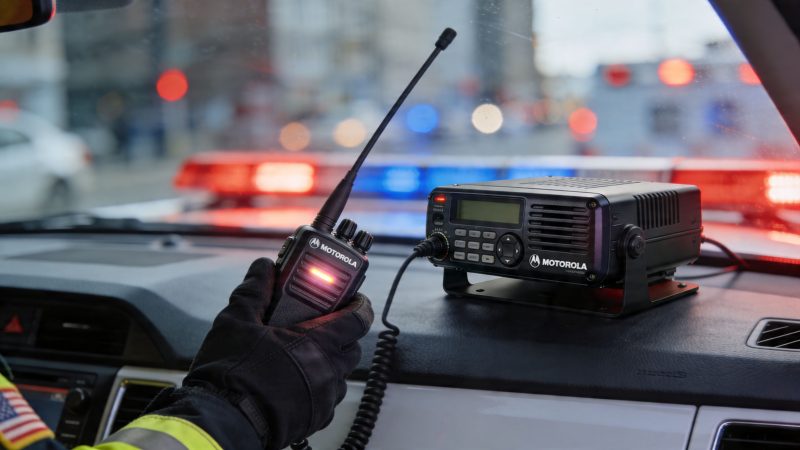
That’s why the motorola mobile radio still matters. In public safety and field operations, the mobile in the dash is often the most dependable communication tool in the vehicle. It’s powered by the vehicle, mounted where the operator can reach it, and tied into the antenna system that usually outperforms a handheld inside a metal cab.
Motorola’s role in this space goes back a long way. In 1941, police cars in Philadelphia became the first equipped with Motorola FM mobile two-way radios, which enabled real-time voice communication between vehicles and dispatch and changed emergency response worldwide, according to Rock Networks' history of Motorola radio development. That history matters because the same core requirement still drives purchasing decisions now: when things get loud and fast, communication has to hold.
Most agencies don’t need another generic buying guide. They need straight talk about what works, what creates cost later, and where vendor documentation leaves too many gaps. That includes tracking vehicles with tools such as AVL units, integrating radio traffic into dispatch workflows, and avoiding expensive mistakes during installation and upgrades.
The Lifeline in Every Vehicle
A deputy trying to reach dispatch from the lower level of a parking structure. A medic unit calling in a destination change while rolling. A brush truck working the edge of county coverage with wind, engine noise, and three conversations happening at once. Those are the moments that decide whether the mobile in the dash was specified and installed correctly.
In real operations, the vehicle radio is usually the communications baseline. Portables matter once crews are on foot, but inside the cab the mobile normally wins on audio, transmit consistency, and plain usability. It runs off vehicle power, uses an external antenna, and does not depend on whether someone remembered to start the shift with a fully charged battery.
Why crews still trust the dash radio
Crews trust the dash radio because it solves predictable field problems.
The mic is where the operator expects it to be. The speaker can cut through road noise if the install was done right. The radio is tied to a fixed antenna system instead of trying to push RF from inside a metal vehicle. That sounds basic, but basic is what holds up at 3 a.m. in bad weather.
A few practical truths show up on almost every fleet:
- The mobile is the stable platform: Vehicle power, fixed mounting, and an external antenna give it a clear advantage in the cab.
- It carries the routine traffic that keeps incidents organized: Status updates, route changes, staging instructions, and priority traffic often start at the console.
- It reduces small failures that waste time: No dead shift battery, no searching for chargers, and no trying to talk clearly while holding a portable and driving.
Practical rule: If the plan assumes a portable can fully replace the vehicle radio inside the cab, expect weaker performance and more operator frustration.
There is also a cost angle that gets missed during purchasing. Agencies sometimes try to save money by trimming the install budget instead of trimming features they will never use. That decision usually costs more later. A cheap antenna, poor grounding, weak speaker placement, or a bad ignition-sense setup can create years of audio complaints, intermittent resets, and service calls that never show up on the original quote.
Where the radio fits in a modern response stack
The mobile radio still carries the voice traffic that keeps field units aligned, but it now has to coexist with CAD, GPS, tablets, telematics, and status tools. The challenge is not buying more hardware. The challenge is making those systems work together without burying crews in extra steps.
A well-managed setup uses the radio for what it does best and ties the vehicle into dispatch with tools like AVL tracking for response units. That approach lowers radio clutter, gives dispatch better unit visibility, and avoids forcing every update over voice.
The trade-off is complexity. Integration adds cabling, power management, training needs, and another layer to troubleshoot when something fails. Done well, it lowers workload and improves awareness. Done poorly, it creates expensive noise in both the budget and the cab.
Understanding Mobile Radio Fundamentals
If you’re buying or replacing a motorola mobile radio system, the biggest mistakes usually happen before the order goes in. Teams pick the wrong band, oversimplify coverage assumptions, or buy capacity they don’t need.
The basics aren’t hard. They just need to be tied to real operations.

Band choice changes field performance
VHF usually makes the most sense in open terrain. Rural fire, public works, and wide-area coverage needs often lean that direction.
UHF tends to perform better in built-up environments. If your crews spend their time around concrete, steel, schools, hospitals, or downtown blocks, UHF is often easier to live with.
A simple way to explain it to non-radio staff is this:
| Band | Usually fits best | Common trade-off |
|---|---|---|
| VHF | Open areas and wider-area travel | Not as forgiving around dense obstacles |
| UHF | Urban and indoor-heavy environments | Typically gives up some range compared with open-area VHF use |
There’s also the question of 700/800 MHz systems, especially in public safety networks. Those can be the right answer when you’re joining an established regional system, but they also tie your decision to infrastructure, governance, and subscription realities that small agencies sometimes underestimate.
Conventional and trunked aren’t the same decision
A conventional system is like assigning each team a dedicated lane. Simple, predictable, and easy to explain.
A trunked system is more like sharing a pool of lanes that are assigned as needed. That improves efficiency, especially when many users and talkgroups share the same system.
Conventional can work well when:
- The agency is smaller: Fewer units, fewer talkgroups, simpler dispatching.
- Coverage needs are straightforward: One service area, stable operations.
- Control matters more than flexibility: Teams want direct ownership over how channels are used.
Trunked usually makes more sense when:
- Many users share the network
- Talkgroup management matters
- Regional interoperability is part of daily life
If your agency rarely fills its existing channels, a more complex architecture might solve a problem you don’t actually have.
Why digital matters in practical terms
One of the clearest examples is Motorola’s MOTOTRBO platform. Motorola states that MOTOTRBO mobile radios use TDMA, splitting a standard 12.5 kHz licensed channel into two alternating time slots, which allows double the calling capacity and lets a single repeater handle the workload of two, reducing infrastructure costs in the process, according to Motorola Solutions' MOTOTRBO digital radio functionality overview.
That matters for budget, not just engineering.
If one repeater can cover what previously needed more hardware, you save money on equipment, installation complexity, shelter space, and long-term maintenance. Motorola also notes that battery life can extend up to 40% in that setup because radios transmit for less time on the air in the duty cycle described in the same document.
For managers, the lesson is simple. Don’t buy digital because it sounds modern. Buy it when the extra capacity, cleaner workflow, or lower infrastructure burden matches your operation.
Key Motorola Radio Series and Essential Features
The right Motorola radio family depends less on brand preference and more on mission type. Public safety agencies with strict interoperability and security needs usually look at APX. Commercial, utility, transportation, and mixed-duty fleets often end up in MOTOTRBO.
The mistake is assuming the more expensive line is always the smarter buy. It isn’t.

Where APX makes sense
If you operate in a public safety environment that requires P25, encrypted traffic, and compatibility with larger government or regional systems, APX is usually the conversation.
The Motorola APX 1500 Single-Band P25 Mobile Radio supports 512 channels, 256-bit AES encryption, and GNSS tracking with less than 5m accuracy, according to the APX 1500 datasheet from Norcom and Motorola documentation. It also supports P25 Phase 1 and Phase 2 operation, which matters for agencies living inside trunked public safety environments.
Those specs aren’t just brochure material. They affect daily work:
- 512 channels: Useful for agencies that have mutual aid, tactical, admin, regional, and event channel plans that grow over time.
- 256-bit AES encryption: Important when units pass sensitive operational or investigative traffic.
- High-precision GNSS: Useful when dispatch needs confident vehicle location during fast-moving incidents.
Where MOTOTRBO often wins
MOTOTRBO tends to be a strong fit when the agency wants digital capability without stepping fully into a P25 public safety cost structure.
That often includes:
- school transportation fleets
- campus security
- utility crews
- industrial sites
- volunteer or combination agencies with tight capital budgets
The value isn’t only in the radios themselves. It’s in the simpler path to useful digital voice and data features for teams that don’t need the full public safety stack.
A quick product walk-through helps if you're comparing in the field:
Features that actually change operations
Some radio features sound nice in procurement meetings but don’t change much day to day. Others save labor, improve officer safety, or reduce the number of workarounds crews invent on their own.
Here’s the short list I’d treat as operationally important:
| Feature | Why it matters in the field |
|---|---|
| Encryption | Protects sensitive traffic and reduces the temptation to move important communication to unsecured channels |
| GNSS location | Helps dispatch verify vehicle position during confusion, especially when crews are moving fast |
| Channel capacity | Prevents crowding and talkgroup bottlenecks |
| Interoperability support | Keeps mutual aid incidents from turning into patchwork communications exercises |
Buy for the incidents you actually run. Don’t buy for the demo script.
If you run routine patrol, fire response, EMS transport, and mutual aid on regional systems, APX may justify its cost. If you manage field teams that need strong mobile voice with cleaner digital operations, MOTOTRBO may be the better value.
How Mobile Radios Power Public Safety
The best way to judge a motorola mobile radio isn’t by a spec sheet. Judge it by what happens across one operational day.
At the start of the shift, a police unit signs on from the vehicle. The dispatcher hears clean audio, confirms assignment, and moves the car into service. Later, the same unit gets rerouted from a low-priority call to a higher-risk assist. That redirect only works well if the message gets through immediately and without repetition.
Law enforcement in motion
For patrol, the mobile radio is often the most consistent communication tool while driving. It supports routine traffic, unit coordination, perimeter setup, and incident escalation without forcing the officer to juggle a portable in the seat.
A practical patrol example looks like this:
- Traffic stop turns into a second-unit request: The officer doesn’t need a complicated workflow. One push, clear voice, immediate answer.
- Pursuit or fast relocation: Dispatch needs reliable voice and accurate unit identification.
- Scene containment: Supervisors can split units across channels or talkgroups without pulling everyone into chaos.
Fireground coordination from the cab to the scene
Fire crews use the vehicle mobile differently. The apparatus radio often handles response routing, water supply coordination, mutual aid contact, and command traffic before crews ever step off the rig.
Once the incident grows, the mobile becomes the bridge between dispatch, command, and units rotating in and out of the scene.
That matters most when command needs to keep radio discipline. A dedicated talkgroup or channel plan is only useful if the radios are programmed sensibly and the users know where to go under stress.
A good radio plan sounds calm on a bad day. A bad radio plan sounds busy before the first unit arrives.
EMS and protected information
EMS operations put a different kind of pressure on the system. Crews may need to pass destination changes, staging instructions, or patient-related information while moving between scenes and facilities.
In those moments, reliability and clarity matter more than menu depth. Crews don’t want to dig through settings. They want the mic to work, the speaker to be intelligible, and the channel plan to make sense.
A well-deployed mobile radio helps with:
- Hospital coordination: Less confusion during destination updates.
- Staging at multi-unit incidents: Better awareness of who is where.
- Long transports: More consistent vehicle-based communication than a handheld alone.
The common thread across police, fire, and EMS is simple. The mobile radio keeps the vehicle tied into the larger response picture. When that link is solid, field teams spend less time repeating themselves and more time handling the call.
Integrating Radios With Modern Dispatch Systems
Many agencies often find themselves in a predicament. The radio hardware is solid, the fleet is installed, and dispatch is running. Then someone asks a reasonable question: how do we connect all of this to a modern software workflow without rebuilding the whole communications stack?
The frustrating answer is that vendor documentation often doesn’t help enough.
Motorola’s public materials cover hardware lines, frequencies, and capabilities well enough. But there is a documented gap around practical integration with third-party CAD systems and personnel tracking platforms. A summary of that issue notes that vendor documentation focuses on radio hardware and lacks substantive guidance on integrating Motorola radios with third-party CAD systems or real-time personnel tracking platforms, including platforms like Resgrid dispatching, as discussed in this industry coverage of Motorola ecosystem expansion and integration gaps.

Where integration usually breaks down
In practice, the weak points are rarely the radios themselves. The trouble usually starts in the spaces between systems.
A few examples show up over and over:
- CAD knows unit status, but radio doesn’t feed it cleanly
- Vehicle location exists, but dispatch can’t present it in one operational view
- Messaging is split across consoles, phones, and separate apps
- Mutual aid patches work temporarily, but nobody owns the long-term workflow
That’s why many centers end up with a patchwork approach. Voice traffic lives in one place. Unit mapping lives somewhere else. Messaging lives in another tool. Staff compensate manually.
What actually works
The practical path is to treat the radio system as one layer in a broader dispatch environment, not the whole environment.
That usually means some combination of:
| Integration method | Best use |
|---|---|
| Console patching | Bridging radio traffic into dispatch workflows when direct system integration is limited |
| Radio gateways | Linking legacy or mixed environments that need traffic shared across systems |
| Location-aware software workflows | Turning vehicle or personnel location into dispatch-visible operational data |
| Message and status overlays | Reducing the need to repeat non-voice updates over the air |
The point isn’t to force every function through the radio. It’s to preserve radio for what it does best, then move the rest of the workload into software that handles status, tracking, documentation, and coordination better.
A field-tested integration mindset
Agencies save money when they avoid trying to make one proprietary ecosystem do every job.
A better pattern is:
- Keep the mobile radio as the trusted voice endpoint.
- Use software for tracking, dispatch workflow, and logging.
- Build the connection points deliberately.
- Test unit identity, location handling, and message routing before rollout.
Don’t wait until a major incident to learn that your radio fleet and dispatch software only coexist on paper.
If your team is modernizing, start with one operational thread. Vehicle location is usually the easiest. Then move to unit status flow, dispatch visibility, and messaging. Agencies that phase integration carefully usually avoid the expensive rework that comes from trying to replace everything at once.
Installation Maintenance and Cost-Saving Strategies
Most radio overspending doesn’t happen at purchase. It happens later through poor installs, unnecessary service calls, inconsistent programming practices, and avoidable equipment turnover.
That’s why total cost of ownership matters more than sticker price.
Public discussion around Motorola deployments often leaves this part underdeveloped. A summary from EMCI Wireless notes that cost-benefit analysis for Motorola radio deployments is largely absent from public discussions, leaving agencies without clear guidance on long-term ownership costs, trade-offs, and ROI frameworks. That gap is exactly why teams should evaluate more than the initial quote, as noted in EMCI Wireless' discussion of mobile radio deployment considerations.

Installation choices that save money later
A bad antenna install can make a good radio look unreliable. A rushed power connection can create noise problems that get blamed on the system. A poor mount location can turn maintenance into a dashboard disassembly problem every time the vehicle comes in.
What usually pays off:
- Clean power wiring: Reduce noise issues and protect the radio from avoidable electrical headaches.
- Thoughtful antenna placement: Better performance now, fewer troubleshooting hours later.
- Accessible mounting: Service technicians can reach the unit without tearing half the console apart.
- Fleet consistency: When every vehicle is built differently, every repair takes longer.
Maintenance that prevents avoidable failure
Mobile radios are durable, but they still fail when agencies treat them as install-and-forget hardware.
A practical maintenance rhythm should include:
- Mic and speaker checks: Cords, connectors, and mounting points take abuse.
- Programming discipline: Keep codeplugs current and controlled.
- Antenna and coax inspection: Physical wear often shows before complete failure.
- Location verification: If the fleet uses GNSS, confirm the positions make operational sense.
The cheapest upgrades aren’t always the lowest-cost decision
Many agencies get trapped when they save money upfront by choosing the narrowest possible configuration, then spend more adding workarounds, replacing weak components, or buying into proprietary add-ons later.
A better buying posture is to ask:
| Question | Why it saves money |
|---|---|
| Can this system integrate cleanly with our existing software? | Prevents duplicate tools and manual work |
| Can our staff support it without vendor dependency for every change? | Lowers service friction |
| Will this architecture still fit us after fleet growth or policy change? | Reduces forklift upgrades |
| Are we buying hardware features we’ll never use? | Keeps scope realistic |
One more point gets overlooked too often. Software cost structure matters just as much as radio cost structure. If you’re evaluating operations tools around the radio environment, compare implementation burden, support model, and ongoing spend using pages like Resgrid pricing, not just hardware quotes.
The radio that costs less to buy can still cost more to own if every change requires a contractor, a proprietary add-on, or a second system to fill the gaps.
Choosing and Troubleshooting Your Radio System
If you’re selecting a motorola mobile radio system, keep the decision process grounded in operations.
Start with the questions that expose long-term fit:
- What incidents do we run most often?
- Do we need P25, or are we buying prestige instead of necessity?
- Will this system integrate with dispatch, mapping, and reporting workflows?
- Can we manage fleet changes without bringing in outside help every time?
- Are we standardizing enough to keep maintenance sane?
That checklist usually leads to a better answer than a feature shootout.
Quick field troubleshooting guide
Most recurring mobile radio problems fall into a few categories.
Poor audio quality
Check the microphone first, then speaker condition, then vehicle noise sources. If multiple vehicles report the same issue, look at programming consistency or system-side audio setup instead of blaming each individual radio.
Failure to connect to the system
Confirm the selected channel or talkgroup, then verify whether the issue is local to one vehicle or broader across the fleet. One failed unit suggests hardware, power, antenna, or programming trouble. Several failed units at once point toward infrastructure or system access issues.
Location problems
If the radio is showing bad position data or no useful location, verify the vehicle environment and installation first. GNSS issues often get treated like software faults when the actual problem is placement, signal view, or incorrect setup.
Intermittent coverage complaints
Ask where it happens, not just whether it happens. Repeated trouble in the same buildings, road segments, or apparatus bays usually tells you more than a vague report that the radio is “weak.”
The agencies that do this well don’t treat the radio as a standalone purchase. They treat it as part of a working response system that has to survive daily use, budget pressure, and bad days without drama.
Resgrid, LLC gives first responders and dispatch teams a practical way to connect dispatching, personnel tracking, messaging, reporting, and organization management in one platform. If your agency is trying to get more value from its communications environment without adding unnecessary complexity, take a look at Resgrid, LLC.