
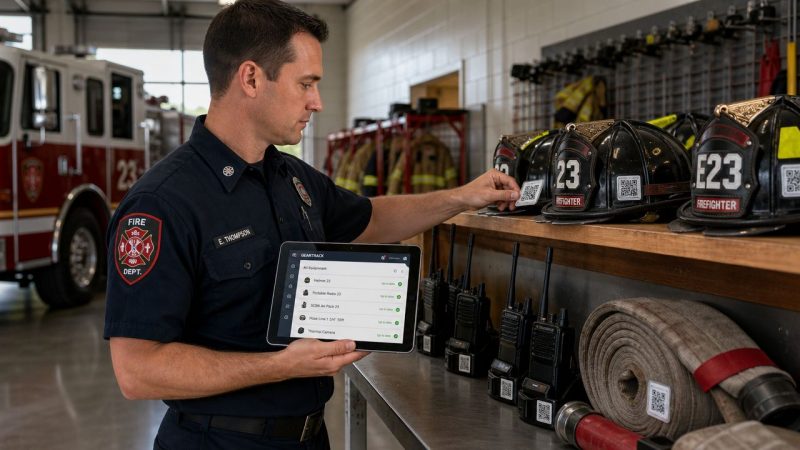
Equipment Maintenance Tracking for First Responders
A highway wreck tones out just before shift change. Engine, rescue, medic unit, everybody rolls. You get on scene, force entry starts, and the hydraulic tool hesitates. Maybe it still works. Maybe it doesn't. Either way, that's the wrong moment to discover a missed service, a weak battery, a leaking hose, or a paper check sheet that never made it back to the station.
That's why equipment maintenance tracking matters in emergency services. In a warehouse, a missed inspection can become an expensive delay. In a firehouse or EMS agency, it can become a bad outcome for a patient, a trapped driver, or your own crew. The issue isn't paperwork. The issue is readiness.
Most departments already know that. The hard part is building a system that survives real station life, multiple shifts, shared gear, and the constant temptation to say, “We'll log it later.” The departments that get this right don't create more admin work. They make checks easier, histories visible, and upcoming service impossible to miss.
When Seconds Count and Equipment Fails
The failure rarely starts on scene. It starts weeks earlier when a crew notices something minor and writes it on a clipboard. Then the clipboard stays on a desk, the unit gets used by another shift, and the tool goes back in service with no repair ticket opened.
That's the danger of loose maintenance habits. Not one dramatic mistake. A chain of small misses.

In first response, run-to-failure isn't a strategy. It's a gamble. The financial side is serious too. Repairing equipment after a breakdown can cost 3 to 10 times more than regular maintenance, and poor maintenance can reduce operational capacity by 5% to 20%, according to industry statistics on maintenance costs and capacity loss.
What failure looks like in a station
It's not only fire apparatus. It's the spare SCBA bottle with an outdated hydro date. The backboard straps that went missing after a transfer. The portable radio with a battery that won't hold a charge through a long incident. The generator that starts fine in the bay but stalls under load because nobody logged the last service interval.
A weak maintenance program usually shows the same symptoms:
- Checks happen without proof: Crews say an item was inspected, but nobody can show when, by whom, or what was found.
- Repairs vanish into conversation: A firefighter tells an officer, an officer tells the mechanic, and nothing gets attached to the asset record.
- Readiness depends on memory: People remember the problem until the next call, next shift, or next staffing shortage.
Practical rule: If a maintenance issue can disappear during shift turnover, the system is too loose.
What readiness actually requires
A reliable department tracks each asset, ties inspections to dates or usage, and keeps a service history with the equipment. That gives officers a clean answer to basic questions. Is this engine current on inspection? Which monitor was last repaired? Which chainsaw is out of service right now? Which PPE item is due next month?
When those answers are easy to find, crews spend less time guessing and less money chasing emergency repairs. More important, they stop discovering equipment problems at the worst possible time.
Build Your Definitive Asset Inventory
Before you can improve maintenance, you need a real inventory. Not a rough list in a binder. Not “mostly tracked.” A complete record of what your agency owns, where it lives, who uses it, and what happens if it fails.
Start in the apparatus bay and move one compartment at a time. Then do the station. Then do the medic bags, technical rescue cache, turnout storage, rehab supplies, radios, chargers, spare batteries, and training equipment. If it affects response or safety, it belongs on the inventory.

What to capture for each asset
For first responders, the minimum record should be practical, not bloated. You want enough detail to identify, inspect, repair, and replace the item without digging through file cabinets.
Use these fields:
Unique ID
Give every tracked item a clear identifier. For apparatus, use your unit number plus a system tag if needed. For portable gear, use a barcode, QR code, or durable label.Make, model, and serial number
This matters when ordering parts, checking recalls, or proving certification history.In-service date
That helps with lifecycle planning and replacement forecasting.Current location
“Station 2” isn't enough. Put “Medic 2 airway cabinet” or “Engine 1 officer-side compartment.”Assigned owner or team
Somebody needs first-line responsibility, even if the item is shared.Criticality
Mark whether failure creates a life-safety issue, a compliance issue, or a convenience issue.
Use a cost and criticality filter
A common mistake is trying to track everything at the same depth. That sounds disciplined, but it usually creates clutter. As noted in this discussion of maintenance ROI thresholds, the “track everything” approach can backfire. Over-instrumenting smaller or low-use assets can create alert fatigue and compliance burden without reducing downtime enough to justify the effort.
A practical station-level filter looks like this:
| Asset type | Failure impact | Tracking depth |
|---|---|---|
| Apparatus, pumps, generators, SCBAs, monitors | High | Full asset record, scheduled inspections, service history |
| Rescue tools, radios, medical bags, turnout gear | Medium to high | Full record with recurring checks and defect logging |
| Hand tools, traffic cones, basic consumable holders | Low | Simple count or periodic inventory check |
| Low-cost duplicates with easy replacement | Low | Exception-based tracking only |
Track deeply where failure hurts operations or safety. Track lightly where replacement is cheaper than administration.
A station walk-through that works
Don't delegate the first inventory entirely to admin staff. Have one operations person and one maintenance-minded person walk it together. The ops person knows how equipment is used. The maintenance person catches what needs a serial, service interval, or warranty note.
Here, many departments find hidden problems:
- Duplicate equipment names that confuse logs
- Unlabeled spare gear with no ownership
- Items moved between rigs without any record
- Expired or near-due certifications buried in cabinets
A strong equipment maintenance tracking program starts with visibility. If the inventory is sloppy, every schedule, report, and budget request built on top of it will be sloppy too.
Choose Your Digital Tracking Tool
Most departments don't need more reminders to “go digital.” They need a system that works at 2 a.m., on a phone, during shift turnover, and under mutual aid pressure. That's where the tool choice matters.
The move is already underway. As of 2018, about 53% of facilities used a CMMS to monitor maintenance, and 78% of organizations using those tools reported improved equipment life, according to maintenance adoption data from UpKeep. That doesn't mean every digital tool is a fit for emergency services.
Spreadsheets, general platforms, and purpose-built systems
Here's the blunt comparison.
| Option | Where it works | Where it breaks |
|---|---|---|
| Spreadsheet | Small inventory, one location, one disciplined owner | Missed reminders, weak accountability, poor mobile use, no clean asset history |
| Generic asset software | Better records, decent reporting, usable for mixed municipal departments | Can feel clunky for crews, weak around station workflows and shared response gear |
| First responder-focused platform | Better fit for shifts, shared assets, operational status, field access | Requires setup discipline and a clear ownership model |
Spreadsheets are fine as a starting point. They're familiar, cheap, and easy to open. They also depend on one person remembering to update them. In emergency services, that's a fragile setup. Shared equipment moves fast, and spreadsheet version control gets ugly fast.
Generic software can work if your city or county already uses it. But if the interface forces firefighters or medics through too many screens, logging will collapse. That's the practical test. Not feature count. Adoption.
What features matter in the field
When evaluating software for equipment maintenance tracking, look for these operational requirements first:
- Mobile access: Crews should be able to inspect, log, and report from the bay floor or the scene support area.
- Recurring tasks and alerts: If the system can't flag upcoming checks automatically, you're still relying on memory.
- Asset-level history: Every repair, defect, test, and certification should stay with the item.
- Status visibility: Officers need to know what is in service, restricted, or out of service right now.
- Attachment support: Photos, invoices, certifications, and manuals should be tied to the record.
If you're still comparing task tools before moving into a full maintenance workflow, a review of the best recurring task app can help clarify what good reminder logic looks like and where reminder apps stop short of full asset tracking.
For agencies weighing software categories, Resgrid comparison options are worth reviewing alongside other platforms, especially if you want equipment records connected to broader operational workflows rather than isolated in a standalone file.
What actually gets used
The best system is usually the one with the fewest excuses. If a firefighter can scan a QR code on an SCBA, see the last inspection, log a defect, and move on in under a minute, usage goes up. If the process requires a desktop login, a separate paper form, and a follow-up email, usage drops.
A maintenance tool should reduce friction, not create another after-action report nobody finishes.
Pick the tool your crews will use during a normal week, not the one that looks impressive in a procurement demo.
Schedule Proactive Maintenance and Inspections
A good inventory tells you what you own. A good schedule keeps it ready. Equipment maintenance tracking then transcends being a database, instead protecting your response capability.
The biggest improvement most departments can make is separating maintenance triggers into three buckets: calendar-based, usage-based, and event-based. If you don't separate them, things get missed because not all equipment wears out the same way.
Use the right trigger for the asset
Calendar-based tasks fit equipment that needs routine checks even when it hasn't seen heavy use. Think weekly engine runs, monthly inventory checks, annual pump testing, annual ladder testing, or scheduled PPE review dates.
Usage-based tasks fit equipment that ages by workload. A generator, saw, or apparatus engine should not rely only on the calendar if runtime or mileage is the primary stressor.
Event-based tasks fit equipment exposed to unusual conditions. A post-fire apparatus inspection, a full check after a technical rescue deployment, or a decontamination and function review after a hazardous materials incident all belong here.
That framework keeps your crews from treating every item the same.
Build one repeatable weekly pattern
For line personnel, the schedule has to be easy enough to complete during a busy tour. One useful approach is to assign a standard weekly checklist to each frontline unit, then attach monthly and annual tasks on top of it.
Here's a simple example.
| System | Task | Frequency | Last Completed | Assigned To |
|---|---|---|---|---|
| Engine fluids | Check oil, coolant, and hydraulic fluid levels | Weekly | [enter date] | Driver |
| Pump panel | Inspect gauges, valves, and visible leaks | Weekly | [enter date] | Driver |
| Generator | Start, run under load, and note runtime hours | Weekly | [enter date] | Engineer |
| Rescue tools | Inspect hoses, couplings, batteries, and case contents | Weekly | [enter date] | Rescue firefighter |
| SCBA cache | Verify cylinder pressure, regulator condition, and tag status | Weekly | [enter date] | Assigned firefighter |
That kind of checklist works because it's specific. “Inspect truck” is vague. “Run generator under load and record runtime hours” gives the crew a clear standard.
If your department wants these checks tied directly to assignments and completion rules, workflow-based maintenance setup is a practical way to keep recurring tasks from getting lost between shifts.
Two examples that matter
A fire truck usually needs both calendar and usage triggers. Weekly startup and visual checks belong on the calendar. Oil service, pump maintenance, and drivetrain work may need mileage or engine-hour triggers.
An SCBA fleet usually needs calendar and event triggers. Scheduled inspection intervals matter, but any unit dropped, contaminated, or flagged during a call should generate an immediate event-based inspection.
- For apparatus: log mileage, engine hours, pump hours, and defects after every shift check.
- For SCBA: log cylinder status, regulator condition, harness wear, and certification dates in one place.
- For medical equipment: tie battery replacements, calibration, and seal checks to recurring tasks.
- For shared specialty gear: require a post-use inspection before the item goes back into storage.
The departments that save money here aren't the ones doing the most maintenance. They're the ones doing the right maintenance before a breakdown turns small wear into a major repair.
Establish Simple Logging and Reporting Procedures
A maintenance system fails when the logging takes longer than the check itself. Crews will do hard work. They won't tolerate pointless work. If you want reliable records, the process has to be fast, obvious, and built into normal station behavior.
That usually means one scan, one form, one place to report a problem.

A practical workflow uses a unique asset ID, captures usage data, sets triggers, and closes the loop with alerts and work-order history. That matters because logging every check and repair creates an auditable record and reduces manual tracking errors, as described in this guide to asset tracking workflows.
Make reporting easier than verbal handoff
The fastest way to lose maintenance data is to let defects travel by conversation. “I told the lieutenant” isn't a record. “Shop knows about it” isn't a record either.
Set a simple rule. If the issue affects readiness, it must be logged against the asset before end of shift.
A usable process often looks like this:
- Scan the asset tag: QR or barcode opens the exact record. No searching.
- Choose the action: Inspection complete, defect found, removed from service, or repair completed.
- Add one note: Short, plain language. “Battery failed load test” is enough.
- Attach proof when needed: Photo, invoice, certification, or part used.
- Submit and route: The right supervisor, mechanic, or quartermaster sees it automatically.
Keep the form short
Crews won't fill out ten fields for a routine check. Reserve detailed forms for actual repair work. Daily and weekly logs should capture only what helps decision-making.
Use required fields sparingly:
| Logging type | Required fields |
|---|---|
| Routine inspection | Asset ID, date, pass/fail, user |
| Defect report | Asset ID, issue, severity, status |
| Repair closeout | Asset ID, work performed, date, closed by |
| Certification update | Asset ID, document, effective date, expiration if applicable |
If your team needs field-friendly access for those updates, mobile app support for crews and staff is the kind of capability that matters more than flashy dashboards.
If the form can't be completed while standing in the apparatus bay, it's too long.
Build accountability without blame
Logging works better when crews know it protects them. A firefighter who reports a cracked tool housing shouldn't feel like they're creating work. They're preventing the next crew from taking bad equipment to a call.
Officers help by reinforcing three habits:
- Log defects immediately
- Close completed work orders
- Return equipment to service only after the record is updated
That last one is where many programs break. The tool gets fixed, put back on the rig, and the paperwork never gets closed. Then six months later nobody knows what was repaired, what part was used, or whether the issue keeps repeating.
Simple logging is not clerical overhead. It's how you create trustworthy history.
Measure Success with Key Performance Indicators
If you can't show whether the system improved readiness, the program won't hold up during budget season. Maintenance needs a few metrics that officers, chiefs, mechanics, and finance staff can all understand without a long lecture.
The point isn't to build a complicated dashboard. The point is to prove that equipment maintenance tracking is reducing preventable problems.
Data on well-executed predictive maintenance programs shows about 12% lower maintenance costs, 9% better availability, and asset life extended by as much as 20%, based on published maintenance effectiveness benchmarks. Those gains only matter locally if your department measures whether its own process is improving.
The few KPIs that matter most
Start with four.
| KPI | What it tells you | Simple formula |
|---|---|---|
| PM compliance | Are scheduled checks being completed on time | Completed PM tasks on schedule / total scheduled PM tasks |
| MTBF | How long equipment runs before failure | Total operating time / failures |
| MTTR | How long repairs take | Total downtime / repair count |
| Availability | Whether gear is ready for service | Operating time / (operating time + downtime) |
PM compliance is the first one to watch. If your scheduled checks aren't getting done, the rest of the program is mostly theater.
MTBF helps identify whether a tool or vehicle is becoming more reliable over time. MTTR shows whether your repair process is dragging because of parts delays, weak vendor support, or poor shop workflow. Availability is the metric command staff understands fastest because it maps directly to readiness.
How to use metrics in a first responder setting
Say a defibrillator keeps failing battery tests. You revise the replacement interval and tighten weekly checks. If MTBF improves afterward, that's evidence the schedule change worked.
Say one reserve engine spends too much time unavailable. MTTR can show whether the problem is slow diagnosis, waiting on approval, or repeated failure of the same component. That changes the conversation from opinion to action.
Use KPI reviews to answer practical questions:
- Which units miss PM tasks most often
- Which assets fail repeatedly after repair
- Which vendors return equipment fastest
- Which categories should be replaced instead of repeatedly repaired
Good maintenance metrics don't just justify budgets. They expose weak habits before those habits become failures.
Don't drown in reporting
One trap is measuring everything because the software allows it. Another is focusing only on failures and ignoring schedule discipline. A department can count breakdowns all year and still miss the core issue, which is that basic inspections were never completed on time.
Review your metrics on a regular rhythm. Keep the list short. Use them to make one decision at a time. Replace a weak schedule. Reassign ownership. Stock a part in-house. Retire a problem asset.
That's where the savings show up. Not in fancy charts. In fewer avoidable outages and more equipment ready for the next call.
Your Equipment Maintenance Tracking FAQ
Departments usually don't struggle with the idea of maintenance tracking. They struggle with the messy details. Shared gear, volunteer staffing, after-hours defects, and specialty equipment all create friction if the process isn't clear.
How do you manage gear shared across stations or shifts
Use one asset record with one current location field and one current status field. Don't create duplicate records just because an item moves. If a thermal imager gets reassigned from Truck 1 to Rescue 2, update the location in the same record so the history stays intact.
For ownership, assign two levels:
- Primary custodian: the station, apparatus, or role responsible for routine checks
- Service owner: the person or shop responsible for repairs and return-to-service decisions
That keeps accountability clear without pretending one person controls a shared item at all times.
What's a simple failure-mode check for critical equipment
You don't need a formal engineering exercise to get value. For high-risk items, ask three questions:
- How does this equipment usually fail
- What early sign appears before total failure
- What check can a crew perform quickly to catch it
A few examples make this practical.
| Asset | Common failure mode | Early sign | Quick check |
|---|---|---|---|
| Hydraulic rescue tool | Hose or power issue | Slow operation, weak pressure | Run function test and inspect couplings |
| SCBA | Regulator or harness issue | Damaged straps, inconsistent seal | Visual harness check and functional test |
| Portable radio | Battery degradation | Short runtime, unexpected drop | Battery swap test during shift check |
| Suction unit | Power or seal failure | Weak vacuum | Operational test before restock |
That kind of quick failure-mode thinking sharpens inspections. Crews stop doing vague “looks good” checks and start looking for the failure that matters.
What should a volunteer or budget-constrained department do first
Start small and be strict. Don't wait for a perfect system.
Begin with:
- apparatus
- SCBAs
- medical devices
- rescue tools
- PPE with certification or inspection requirements
Use unique IDs, recurring tasks, and defect logging first. Add parts tracking and deeper analytics later. A small department can improve readiness quickly just by replacing whiteboards and memory with a shared digital record and a firm closeout process.
How do you handle bad data or missing connectivity
Have an offline fallback. Crews should be able to record a defect even if the network is down, then sync it later. Safety-critical gear also needs chain-of-custody discipline. If telemetry is missing or suspicious, use manual verification before returning the asset to service.
That matters more in public safety than many departments realize. A bad maintenance decision can come from bad data just as easily as bad wrench work.
When is detailed tracking not worth it
Not every low-cost item needs full lifecycle tracking. If failure has little operational impact and replacement is quick, a periodic count may be enough. The better question is whether the cost of tracking is lower than the cost of failure, confusion, or replacement delay.
That's the balance experienced fleet managers learn early. Track what protects readiness. Don't build paperwork around gear that doesn't justify it.
If your agency wants one system for equipment records, inspections, maintenance history, and operational coordination, Resgrid, LLC is worth a look. It's built for first responders and public safety teams, and it gives departments a way to connect asset tracking with the rest of daily operations instead of keeping maintenance in a separate silo.