
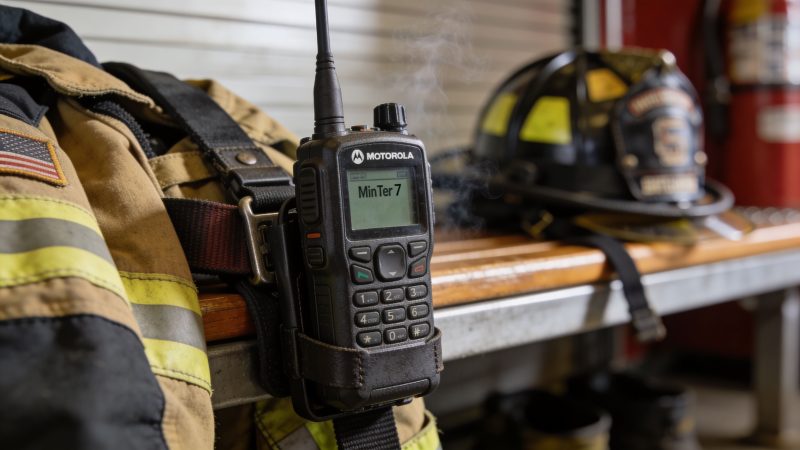
Motorola Minitor 7: The First Responder’s Ultimate Guide
The call comes in during dinner, during a staff meeting, or halfway through the only hour of sleep a volunteer firefighter was going to get that night. Cell coverage is weak on one side of town. The CAD notification hits some phones late. One person’s app is muted. Another has no signal in the machine shop. That’s how incidents start with gaps before the first unit even leaves the bay.
That’s why pagers still matter.
A motorola minitor 7 isn’t trying to replace every modern communications tool. It handles one job: get the alert to the responder fast, clearly, and in a form factor that can ride on a belt, sit on a charger, and take abuse without becoming one more thing the crew has to troubleshoot. In the field, purpose-built gear usually beats all-in-one gear when conditions get ugly.
When Every Second Counts The Role of Reliable Paging
A structure fire at shift change is where communication problems show up fast. Dispatch sends the tone-out. Some members are already in motion. Others are driving in from work. The officer needs the right people moving, not everyone guessing.
That first alert has to cut through noise, gloves, rain, engine vibration, and a dozen other distractions. A smartphone can help, but it’s still a general-purpose device competing with texts, apps, updates, battery drain, and dead zones. A pager doesn’t have that identity crisis. It exists to alert.

A lot of departments now pair paging with digital messaging tools so the initial alert is backed up by richer incident information. Used correctly, a system like team messaging for first responders adds assignment details, updates, and coordination without asking the pager to do a smartphone’s job.
Where paging still wins
The pager earns its place in a few common situations:
- Weak cellular coverage: Rural roads, plant sites, basements, and outbuildings still expose the limits of app-only alerting.
- Glove-friendly alerting: Crews can feel or hear a dedicated alert faster than they can access a phone and sort through notifications.
- Cleaner incident starts: A pager reduces confusion because it’s not mixing dispatch traffic with family texts and software alerts.
Practical rule: Use paging for the first alert and your digital platform for follow-up detail. That split keeps your dispatch chain simple when the pressure is highest.
What responders actually need
At the start of an incident, nobody cares about flashy features. They care about four things:
- Did I get the alert?
- Was it loud enough or distinct enough to notice?
- Can I replay the important part?
- Will the device still work after getting knocked around all week?
That’s the standard the motorola minitor 7 has to meet. If it can’t help a responder get moving with confidence, the rest of the spec sheet doesn’t matter.
Understanding The Motorola Minitor 7 Legacy
The easiest way to explain the Minitor is this: it’s the dedicated fire alarm in a building full of general-purpose speakers. Phones, tablets, and laptops do a lot of useful things. A pager handles one mission-critical function with fewer distractions and fewer points of failure.
That approach isn’t new. It’s the whole reason the line lasted.
According to Motorola Solutions’ Minitor anniversary history, the Motorola Minitor line began in 1975 and has now passed over 50 years of continuous innovation, with the Minitor VII released in 2025 as the seventh generation. That matters because the design philosophy hasn’t changed much. Keep it compact. Keep it dependable. Improve what matters in practical use.
Why the history matters
Departments don’t buy pagers because they’re nostalgic. They buy them because old lessons still apply.
A responder needs gear that can be worn all day, charged without fuss, and trusted under stress. The Minitor line was built around the original need for portable radio technology small enough to be worn and activated only when needed. That basic requirement still makes sense today, especially for volunteer agencies and mixed-response systems where people are spread across a county and not sitting in the station.
Here’s the practical takeaway. The Minitor 7 is not some experiment trying to convince responders to adapt to a new workflow. It comes from a long line of equipment shaped by actual field use.
What a pager is in a modern stack
The pager sits near the front end of your alerting chain. It is not your records platform. It is not your scheduling system. It is not where you want crews reading long updates or managing all incident documentation.
Its job is to do these things well:
- Receive the alert cleanly
- Differentiate routine traffic from urgent traffic
- Give the responder enough information to act
- Keep working when consumer devices become unreliable
A good pager reduces hesitation. The member hears the alert, confirms the message, and starts moving.
That’s a different role than a smartphone, and it should stay a different role. Agencies get into trouble when they expect one device to do everything. The Minitor 7 makes more sense when you treat it as a reliable trigger inside a larger communications system, not as a replacement for that system.
Built for the Front Lines Key Features and Specs
A pager earns its keep at 0300, in the rain, with gloves on, after it has already ridden a belt for twelve hours. That is the right way to judge the motorola minitor 7. The spec sheet matters, but only where it changes what a responder can hear, replay, carry, and maintain over time.

Routing and message handling
The Minitor 7 gives departments enough structure to divide alerts cleanly. It supports 5 channels, 15 programmable addresses per channel, 20 minutes of voice storage, and battery life rated up to 80 hours under the published duty cycle, as listed in Radio Depot’s Minitor 7 product specifications.
In practice, that means a department can separate station traffic, EMS callouts, officer notifications, mutual aid, and command alerts without drowning everybody in the same tone-outs. That matters after the purchase, when someone has to build the codeplug in CPS and keep it organized. A pager with this many address combinations gives you room to set up clean alerting plans now, then adjust later as staffing, run volume, or mutual aid assignments change.
Voice storage is one of the features crews appreciate after the first missed dispatch. Members can replay the message instead of asking dispatch to repeat it over the air. That reduces radio clutter and cuts down on bad starts caused by half-heard details.
The operating bands are VHF 143 to 174 MHz and UHF 450 to 486 MHz, with 25 kHz or 12.5 kHz spacing options. The pager measures 4.5 x 2.4 x 1.0 inches and weighs 6.4 ounces with battery and clip. Those numbers point to something simple. People will wear it, which is half the battle with any issued device.
Environmental durability
The environmental ratings are strong where they need to be. The Minitor 7 carries IP66 and IP67 ingress protection ratings and is rated for operation from -30°C to +60°C, based on the same published specifications noted earlier.
For field use, that translates into a pager that can handle rain, dust, road spray, and the usual abuse of shift work. It does not mean the unit is indestructible. I have seen good equipment fail early because it spent weeks riding loose on a dashboard, getting cooked in the sun, or charging on worn-out contacts in a dirty base.
Daily handling determines repair costs.
Departments that want these pagers to last should treat accessories as part of the maintenance plan, not as afterthoughts. Damaged clips, weak chargers, and off-brand batteries create more failures than the housing itself. That is one of those post-purchase realities the brochure does not cover.
Intrinsic safety and procurement value
The Minitor 7 is UL-listed as intrinsically safe by default across all models, and that certification applies when the pager uses the required IS-rated battery packs, according to Motorola Solutions’ intrinsic safety documentation.
That simplifies purchasing and replacement planning.
| Issue | What default intrinsic safety changes |
|---|---|
| Hazardous environment deployment | The unit is already suited for regulated environments where ignition risk matters |
| Procurement decisions | Buyers do not have to sort through separate safety variants to meet requirements |
| Lifecycle support | Standardizing the right battery and replacement process reduces ordering mistakes later |
Field advice: Keep battery purchasing tight. Intrinsic safety depends on using the correct IS-rated battery, and that rule needs to carry through every reorder, spare, and replacement cycle.
Where the Minitor 7 fits in a working system
The Minitor 7 does one job well. It alerts people, stores the voice traffic, and stays simple enough to trust under stress. Agencies get the best return when they build around that role instead of trying to turn the pager into a smartphone.
That is where system design matters after deployment. A clean setup in CPS, paired with a modern alerting workflow and dispatching software for emergency teams, gives the pager a clear place in the stack. The pager handles the immediate alert. The dispatch platform carries maps, updates, staffing visibility, and the rest of the incident detail. That division keeps field alerting fast and keeps maintenance manageable, because you are not forcing one device to solve every communications problem at once.
Improving Response with Smart Paging Workflows
At 02:13, tones drop for a vehicle fire with possible exposure. The right crew needs to wake up, hear the address once, replay it if necessary, and get rolling. If dispatch hits too many people or sends too little detail, response slows down before the first unit ever leaves the bay.
That is why paging workflow matters as much as pager hardware. The Motorola Minitor 7 works best when departments treat it as the first alert in a larger response process, not the whole process. Tone-out gets attention fast. Then your digital system carries staffing updates, maps, acknowledgments, and incident changes.

A practical dispatch sequence
A good county setup separates who gets alerted from what happens after the alert. Fire suppression, EMS, chiefs, and mutual aid can overlap, but they should not all be tied to the same tone and voice path unless the response plan calls for it.
A workflow that holds up in real use usually looks like this:
- Dispatch selects the correct group based on incident type, run cards, and time of day.
- The pager alerts only the intended members through the address and channel plan already built into the fleet.
- Voice traffic follows immediately so responders can replay the message instead of asking dispatch to repeat the address.
- The incident management side takes over through response team workflow tools for updates, staffing visibility, and coordination beyond the initial tone-out.
That split keeps each tool doing the job it does well.
It also reduces avoidable radio traffic. Crews hear fewer unnecessary alerts. Dispatch spends less time re-toning or answering basic repeat requests. Officers get cleaner accountability once the call moves from alerting to active management.
Where departments save money
The expensive part of poor paging is usually not the pager. It is the extra labor and confusion that follow a bad workflow.
If members miss alerts because groups were programmed too broadly, too narrowly, or inconsistently, dispatch has to patch the gap with callbacks, second pages, and radio repeats. That burns time every shift. It also trains people to wait for a second alert instead of moving on the first one.
Departments usually get better results by keeping the pager layer simple and reliable, then using a modern dispatch platform for everything that belongs after the tone. That approach lowers training friction, cuts one-off fixes, and makes CPS changes easier to control across the fleet.
What works in the field
What works:
- Role-based alerting: Program officers, stations, EMS units, and specialty teams by function so the right people get the first call.
- Replay as part of training: Teach members to use stored voice before calling dispatch for a repeat.
- Stable channel logic: Keep assignments consistent across all pagers so fill-in personnel and mutual aid members are not guessing.
- Workflow discipline: Let the pager handle notification, then shift updates and coordination into the dispatch system.
What causes problems:
- One-channel thinking: If every call sounds the same, urgency starts to blur.
- Too many custom exceptions: One-off programming creates headaches at shift change, during swaps, and when pagers need replacement.
- Using the pager for the whole incident: Paging starts response. It does not replace status tracking, mapping, or resource coordination.
The practical goal is simple. Wake the right people, give them enough voice detail to move, and hand the rest of the incident to systems built for managing it. That is how you improve response time without making the alerting side harder to maintain.
Practical Setup and Programming Guide
Most problems with the motorola minitor 7 don’t start in the field. They start at the programming bench. A pager with sloppy CPS setup becomes a reliability problem that looks like hardware failure. In reality, the unit may be fine and the codeplug may be the weak point.
That’s why the software side deserves more attention than it usually gets. Forum discussions around the official CPS R01.02 tool show a recurring problem: users can find basic software access, but they struggle with feature enabling, custom voice announcements, adjustable squelch, and the actual workflow for putting a pager into service, as reflected in this RadioReference discussion about Minitor 7 software.

Start with a fleet template
Don’t program each pager from scratch if you can avoid it.
Build one baseline profile for each operational role. For example, create separate templates for line firefighters, command staff, EMS responders, and support members if your alerting plan differs by role. Then clone and adjust only what must be unique.
That approach saves money because it cuts outside programming labor and reduces the chance of expensive mistakes. A department that can handle routine CPS changes in-house avoids paying a vendor every time a tone plan changes or a member needs reassignment.
A simple CPS workflow that works
Use a repeatable checklist every time:
- Read the pager first: Pull the existing configuration before making changes. That gives you a fallback if the new setup behaves badly.
- Name channels clearly: Use names that match your dispatch plan, not cryptic shorthand only one radio tech understands.
- Set addresses by response role: Program for how people are dispatched, not how the organizational chart looks on paper.
- Match alert behavior to urgency: Distinct tones or vibration patterns help members recognize what kind of call they’re getting before they hear the voice message.
- Test voice handling: If your workflow depends on replaying instructions, verify message storage and playback after writing the configuration.
- Document every revision: Keep a change log with date, technician, and reason for the update.
Common setup mistakes
A lot of field complaints trace back to avoidable programming habits.
| Mistake | What it causes |
|---|---|
| No standard template | Inconsistent pager behavior across the fleet |
| Poor channel naming | Members select the wrong channel or ignore a needed one |
| Untested alert profiles | Calls are missed because the tone isn’t distinct enough in real noise |
| No backup of old config | A bad write creates unnecessary downtime |
| Undocumented changes | Nobody knows why one pager behaves differently from the rest |
Keep one designated programming laptop, one approved cable set, and one person accountable for version control. Most “mystery problems” disappear when configuration discipline improves.
Features worth checking before deployment
Before issuing any unit, verify the practical items people notice on shift:
- Custom voice announcement behavior
- Squelch settings appropriate to the operating environment
- Scan behavior across the assigned channels
- Alert mode selection that makes sense for the member’s assignment
- Playback controls that the user has practiced with
You don’t need every member to become a CPS expert. You do need one or two people in-house who can manage the fleet without waiting on a third party for every small change. That’s where the actual savings show up over time.
Field Maintenance and Troubleshooting Tips
A pager that’s programmed well can still fail your team if daily care is sloppy. The Minitor 7 is built for hard use, but hard use isn’t the same as careless use.
The first maintenance rule is simple. Treat it like issued life-safety equipment, not like a personal gadget. Charge it consistently, inspect it routinely, and don’t wait for an incident to find out the speaker port is packed with grime.
Daily habits that protect the device
Use a short station-level checklist:
- Inspect the housing and clip: If the clip is loose or the case is cracked, fix it before it becomes a drop problem.
- Clean after dirty shifts: Wipe down mud, dust, and residue, especially around buttons and the speaker area.
- Check playback function: The Minitor 7 supports message recording, replay, fast-forward, rewind, delete, and lock functions in its voice storage system, according to Induscom’s Minitor 7 overview. Make sure members know how to use those controls before they need them under stress.
- Confirm alert profile selection: A pager on the wrong alert mode can look dead when it’s just set badly for the environment.
Troubleshooting missed pages
When someone reports missed alerts, don’t jump straight to blaming coverage or dispatch. Work the problem in order.
- Check the programmed channel and alert profile
- Verify the battery and charging routine
- Test message playback and basic receive behavior
- Compare the unit’s programming against your fleet template
- Only then escalate to signal-path or infrastructure review
Most missed-page complaints are either programming drift, wrong channel selection, or poor charging habits. Start there.
The same goes for garbled audio. Dirt in the speaker area, damage from rough handling, or a bad settings change can all look like a larger system issue. A disciplined check saves repair costs and avoids replacing a pager that only needed cleaning, reprogramming, or a battery review.
The Minitor 7 as a Strategic Communications Asset
The motorola minitor 7 makes the most sense when you stop looking at it as a standalone gadget and start treating it as a strategic alerting endpoint. Its value is not just in what it can do on the bench. Its value is in how reliably it starts the response when the rest of the environment is messy.
That’s why post-purchase discipline matters so much. Strong programming practices keep the fleet consistent. Practical maintenance keeps units in service. Clear channel logic and alert design reduce noise for responders. Those are the decisions that turn a pager purchase into an operational advantage.
There’s also a budget lesson here. Agencies waste money when they buy solid hardware and then manage it poorly. They pay outside vendors for simple programming changes, replace units that were never properly maintained, or create avoidable confusion with inconsistent configurations. A pager that’s easy to live with, program correctly, and support over time is worth more than one with a longer list of features nobody uses well.
The Minitor 7 fits modern response work because it stays focused. It alerts, stores voice traffic, supports structured routing, and holds up in ugly conditions. That simplicity is not old-fashioned. It’s efficient. When the incident starts, that’s the kind of equipment crews trust.
If your agency wants a practical way to connect paging, dispatch, messaging, personnel tracking, and day-to-day coordination in one place, take a look at Resgrid, LLC. It gives first responders and dispatch teams a flexible platform that supports real operations without forcing expensive contracts or bloated implementation work.