
Building the Modern Emergency Communication Center
The phones are already ringing. One caller can't give a clear location. Another incident is waiting for unit assignment. A supervisor is covering a console because someone called out again. The CAD feels older than the carpet, the radio traffic is stacked, and every proposed “modernization” comes with a contract size that would flatten a small agency's budget.
That's where a lot of emergency communication center leaders are right now.
The hard part is that the mission hasn't gotten simpler. The system has to answer quickly, triage accurately, dispatch cleanly, document everything, and stay operational when power, networks, or staffing go sideways. You don't get to pause service while you figure out procurement. You have to improve the center while the center is live.
A modern emergency communication center doesn't need shiny technology for its own sake. It needs practical improvements that reduce workload, remove manual friction, preserve continuity, and help a thin staff do reliable work without adding avoidable cost. That's the lens that matters.
What Is an Emergency Communication Center
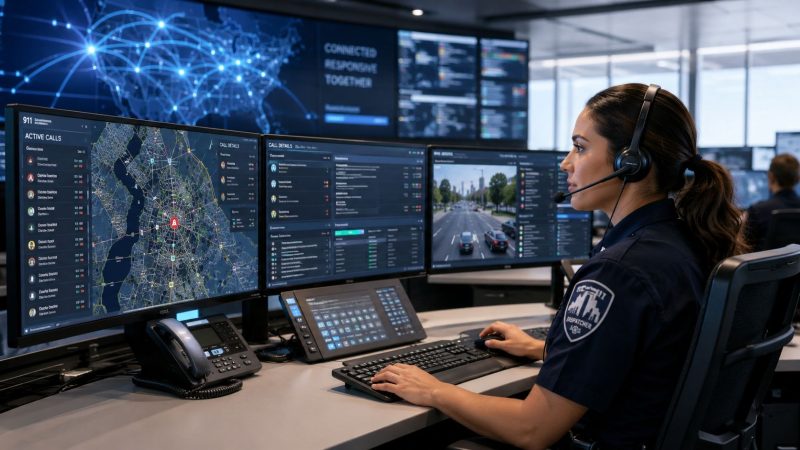
An emergency communication center is the operational hub where emergency requests are received, assessed, prioritized, and routed into action. In public safety terms, it's commonly called an ECC or Public Safety Answering Point (PSAP). Functionally, it's the nerve center of law enforcement, fire, EMS, and often emergency management coordination.
That sounds straightforward until you watch the workload in real time.
A caller reports chest pain but isn't sure of the address. Another line lights up for a crash blocking traffic. A field unit asks for an updated status. The call taker has to gather facts, follow protocol, calm the caller, enter the event, and push clean information downstream fast enough for dispatch to move resources without creating confusion. If the center relies on disconnected tools, handwritten notes, or workarounds that only make sense to veteran staff, every extra click becomes a delay.
The scale alone explains why these centers matter. In 2021, emergency communications centers across the United States handled approximately 213,652,929 total 911 calls delivered to primary PSAPs in 45 states, according to the 2021 911 Profile Database Report. That isn't just a big number. It reflects the daily reality that an ECC has to function as a stable, disciplined operation under constant load.
What the center actually does
An ECC is more than a room with headsets and radios. It combines several responsibilities:
- Call intake: Answering 911 and related emergency lines.
- Information capture: Confirming location, nature of incident, hazards, and caller details.
- Triage: Determining urgency and the right type of response.
- Dispatch: Assigning and communicating with field resources.
- Coordination: Managing updates between responders, supervisors, and partner agencies.
- Documentation: Creating the record that supports operations, review, reporting, and continuity.
Why the definition matters
Many agencies treat the emergency communication center as back-office support. That's a mistake. The center doesn't sit behind the response. It starts the response, shapes the response, and often determines whether responders arrive with enough information to work safely and efficiently.
Practical rule: If your center depends on heroic effort to survive a normal shift, it isn't modernized. It's compensating.
That distinction matters when budgets are tight. If leaders think of the ECC as just telephones and radios, they underinvest in workflow, staffing support, and system design. If they treat it as mission-critical infrastructure, they make better decisions about redundancy, software, training, and facility resilience.
A well-run ECC shortens confusion. A poorly supported one multiplies it.
The Core Functions of a Modern ECC
A modern ECC works a lot like an air traffic control tower. It doesn't just receive information. It interprets fast-moving conditions, assigns priority, directs resources, and keeps multiple actors aligned while conditions change.
The work follows a chain. If one link is weak, the rest of the incident suffers.

Call taking and PSAP intake
The first job is answering the request for help and extracting usable information. That sounds basic, but it's where discipline matters most. ECCs, also known as PSAPs, operationally resolve caller needs efficiently by using specific triaging guidelines and standardized call-taking scripts during the initial 911 intake process, as described in the Transform911 overview of ECC operations.
A strong call taker does two things at once. They stabilize the conversation and structure the data. The caller may be panicked, confused, angry, injured, or reporting on behalf of someone else. The center still has to pin down the essentials in the right sequence.
Categorization and dispatch
Once the intake is clean, the event has to be categorized. Priority, response type, location confidence, safety concerns, and agency responsibility all shape the next move. If categorization is sloppy, dispatchers spend the next several minutes fixing bad inputs while units are already en route.
That's why modern systems matter. A platform built for dispatching workflows should support structured incident entry, live status changes, and shared visibility across the team. It shouldn't force dispatchers to bounce between paper logs, radios, spreadsheets, and side-channel messages just to maintain a coherent picture.
Here's where centers often lose money without noticing it. When call intake and dispatch live in disconnected processes, supervisors pay for the gap in overtime, duplicate entry, after-action cleanup, and training time for new staff who have to learn workarounds instead of a system.
Ongoing incident coordination
Dispatch is not the end of the workflow. It starts the operational conversation with the field. Units request updates. Additional callers provide new facts. Hazards change. Supervisors need a current picture. Mutual aid may come into play. The center has to keep incident data accurate while traffic is still moving.
A short walkthrough helps show the difference between old and modern practice:
| Stage | Legacy approach | Modern approach |
|---|---|---|
| Intake | Handwritten notes plus manual CAD entry | Structured scripts with direct event creation |
| Updates | Radio-heavy, repeated transmissions | Shared live updates visible across roles |
| Resource status | Manual tracking on boards or memory | Real-time unit status and personnel visibility |
| Documentation | Reconstructed after the fact | Continuous documentation during the incident |
Video examples help when explaining this workflow to command staff and local decision makers:
The best centers reduce cognitive load at each handoff. They don't ask call takers and dispatchers to memorize what software should track for them.
The Four Pillars of a Resilient ECC
A resilient center stands on four connected pillars. If one is weak, the others carry too much weight. Agencies usually overfocus on one pillar, usually technology, and ignore the rest. That creates fragile modernization. The center looks upgraded on paper but still struggles during a hard week.

People
Staffing is the first pillar because every other investment depends on people using it well. Training has to cover more than policy. It has to build confidence under load, accuracy during ambiguity, and consistency across shifts.
Burnout often gets discussed as a wellness topic alone. It's also an operations topic. A center with confusing workflows, fragmented tools, and poor schedule visibility drains people faster than one with disciplined processes. Good systems don't replace staff. They protect staff from avoidable friction.
A practical move that saves money is standardizing core screens, scripts, and event types. When every trainee learns the same workflow, supervisors spend less time correcting style differences and more time coaching judgment. That shortens ramp time without cutting corners.
Processes
The second pillar is process. Centers need documented operating procedures that match real work, not idealized work. If your SOP says one thing and the floor does another, the unofficial process wins. That's dangerous during mutual aid, training, turnover, and audits.
Good process design focuses on a few questions:
- What must happen every time: Location verification, event coding, callback capture, unit acknowledgment.
- What can vary by incident: Specialized notifications, command escalation, cross-agency routing.
- What should be automated: Status updates, personnel tracking, reporting fields, schedule checks.
- What should never depend on memory: Critical safety prompts, escalation steps, fallback procedures.
Field-tested advice: Write SOPs around the actual console workflow. If staff need a separate cheat sheet to survive the software, the process is broken.
Technology
Technology is the third pillar, but it should serve the first two. Modern CAD, mapping, messaging, personnel tracking, and secure collaboration tools help the center move faster with fewer manual errors. The wrong technology adds cost and locks the agency into custom workarounds.
A practical technology standard is role clarity. Call takers, dispatchers, supervisors, and field users need different views of the same operational picture. That's where integrated systems outperform point solutions stitched together over time.
Security also has to be operational, not theoretical. The center should protect access, communications, and operational data with tools designed for public safety workflows, including secure emergency operations controls.
Infrastructure
The fourth pillar is physical and utility resilience. ECCs mandated for 911 operations must be engineered with blast and ballistic-resistant exterior wall systems to ensure resiliency against active threats, supported by redundant electrical systems and backup power infrastructure that prevent service interruption, as shown in the Central Communications Center project overview.
That level of resilience isn't only for flagship state or metro facilities. Even smaller agencies should think in layers. Protected equipment rooms, diverse network paths, backup power, environmental controls, and clean failover planning all matter. If you're evaluating long-term resilience spending, this guide to commercial solar battery ROI is useful for thinking through how backup energy investments can support continuity planning in facilities that cannot tolerate downtime.
A simple audit lens
Use this quick check when reviewing your center:
| Pillar | Warning sign | Better direction |
|---|---|---|
| People | Veterans carry the whole shift | Cross-train and simplify console work |
| Processes | Staff rely on memory and side notes | Build repeatable workflows |
| Technology | Multiple disconnected tools | Integrate core tasks into fewer systems |
| Infrastructure | Backup plans exist only on paper | Test power, network, and failover routines |
Resilience isn't one purchase. It's alignment.
Overcoming Key Challenges in ECC Operations
At 2:15 a.m., one dispatcher is covering two roles, a supervisor is filling a console, and a call taker is writing notes on paper because the scheduling tool, CAD, and personnel system do not line up. That is the kind of shift where small inefficiencies turn into missed details, longer handle times, and staff who go home convinced the system is working against them.
For many agencies, the central problem is not a lack of commitment. It is a stack of tools and processes built for a larger budget, a larger staff, or a different era. The staffing strain is well documented. A critical gap in the market is the lack of scalable, low-cost dispatch solutions for ECCs facing burnout and staffing shortages, and 74% of 911 centers report severe staff burnout and mental health warning signs, according to the U.S. Fire Administration discussion of a national 911 survey.

What usually fails under pressure
I see the same three responses over and over in strained centers.
One is adding another point solution. It solves one narrow problem and creates three new ones: another login, another training cycle, and another place where information can drift out of sync.
Another is informal workarounds. Staff stop entering full notes, resource status gets tracked by radio and memory, and supervisors rely on side conversations to understand what is happening. That can keep a shift afloat, but it also creates report gaps, handoff errors, and more cleanup after the incident.
The third is buying a large legacy platform to fix everything at once. That path can work for a big agency with time, money, and internal IT support. For a smaller center, it often means a long implementation, expensive change orders, and years of dependence on the vendor for basic updates.
What works better for lean teams
Understaffed agencies usually get better results from simplification than expansion. Fewer systems. Fewer duplicate steps. More local control.
That is why self-service dispatch platforms and flexible integrated tools matter. They let the agency manage schedules, personnel status, incidents, and documentation in one place without waiting on a vendor every time a field, workflow, or permission needs to change. For a center with limited admin capacity, that is not a convenience. It is a cost-control strategy.
The financial trade-off is straightforward. A cheaper system that staff can configure and maintain may offer fewer custom features than a top-tier legacy suite, but it can still produce better operational results if the team uses it consistently and the workflows match daily reality.
Match the remedy to the failure point
Modernization works best when leaders break the problem into parts and fix the source of friction first.
- If overtime starts with scheduling confusion, put shift management, availability, and personnel tracking in a tool supervisors can update without outside help.
- If call takers are repeating the same data in multiple places, move event creation, status updates, and documentation into one workflow.
- If supervisors lack a clean operational picture, prioritize shared real-time status visibility over cosmetic feature additions.
- If IT capacity is thin, choose systems that local staff can configure, test, and adjust without a long professional-services contract.
- If training never seems to stick, remove unnecessary steps and stop asking staff to memorize what software should track for them.
Do not buy prestige. Buy relief for the daily friction that burns paid time and wears down the shift.
Morale follows the workflow more than many leaders expect. People stay longer in centers where the tools are predictable, the documentation burden is reasonable, and routine changes do not require a work-around. If every shift feels like patching over bad systems, retention gets harder, no matter how strong the mission is.
Best Practices for ECC Implementation and Optimization
At 2:17 a.m., a short-staffed center gets hit with a medical call, a rollover crash, and a law enforcement assist within minutes. The radios are busy. A supervisor is covering a position. One dispatcher is checking a whiteboard, another is updating a spreadsheet, and the CAD record still is not the full picture. That is the kind of strain that exposes whether an ECC was built for daily reality or for a procurement checklist.
The best implementations reduce that strain first. Agencies with limited staffing and limited capital usually get better results from practical workflow fixes, self-service administration, and systems that share data cleanly than from large projects packed with features nobody can support.

Start with the shift, not the software demo
Before reviewing vendors or redesigning a room, watch a real shift from call intake through dispatch, status changes, supervisor review, and end-of-shift documentation. Document every handoff. Note every place staff leave the main system to finish routine work. That is where cost and delay usually hide.
In practice, the expensive problems are rarely the ones shown in a sales presentation. They are the paper callback list taped to a console, the side spreadsheet used to track staffing, the radio traffic spent confirming unit status, and the after-action cleanup required because information lives in three places. A platform that brings intake, dispatch, personnel visibility, and message flow into one operating picture usually does more for an understaffed center than another custom feature set.
A practical implementation checklist
Use a build plan that operations staff can live with and supervisors can maintain without constant vendor involvement.
Define the minimum working configuration
Set up the fewest forms, status codes, unit types, and call categories needed to run the shift cleanly. Extra complexity slows adoption and increases training time.Fix one high-cost workflow first
Pick a function that wastes paid time every day, such as dispatch entry, resource tracking, or shift staffing updates. Early wins matter, especially when the team is already tired of change.Assign a local system owner
Every center needs one person or a small group who can update templates, adjust fields, test changes, and keep standards from drifting. If every edit requires a contract amendment, optimization stalls.Train on incidents, not menus
Build training around the calls your center handles. Include multi-unit dispatches, mutual aid, transfers, and shift-change continuity. Staff remember workflows they use under pressure.Test failure modes before go-live
Run table-top and live drills for power loss, network interruption, radio overload, and partial system outage. Backup procedures should be familiar before the first bad day.Review at 30, 60, and 90 days
Most implementation problems show up after the launch meeting is over. Scheduled reviews help supervisors remove extra clicks, close training gaps, and tighten documentation rules before bad habits settle in.
What to measure
A useful ECC scorecard stays small enough to review every week and specific enough to drive a decision. I usually recommend starting with five areas: call handling time, dispatch accuracy, queue pressure, schedule adherence, and report completeness. If a metric does not lead to a staffing change, workflow adjustment, coaching point, or configuration update, it is probably noise.
| Metric area | Why it matters | Best use |
|---|---|---|
| Call handling | Shows intake pressure and consistency | Staffing and training adjustments |
| Dispatch quality | Reveals coding or routing problems | SOP refinement |
| Queue pressure | Shows when workload is outrunning available staff | Shift coverage and overflow planning |
| Schedule adherence | Exposes staffing strain and late relief patterns | Supervisor planning |
| Documentation quality | Protects continuity, review, and reporting | Case review and coaching |
Build for admin self-sufficiency
Many projects get expensive for no operational gain. A center buys software, then finds out simple changes require vendor tickets, paid support hours, or a long wait for a specialist. That model is hard on agencies that already run lean.
Choose tools your local team can configure and maintain with reasonable training. Supervisors should be able to update call types, notification rules, user roles, and common workflows without opening a procurement cycle. For repetitive workload, selective automation also helps. Features such as AI-supported emergency operations tools can reduce manual sorting and administrative drag without removing dispatcher judgment from the process.
Where optimization actually pays off
Most savings do not come from cutting headcount. They come from giving the same staff fewer manual steps to carry through a shift.
When incident details are entered once instead of retyped, when unit status is visible without repeated radio checks, and when documentation is completed in the same workflow as dispatch, supervisors spend less time correcting records and more time managing operations. That usually shows up as lower overtime pressure, faster onboarding for new hires, fewer avoidable errors, and less burnout from routine friction.
A useful test: if a new system creates more supervisor cleanup work, it is adding cost, not improving the center.
The best ECC implementations feel calmer on a busy day because the workflow is clearer, the tools are easier to maintain, and the center is less dependent on workarounds.
The Future-Ready Emergency Communication Center
A future-ready emergency communication center isn't defined by how much technology it owns. It's defined by how well people, process, software, and infrastructure work together under pressure.
That matters because most agencies aren't modernizing from a blank slate. They're carrying legacy systems, staffing gaps, procurement limits, and facilities that weren't designed for today's demand. The answer isn't to wait for a perfect capital cycle. It's to make practical improvements that reduce dependency on paper, cut duplicate effort, improve visibility, and strengthen continuity one layer at a time.
The agencies that make the most progress usually do three things well. They simplify workflows. They choose systems staff can use and administrators can manage. And they avoid locking core operations behind expensive change requests every time the center needs to adjust.
What future-ready actually looks like
It looks like a center where call intake, dispatch, messaging, and resource visibility support each other instead of competing for attention. It looks like a facility with backup power and resilient planning. It looks like supervisors using operational data to coach and plan, not just report upward. It also looks like selective adoption of tools such as AI-supported emergency operations features where automation helps reduce repetitive workload without pushing judgment out of the room.
The practical next step
If you lead or support an ECC, review your center through a hard operational lens. Which task still depends on paper? Which update still requires two systems? Which staffing burden is really a workflow problem in disguise? Which expense exists only because the current platform makes ordinary changes hard?
Start there.
Modernizing an emergency communication center doesn't require unlimited funding. It requires disciplined choices. The centers that improve fastest usually aren't the ones spending the most. They're the ones removing friction first, protecting their staff from preventable overload, and building a system they can maintain without outside dependency at every turn.
If your agency needs a more practical path to modernization, Resgrid, LLC is worth a close look. It gives first responders, dispatchers, and public safety teams a unified platform for dispatching, messaging, personnel tracking, scheduling, and reporting without the usual contract-heavy overhead. For agencies that need flexible, self-service tools instead of another expensive legacy commitment, that's a strong place to start.