
Personnel Management Software: Guide for First Responders
Your dispatcher is juggling three phones. A storm front just rolled through, two crews are already tied up, one medic marked available by text but never updated the board, and the volunteer who can drive the heavy unit isn't answering because nobody has the right contact thread. Meanwhile, payroll is still built from handwritten shift notes, training records live in a shared folder, and mutual aid coverage depends on someone remembering who renewed what cert last month.
That's the point where most agencies realize their problem isn't “HR software.” It's operational visibility. They don't need a prettier employee file. They need to know who's available now, where the gaps are, and whether the person getting assigned is cleared, equipped, and legal to work that assignment.
Generic back-office tools rarely solve that. They store names, dates, and forms. First responder teams need something that connects static personnel records to live operations. That gap matters more than most buying guides admit, especially in shift-based environments where a stale status board can create overtime, missed coverage, or a bad scene outcome.
Beyond the Spreadsheet Chaos
A lot of agencies still run personnel management through a patchwork that grew over time. There's a spreadsheet for rosters, a paper binder for certifications, a whiteboard for shift swaps, a group text for last-minute fill-ins, and a separate payroll process that somebody fixes by hand at the end of the pay period. It works until it doesn't.
The failure point is usually predictable. A multi-agency call comes in. Dispatch needs a qualified driver, a supervisor, and enough field personnel to cover the incident without stripping the rest of the district bare. One list is outdated. Another list has the right names but not current availability. Someone's certification expired and nobody saw it. Now the problem isn't software. It's time, risk, and labor cost.
The real gap isn't admin, it's live readiness
Most software marketed under employee or workforce management was built for stable office environments. First responder organizations don't operate that way. Availability changes by the hour. Volunteers move in and out. Paid staff trade shifts. Equipment assignments matter. Credentials matter. Mutual aid relationships matter.
That's why the underserved issue is data fragmentation tied to real-time dispatch. 77% of organizations struggle with fragmented HCM data stored across six or more providers, according to the source behind the operational gap highlighted in this discussion on fragmented HR systems and live personnel visibility. In first response work, fragmented data isn't just annoying. It blocks fast staffing decisions.
Practical rule: If dispatch has to check three systems and send two texts before assigning one person, your personnel process is already too slow.
Why this category keeps growing
Agencies aren't imagining this problem. The broader market has moved because organizations need digital systems that reduce manual coordination. The global employee management software market was valued at USD 6.83 billion in 2023 and is projected to reach USD 12.57 billion by 2032, growing at a CAGR of 7.02%, reflecting a major shift toward digital operations, according to employee management software market data.
That growth matters because it tells you this isn't a niche experiment anymore. Teams across industries are replacing disconnected admin processes with systems that centralize scheduling, status, records, and reporting. For first responders, the case is even stronger because missed information has operational consequences fast.
A spreadsheet can list employees. It can't tell you, in one clean view, who is available, certified, already deployed, approaching overtime, and safe to assign.
What Is Personnel Management Software for First Responders
Think of personnel management software as air traffic control for your team. Traditional HR systems answer questions like who works here, when were they hired, and what forms are on file. First responder personnel management software has to answer a different set of questions: who's available right now, what can they legally do, what shift are they on, what unit are they attached to, and how do I contact them immediately.

The three jobs it has to do well
A useful system in emergency services usually combines three functions into one operating picture.
Centralized personnel records
This is the foundation. Names, roles, certifications, station assignments, contact methods, training history, and availability rules should live in one place.Operational communication hub
When a dispatcher, duty officer, or supervisor needs to reach people, the system should support messaging tied to shifts, incidents, or groups. That beats hunting across text chains and consumer chat apps.Real-time status and tracking layer
In this regard, generic HR tools usually fall short. First responders need live statuses such as available, en route, on scene, off duty, unavailable, or covering another area.
If one of those pieces is missing, the system becomes partial truth. Partial truth is dangerous in operations.
What it looks like in practice
Take a volunteer fire company covering nights and weekends. A basic HR platform can tell the chief who is on the roster. It usually won't show who marked available for tonight, who still has a current cert, who accepted the standby notice, and who is already committed to another community event.
A stronger setup bridges that gap. The same record used for payroll or compliance also supports dispatch decisions. The software becomes the system people trust at two in the afternoon and at two in the morning.
That distinction also matters outside public safety. Nonprofits and mixed volunteer organizations run into a similar coordination problem, especially when availability changes fast. This guide to streamlining volunteer operations is useful because it shows how central scheduling and communication reduce admin friction when teams aren't sitting in one office.
A personnel record should be more than a file cabinet entry. In emergency operations, it should help answer the next staffing question without making someone dig.
The standard to hold vendors against
If a platform only helps HR after the shift ends, it's incomplete for this use case.
For first responders, personnel management software should let you:
- See current availability: not last week's schedule
- Verify qualifications quickly: before assignment, not after
- Communicate by role or incident: without exporting lists
- Keep admin and operations aligned: so payroll, scheduling, and dispatch aren't fighting each other
That's the essential definition that matters in the field.
Core Features That Matter for Emergency Services
Feature lists get bloated fast. For emergency services, four functions carry most of the operational weight: scheduling, status tracking, integrated messaging, and reporting. If those four are weak, everything feels harder than it should.
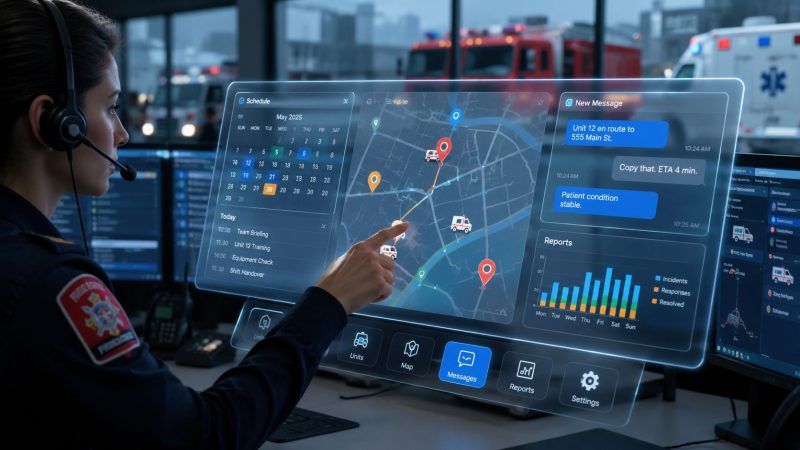
A live platform view helps make the difference concrete.

Scheduling that reflects reality
A clean calendar isn't enough. Emergency services scheduling has edge cases everywhere. Rotating tours, callback lists, volunteers with partial availability, mutual aid commitments, station coverage, training nights, and event standby all affect who should be assigned.
Good scheduling tools reduce overtime and missed coverage because supervisors can see constraints before posting a shift. Better ones also show qualifications tied to the schedule, so you don't accidentally fill a slot with someone who can work but isn't cleared for that role.
A practical example: if your crew runs a 24/48 model and one member swaps into a special event assignment, the software should update downstream staffing implications instead of leaving a lieutenant to notice the hole later.
For agencies evaluating options, the details in a system's personnel management features matter less as a checklist and more as an operations test. Can it handle contact data, roles, certifications, status, and availability in one workflow without duplicate entry?
Tracking that means more than dots on a map
Some teams hear “tracking” and think GPS. That's only part of the job. For personnel management software, tracking should include:
- Current status: available, unavailable, en route, on scene, assigned elsewhere
- Role readiness: supervisor, medic, driver, logistics, command staff
- Credential readiness: certs, expirations, training completion
- Assignment context: which incident, shift, or event the person is tied to
That gives dispatch and command a usable roster, not just a map screen.
Here's where agencies get burned. They buy a tool that shows location but doesn't track qualifications, or one that tracks certifications but doesn't update operational status. Then they're back to reconciling systems by hand.
Messaging that stands up after the incident
Integrated communication isn't just about convenience. It's about accountability. Consumer messaging apps are quick, but they're hard to audit, easy to fragment, and often disconnected from the actual shift or incident record.
A stronger model ties communication to the people and assignment involved. If a supervisor sends a fill request, confirms coverage, or updates a deployment group, those messages should stay connected to the operational record.
This walkthrough gives a useful sense of what teams expect from a modern personnel and dispatch environment.
Reporting that helps in the budget room
Automated reports matter because agencies eventually have to explain staffing decisions, participation levels, training gaps, and labor use. If reporting is manual, those reviews become slow and political.
Useful reports usually answer practical questions:
| Need | Why it matters |
|---|---|
| Shift fill history | Shows recurring coverage gaps |
| Participation by member | Helps with volunteer engagement and staffing decisions |
| Certification status | Reduces assignment risk |
| Incident staffing records | Supports after-action review and accountability |
One product worth considering in this category is Resgrid, which combines dispatching, messaging, personnel tracking, schedules, and reporting in one platform. That matters because the true value isn't any one feature by itself. It's having fewer handoffs between them.
Calculating the ROI of Your Software
At 5:30 a.m., a captain is trying to fill a shift before turnout. One person is on vacation, one certification expired last week, and two more are marked available in HR but already committed elsewhere. If your system cannot answer who can work right now, labor costs rise fast. The overtime hit is obvious. The slower damage shows up later in payroll corrections, supervisor time, and avoidable coverage gaps.
Budget approval usually comes down to one question. Will this software cut recurring operating costs enough to justify the spend? For emergency services, the answer is rarely in the license fee alone. It comes from reducing preventable labor waste and giving supervisors current staffing information instead of stale personnel records.
Start with labor, not licenses
The first place to measure ROI is unplanned overtime. Agencies spend money when supervisors fill openings late, call the wrong people first, or miss a credential issue until the last minute. A platform that matches live availability, qualifications, and assignment rules helps prevent those mistakes before they become premium-pay hours.
Analysts at Assembled found that workforce management software can save a 30-person support team with four team leads nearly $200,000 annually by optimizing scheduling and reducing overtime, according to Assembled's workforce management cost analysis. A fire department, EMS agency, or SAR team will not mirror that staffing model exactly. The operational lesson still holds. Better scheduling logic changes labor cost faster than many leaders expect.

Measure it with a clean before-and-after comparison. Pull one quarter of unplanned overtime before rollout, then compare it with a quarter after scheduling rules, availability updates, and qualification checks are in steady use. Break the hours down by cause. Callouts, uncovered shifts, training conflicts, and visibility failures point to different operational fixes.
Admin time counts too
A second bucket sits in the back office, but it starts in the field. If shift records, attendance, leave, and personnel files live in separate tools, someone has to reconcile them. That work usually falls on supervisors, payroll staff, or both.
Business.com reports that implementation of personnel management software reduces payroll processing time by 69%, according to Business.com's HR management market report. That matters because payroll cleanup is expensive in ways many agencies fail to track. Every correction takes follow-up, approvals, and staff time. It also erodes trust when members keep finding mistakes on checks or stipends.
The same logic applies to compliance records. A missing driver qualification file or expired document may look like an HR problem until it blocks an assignment or creates exposure after an incident. Tools built for record control, such as My Safety Manager's DQ file software, show why document accuracy has direct operating value.
Budget test: If supervisors build schedules in one place, confirm coverage by text, and fix hours in a spreadsheet, the agency is paying for the same shift multiple times.
Build the case in three buckets
A short ROI model usually gets more traction than a long software pitch.
- Direct labor savings: fewer overtime hours, fewer unnecessary callbacks, tighter shift coverage
- Administrative savings: less payroll cleanup, fewer manual reports, fewer duplicate entries
- Risk reduction: fewer assignment errors, better records during audits, disputes, and after-action review
Procurement teams should also compare software cost against current labor waste using clear vendor pricing. That is why it helps to review personnel management software pricing early, before the discussion turns into a feature checklist.
One last point gets missed in a lot of buying conversations. Static HR data has limited value during live operations. The return comes from turning personnel records into current staffing decisions. Leaders do not just need to know who works here. They need to know who is available now, who is qualified now, and who can be assigned without creating cost or risk two hours later.
A Practical Checklist for Selecting the Right Software
At 02:00, a supervisor is trying to fill an unexpected vacancy. One employee is marked active in HR, but their certification expired last week. Another is on the roster but already close to overtime. A third can respond, but nobody can confirm it fast. That is where weak software shows itself. The issue is not whether the system stores personnel records. The issue is whether it helps you make a safe staffing decision in minutes.

A good buying process tests for field reality, not demo polish. If the platform cannot tell you who is available now, qualified now, and assignable now, it will become another admin system that crews work around.
Questions that expose weak systems
Use these questions in every vendor review, and ask for live answers inside the product.
Can field staff handle the full workflow from a phone?
Supervisors and crews need more than a stripped-down mobile app. They need to update availability, confirm assignments, review credentials, and handle shift changes without opening a laptop.Does it reflect how your operation staffs incidents and stations?
Ask the vendor to show multi-station coverage, callback lists, volunteers, mandatory rest windows, event staffing, and mutual aid support. Generic scheduling breaks fast in public safety.How does it block bad assignments before they happen?
The system should flag expired certifications, licensing gaps, training misses, hour limits, and role restrictions before a supervisor places someone into the slot.What still works when connectivity gets weak?
Rural coverage gaps, storms, and damaged infrastructure are normal operating conditions for many agencies. If the platform depends on perfect internet, it will fail at the worst time.How fast can a new supervisor learn the daily tasks?
Selection teams often underestimate this point. If common actions take too many taps, too many screens, or too much menu hunting, people go back to texts, calls, and side spreadsheets.Can the vendor show audit history, not just current status?
After-action review, labor disputes, and compliance checks all depend on historical records. You need to see who changed an assignment, when they changed it, and what the qualification status was at that moment.
Compliance has operational value
Compliance is not a back-office box to check. It affects who can work, who can drive, who can lead, who can be billed, and what your agency can defend after an incident.
For smaller organizations, software adoption often improves compliance because records, time data, and required documents stop living in separate places. The practical test is simple. Can the system show current qualifications, worked hours, acknowledgments, and assignment history without a manual cleanup effort?
That standard matters well beyond HR. In transportation and other regulated operations, teams use specialized tools because missing or outdated records create immediate exposure. If your agency also manages regulated documentation, My Safety Manager's DQ file software is a useful example of how qualification tracking and document control should work in day-to-day operations.
Buy for live operations. A platform that only looks organized in admin mode will not hold up during shortages, callbacks, or fast-moving incidents.
Use a simple scorecard
Keep the evaluation process boring and consistent. Score every vendor against the same operational criteria, then compare the totals with your command staff, finance lead, and the people who will use the system on shift.
| Criteria | What to look for |
|---|---|
| Mobile usability | Full field function, not read-only access |
| Real-time status | Current availability, not just payroll records |
| Scheduling depth | Coverage rules that match actual staffing practice |
| Certification controls | Alerts, restrictions, audit trail, easy visibility |
| Offline resilience | Usable during weak or intermittent connectivity |
| Reporting | Fast operational, payroll, and compliance outputs |
| Support and training | Practical help for supervisors and field users |
| Pricing clarity | Clear setup, support, and expansion costs |
The right system reduces phone tag, duplicate entry, payroll cleanup, and preventable assignment errors. If it adds steps without giving supervisors better visibility during the shift, keep looking.
Best Practices for Implementation and Adoption
Software fails in public safety for the same reason a lot of operational change fails. Leaders buy it, announce it, and assume people will adapt because the need is obvious. That rarely works. Teams adopt tools when the tool makes the shift easier on day one, not because a memo says the rollout is live.
Start with one pain point people already hate
The easiest win is usually scheduling or availability management. Those are visible pain points, and crews feel the benefit quickly. When personnel stop getting surprised by schedule changes, and supervisors stop chasing responses across multiple channels, trust starts to build.
Don't launch every feature at once. Roll out the core roster, then scheduling, then status tracking, then reports. A phased approach lets your team form habits before you ask them to change everything.
Put real operators in charge of adoption
Your internal champions matter more than your vendor demo. Pick people who work the floor, not just people who sit in admin. A battalion chief, dispatcher, shift lieutenant, or team lead who uses the platform daily can answer practical questions in the language the crew speaks.
That also helps expose weak workflows early. If a crew lead says, “this takes too many taps when I'm on scene,” listen. Adoption problems usually show up first as workarounds, not complaints.
If your rollout depends on everyone reading the training manual, the rollout is already in trouble.
Train through scenarios, not menus
The best training sessions use real situations.
- Missed shift coverage: show how to find an available qualified replacement
- Expiring cert: show how a supervisor sees it before assignment
- Storm activation: show how to notify the right group and confirm staffing
- Post-incident review: show how to pull attendance and participation records
That kind of training sticks because it mirrors what people do. Menu-by-menu training fades fast.
Write down the new rules
Every implementation needs operating rules, not just software access.
For example:
- Status ownership: who updates availability, and when
- Schedule authority: who approves swaps and callback changes
- Messaging rules: what belongs inside the system versus phone or radio
- Record standards: who owns certifications, attachments, and training updates
Without those rules, the platform becomes another optional tool instead of the agreed source of truth.
Watch behavior in the first month
The first month tells you whether the change is real. Look for skipped updates, duplicate communications, side spreadsheets, and supervisors reverting to old methods under pressure. Those aren't signs of bad people. They're signals that a workflow still feels slower than the old workaround.
Fix those points quickly. Small process repairs early keep the software from becoming shelfware later.
Integrating Your Systems for a Single Source of Truth
At 02:13, nobody cares that payroll has the right employee ID if operations cannot tell who is available, qualified, and close enough to respond. That gap is where generic HR software fails first responder agencies. It stores personnel records. It does not always support live decisions.
A personnel platform starts paying off when it connects the back office to the field. Dispatch, scheduling, training records, timekeeping, messaging, and incident documentation should all pull from the same current personnel record. If they do not, supervisors start checking three systems, then calling or texting to confirm what the software should already know. That burns time, creates errors, and puts bad information into operational decisions.
The target is simple. One record for the person, one current status, and one clear trail of what changed.
That matters in practical ways. A dispatcher should see whether a medic is certified, on shift, and marked available without opening separate tools. A supervisor should not have to rebuild hours for payroll after a callback event. A command officer reviewing a major incident should be able to confirm who was alerted, who acknowledged, and who responded from connected records instead of stitched-together exports.
Getting there takes planning. Imports fail when agencies bring over years of duplicate names, outdated certifications, and inconsistent status codes. Ownership also has to be clear. Someone must decide which system is the source for identity, which one controls availability, and which one owns pay data. PEO Metrics on seamless transitions is useful here because the migration problem is usually operational, not just technical.
Security needs the same practical lens. First responder agencies hold contact information, personnel files, credential records, schedules, and live availability data. Role-based access, audit logs, and field-ready authentication are not box-checking features. They protect trust in the system while still letting the right people act fast during an incident.
Set the standard clearly:
- Limit access by role: crews, supervisors, finance, and command should not all see or edit the same data
- Track every important change: status edits, certification updates, and schedule adjustments need a visible history
- Protect mobile access: field access has to be fast without turning every phone into an open door
Integration also affects labor cost. AltLogic's analysis of workforce management savings notes that accurate time and attendance tracking through software reduces payroll errors and buddy punching, which can drive up labor costs. In public safety, those errors often start with disconnected systems. Time gets captured in one place, corrected in another, approved through side messages, and paid from a third record. Agencies then spend supervisor time fixing preventable mistakes after the fact.
Good workflow design closes that gap. Routing approvals, availability changes, callback notices, and follow-up tasks through defined personnel and operational workflows keeps decisions inside the system instead of scattered across texts, whiteboards, and memory.
If your agency needs a system that connects dispatch, personnel tracking, messaging, schedules, and reporting in one place, Resgrid, LLC is worth a look. It is built for operational teams that need live visibility, not just back-office recordkeeping, and it caters to the need for first responders to know who can respond now.