
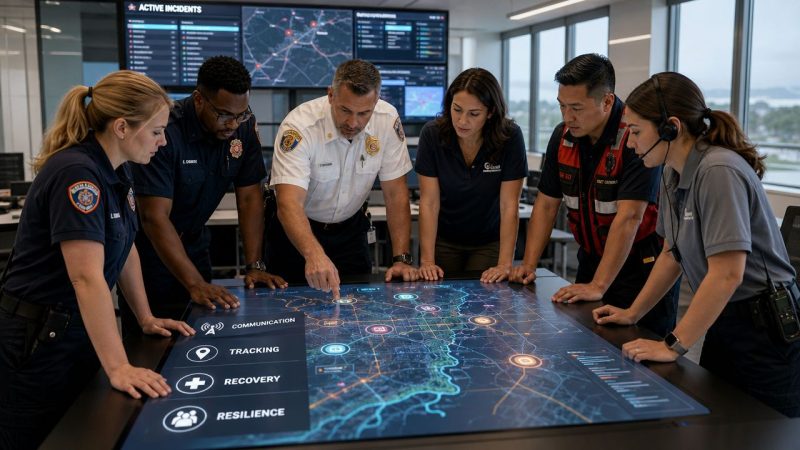
Business Continuity Solution: Guide for First Responders
If you're responsible for dispatch, field coordination, or emergency operations, you probably already know the weak point in most continuity planning. The radios may work, the CAD may have a backup, and the file server may replicate somewhere else. Then a real disruption hits and the breakdown starts somewhere else entirely. No one knows which channel to use, supervisors can't confirm who is available, and teams waste critical minutes rebuilding a picture of the operation.
That's why a business continuity solution has to be judged by one standard above all others. Can your people still coordinate work under pressure when the primary system, facility, or network path is gone?
For communication-dependent teams, continuity isn't just about recovering data. It's about preserving command and control. Dispatch has to keep assigning work. Supervisors have to account for crews and equipment. Field personnel need alternate instructions that are clear, fast, and usable when the normal workflow is broken. If the plan only restores systems after the fact, it may still fail the operation when you need it most.
Beyond Backups What Is a Business Continuity Solution
A backup gives you a copy of data. A business continuity solution gives you a way to keep operating.
That distinction matters in emergency services. If a dispatch center loses its primary software, the immediate problem isn't only whether records can be restored. The core problem is whether call intake, unit assignment, personnel notification, and status tracking can continue in some controlled form. A backup helps later. Continuity helps now.
The easiest way to explain it is this. A backup is a spare tire. Useful, necessary, and limited. A continuity solution is roadside assistance plus a tow plan, a temporary vehicle, a way to notify the driver, and a map for getting the trip back on schedule. One restores an asset. The other preserves the mission.

What continuity looks like in operations
For dispatch and first response teams, continuity usually includes these practical capabilities:
- Alternate communications: If the primary system is down, teams still need messaging, alerts, and tasking.
- Operational visibility: Someone has to see who is on duty, who acknowledged, and what resources are available.
- Fallback workflows: If the main process fails, the organization needs a simpler process that still works.
- Recovery discipline: Systems and procedures must come back in the right order so the operation doesn't create more confusion during recovery.
A lot of organizations still buy for recovery and assume continuity comes with it. It doesn't. Recovery is one part of continuity. The rest lives in process, staffing, and coordination.
Practical rule: If your plan starts with restoring servers but doesn't specify how dispatchers and supervisors communicate in the first hour, it isn't finished.
This shift from simple backup thinking to broader continuity planning isn't theoretical. Industry coverage citing Gartner data reported that the market for business continuity and disaster recovery solutions was projected to reach $61.7 billion by 2017, while DRaaS was projected to rise to $11.92 billion by 2020 from $1.42 billion in 2015, a 52.9% compound annual growth rate, showing how quickly organizations moved toward formal continuity platforms rather than ad hoc backup planning, according to Arcserve's summary of those projections.
The standard that matters
A sound continuity solution answers four blunt questions:
| Question | What a weak plan does | What a strong plan does |
|---|---|---|
| Can we still receive and assign work? | Waits for the main system to return | Provides an alternate dispatch path |
| Can we still reach people? | Relies on one communication channel | Uses primary and backup channels |
| Can we still account for resources? | Depends on memory and phone calls | Keeps personnel and equipment visible |
| Can we recover without chaos? | Restores pieces in random order | Follows a tested sequence |
If you're buying only for data restoration, you're buying too low in the stack. Operations need continuity that protects communications, task flow, and accountability at the same time.
The Core Components of Operational Resilience
Operational resilience is easiest to understand when you stop treating it as an IT project and start treating it as a field operations problem. In practice, four components do the heavy lifting.
To keep the structure grounded, think about a county dispatch center supporting fire, EMS, and public works during a storm. The center doesn't need abstract resilience. It needs to keep the right people informed, moving, and accountable.

Disaster recovery that supports operations
Disaster recovery still matters. If the system holding schedules, contact lists, incident data, or dispatch workflows is gone, the operation degrades fast.
But recovery has to be tied to business impact. Industry guidance emphasizes using a Business Impact Analysis to identify critical functions, dependencies, and tolerable downtime before setting RTO and RPO, then aligning failover, backup frequency, orchestration, and clean recovery methods such as immutable or offline backup patterns like the 3-2-1-1-0 rule, as explained in Tierpoint's continuity planning guidance.
For a dispatcher, that translates into plain language:
- RTO: How fast do we need this function back before operations become unacceptable?
- RPO: How much data loss can we tolerate without creating safety or accountability problems?
A personnel roster may tolerate some delay. A live dispatch board may not. Treating every system the same usually wastes money on low-value redundancy and underprotects the systems that run the operation.
Incident response and communications
The first operational failure in many disruptions is communication drift. One supervisor starts texting. Another uses email. A field unit calls a personal phone. Within minutes, no one is working from the same picture.
A continuity platform has to provide a clear communication spine. That means alerting, acknowledgment, role-based messaging, and a shared place to post status changes. For some organizations, that may include tools listed on Resgrid's features page, which covers dispatching, messaging, organization management, personnel tracking, and reporting in one environment.
That matters because consolidating communication functions can reduce both licensing sprawl and operator confusion. During a crisis, every extra login and disconnected app adds friction.
A quick reference before buying:
- One channel is fragile: If your workflow depends on a single app or single network path, expect failure under stress.
- Acknowledgment matters: Sending a message isn't the same as knowing who received it.
- Role-based access matters more than broad access: Dispatchers, supervisors, and field units don't need the same screen.
A short explainer is useful here if you're briefing your team or leadership:
Personnel and equipment tracking
If you can't answer "who is available" and "what assets are ready," continuity is already slipping.
Many plans get too technical and miss the daily reality of response work. Dispatch centers and emergency managers need live accountability. That includes staffing status, shift coverage, apparatus availability, specialized equipment, and assignment history. In a prolonged outage, a simple and current operating picture often saves more time than a complex restore sequence.
During a communication outage, teams rarely fail because they lack data backups. They fail because they can't quickly rebuild a trusted picture of people, assignments, and equipment.
Process continuity and alternate workflows
The final component is procedural. When the normal workflow fails, what does the reduced-mode workflow look like?
A strong plan specifies alternate intake, manual dispatch procedures, paper or simplified digital logging, escalation paths, and transfer triggers. It doesn't pretend the fallback process will be elegant. It only needs to be controlled, trainable, and good enough to preserve service.
That is where money gets saved in practice. Not by buying every premium feature, but by identifying the minimum operational workflow that keeps units moving until full capability returns.
Real-World Scenarios for First Responders
A continuity plan becomes real when you run it against the kinds of failures dispatch teams face in practice. Two scenarios come up repeatedly: cyber disruption and infrastructure loss.
Recent guidance treats cyber attacks like ransomware as business interruption events, not just IT incidents. With ransomware involved in roughly 32% of analyzed breaches, continuity planning has to cover live communication and coordination during cyber-induced downtime, as noted in SBT Partners' discussion of continuity consequences.
Ransomware in the dispatch environment
A municipal dispatch center starts the morning shift normally. Then the call handling and records environment begins locking up. IT isolates systems. CAD access becomes unreliable. Shared drives disappear. The instinctive response is to wait for restoration.
That delay is where operations get hurt.
A better continuity posture moves immediately to an alternate dispatch path. Supervisors push preassigned fallback roles. Dispatchers use a secondary platform for unit tasking, status updates, and agency messaging. Field units don't need the full primary system in that moment. They need clean instructions, incident identifiers, and a place to acknowledge and update status. For teams evaluating practical options, a tool with dispatching capabilities built for coordinated response can support this reduced-mode workflow while the primary environment is contained and recovered.
The savings in this scenario aren't abstract. They come from avoiding idle crews, duplicated calls, and the expensive scramble of stitching together separate texting, spreadsheet, and phone-tree workarounds.
Storm damage and communication failure
Now take a wind event that knocks out commercial power, saturates cellular service, and forces agencies to split operations across stations, vehicles, and temporary command points.
The common mistake is assuming the continuity problem is only digital. In reality, the challenge is keeping assignment discipline and accountability across a scattered operation. A continuity solution helps by supporting multi-channel messaging, role assignment, and current personnel status so division leads know who checked in, who is committed, and who can be reassigned.
This also affects logistics. Agencies often overlook how quickly equipment movement becomes a bottleneck when normal facilities are constrained. If your team is dealing with temporary storage, rapid relocation, or controlled movement of specialized gear, resources like material handling for law enforcement are useful because they address the physical side of continuity that often gets left out of software planning.
The operation doesn't stop because one system failed. It stops when nobody can tell who is doing what, with which equipment, and on which channel.
In both scenarios, the same lesson holds. The continuity solution that works isn't the one with the longest feature list. It's the one that preserves coordination when the primary workflow is broken.
How to Choose the Right Business Continuity Solution
Most buyers get distracted by feature volume. In real incidents, feature volume matters less than clarity under stress, operational fit, and total cost of ownership.
The financial side alone should force a harder look. Reported downtime costs range from $427 per minute for smaller businesses to over $9,000 per minute for larger enterprises, according to Invenio IT's continuity statistics summary. For communication-heavy operations, a short outage can cost more than the annual software bill you were trying to avoid.
The questions worth asking vendors
Use these questions instead of asking for a generic demo.
- Can operators use it under pressure? A continuity tool that requires deep menu diving or heavy training won't hold up at 3 a.m.
- Can it scale without a redesign? Small teams often start with messaging and scheduling, then need dispatching, tracking, and reporting later.
- Does it reduce tool sprawl? Consolidating messaging, dispatch, status tracking, and reporting can save money and lower training burden.
- What does implementation require? Hidden consulting work, mandatory onboarding packages, or long customization cycles drive costs up fast.
- Can it support degraded operations? Ask how the platform works when your normal workflow is impaired, not only when everything is healthy.
- How hard is it to administer? If only one specialist can maintain it, continuity risk just moved to a person instead of a system.
A practical buying matrix
| Buying criterion | What to favor | What to avoid |
|---|---|---|
| Ease of use | Simple workflows, clear status views, fast training | Complex interfaces that need constant reference guides |
| Cost control | Transparent pricing, minimal implementation overhead, consolidated functions | Multiple add-ons, mandatory services, overlapping tools |
| Operational fit | Dispatch, messaging, personnel, and equipment visibility in one workflow | Products centered only on back-end recovery |
| Flexibility | Configurable roles and processes | Rigid workflows that force your team to adapt to the software |

Where organizations waste money
The biggest waste usually isn't the wrong subscription tier. It's paying for duplicate tools because no one mapped the operational workflow first.
A dispatch-heavy team may be carrying separate products for alerting, team chat, shift scheduling, incident logging, personnel accountability, and reporting. If a continuity solution can replace several of those functions with one manageable platform, the savings show up in fewer licenses, less training time, and fewer handoffs during incidents.
A cheaper product isn't cheaper if it forces your team to maintain parallel systems just to stay operational.
Your Implementation Roadmap and Checklist
Buying software doesn't create continuity. Deployment discipline does.
The rollout should be treated like an operational project with defined owners, test dates, and fallback procedures. If you skip that and turn the platform on, the organization will discover its real gaps during the first incident.

Stage one through four
Start with these four actions.
Assess critical functions
Identify the work that cannot stop. For most communication-dependent teams, that includes dispatching, alerting, accountability, shift coverage, and status reporting. Keep the list short. If everything is critical, nothing is prioritized.Map communication paths
Document the primary and backup path for each role. Dispatcher to supervisor. Supervisor to field unit. EOC to partner agency. Then check where one failed app, one cellular path, or one person creates a choke point.Onboard personnel by role
Train dispatchers, supervisors, and field personnel differently. They don't use the system the same way, so don't train them the same way. If your team needs product-specific help during setup or troubleshooting, Resgrid support options show the kind of service structure that can help organizations maintain continuity while implementing and operating the platform.Test and refine
Mature continuity programs are separated from shelfware by testing cadence. Guidance recommends at least annual testing, including live simulations, and using outcomes to compare against recovery targets so hidden flaws are exposed before a real event, according to Tietoevry's continuity testing guidance.
A field-ready checklist
Use a simple checklist before you call the rollout done:
- Critical functions named: Dispatch, notification, accountability, and reporting are clearly prioritized.
- Fallback workflows documented: Staff know what to do when the primary process is down.
- Role assignments confirmed: Every shift knows who triggers alerts, who manages status, and who escalates.
- Contact paths verified: Primary and alternate communication methods have been checked.
- Training completed: Operators have practiced the reduced-mode workflow, not just watched a demo.
- Exercise scheduled: The next drill is already on the calendar.
A continuity system isn't validated when the contract is signed. It's validated when a tired operator can still use it correctly during a bad shift.
The low-cost move here is simple. Build the minimum viable continuity workflow first. Don't try to automate every edge case on day one. Get the critical path working, test it, then add refinement after the team can operate it reliably.
Common Business Continuity Pitfalls to Avoid
The first pitfall is the plan on the shelf. Someone writes a continuity plan, stores it in a shared folder, and assumes the organization is covered. Then a disruption hits and nobody has practiced the steps in the order reality demands. The fix is simple: exercise the plan in realistic scenarios and update it after each test.
The second pitfall is the IT-only view. Teams protect backups, servers, and restore points but leave communications, role assignment, and manual workflow design half-finished. ISO 22301 guidance emphasizes that many continuity failures happen on the human side because of role confusion, slow decision-making, and poor coordination, especially in the first 60 minutes of disruption, as discussed in Bryghtpath's guide to business continuity. The solution is to define who makes decisions, who communicates, and how the operation runs in reduced mode.
Three warning signs
- People ask which tool to use during the incident: Your communication hierarchy isn't clear.
- Supervisors keep personal workarounds: Your official workflow isn't trusted.
- New staff don't know the fallback process: Training is incomplete.
The third pitfall is the assumption of competence. Leaders assume experienced personnel will improvise successfully under pressure. Sometimes they do. More often, they improvise three different systems at once. Give them training, short runbooks, and drills built around likely disruptions, not ideal conditions.
The agencies that handle disruption well usually aren't the ones with the thickest plans. They're the ones that made coordination easier before the incident started.
If your team needs a practical platform for dispatching, messaging, personnel tracking, and continuity-focused coordination, Resgrid, LLC is one option built around those operational needs. The useful question isn't whether you need continuity. It's whether your current setup can keep people coordinated when the primary system goes down.