
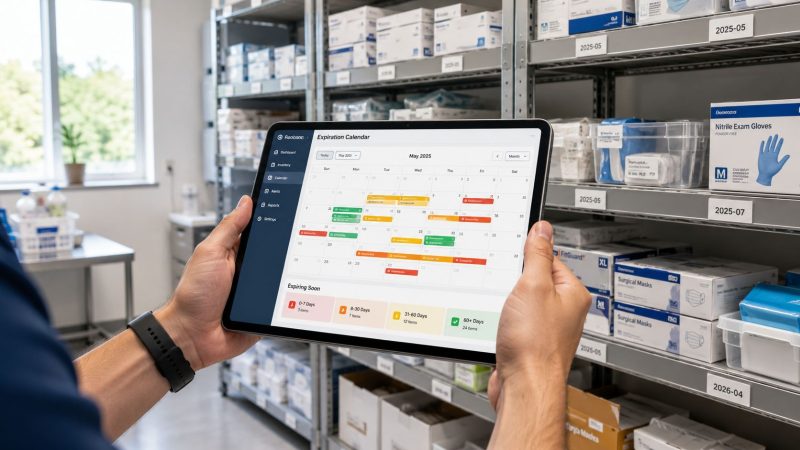
Expiration Date Tracking: Save Money & Ensure Compliance
If you're running ambulances, fire apparatus, emergency caches, clinic rooms, or field kits, you already know the failure mode. Nobody notices a short-dated item during a busy shift. The kit still looks full. The vehicle still shows ready. Then an inspection, call, or restock exposes expired stock that should've been pulled weeks earlier.
That's why expiration date tracking has to be built as an operations system, not a spreadsheet habit. In mission-critical environments, the goal isn't just compliance. It's preventing avoidable waste, avoiding stockouts, and making sure the right item is usable when a crew reaches for it.
The basic idea has already proven its value at scale. Global food loss remains a massive problem, with about 1.3 billion tons of food, or roughly one-third of all food produced for human consumption, lost or wasted each year, and expiration-date systems have been shown to help reduce avoidable waste in retail settings through better identification and movement of aging inventory (study in Resources, Conservation and Recycling). The same operating principle applies to medical supplies, PPE, vehicle stock, and certifications. If you can see what is aging, you can act before it becomes a loss.
Defining the Scope of Your Tracking System
The fastest way to waste money on expiration date tracking is to track everything with the same level of detail.
A fire department, EMS agency, hospital transport team, or emergency management office usually has three very different categories of expiring assets: clinical items that can directly affect patient care, operational items that can stop a vehicle or team from performing, and administrative items such as licenses and certifications. These categories don't need the same workflow, and pretending they do creates cost without adding control.
Start with risk, not inventory count
A practical scope decision starts with four questions:
- What causes real harm if it expires unnoticed?
- What has a short enough shelf life to justify active monitoring?
- What is expensive enough that avoidable discard hurts the budget?
- What creates compliance exposure if it's out of date?
That framework immediately separates high-value tracking targets from low-value noise.
For example, an EMS service should usually track naloxone, epinephrine, AED pads, sealed sterile items with clear expiration dates, blood glucose supplies, and other treatment-critical consumables. A fire department may also need to track foam concentrate, specialty medical cache items, and selected apparatus supplies. On the personnel side, some organizations also fold in certifications because the operational consequence is similar. An expired credential can sideline a person just as surely as an expired medication can sideline a bag.

Decide where simple tracking is enough
Not every item needs lot-level control.
In mixed environments, a simpler model often works better for lower-risk assets. Community guidance around inventory systems shows that teams frequently look for ways to track expiration dates without full lot tracking, especially when lot control adds extra process overhead for a limited number of date-sensitive items (discussion of expiration tracking without lot tracking). That matters in public safety because scan speed and crew compliance matter more than theoretical perfection.
Use a short decision table like this:
| Item type | Suggested control level | Why |
|---|---|---|
| Medications and treatment-critical supplies | Lot-level with expiration date | Highest risk if wrong item stays in service |
| Frequently rotated consumables | Item plus expiration attribute | Lower overhead, still visible |
| Non-expiring or very low-cost items | No active expiration tracking | Avoids clutter and labor waste |
| Certifications and licenses | Person-level validity tracking | Operational readiness and compliance |
Practical rule: If a missed expiration would change patient care, vehicle readiness, or deployability, track it actively. If it only creates record clutter, leave it out.
Assign ownership before you buy tools
Most failed systems don't fail because the software was weak. They fail because nobody owns intake, nobody owns review, and everybody assumes someone else will pull aging stock.
Assign one owner for each stage:
- Receiving owner handles initial data entry or scan confirmation.
- Station or vehicle owner checks assigned inventory and acts on alerts.
- Supply or logistics owner approves transfers, replacement, and disposal.
- Compliance owner reviews audit output and closes gaps.
If you're documenting this inside existing operating procedures, build that ownership into your workflow configuration. Scope control saves money in two ways. It avoids overengineering, and it keeps staff focused on assets where expired stock costs you readiness, replacement dollars, or both.
Designing Your Data Model and Workflows
Once scope is set, the next mistake is overbuilding the database and underbuilding the process.
A usable expiration date tracking system needs clean intake more than it needs fancy dashboards. If the field crews, quartermaster, or station officer can't capture the right information in seconds, the system will decay fast.
Capture the minimum viable data
At intake, the operational minimum is straightforward: product ID, lot or batch, expiration date, and location. That basic structure supports FEFO movement and near-expiry visibility. A warehouse guide focused on expiration tracking also recommends capturing related operating context such as storage conditions and movement history for stronger control, and reports that properly implemented tracking can reduce waste by 20-40% in the first year, while automated systems can cut waste by 60-85% within six months in some food-service and distribution settings (practical rollout guidance for expiration tracking).
For first responders, I'd add one more field if the software allows it without friction: assigned unit or kit. That gives you the difference between “we own three valid boxes” and “Medic 4 is carrying the one that expires first.”

Build the workflow into work that already happens
The right workflow doesn't add a separate administrative task. It attaches data capture to events that already exist.
A clean example is ambulance restocking:
- Crew scans or selects the item being loaded.
- System fills the item identity automatically.
- User enters or scans the expiration date.
- Quantity is confirmed.
- Location is set to the vehicle, bag, cabinet, or station room.
That's it. If your process requires a responder to type long product names, search through a giant list, and manually choose multiple fields at 2 a.m., data quality will collapse.
The best expiration workflows are boring. One scan, one confirmation, one placement.
A similar approach works for AED pads. Receive the pads into supply, attach the expiration date, assign them to a building kit or vehicle, and trigger the next review date automatically. When a replacement arrives, the outgoing pads should be reassigned or retired in the same transaction. That closes the loop and keeps ghost inventory from living in the system.
Choose granularity by use case
Different assets need different detail levels.
- Medication bins usually justify lot-level capture because recalls, substitutions, and expiry windows matter.
- Mass PPE stock may only need item-level expiration if the operational question is only whether the stock is still deployable.
- Personnel credentials often fit a validity model better than inventory logic. If you're also responsible for training compliance, the workflow ideas behind managing certification validity periods are useful because they treat expiration as an operational scheduling problem, not just a recordkeeping field.
A bad data model tries to make every asset conform to one structure. A good one asks what decision the team must make when the date gets close, then collects only the data needed to support that decision.
Implementing Proactive Reminders and Alerts
A date field sitting in a database doesn't save money. Alerts do.
The heart of expiration date tracking is moving from periodic checking to continuous exception management. That's where organizations stop burning labor on cabinet-by-cabinet inspections and start acting only where a date, quantity, or assignment creates risk.

Digital adoption is heading in this direction across the market. A 2025 market report valued the global food expiration date tracker market at $3.8 billion and projected it to reach $8.6 billion by 2034, with a projected 9.5% CAGR. The same report says mobile applications are the fastest-growing product type, with an expected 12.4% CAGR through 2034, reflecting the shift from manual checking to barcode-, QR-, and database-linked workflows (market outlook for food expiration date trackers).
Use staged alerts, not one warning
One alert threshold is usually too late.
If a unit medic gets a message the day an item expires, the organization still has to pull it, find a replacement, update the record, and possibly reshuffle stock across vehicles. That's reactive management.
A staged alert model works better:
- Early warning tells logistics that an item is approaching the decision window.
- Action warning tells the assigned owner to rotate, transfer, or consume first.
- Critical warning triggers replacement and removal from service.
For a high-turn item, the early alert might prompt a move to a busier unit so it gets used before expiration. For a low-turn controlled supply, the same alert might trigger a reorder because field use won't clear it in time.
Match the alert to the role
The wrong person shouldn't get the wrong alarm.
Dispatch supervisors don't need every low-priority inventory warning. Vehicle captains shouldn't be the only people seeing re-order issues. Good alert design assigns tasks to the person who can act:
| Alert type | Best owner | Typical action |
|---|---|---|
| Near-expiry inventory | Station officer or vehicle lead | Pull, rotate, verify stock |
| Replacement need | Logistics or supply coordinator | Reorder or reallocate |
| Certification approaching expiration | Training or personnel admin | Schedule renewal |
| Critical expired item | Duty supervisor and logistics | Remove from service, document replacement |
Integrated communication matters. If your system supports role-based notifications and direct team communication, a feature set like operational messaging and notifications helps because the alert can move directly into an assignment instead of becoming another email nobody owns.
Design alerts around money and readiness
Genuine savings come from actions that happen before discard.
If a station has short-dated naloxone and another station has higher call volume, transfer it early. If a spare vehicle carries treatment items that rarely get touched, use alerts to rotate stock into frontline units before it becomes dead inventory. If a certification is close to expiration, schedule training before the roster creates a staffing problem.
Here's a quick demo of the kind of operational environment where alerts matter:
Field advice: Alerts should trigger a named action, not just a notification. “Expires soon” is weak. “Move box from Reserve 2 to Medic 1 by Friday” prevents waste.
Teams often think the waste comes from expired stock alone. In practice, a lot of the loss comes from labor, duplicate purchasing, and emergency reorders caused by poor visibility. Alerts fix all three when they're tied to ownership and timing.
Integrating with Dispatch and Personnel Systems
A tracking system that lives on its own tab will never become operational truth.
In public safety and emergency response, the highest value comes when expiration status connects to dispatch decisions, readiness checks, staffing, and qualification records. Inventory data gains force when it can answer real-time operational questions: Is the assigned unit carrying valid supplies? Is the person being scheduled still cleared for that role? Is a reserve asset deployable today?
Turn dates into readiness signals
A dispatch board can show unit availability, but that only tells part of the story. A vehicle marked available may still be functionally degraded if a critical item is expired or missing. Integration closes that gap by feeding expiration status into assignment logic, shift prep, and exception review.

The same principle applies to staff qualifications. If a firefighter's fit test, EMS credential, or specialty certification is nearing expiration, that should appear where staffing and qualification decisions happen. Public safety teams using personnel management tools can treat certification validity as part of readiness, not a separate clerical problem.
Connect the systems at the decision points
You don't need every platform talking to every other platform in real time. You need integration at the moments when someone makes a decision.
Good connection points usually include:
- Receiving to inventory assignment so newly stocked items immediately attach to a station, bag, or unit
- Inventory to dispatch readiness so supervisors can see whether assigned assets are fully deployable
- Personnel records to scheduling so expiring credentials surface before shifts are built
- Reporting to command review so the organization sees trends in aging inventory and compliance gaps
A practical example: a specialty response unit is tagged for a call that may require a specific medication or treatment capability. The system doesn't need to decide the dispatch alone. It does need to show whether the unit's stocked items are current and whether the assigned personnel still hold required qualifications. That reduces risky assumptions and cuts the side work of calling stations to verify what should already be known.
Systems become reliable when crews stop asking, “Is that date current?” and start assuming the answer on screen is trustworthy.
The integration goal isn't technical elegance. It's a single operating picture that lets supervisors act faster with fewer manual checks.
Establishing Audits and Measuring Performance
Most organizations think implementation is the hard part. It isn't. Keeping the data trustworthy is harder.
Expiration date tracking only pays for itself when the records stay aligned with the shelf, vehicle, cabinet, and roster. That requires an audit loop. Not a once-a-year inspection. A recurring process that catches drift before drift becomes budget loss or readiness risk.
Audit the process, not just the items
A physical spot check should answer more than “is this box expired?” It should answer whether the intake process, transfer process, and alert process are working.
Use a simple audit structure:
- Random asset checks compare a sample of physical items against system dates and assigned locations.
- Exception review looks at items near expiration and verifies that an action owner exists.
- Alert testing confirms overdue or near-expiry notifications reach the right people.
- Disposition review checks whether removed items were retired correctly instead of lingering in stock.
An industry glossary on expiration date tracking argues for exactly this kind of KPI-driven control loop and warns that the major failure mode is data-quality drift. It also notes that facilities without automated tracking typically see 3-5% loss rates, while well-managed automated programs can reduce freshness-related complaints by 70-80% and cut waste by 60-85%, provided alerts, dashboards, and FEFO logic are actively managed and audited monthly (KPI guidance for expiration date tracking).
Use KPIs leadership will understand
A dashboard full of technical fields won't justify budget. Operations leaders and finance staff need measures tied to loss prevention, readiness, and compliance.
Track metrics such as:
| KPI | What it tells you | Why it matters |
|---|---|---|
| Expiration rate | How much stock expired before use | Direct measure of avoidable waste |
| Compliance rate | Share of tracked assets still within valid date range | Readiness and inspection confidence |
| Inventory turnover | How quickly date-sensitive stock moves | Shows whether buying levels fit usage |
| Alert effectiveness | Whether alerts led to action before expiry | Reveals if notifications are too late or ignored |
| Shelf-life utilization | How much usable life was consumed before exit | Helps tune reorder and rotation timing |
For organizations with more mature systems, metrics such as salvage day, time-to-salvage, and spoilage value ratio can expose a subtler problem. Items may remain technically valid but operationally unusable because too little shelf life remains when they finally reach the point of use. That's where audit data becomes planning data.
Measure savings in the language of waste avoided
The cleanest cost case usually comes from four buckets:
- Lower discard value from fewer expired items
- Less duplicate purchasing because stock is visible and transferable
- Less labor spent on manual date hunts
- Fewer emergency replacements bought under pressure
Don't wait for perfect analytics. Start with quarter-over-quarter comparisons on expired write-offs and urgent replacement activity. If the trend moves in the right direction and audit accuracy improves, the system is doing its job.
Monthly audits are not bureaucracy. They're what keeps a good system from quietly becoming a bad one.
Best Practices for Maintenance and Compliance
The strongest expiration date tracking programs behave like maintenance programs. They run on repetition, ownership, and correction.
That matters because the printed expiration date is only one aspect of the operating decision. In many environments, an item becomes unusable before its legal expiration because it won't have enough remaining life by the time it reaches a patient, crew, or incident. Industry guidance on advanced KPIs calls this salvage day, the last viable shipping or selling date before the remaining shelf life is too short to be useful (advanced shelf-life KPIs and salvage day).
Treat shelf life as a readiness window
For first responders, salvage day is easy to understand. A medication may still be technically valid, but if it expires too soon to remain on a reserve unit, in a remote cache, or through the next inspection cycle, it's already a rotation candidate.
That changes how good managers handle stock:
- Move short-dated items to high-use locations
- Keep long-dated items in reserve or low-turn assignments
- Set replacement thresholds based on deployment reality, not just printed expiry
- Train staff to remove “commercially dead” inventory before it creates hidden risk
Keep the system alive
Training has to be continuous because turnover and promotions change who touches the process. New medics, station officers, logistics techs, and supervisors need to learn not only what to scan but why the control matters. If they don't understand the operational consequence, they'll treat the system like clerical busywork.
There's also a broader maintenance lesson here. Teams that want to optimize asset reliability often discover that asset lifecycle discipline and expiration discipline overlap. Both depend on clear ownership, timely intervention, and data that supports action instead of sitting in a report.
The best long-term approach is simple. Review your thresholds, retrain when errors repeat, and tighten the process where alerts are being ignored or delayed. Compliance matters, but the larger win is stewardship. Less waste. Fewer surprises. Better readiness on the day a crew needs the item.
If your organization needs one place to manage dispatch activity, communications, personnel records, and time-sensitive operational data, Resgrid, LLC provides a platform built for first responders, emergency management teams, and other mission-critical operations. It can fit organizations that want expiration-related tracking tied more closely to day-to-day readiness instead of handled in disconnected spreadsheets and inboxes.