
UAV Mapping Services: Intelligence for First Responders
At 02:17, the radio traffic is stacked up, crews are coming in from different directions, and nobody has the full picture. A tanker is leaking on the shoulder of a highway. Runoff may be heading toward a drainage ditch. Patrol has one view. Fire has another. Public works is asking where to stage. Command needs a perimeter now, not after three separate drive-arounds and a hand-drawn sketch that's outdated before it hits the whiteboard.
That's where UAV mapping services stop being a gadget and start being operational intelligence.
A live aerial look helps, but a proper map does more. It gives you a shared reference everyone can work from. You can brief from it, assign from it, mark hazards on it, and hand it to the next operational period without starting over. In public safety, that matters because wasted movement costs time, and bad location data puts people in the wrong place.
From Chaos to Clarity The Role of UAV Mapping in Emergencies
A large brush fire is moving across mixed terrain. Crews on the road can see smoke columns, but not the drainages behind the ridge. Law enforcement is trying to keep civilians out. EMS wants a safe ingress route if a firefighter goes down. Utilities need to know whether lines are threatened. The first map that usually exists is whatever someone can pull from a standard basemap. That's useful, but it doesn't show today's fire edge, today's vehicle congestion, or today's cut line.
That gap is what UAV mapping services close.
Instead of relying on partial reports, a drone team can capture overlapping imagery over the operational area and turn it into a usable map product. For an incident commander, the value isn't the aircraft itself. The value is getting a current view of the incident area that supports decisions on access, staging, exclusion zones, and task assignments.
The reason this matters now is simple. UAV mapping has moved into regular commercial use, not experimental use. The global drone data services market was valued at USD 1.05 billion in 2022 and is projected to reach USD 15.05 billion by 2030, with a 39.0% CAGR, while mapping and surveying was the largest service type. That tells you the market isn't treating mapping as a side feature. It's treating it as the main job.
What commanders actually gain
A good aerial map changes three things fast:
- Shared understanding: Everyone stops arguing about where the problem is and starts working from the same visual reference.
- Safer movement: Teams can identify blocked routes, soft ground, debris fields, water crossings, or unstable structures before sending people in.
- Cleaner documentation: The incident scene gets captured in a form that supports after-action review, investigations, and handoff to recovery teams.
Practical rule: If the incident footprint is changing faster than your field notes can keep up, you need a current map, not another verbal estimate.
This is especially useful on incidents where the ground view lies to you. Hills hide spread. Smoke hides access. Urban clutter hides collapse patterns. Floodwater hides washouts. A map built from current aerial collection clears that up.
A practical example
Take a search operation at first light after an overnight storm. Roads are passable in some places and not in others. Crews already spent part of the night checking addresses from outdated parcel views and local memory. A fresh UAV map can show where vehicles can get through, where debris is blocking ingress, and which structures need priority contact. That doesn't replace field judgment. It sharpens it.
The operational lesson is straightforward. Don't ask only, “Can the drone see it?” Ask, “Can command act on what the drone produces?”
Understanding UAV Mapping Concepts
Most responders don't need a graduate course in photogrammetry. They need to know the difference between a sharp aerial picture and a map they can trust.
Photogrammetry is the process of turning many overlapping photos into something measurable. The easiest way to think about it is depth perception. Your two eyes see the same object from slightly different angles, and your brain turns that into distance and shape. UAV mapping software does a similar job with many images captured across a flight path.
The difference between imagery and mapping
A drone can give you a live video feed in seconds. That's good for immediate awareness. A mapped product takes those overlapping images and aligns them to real-world coordinates, which is what makes it useful for measurement, overlays, and planning.

Terms that matter on the ground
Here are the terms that affect operations:
- Georeferenced: The map is tied to real coordinates, so features line up where they belong.
- Ground Control Points: These are known reference points used to improve accuracy. If the job requires measurement you can defend later, ask whether GCPs were used.
- GeoTIFF: A map file that keeps geographic information attached to the image.
- LAZ or LAS: Point cloud formats used when you need detailed 3D spatial data.
If a vendor can't explain those in plain language, that's a warning sign. Public safety teams don't need buzzwords. They need to know whether the output can support operational decisions, documentation, or engineering follow-up.
What this means for first responders
For most incident work, you should separate needs into two buckets:
| Need | What works | What doesn't |
|---|---|---|
| Fast scene overview | Rapid imagery products for command reference | Treating a quick image as engineering-grade data |
| Measurable, defensible map output | Georeferenced products with accuracy controls | Assuming every drone map is suitable for legal or technical measurement |
That distinction saves money. If all you need is a current visual layer for perimeter control, don't pay for a survey package. If you're documenting a collapse, a landslide, or a hazmat release boundary that others will measure later, don't cut corners on control and processing.
Indoor and partially enclosed scenes create another issue. GPS can be weak or unavailable, and the workflow changes. If your team handles warehouses, transit hubs, or damaged buildings, it helps to understand related methods like mapping complex indoor spaces with LiDAR, because not every mapping problem is an open-sky flight problem.
The most expensive UAV product is the one that produces a file nobody can use in the command post.
Core Capabilities and Data Products
When someone orders UAV mapping services, they usually ask for “a map.” That's too vague. Different products solve different field problems. If you don't define the job up front, you'll get a deliverable that looks impressive and still doesn't help operations.

Orthomosaic maps
An orthomosaic is the workhorse product for emergency operations. It's a stitched aerial image corrected so it can function like a map, not just a picture.
Use it when you need to:
- Mark control zones: Hot zone, warm zone, cold zone, roadblocks, and staging all make more sense on a current overhead.
- Brief incoming units: A fresh orthomosaic cuts down on confusion for mutual aid crews unfamiliar with the area.
- Document scene conditions: It creates a visual record that can support investigation and post-incident review.
For public safety, this is often the best balance of speed and utility.
Elevation models and terrain products
A digital elevation model or related terrain product matters when vertical changes drive risk. Flood response, hillside search, wildfire line planning, and access route selection all benefit from understanding grade, drainage, and terrain breaks.
This isn't just a planning tool. It can keep crews out of bad approaches. A road that looks passable from street level may cross low ground, wash out at the shoulder, or dead-end into an embankment. Terrain-aware mapping exposes that before a heavy unit commits.
3D models and point clouds
A 3D model is useful when shape and structure matter. Think collapse scenes, industrial facilities, damaged roofs, bridge strikes, or complex intersections.
A point cloud goes a step deeper. It supports detailed spatial analysis and follow-on measurement. That's especially relevant when engineers, utilities, or investigators are part of the response or recovery.
UAV-based LiDAR can measure objects with centimeter-level precision while capturing millions of points per second, which supports volumetric analysis, terrain modeling, and change detection. In plain terms, that means LiDAR and dense photogrammetry are strong options when you need to understand shape, height, voids, or change across a scene with a lot of detail.
If the question is “Where do I send crews?”, an orthomosaic may be enough. If the question is “What exactly changed, shifted, or failed?”, you may need 3D data.
Matching the product to the mission
A simple way to choose:
- Perimeter, access, staging, scene overview: Orthomosaic
- Slope, drainage, flood path, terrain hazards: Elevation product
- Collapse geometry, infrastructure damage, reconstruction: 3D model
- Engineering review, high-detail analysis, change tracking: Point cloud or LiDAR output
Construction teams use the same logic. If you want a non-public-safety example of deliverables matched to field work, this guide to drone mapping for paving contractors shows how the same products support layout, progress tracking, and site decisions.
A map only becomes operationally useful when crews can work from it inside the system they already use. That's why the delivery format matters as much as the flight. If your platform supports live mapping in operations, ask for exports that can be brought in cleanly instead of a static PDF that dies in someone's inbox.
The Emergency Response Workflow in Action
The best UAV mapping missions feel ordinary. That's the goal. They fit into the incident rhythm instead of interrupting it.
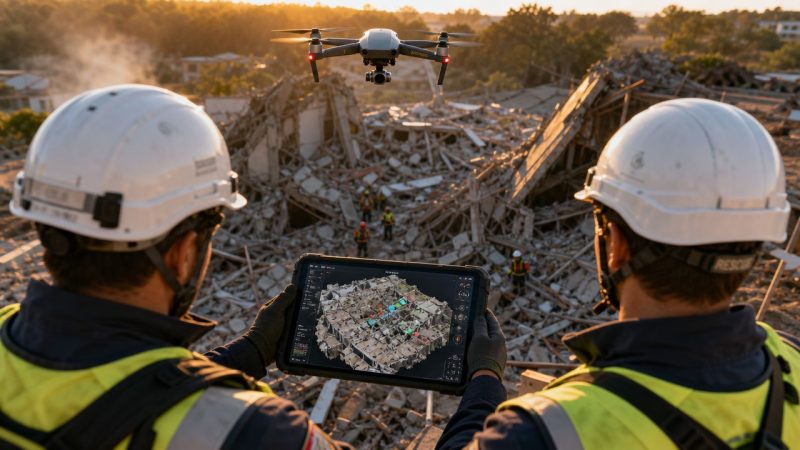
Start with a structural collapse at a commercial building after a storm. Initial companies arrive and confirm partial failure, unstable debris, utility involvement, and multiple access issues. Command doesn't need a cinematic drone video. Command needs a current map that shows the collapse footprint, viable approach paths, exposure risks, and where not to put people.

How the mission unfolds
The workflow usually looks like this:
Request and objective setting
Someone in command defines the question. Not “fly the drone.” The request is more like: identify safe ingress, map the debris field, confirm roof failure extent, or update the perimeter after secondary collapse.Flight planning and capture
The drone team checks airspace, hazards, weather, obstacles, and takeoff position. They collect overlapping imagery over the operational area and avoid freelancing outside the mission objective.Processing
Some incidents need a fast field product. Others allow slower processing for better accuracy. The right answer depends on what command needs right now.Dissemination
The product gets pushed to command in a format people can use, not just admire.Operational use
Command updates assignments, routes, divisions, safety zones, and resource placement from the new information.Archiving and review
The final outputs support later investigation, reporting, recovery planning, and lessons learned.
Here's a field view of how drone mapping fits into emergency work:
Where teams usually lose time
The flight is rarely the slowest part. The handoff is.
A drone team can collect excellent data and still fail operationally if the map arrives as a large file no one can open, or as an email attachment buried in a chain while crews are moving. The product has to land where supervisors and dispatch staff already work.
That's why the workflow should include dispatch early. If route closures, staging locations, or assignment boundaries change based on aerial intelligence, the information should move into the dispatch process, not stay trapped with the UAV unit. Systems that support dispatch coordination in one place make that handoff cleaner because they reduce the gap between seeing the map and acting on it.
A practical use case
On a collapse scene, the first UAV pass may show three things command didn't know from street level:
- Rear access is blocked by fallen mechanical equipment.
- The exposure building has roof damage and shouldn't be used as a safe corridor.
- Debris spread is wider than reported, which changes where apparatus and rehab can stage.
None of that replaces recon by qualified crews. It changes where those crews go first, and that saves time and reduces unnecessary exposure.
Choosing a UAV Mapping Service Provider
Procurement teams often focus on aircraft type first. That's understandable and usually backward. The key buying decision is whether the provider can support your incident workflow, deliver usable outputs quickly, and operate safely under public safety conditions.
Start with the mission, not the drone
A provider should be able to answer basic operational questions without drifting into sales talk:
- What can you deliver during the incident? Not next week.
- What file formats do you provide? If the answer is vague, keep digging.
- How do you handle restricted or complex airspace?
- What does your quality control look like when measurement matters?
- How do you protect sensitive incident data?
That last point is where money gets saved. If a site sits in constrained airspace or weather is poor, a delayed drone mission can tie up staff and still produce nothing useful. Sometimes the right call is a limited UAV task, not a full mapping deployment. Sometimes it's ground recon first.
Vendor Selection Checklist
| Criteria | What to Look For | Why It Matters (Cost & Safety Impact) |
|---|---|---|
| Pilot credentials | FAA Part 107 capability for commercial operations and clear public safety flight procedures | Reduces legal and operational risk |
| Insurance and liability | Current coverage appropriate to aviation and field operations | Protects the agency if something goes wrong on scene |
| Public safety experience | Work on incidents, critical infrastructure, or time-sensitive field operations | Shortens the learning curve during live events |
| Turnaround method | Clear plan for rapid field delivery versus later high-accuracy delivery | Prevents paying for outputs that arrive too late to help |
| Accuracy controls | Ability to explain when GCPs, QA, and validation are needed | Avoids paying engineering-level rates for planning-only work, or the reverse |
| Data security | Defined handling for sensitive imagery and incident records | Reduces exposure for law enforcement, critical sites, and investigations |
| Integration readiness | Exports that fit GIS, CAD, and command platforms | Saves staff time and prevents manual rework |
What works and what doesn't
What works is a provider who asks operational questions back. They should want to know your incident types, your command software, your turnaround expectations, and whether you need planning-grade or measurement-grade output.
What doesn't work is a vendor who promises every deliverable for every incident. UAV mapping has limits. Wind, rain, smoke, tree cover, obstacle density, and legal restrictions all affect performance. A serious provider will say when a drone is the wrong tool or when only a partial mission is realistic.
Cheap bids become expensive when your staff has to clean up file problems, chase permissions, or rerun the work after the incident.
Integrating Map Data with Command Systems
This is the part most UAV discussions skip. The map isn't the finish line. The map is the input.
Agencies usually don't struggle to understand why an aerial map is useful. They struggle to move that map into the places where dispatchers, supervisors, and field units already coordinate work. That operational gap matters more than another debate about camera specs.

Turning a map into a common operational picture
A fresh orthomosaic or tile layer should feed the common operational picture. Once it's in the system, command can do more than view it.
They can:
- Overlay unit positions: See who is operating near hazards, edges, or changing conditions.
- Create operational areas: Draw exclusion zones, branch boundaries, search sectors, or temporary traffic control areas.
- Assign work from geography: Tasks become tied to places, not just radio traffic.
- Track change over time: Compare the current scene to earlier passes and adjust operations accordingly.
A platform like workflow tools for field coordination becomes relevant. If a UAV map can trigger assignments, routing, and status updates inside the same operating environment, the map becomes actionable instead of decorative.
A field example
Take a hazmat release in an industrial yard. The UAV team produces an updated aerial layer showing runoff direction, access gates, parked trailers, and the practical edge of the hot zone. If command drops that layer into the operational system, supervisors can assign decon setup to one side of the yard, reroute incoming apparatus away from contamination risk, and mark a no-entry area around affected drainage.
That is a very different outcome from emailing a PDF map around and hoping everyone interprets it the same way.
What to standardize before the next incident
Agencies get better results when they decide these issues ahead of time:
- Accepted file formats: Know what your GIS and command tools can ingest.
- Naming conventions: Use incident-based names that match operations, not vendor shorthand.
- Sharing path: Decide who receives the first product and who publishes it into the common view.
- Task linkage: Define how divisions, branches, or units will act on mapped updates.
A UAV product becomes command intelligence only when someone can assign, track, and close work from it.
If you want UAV mapping services to save time, remove the manual relay steps. Every extra screenshot, forwarded email, or verbal re-brief adds friction and creates new failure points.
Frequently Asked Questions about UAV Mapping
How much do UAV mapping services cost?
Pricing depends on the mission, the site, the urgency, the airspace, and the deliverables. For public safety buyers, the practical way to budget is by scope, not by asking for a generic rate card. A fast orthomosaic for operational awareness is a different job from a detailed post-incident model meant for engineers or investigators.
To save money, define the use case before the quote request. If you only need a current overhead layer for perimeter control and routing, say that. Don't ask for every possible output and pay for data nobody will use.
How fast can a provider deliver results?
Some products can be delivered quickly enough to influence the active incident. Others take longer because the processing and quality checks are heavier. The right question isn't “How fast can you process?” It's “What can you get to command during the incident, and what comes later?”
Ask vendors for two timelines: one for rapid field delivery and one for final archival products.
Do we always need survey-grade accuracy?
No. Many emergency decisions require a current, georeferenced visual product more than they require the highest accuracy workflow available. If you're documenting evidence, infrastructure damage, or something likely to be measured later, accuracy requirements go up.
That's where agencies waste money. They either underbuy and get a product that can't support the next phase, or overbuy and pay for precision that operations never needed.
What should procurement ask first?
Start with operational questions:
- What incident types do you support well?
- What can you deliver in the field versus after the fact?
- How do your outputs integrate with our mapping, GIS, or command tools?
- What happens if weather, airspace, or obstacles prevent the full mission?
- How do you handle sensitive incident data?
Is UAV mapping always the right choice?
No. Some scenes are poor candidates because of weather, restricted airspace, obstacles, indoor conditions, or the amount of setup required relative to the problem. Good providers will say that plainly.
For agency buyers, that honesty matters. The point isn't to fly a drone on every incident. The point is to get usable intelligence in the safest, fastest, most cost-aware way possible.
If your team wants to move from static maps to operational use, Resgrid, LLC provides dispatching, mapping, workflow, messaging, and coordination tools that can help first responders turn aerial data into assignable, trackable action during live incidents.