
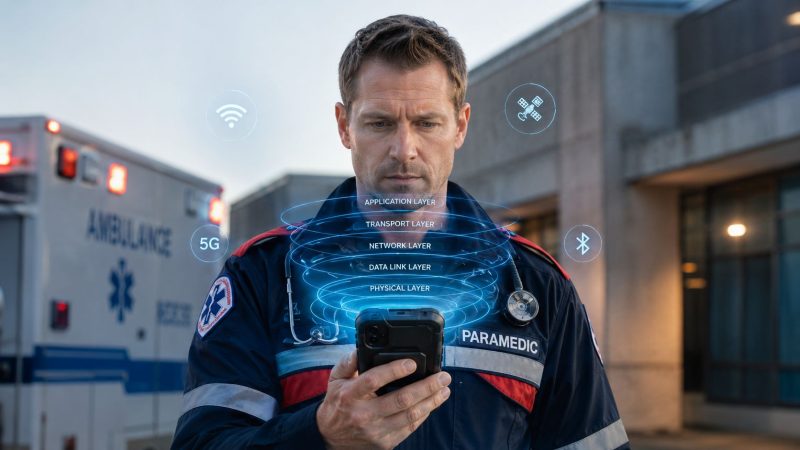
Wireless App Protocol: A Guide for First Responders
A crew is inside a concrete mid-rise. One medic is trying to push a patient update from a phone to the rest of the response chain. The app shows a spinner, then nothing. No fresh status. No confirmation. No clean retry. In public safety, that isn't a minor UX flaw. It's an operational break.
That's why the wireless app protocol question is more critical than generally acknowledged. Protocol choices decide how an app behaves when coverage is weak, when a device is power-constrained, and when people need the system to degrade gracefully instead of collapsing. If your users work from offices and home Wi-Fi, you can get away with a lot. If your users are firefighters, EMS crews, dispatchers, or field command staff, you can't.
Early mobile systems had to solve this problem under much harsher technical limits than we deal with today. Those design lessons still matter. The names have changed, radios are better, and devices are far more capable, but the core problem is the same. Data has to move through bad conditions, and it has to do it predictably.
When Every Second Counts and the Signal Drops
A weak connection usually fails in stages. First, the app slows down. Then requests start timing out. After that, users repeat actions because they can't tell whether the first tap worked. That's how you end up with duplicate updates, missing acknowledgments, or a supervisor who thinks a crew never received a message when the actual problem was transport behavior under poor signal.
In first-responder environments, buildings are a common failure point. Stairwells, parking structures, utility rooms, and older concrete facilities punish mobile traffic. The problem isn't just raw coverage. It's unstable coverage. An app may bounce between usable and unusable in seconds, which is harder to handle than a clean offline state.
A dispatch or coordination tool needs to treat these conditions as normal. Messages should queue locally. Reads and writes should reconcile cleanly. Urgent communications should use a channel designed for quick delivery, not a heavy request pattern that assumes steady connectivity. Teams that depend on field communication often benefit from systems built around resilient team messaging for active incidents, because the operational need isn't “send data eventually.” It's “keep the right people synchronized under stress.”
What breaks in the field
Three failure modes show up over and over:
- Request chains fail halfway: The app fetches part of a record, then loses the next call and leaves the screen in an ambiguous state.
- Reconnect logic gets noisy: Devices come back online and immediately flood the network with retries, presence updates, attachment syncs, and stale polling.
- Users lose trust: Once responders think the app might not deliver, they switch to voice, paper, screenshots, or side-channel texting.
Practical rule: If the user has to guess whether a critical action succeeded, the protocol and retry model need work.
The protocol underneath your mobile app won't solve every reliability problem, but it shapes most of them.
Understanding the Wireless Protocol Stack
A wireless app protocol isn't one rule. It's a stack of rules. Each layer handles a different job, and the app works only when those layers cooperate under imperfect network conditions.
One useful way to think about it is mail handling. One layer decides how the message is written. Another decides whether delivery needs confirmation. Another figures out the route. Another deals with the local handoff between devices and radios. The bottom layer is the physical transmission itself.

Why layers matter
When engineers say protocol stack, they're talking about separation of concerns. That separation is what lets a mobile app keep most of its logic while moving across different network conditions. The interface may be the same while the transport beneath it changes from Wi-Fi to cellular, or from one carrier behavior to another.
That basic idea was central to WAP. WAP is a layered protocol stack, not a single protocol, featuring layers like the Wireless Application Environment and Wireless Datagram Protocol. Its design made WAP bearer-independent, allowing it to run over different transports like GSM SMS or CDMA packet data without major rewrites according to this technical overview of the WAP stack.
The layers in practical terms
Application layer
This layer contains the user-facing behavior. Message formatting, event payloads, status updates, map data requests, and alert semantics all sit here. If your field app sends a unit status change, this layer decides what that change means.
Transport layer
This layer handles delivery behavior. Should the sender wait for confirmation? Should packets be retransmitted? Is the connection long-lived or request-based? A poor transport fit causes lag, battery drain, and confusing failure states.
Network layer
This is the routing layer. It gets traffic across networks, not just across one device-to-device link. In practice, path changes, roaming, and variable routes can complicate assumptions about timing and reliability.
Data link layer
This manages communication over the local connection. On mobile, that often means how the device talks over the current radio path. Instability here can show up to users as “the internet is weird” even when the actual fault is closer to the device.
Physical layer
This is the raw signal path. Radio conditions, interference, building materials, and distance all hit here first.
The biggest design mistake is treating failures at lower layers as if the application can ignore them. It can't. Users feel the result long before logs tell the story.
For first-responder software, the stack matters because every layer leaks upward under stress.
Common Protocols Powering Modern Mobile Apps
Most mobile apps today don't use WAP. They use newer protocols over modern internet stacks. But the practical selection problem remains the same. You have to choose how the device talks, how often it talks, and what happens when that conversation gets interrupted.

HTTP and HTTP/2
HTTP is still the default workhorse for mobile applications. If your app needs to fetch a roster, submit a report, retrieve incident details, or download a map tile set, HTTP is usually the first choice. It's widely supported, easy to inspect, and straightforward to secure in modern deployments.
HTTP/2 improves efficiency by letting multiple exchanges share a single connection more effectively than older request patterns. In the field, that helps most when the app makes many small calls. But HTTP still tends to encourage a request-response mindset. That's fine for loading records. It's less ideal for real-time coordination.
A practical first-responder example is pulling preplans or hydrant data before arrival. HTTP works well because the app can ask for a specific dataset, cache it, and move on.
WebSockets
WebSockets keep a persistent two-way channel open between device and server. That changes the interaction model. Instead of constantly asking “anything new?”, the app can receive updates as they happen.
That makes WebSockets a good fit for live dispatch chat, rapidly changing incident boards, and unit status streams where operators and field crews need the same picture without waiting for the next poll cycle. The trade-off is operational discipline. Long-lived connections don't manage themselves. NAT timeouts, captive portals, radio handoffs, and sleep states can all interrupt them in ugly ways.
If your team uses WebSockets, don't assume “connected” means healthy. Track freshness, missed heartbeats, and resubscription behavior after reconnect.
MQTT
MQTT is designed for lightweight publish-subscribe messaging. It's commonly associated with IoT, but the design philosophy matters for mobile too. When a device needs to send compact state changes efficiently, MQTT can be a strong fit.
For public safety scenarios, think of telemetry, environmental sensors, equipment status, or compact field updates where the payload is small and the network may be unreliable. MQTT also supports message delivery patterns that help when some updates matter more than others.
Which one belongs where
The cleanest systems usually mix protocols instead of forcing one protocol to do everything:
- Use HTTP for records and transactions: forms, attachments, search, report submission.
- Use WebSockets for active operational coordination: chat, presence, live board changes.
- Use MQTT for lightweight event streams: sensor feeds, compact telemetry, state broadcasting.
Don't pick the protocol your team knows best. Pick the one that fails most gracefully for the job you're assigning it.
That decision affects battery life, server load, user trust, and field reliability more than most feature discussions do.
Comparing Protocol Trade-Offs Latency Power and Cost
There's no universal winner. The right protocol depends on what the user is doing, how often the device talks, and what happens when the signal degrades. In first-responder systems, the wrong choice creates direct operational cost. Batteries die sooner. Data usage climbs. Retries pile up. Support teams spend time chasing “random sync issues” that are really protocol mismatch.
Early mobile design made this obvious because devices had so little margin. WAP-era systems were built for resource-constrained hardware, using a microbrowser, binary transmission for compression, and lightweight formats like WML. They also offloaded complexity to gateways, which made web services practical on limited phones as described in this WAP architecture paper. Modern devices are stronger, but field conditions still punish wasteful communication patterns.
What good trade-off analysis looks like
If a feature changes every few seconds, repeated HTTP polling is often the wrong fit. It generates overhead even when nothing changed. Across a fleet of devices, that overhead turns into avoidable mobile data usage and backend chatter. A persistent channel or lightweight publish-subscribe model is often cheaper to operate.
If a feature sends large structured records only occasionally, MQTT may be too awkward and WebSockets may be unnecessary. HTTP is simpler, easier to reason about, and usually easier to debug in production.
If the device sits in a vehicle cradle all day, power impact matters less than reliability and state freshness. If the device rides in a turnout pocket for a long operational period, radio chatter and keepalive strategy can become expensive in battery terms.
For teams that want a better mental model for delay, jitter, and why “fast on Wi-Fi” says almost nothing about field behavior, Capgo's developer guide to network latency is a useful framing resource.
Protocol Comparison for First-Responder Apps
| Protocol | Best For | Latency | Bandwidth Usage | Power Impact | Reliability |
|---|---|---|---|---|---|
| HTTP/2 | Fetching records, submitting forms, downloading reference data | Good for request-response work, weaker for continuous live updates | Moderate to high if the app polls often | Can rise if the app makes many repeated requests | Strong when requests are idempotent and retry-safe |
| WebSockets | Live chat, active dispatch boards, unit status updates | Low when the connection is healthy | Efficient for frequent updates, wasteful if poorly managed | Moderate because persistent connections need maintenance | Good if reconnect and resubscribe logic are disciplined |
| MQTT | Compact telemetry, sensor feeds, lightweight event distribution | Low for small message flows | Low for small payloads and event-driven communication | Often favorable for constrained devices | Strong when topic design and delivery policy match message importance |
Where teams waste money
- Polling too often: Constant refresh cycles burn data plans and server resources.
- Sending full objects instead of deltas: If only one field changed, don't resend the entire incident model.
- Retrying without backoff: Aggressive retry storms waste battery and punish weak networks.
- Treating all messages equally: A mayday alert and a background sync task shouldn't compete the same way.
Small transport decisions become fleet-wide cost issues quickly.
Architecting for Mission-Critical Reliability
Protocol choice matters, but architecture decides whether that choice survives real operations. A mission-critical mobile system has to assume packet loss, radio transitions, dead zones, stale state, and users who can't stop to troubleshoot. Reliability has to be designed in before the first incident ever gets dispatched.

Offline first beats online only
Field users don't care whether your architecture is elegant. They care whether the app still lets them read the assignment, update status, and capture notes when the network drops. That means local persistence isn't a nice extra. It's table stakes.
A solid pattern looks like this:
- Cache critical operational data locally: active incidents, assignments, contact lists, maps, reference material.
- Queue writes on device: status changes, note entries, checklist completions, acknowledgments.
- Reconcile with conflict rules: decide what wins when device state and server state disagree.
If your app blocks core actions whenever the server can't be reached, users will route around it.
Reconnect logic has to stay calm
One of the worst behaviors in poor coverage is panic reconnect. The radio comes back and the app tries to do everything at once. Presence reconnects. Chat reconnects. Sync resumes. Attachments retry. Pollers wake up. That surge can knock the client right back into failure.
Use staged recovery instead:
- Restore the minimum viable control channel.
- Refresh only the data needed for the screen the user is on.
- Resume background sync gradually.
- Delay bulky transfers until the connection looks stable.
Field lesson: An app that reconnects slowly and predictably is usually safer than one that tries to become fully current in a single burst.
For crews working in rural or mobile command settings, transport redundancy matters too. SwiftNet Wifi's guide to internet redundancy for remote users is worth reading because it frames failover as an operational design issue, not just a networking purchase.
Security has to be end to end
Classic WAP designs had an important security weakness. Traffic could be decrypted at the WAP gateway and then re-encrypted for the internet, which created a trusted intermediary rather than true end-to-end protection. Security analysis of WAP also documented vulnerabilities tied to WTLS behavior and packet-level exposure in that gateway-centric model, as discussed in this paper on WAP security issues.
That old design lesson still matters. In public safety systems, don't insert avoidable trust points where sensitive communications can be exposed in transit. If a gateway, broker, proxy, or translation layer can inspect protected operational data, treat that as a serious design decision, not an implementation detail. Teams evaluating secure mobile coordination should expect clear documentation around end-to-end security controls for responder platforms.
Prioritize by consequence
Not every event deserves the same treatment. Some updates can tolerate delay. Others can't.
Use different handling for different classes of traffic:
- Life-safety alerts: highest priority, explicit acknowledgment, aggressive confirmation.
- Operational updates: reliable delivery, but tolerant of short delay.
- Background sync: opportunistic, pausable, and easy to discard and restart.
Push notifications also need discipline. They're useful for waking the app and signaling urgency, but they shouldn't be your whole delivery model. If the user opens the device after an alert, the app still needs a durable sync path and local state model that can reconstruct truth quickly.
Systems earn trust when they stay usable under partial failure, not when they look fast in perfect conditions.
Actionable Guidance for Testing and Implementation
WAP was conceived in 1997 by Ericsson, Motorola, Nokia, and Unwired Planet as an open standard for mobile internet access, and the WAP Forum later grew to over 200 members according to this history of WAP and the WAP Forum. The point isn't nostalgia. It's that engineers have been dealing with constrained wireless environments for a long time. The teams that succeed test for ugly reality, not lab-perfect behavior.

Test the failures you expect to see
A field app should be tested under conditions that resemble basements, moving vehicles, crowded incident scenes, and low battery operation. That means actively simulating:
- Packet loss and unstable latency: not just slow links, but inconsistent ones.
- Repeated connect and disconnect cycles: especially during active workflows.
- Background and foreground transitions: mobile operating systems interrupt network behavior constantly.
- Partial sync states: downloaded roster, missing attachments, stale map layer, pending writes.
If the team only tests “open app on strong Wi-Fi and submit form,” they're testing the least important case.
Audit implementation details that usually get missed
Retry behavior
Make sure retries use backoff and jitter. Synchronized retries from many devices can look like an outage amplifier.
Local data policy
Verify what's cached, for how long, and what happens when it becomes stale. Users need clear state, not hidden uncertainty.
Battery impact
Watch what happens when the app maintains long-lived connections, wakes frequently, or retries aggressively. Power regressions often show up after networking changes, not UI work.
Security boundaries
Review every component that can see sensitive traffic or cached data. If a broker, proxy, or logging layer can read operational content, that needs deliberate approval.
Build a test plan around “what happens when the signal gets weird,” not just “does the request succeed.”
A practical rollout checklist
- Start with one critical workflow and validate it in poor coverage before broad rollout.
- Instrument client-side state changes so support teams can tell offline, reconnecting, queued, and failed apart.
- Use feature flags for transport changes because protocol behavior can fail in ways that only appear at scale.
- Run field trials with actual responders using the devices and carriers they already carry.
- Review the mobile app surface regularly if you provide responder tools through dedicated apps for field operations.
The implementation is ready when users stop having to think about the network.
Choosing the Right Protocol Is Mission Assurance
In first-responder software, the wireless app protocol isn't background plumbing. It shapes whether the app stays useful when buildings block signal, when devices are battery-limited, and when multiple systems compete for a weak connection.
The practical takeaway is simple. Use the protocol that matches the job. Keep the architecture offline-capable. Reconnect in stages. Treat security boundaries as operational risk, not abstract compliance work. Test failure conditions until the behavior is boring and predictable.
That's what mission assurance looks like in mobile systems. Not theoretical uptime. Not a polished demo on strong Wi-Fi. Reliable behavior when the connection is unstable and people don't get a second chance to resend the right information.
Resgrid, LLC builds tools for agencies and teams that need dispatch, messaging, tracking, and coordination to keep working in real-world conditions. If you're evaluating a platform for mission-critical operations, visit Resgrid, LLC to see how they approach reliability, security, and cost-conscious deployment for first responders and field organizations.