
I Am Responding App: 2026 Guide & Alternatives
The tones drop, a dispatcher relays the address, and your staffing picture is still fuzzy. A few members answer by text, someone calls the officer, somebody else is already driving, and command is left guessing whether enough people will make the call. That old workflow still exists in a lot of agencies. It works, until it doesn't.
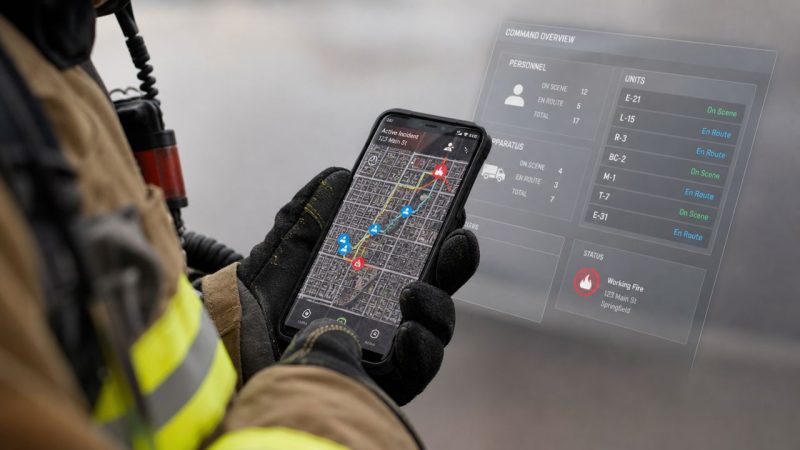
The I Am Responding app exists to replace that guesswork with a shared operational picture. It's built for the part of emergency response that happens between dispatch and arrival: alerting members, tracking acknowledgments, showing who is coming, and giving command staff a cleaner view of personnel movement and incident details.
For agencies evaluating it today, the key question isn't whether the app can notify responders. It can. The harder question is whether its full operating model fits your agency's budget, privacy expectations, integration needs, and long-term flexibility.
What Is the I Am Responding App
A call drops at 2:14 a.m. Before the first unit leaves the driveway, command needs two answers. Who saw the alert, and who is really coming. IamResponding is built to answer those questions with a shared alerting and status platform for fire, EMS, and other emergency response agencies.
The product combines a mobile app for responders with a browser-based view for officers, dispatch-adjacent staff, and administrators. That split matters in real operations. Field personnel need a fast way to acknowledge a call and mark intent. Supervisors need a screen that shows turnout, staffing gaps, and incident updates without chasing texts or phone calls.
For departments replacing manual callout methods, that solves a real problem. It reduces radio traffic, cuts down on side-channel communication, and gives officers earlier visibility into whether they have enough people to staff the response safely.
Where it fits best
IamResponding generally fits agencies that want more structure than pagers and group texts can provide, but do not want to build or maintain their own dispatch workflow tools.
It is usually a strong fit for:
- Volunteer and combination departments that need quick turnout visibility
- Agencies with distributed staffing where responders come from home, work, or multiple stations
- Organizations that want one vendor-managed system instead of piecing together alerts, maps, and status tracking from separate tools
That vendor-managed approach has benefits. Setup is usually faster than a custom stack, and departments get a product shaped around common public safety workflows. The trade-off is flexibility. Closed platforms tend to limit how far an agency can adapt forms, integrations, data handling, and future feature changes to its own operating model.
That matters more over time than it does in the first demo.
What agencies should evaluate first
The app is easy to understand. The harder evaluation is operational and financial.
Start with these three questions:
Does it match your staffing model
A mostly volunteer department, a career EMS service, and a mixed county system do not respond the same way. Response software needs to reflect that, or crews end up working around the tool.How much platform control do you need
If your agency wants standard workflows with minimal IT involvement, a closed system can be acceptable. If you expect to customize dispatch logic, reporting, or integrations, an open platform such as Resgrid's dispatching tools may offer more room to adapt without waiting on a vendor roadmap.What will it cost after implementation
Subscription price is only one line item. Agencies should also account for admin time, user management, training, policy work around location sharing, and the cost of living with a system that may be harder to modify later. That is where total cost of ownership starts to separate products that look similar on a feature checklist.
Emergency response software also lives inside a wider risk environment. Agencies that handle roadway incidents, fleet events, or multi-agency scene management may already rely on outside guidance, such as this resource for trucking accident response, when they build operational procedures. The same discipline should apply when evaluating dispatch and turnout platforms. A tool has to fit the way the agency works, not just the way a sales demo flows.
How IamResponding Manages Incident Response
A responder usually experiences the I Am Responding app in short bursts. The alert arrives. They glance at the incident type and address. They tap a status. Then the app becomes a moving status board in their pocket while they head to the station or scene.

What the responder sees first
The mobile architecture is built around real-time situational awareness. The app surfaces incident notifications, live responder location, ETA, and CAD incident details. It also supports responding from a wrist on Wear OS, which can matter for members who can't safely grab a phone right away during movement or station turnout. That same mobile listing notes an important constraint: continuous GPS in the background can dramatically reduce battery life (IamResponding mobile app listing).
A typical workflow looks like this:
Dispatch sends the call
The responder gets a push notification with the incident information.The responder marks intent
They tap a response state such as going to station or going to scene, depending on agency policy.Location and ETA update
Command staff can see movement, route progress, and who appears likely to arrive first.The responder checks details
CAD notes, map context, and navigation support reduce the need for follow-up radio traffic.
Where it helps on real calls
The app earns its keep. On a medical call with sparse staffing, command can see whether the first-arriving crew is enough to handle patient movement. On a brush fire, officers can tell whether additional apparatus staffing is likely before committing mutual aid. On a vehicle incident with possible entrapment, members can review dispatch notes before arrival instead of hearing fragmented details over the air.
For roadway incidents, that advance information matters because the first arriving unit often has to make immediate decisions on lane positioning, traffic control, hazards, and patient access. If your crews handle highway or commercial vehicle scenes, this resource for trucking accident response is useful context for what responders may need to account for before they even step out of the cab.
What works and what doesn't
What works well is the shared visibility. Members know whether they're the only one coming. Officers know whether they need to escalate. Dispatch doesn't have to relay the same staffing question repeatedly.
What doesn't work as well is assuming every responder can leave tracking on all the time without consequence. Personal phones die. Permissions get disabled. Background behavior changes after operating system updates.
A practical way to judge any response app is to ask one question: does it reduce radio traffic and uncertainty during the first few minutes of the call? If the answer is yes, it has operational value. If you're comparing options, it also helps to look at how other systems structure mobile and web dispatch workflows, because the alert is only one part of the response chain.
Turnout tools save the most time when they remove duplicate communication. If the app still leaves officers texting, calling, and polling crews manually, it's not fully solving the problem.
The View from the Command Post
A structure fire tones out at 2:13 a.m. Within the first minute, command needs to know whether enough qualified people are coming, which apparatus can roll, and whether mutual aid should start early. That is the ultimate test of a response platform from the command post.
The responder's experience is only part of the story. Officers, chiefs, and dispatch supervisors need a dashboard they can trust under time pressure. If the mobile app gets the attention, the web view is what turns alerts into staffing decisions.

What command staff need from the dashboard
From a command perspective, the dashboard has to answer four questions quickly and with enough confidence to act:
| Need | Why it matters |
|---|---|
| Who acknowledged | Confirms whether the alert reached the right people |
| Who is responding | Shows likely turnout, not just who is on the roster |
| Where they are | Helps with staging, coverage gaps, and early staffing judgment |
| What units are available | Reduces delays during overlapping calls or station coverage moves |
That sounds simple. It rarely is.
A dashboard can display plenty of activity and still fail operationally if officers have to confirm everything by radio or phone. Good command software reduces that verification burden. It should shorten the time between alerting and making a confident deployment call.
Daily use is where cost starts to show
The command view is not only for active incidents. In many agencies, it becomes part roster system, part notification console, and part after-action record. Chiefs use it to manage groups, review participation, and clean up account access. Those tasks are routine, but they drive long-term cost more than many buyers expect.
Poor roster discipline creates direct overhead. Alerts go to inactive members. Specialty teams get missed. Admin staff spend hours correcting records that should have been fixed during setup. Closed systems can handle those jobs well enough, but they also tend to lock agencies into the vendor's way of organizing data, reports, and permissions.
That trade-off matters over time. A platform may work fine on day one and still become expensive to live with if every process change depends on vendor support, plan limits, or feature availability.
Where closed platforms can frustrate agencies
IamResponding benefits from maturity and broad real-world adoption, which shows up in familiar workflows and a command interface many departments can learn quickly. That has value, especially for agencies that want a known commercial product and do not plan to customize much.
The limitation is flexibility.
Closed platforms usually set the boundaries for integrations, reporting logic, workflow changes, and data access. If your department has unusual staffing rules, cross-border mutual aid needs, or dispatch practices that do not fit the default model, the software can start shaping operations instead of supporting them. That is where total cost of ownership becomes more than the subscription price. Time spent working around product limits is still cost.
Open-source platforms such as Resgrid take a different approach. They typically give agencies more control over configuration, hosting, and customization, which can matter for departments that want to adapt the system to local practice instead of waiting on a vendor roadmap. That added flexibility is not free. Someone still has to manage setup and governance. But for agencies that expect change, it can be a better long-term value than paying year after year for a closed platform that resists modification.
A command dashboard earns trust when officers can act on it without needing a second channel to confirm what they are seeing.
That is the standard I use. If command still has to fall back on texts, calls, and repeated radio checks, the platform is helping with awareness but not fully serving as an operational source of truth.
Onboarding and Pricing What to Expect
Most agencies don't struggle with downloading an app. They struggle with everything that comes before and after that step.
The onboarding process for a platform like IamResponding is usually straightforward at a high level. An agency requests pricing, selects a plan, and gets administrative access. From there, someone has to do the essential work: load members, organize apparatus, define groups, and align the system with actual operating procedure.
The setup work that takes time
The hidden part of onboarding is cleanup. If your roster is outdated, radio identifiers are inconsistent, or station assignments live in three separate spreadsheets, the software won't fix that by itself.
A practical onboarding sequence usually looks like this:
- Roster cleanup first: Remove inactive members, verify contact methods, and standardize naming before import.
- Define response statuses: Keep them short and operational. Too many status choices create bad data.
- Map apparatus and groups: Build the structure around how calls are staffed, not around org-chart theory.
- Test one workflow at a time: Start with alerting and acknowledgment before layering in every available feature.
Where agencies overspend
The biggest budgeting mistake is comparing only the quoted subscription price. The actual cost includes staff time, implementation friction, training, and whatever happens when you need features that weren't part of the first conversation.
Ask these questions before signing:
What does the base subscription include?
Don't assume support, integrations, or premium options are bundled.How much admin time will setup require?
If one officer is doing all the configuration after hours, that labor still has a cost.What happens when your workflow changes?
A merger, district change, staffing model shift, or CAD update can turn a low-friction deployment into a recurring project.
Money-saving moves that actually work
A few habits save agencies money quickly:
- Pilot with your hardest use case: If the app works for mutual aid, split staffing, or overnight turnout, it will usually work for routine calls.
- Write a local admin guide: A one-page internal guide prevents repeat training and cuts support dependency.
- Limit feature sprawl early: Turn on only the features your officers will actively use in the first phase.
Closed SaaS platforms can be efficient when the workflow fits out of the box. They get expensive when an agency needs exceptions, custom handling, or long-term adaptation. That's why total cost of ownership matters more than first-year pricing.
Understanding Privacy and Location Tracking
Location tracking is where convenience and policy collide. Most agencies like the operational value right away. Fewer agencies do the harder work of setting limits around how that value should be used.

Why this issue gets missed
When turnout is the immediate problem, officers tend to focus on one question: can I see where my people are? That's understandable. But the minute a system tracks member location on personal devices, the agency also owns a privacy problem, a policy problem, and often a labor-relations problem.
The user-facing setup material around the I Am Responding app points agencies toward enabling location-dependent features, but it leaves a common operational gap. Many departments still have to decide for themselves what data is collected, how long it is retained, who can view it, and when continuous tracking is justified. The mobile setup guidance also highlights a practical trade-off many users already notice in the field: location-enabled functions are useful, but background GPS can hit battery life hard, especially on personal phones.
The RapidSOS integration is powerful
IamResponding offers an integration with RapidSOS for real-time 911 caller location data at no additional cost. According to the support documentation, it can display live caller location and breadcrumb trails on the map, refresh location data every 60 seconds, and provide live data for the first 10 minutes of a CAD incident. Agencies can also view distance from the incident, uncertainty radius, and time of last received location, with optional additional data when available (RapidSOS caller location integration details).
That's a real operational advantage. A confused caller in a park, on a trail, or moving after a crash is much easier to locate when command can see breadcrumb movement rather than rely on verbal directions.
The policy questions agencies should answer in writing
Discipline is needed in many departments. Don't leave location behavior to whatever the default app settings happen to be.
Use a written policy that covers:
- When tracking is active: Only on active responses, only when on duty, or always on for designated roles
- Who can view location: Dispatch only, command staff only, or broader officer access
- What devices are allowed: Agency-issued only, personal devices with consent, or a mixed model
- What happens to stored data: Retention periods, access logs, and review authority
If your agency is comparing systems, a vendor's stated privacy posture should be part of procurement, not an afterthought. Reviewing a platform's published privacy information and data expectations is a useful baseline for those conversations, even if your final choice is another product.
Use the least invasive tracking policy that still supports safe operations. Convenience isn't enough reason to collect location data all the time.
What works in practice
The most workable approach I've seen is event-based tracking. Turn it on when the member is actively responding or assigned to an operational period. Turn it off when the operational need ends. That protects battery life, narrows privacy concerns, and still gives command the visibility it needs.
IamResponding vs Resgrid A Platform Comparison
A dispatch platform isn't just a tool purchase. It's a workflow commitment. Once your roster, alerts, procedures, and habits are tied to a system, changing later gets harder than most agencies expect.
That's why the comparison between IamResponding and Resgrid isn't really about which screen looks nicer. It's about cost structure, control, and how much freedom your agency wants after deployment.

Cost model and total ownership
Closed SaaS products usually make budgeting easier at the beginning and harder over time. You get a quote, approve a subscription, and launch. The catch is that future needs often depend on vendor packaging, support boundaries, and whatever pricing model applies to your agency type.
Open-source-oriented platforms shift that equation. They may require more thought up front, but they can reduce licensing pressure, especially for agencies that have internal technical support or regional partners who can help manage deployment and customization.
Here's the practical difference:
| Criteria | IamResponding | Resgrid |
|---|---|---|
| Pricing style | Traditional subscription model | Includes open-source and hosted paths |
| Customization | Limited to vendor-supported configuration | Greater flexibility, including self-hosting options |
| Data control | More vendor-managed | More agency-controlled, depending on deployment |
| Long-term adaptability | Tied closely to vendor roadmap | Better fit for agencies that want to shape workflows |
For agencies trying to save money, the key isn't chasing the cheapest first-year number. It's avoiding a platform that becomes expensive every time your process changes.
Flexibility and operational fit
Closed systems often work best when your agency operates in a common pattern. Standard call types, standard turnout, standard admin needs. If that's you, a tightly managed platform can be a strength.
If your agency has unusual requirements, such as custom status logic, specialized team workflows, nontraditional dispatch structures, or a need to connect multiple systems, open architecture becomes more valuable.
This is the point where many buyers should seriously compare IamResponding with Resgrid's side-by-side platform analysis. Not because one product is universally right, but because the underlying platform philosophy is different enough to affect procurement, governance, and cost.
What each approach does well
IamResponding does well when you want a mature, focused system that handles the core alerting and response coordination workflow with less technical ownership on your side.
Resgrid is one option for agencies that want dispatching, messaging, tracking, organization management, reporting, and more control over deployment choices within a broader open-source model.
If your agency hates software projects, a managed platform may be easier to live with. If your agency hates vendor lock-in, you need to weigh flexibility much more heavily.
The decision most buyers miss
Most departments compare features. Fewer compare constraints.
Ask not only what the platform can do today, but also:
- What can't we change ourselves
- What data can we export cleanly
- What happens if our CAD, staffing model, or governance changes
- Who controls the pace of future improvements
That's where total cost of ownership shows up. Not just in dollars, but in options you either keep or give away.
Choosing the Right Dispatch Platform
The right platform is the one your members will use, your officers will trust, and your budget can support without constant compromise.
IamResponding is a credible, established tool for alerting and response coordination. It has real operational maturity, and plenty of agencies clearly rely on it every day. If your department wants a managed system with familiar workflows and you don't need deep customization, it can be a practical fit.
If your agency is more sensitive to long-term cost, data control, or workflow flexibility, look harder at the platform model before you commit. A closed product may solve today's notification problem while creating tomorrow's integration or governance problem.
Use a short decision filter:
- Must-have operations: Identify the few workflows that cannot break, such as turnout, staffing visibility, and mutual aid communication.
- Three-year cost view: Ask for the recurring price, support expectations, and the cost of change, not just the opening quote.
- Data and policy control: Confirm what you can export, what you can configure, and how location and user data are governed.
Schedule live demos. Test your hardest scenario. Let the shift officers and line members touch the product before leadership decides.
A dispatch platform should reduce friction. It shouldn't add budget surprises, privacy confusion, or vendor dependence you can't unwind later.
If you're evaluating dispatch and response platforms and want an option that supports open-source deployment, flexible organization management, and operational tools built for field use, take a look at Resgrid, LLC. It's worth reviewing alongside any closed-platform shortlist so you can compare not just features, but control and total cost over time.